| Windows 7: Show us your SSD performance 2 |
04 Feb 2013
|
#1021 | | Windows 7 Home Premium 64bit |
Thanks for all the help, guys. I sure appreciate it very much. | My System Specs |
| System Manufacturer/Model Number Dell XPS 8300 OS Windows 7 Home Premium 64bit CPU i7-2600 Memory 8gb Graphics Card AMD Radeon 6770 Monitor(s) Displays hp w2007 |
04 Feb 2013
|
#1022 | | Win7 Pro 64-bit SP1 Nor*Cal |
| My System Specs | | System Manufacturer/Model Number Shuttle SH67H3 OS Win7 Pro 64-bit SP1 CPU Intel Core i5 2500K Motherboard Shuttle FH67H Memory Corsair XMS3 DDR3 4x4GB Graphics Card NVIDIA GeForce GTX 650 Ti Monitor(s) Displays Samsung S23B550V Screen Resolution 1920x1080 PSU Shuttle PC63J 500W Hard Drives Crucial m4 2.5" SSD 256GB,
WD Caviar Black 1TB,
WD Scorpio Blue 320GB |
04 Feb 2013
|
#1023 | | Windows 7 Ultimate SP1 X64/ linux in VM NW Florida |
| My System Specs | | Computer type PC/Desktop System Manufacturer/Model Number Home Built- Always under construction OS Windows 7 Ultimate SP1 X64/ linux in VM CPU Intel i7-3770K Motherboard Asus Maximus V Extreme Z77 Memory 8GB G.Skill Ripjaws Z DDR3-2400 (2X4GB) Graphics Card EVGA GTX 670 SC 4GB Sound Card On Board Monitor(s) Displays Asus 24" LCD Screen Resolution 1920X1080 Keyboard Logitech G510 Mouse Logitech G500 PSU CORSAIR AX850 Case Cooler Master HAF X Cooling Custom Water Cooling Hard Drives Samsung 840 Pro 256 GB, Samsung 840 Pro 256 GB, Samsung 830 256GB, Samsung HD103SJ 1TB . External HD- Black X dock esata 1TB Samsung Spinpoint, Rosewill USB 3.0 dock 1TB Samsung Spinpoint Internet Speed carrier pigeon speed Antivirus MSE/MBAM Browser ie8 Other Info 2nd Rig,Windows 7 Ultimate SP1 X64, i7-2600K, Asrock P67 Extreme 4, 8GB DDR3-2133, HAF XM case, Noctua NH-D14, Gigabyte HD6950 OC 1GB, 2 X Crucial M4 128GB, Asus 24" LED.
Laptop- Samsung RF711-SO1 17" i5-2310M, 8GB DDR3-1333, Crucial M4 and OCZ vertex2, Nvidia GT540M.Win 7 HP X64 SP1. OS Windows 7 Ultimate x64 CPU Intel Core i7-2600 Memory 16Gb DDR3-1600 Graphics Card ATI Radeon 7950 Sound Card Creative X-Fi Extreme Gamer Monitor(s) Displays (2) 22" LG WideScreens Screen Resolution 1920 x 1080 PSU Antec TruPower 750W Hard Drives (1) Samsung 840 Pro 256GB
(1) WD RE4 1Tb SATA3 Drive Internet Speed 50Mbps |
13 Feb 2013
|
#1025 | | Windows 7 Professional 64bit SP1 Kentucky |
Cyberwolf, those scores are rockin! | My System Specs | | Computer type PC/Desktop System Manufacturer/Model Number Custom Built OS Windows 7 Professional 64bit SP1 CPU Intel Core i5-3570K @ 4.5GHz Motherboard Asus Sabertooth Z77 Memory Corsair Vengeance 16GB (4x4) @1866MHz Graphics Card Intel HD4000 Sound Card Onboard Audio Monitor(s) Displays Dell S2309W Screen Resolution 1920x1080 Keyboard Max Nighthawk X8 Mechanical keyboard Mouse Logitech MX 500 Wired PSU Seasonic X750 80+ Gold Full Modular Case Antec Eleven Hundred Super Mid Tower Cooling Intel Liquid Cooler Hard Drives Samsung 830 128GB SSD - OS
2 x 2TB Seagate Barracuda 7200.14 HDD - Storage Internet Speed 50Mbps DL / 10Mbps UL Antivirus Microsoft Security Essentials Browser Chrome/Firefox Other Info Klipsch ProMedia 2.1's
Asus RT-N66R Wireless Router |
13 Feb 2013
|
#1026 | | |
I know! I was originally having system stability issues and ruled out RAM and Power Supply. So when I changed the board I thought hell, why not update my SSD. Read some articles and found this drive to be very fast. Very happy with it! Plus its about 1000x sexier than my previous Corsair. Even though you cant really see it in the case. lol | My System Specs | | OS Windows 7 Ultimate x64 CPU Intel Core i7-2600 Memory 16Gb DDR3-1600 Graphics Card ATI Radeon 7950 Sound Card Creative X-Fi Extreme Gamer Monitor(s) Displays (2) 22" LG WideScreens Screen Resolution 1920 x 1080 PSU Antec TruPower 750W Hard Drives (1) Samsung 840 Pro 256GB
(1) WD RE4 1Tb SATA3 Drive Internet Speed 50Mbps |
13 Feb 2013
|
#1027 | | |
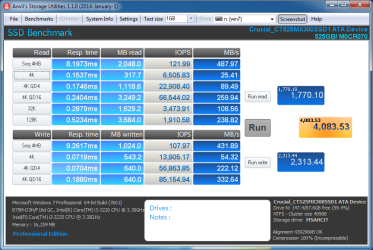
First is my original score, second is my tweaked score by caching data to RAM and delaying write to SSD ( to be used only with battery backup as an unexpected power loss would result in lost data and possible corruption ) | My System Specs | | OS Windows 7 Ultimate x64 CPU Intel Core i7-2600 Memory 16Gb DDR3-1600 Graphics Card ATI Radeon 7950 Sound Card Creative X-Fi Extreme Gamer Monitor(s) Displays (2) 22" LG WideScreens Screen Resolution 1920 x 1080 PSU Antec TruPower 750W Hard Drives (1) Samsung 840 Pro 256GB
(1) WD RE4 1Tb SATA3 Drive Internet Speed 50Mbps |
13 Feb 2013
|
#1028 | | Windows 7 Ultimate X64 SP1 Mt. Crumpit/Whoville |

Quote: Originally Posted by Cyberwolf First is my original score, second is my tweaked score by caching data to RAM and delaying write to SSD ( to be used only with battery backup as an unexpected power loss would result in lost data and possible corruption ) Please tell us how to do that, amazing scores. | My System Specs | | Computer type PC/Desktop System Manufacturer/Model Number Home Built Desktop By DataTech OS Windows 7 Ultimate X64 SP1 CPU Intel i5-2550K, Differing ~4.4-4.8GHz No built in GPU Motherboard ASUS P8Z68-V PRO/GEN3 Memory 16GB G.Skill Sniper 2133MHz 4x4GB Graphics Card ASUS ENGTX460 DirectCU/2DI/1GD5 GeForce GTX 460 Sound Card Onboard Realtek 5-1 Monitor(s) Displays Samsung P2570HD Screen Resolution 1920x1080 Keyboard Old, beat-up Dell USB From 10 yrs Ago Mouse Gigabyte m6900 wired PSU Corsair HX650W Case Inwin Dragon Rider Cooling Hyper 212 EVO w/two Noctua fans, push-pull, @1300 RPM Hard Drives Crucial M4 128GB for OS, 750GB Seagate MomentusXT for data, 500GB Seagate Constellation for storage Internet Speed 8-19 Mbs down, 3-4 Mbs up Comcast Cable Antivirus Norton Internet Security Browser IE 9, Opera when needed Other Info 4 case fans, LG BluRay-RE, ASUS DVD-RW, Mr. Fusion power generator with flux capacitor, 1.21 gigawatts. |
13 Feb 2013
|
#1029 | | |
Download a program called "FancyCache". Its still in Beta, so keep that in mind. Download FancyCache for Disk 0.8.0 Beta Free - Virtual Cache for Disks - Softpedia
This program once installed definitely needs a system reboot to access your drive.
You can configure multiple options including how much memory the program uses in RAM, block size, ect.
Mainly need to play around with settings to see what works best. Obviously, the faster RAM you have the better the results. Also more RAM is clearly better as you can allocate more to the program without sacrificing programs loading in the background.
There is a section about Fancycache, and the settings they used (and which I replicated, which is the results you are seeing in the SS to the right) here : Speed Up SSD & Optimize For Performance with 9 Quality Tweaks
Very critical you have battery backup or are doing non essential things, because when you've set it to cache to RAM...Any power interruptions, unexpected reboots, power spikes, ect could very well ruin your day data wise. | My System Specs | | OS Windows 7 Ultimate x64 CPU Intel Core i7-2600 Memory 16Gb DDR3-1600 Graphics Card ATI Radeon 7950 Sound Card Creative X-Fi Extreme Gamer Monitor(s) Displays (2) 22" LG WideScreens Screen Resolution 1920 x 1080 PSU Antec TruPower 750W Hard Drives (1) Samsung 840 Pro 256GB
(1) WD RE4 1Tb SATA3 Drive Internet Speed 50Mbps |
13 Feb 2013
|
#1030 | | Windows 7 Ultimate X64 SP1 Mt. Crumpit/Whoville |

Quote: Originally Posted by Cyberwolf Download a program called "FancyCache". Its still in Beta, so keep that in mind. Download FancyCache for Disk 0.8.0 Beta Free - Virtual Cache for Disks - Softpedia
This program once installed definitely needs a system reboot to access your drive.
You can configure multiple options including how much memory the program uses in RAM, block size, ect.
Mainly need to play around with settings to see what works best. Obviously, the faster RAM you have the better the results. Also more RAM is clearly better as you can allocate more to the program without sacrificing programs loading in the background.
There is a section about Fancycache, and the settings they used (and which I replicated, which is the results you are seeing in the SS to the right) here : Speed Up SSD & Optimize For Performance with 9 Quality Tweaks
Very critical you have battery backup or are doing non essential things, because when you've set it to cache to RAM...Any power interruptions, unexpected reboots, power spikes, ect could very well ruin your day data wise. Thanks, I'll give it a run ans see how it goes. | My System Specs | | Computer type PC/Desktop System Manufacturer/Model Number Home Built Desktop By DataTech OS Windows 7 Ultimate X64 SP1 CPU Intel i5-2550K, Differing ~4.4-4.8GHz No built in GPU Motherboard ASUS P8Z68-V PRO/GEN3 Memory 16GB G.Skill Sniper 2133MHz 4x4GB Graphics Card ASUS ENGTX460 DirectCU/2DI/1GD5 GeForce GTX 460 Sound Card Onboard Realtek 5-1 Monitor(s) Displays Samsung P2570HD Screen Resolution 1920x1080 Keyboard Old, beat-up Dell USB From 10 yrs Ago Mouse Gigabyte m6900 wired PSU Corsair HX650W Case Inwin Dragon Rider Cooling Hyper 212 EVO w/two Noctua fans, push-pull, @1300 RPM Hard Drives Crucial M4 128GB for OS, 750GB Seagate MomentusXT for data, 500GB Seagate Constellation for storage Internet Speed 8-19 Mbs down, 3-4 Mbs up Comcast Cable Antivirus Norton Internet Security Browser IE 9, Opera when needed Other Info 4 case fans, LG BluRay-RE, ASUS DVD-RW, Mr. Fusion power generator with flux capacitor, 1.21 gigawatts. Show us your SSD performance 2 problems? All times are GMT -5. The time now is 03:21 AM. | |