Windows 7 Forums


Windows 7: Show us your SSD performance 2

12 Dec 2012   #781

Windows 7 Ultimate 64
Southern California


I just set up a 4gb Ram Disk for free via AMD. I'll use this for awhile and evaluate if the purchase to unlock additional space is deemed worthwhile. The 4gb leaves me with 12gb of 1866 ram and the speed of things has increased.

My System SpecsSystem Spec

12 Dec 2012   #782

Windows 7 Ult x64 - SP1/ Windows 8 Pro x64
Wanderer


Quote   Quote: Originally Posted by JerometheGiraff View Post
Quote   Quote: Originally Posted by Dave76 View Post
Quote   Quote: Originally Posted by JerometheGiraff View Post
I've decided to add system spec, I hope we can now lay this to rest and get onto my question at hand.
Nice rig, info does help.

Some SSDs need to be taken care of in different ways, depending on the controller and nand used.
If we knew the brand, we can find the controller type, we could possible help speed it up a bit.
SandForce controllers are different than Intel or JMicron, there are different things that can be done.
Also the age of the SSD, at a certain age, actually number of writes, it might need to be secure erased to re-gain performance.
Another is firmware update, depending on the SSD brand and model.

Let us know.
It's a Patriot Pyro 60 gig SSD.
Before doing anything to your SSD make a full image backup.
You have to decide if you want to try any methods of improving performance to your SSD, there are risks, as with most things done on computers.

Check your firmware version with AS SSD, you don't have to run the benchmark, it will tell you the firmware version in the upper left corner.
Also CrystalDiskInfo will show you the firmware.

First, make sure this is your SSD, installing the wrong firmware may brick the SSD.
Drivers and downloads for Pyro 60GB SATA III 2.5

One option to secure erase: Guide: Secure Erase/Zero Write/Factory Clear a Patriot SSD with Free/OSS software.
My System SpecsSystem Spec
13 Dec 2012   #783

Windows8


Quote   Quote: Originally Posted by Dave76 View Post
Quote   Quote: Originally Posted by JerometheGiraff View Post
Quote   Quote: Originally Posted by Dave76 View Post

Nice rig, info does help.

Some SSDs need to be taken care of in different ways, depending on the controller and nand used.
If we knew the brand, we can find the controller type, we could possible help speed it up a bit.
SandForce controllers are different than Intel or JMicron, there are different things that can be done.
Also the age of the SSD, at a certain age, actually number of writes, it might need to be secure erased to re-gain performance.
Another is firmware update, depending on the SSD brand and model.

Let us know.
It's a Patriot Pyro 60 gig SSD.
Before doing anything to your SSD make a full image backup.
You have to decide if you want to try any methods of improving performance to your SSD, there are risks, as with most things done on computers.

Check your firmware version with AS SSD, you don't have to run the benchmark, it will tell you the firmware version in the upper left corner.
Also CrystalDiskInfo will show you the firmware.

First, make sure this is your SSD, installing the wrong firmware may brick the SSD.
Drivers and downloads for Pyro 60GB SATA III 2.5

One option to secure erase: Guide: Secure Erase/Zero Write/Factory Clear a Patriot SSD with Free/OSS software.
Those are the right drivers Why do I have to wipe my drive ?
My System SpecsSystem Spec
.


13 Dec 2012   #784

Windows7 Pro 64bit SP-1; Windows XP Pro 32bit
Grafton,IL


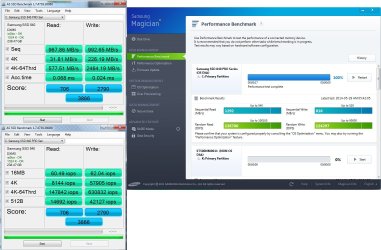
My new laptop with a Samsung 840 250GB.
Attached Thumbnails
Show us your SSD performance 2-anvil-app-12-13-2012.png  
My System SpecsSystem Spec
13 Dec 2012   #785

Windows7 Pro 64bit SP-1; Windows XP Pro 32bit
Grafton,IL


Last bench I'm running.
Attached Thumbnails
Show us your SSD performance 2-ssd-bench-samsung-ssd-840-12.13.2012-12-55-35-pm.png  
My System SpecsSystem Spec
13 Dec 2012   #786

Windows 7 Ultimate X64 SP1
Mt. Crumpit/Whoville


Dang Mike, the 840 series looks good!
My System SpecsSystem Spec
13 Dec 2012   #787

Windows7 Pro 64bit SP-1; Windows XP Pro 32bit
Grafton,IL


I like it so far.
This is the standard 840 not the Pro.
My System SpecsSystem Spec
13 Dec 2012   #788

Windows 7 Ultimate SP1 X64/ linux in VM
NW Florida


Good job Mike. That's very good. The 840 is better than I thought.
My System SpecsSystem Spec
13 Dec 2012   #789
whs

Vista, Windows7, Mint Mate, Zorin, Windows 8
Florida in winter, Black Forest/Germany


Very nice Mike. They had the 128GB model of the 840 on sale for under $80 - at Newegg.
My System SpecsSystem Spec
13 Dec 2012   #790

Windows7 Pro 64bit SP-1; Windows XP Pro 32bit
Grafton,IL


Quote   Quote: Originally Posted by whs View Post
Very nice Mike. They had the 128GB model of the 840 on sale for under $80 - at Newegg.
Yes I saw that.
Mine was already ordered and on the way when that sale appeared.
C'est la vie!
My System SpecsSystem Spec
Reply

 Show us your SSD performance 2 problems?


Thread Tools


Similar help and support threads for: Show us your SSD performance 2
Thread Forum
Show us your hard drive performance Hardware & Devices
Show us your SSD performance Hardware & Devices
HDDs Show in BIOS, But Do Not Show in Disk Management Hardware & Devices
Show us your Mechanical HDD performance... Hardware & Devices
show hidden folders show file extensions thru registry General Discussion


All times are GMT -5. The time now is 08:03 AM.


Seven Forums Android App Seven Forums IOS App Follow us on Facebook

Windows 7 Forums is an independent web site and has not been authorized,
sponsored, or otherwise approved by Microsoft Corporation.
"Windows 7" and related materials are trademarks of Microsoft Corp.
© Designer Media Ltd
  

1 2 3 4 5 6 7 8 9 10 11 12 13 14 15 16 17 18 19 20 21 22 23 24 25 26 27 28 29 30 31 32