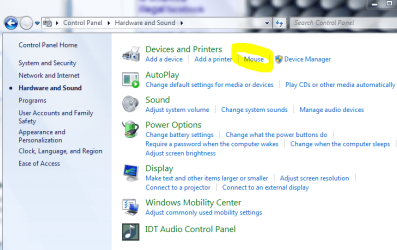
|
Welcome to Windows 7 Forums. Our forum is dedicated to helping you find solutions with any problems, errors or issues you are experiencing with Windows 7. The Windows 7 forum also covers news and updates and has an extensive Windows 7 tutorial section that covers a wide range of tips and tricks.
Windows 7 - Dell touchpad set to click after every tap, hard to type with it there |
02-08-2012
|
#1 | | Windows 7 Professional x64 |
Dell touchpad set to click after every tap, hard to type with it there Hello everyone. Apologies if the title wasn't clear.
I bought a dell inspiron laptop recently and was having some trouble when I type. My hands tend to rest at times on the touchpad and every time i do, the single click tap takes me to where ever the mouse is located. Usually its in another section of the document that I am writing in, so that I start to type in the middle of a paragraph that I had already written.
In addition, I have installed asenother mou <-- see??? it did it again!
"In addition, I have installed another mouse driver for a mouse to use with the laptop, so I haven't been able to access any mouse settings other than the additional mouse settings. However, the touchpad still functions."
Is there a way to either disable the touchpad when a mouse is connected, or to change its settings while another mouse is connected?
I am afraid that if I uninstall the mouse driver and see about changing the touchpad settings (if possible), that installing the new mouse again would just take away any of those settings that I would change.
All suggestions welcome. If nothing is forthcoming I will attempt to uninstall the mouse driver and change the touchpad settings. I would prefer not to have to manually disable the touchpad
Thanks in advance! | My System Specs | | System Manufacturer/Model Number Custom Built PC (In French it is called "PC de moi") OS Windows 7 Professional x64 CPU Intel Core i7-3820 CPU OC @ 3.80GHz Motherboard Gigabyte G1.Assassin2 Memory 8.00GB (2GBx4) DDR3 1866MHz Graphics Card Nvidia-Gigabyte GeForce GTX 580 1.5GB SLI-soon 680 Sound Card On board Creative SB X-Fi Monitor(s) Displays acer 24" H243H Screen Resolution 1920x1080 Keyboard Microsoft Comfort Curve 2000 Mouse Tek Republic Wired Laser 3600 dpi Gaming Mouse PSU Silent Pro 1000w gold 80+ Case Azza Hurrican 2000 Cooling Liquid CPU cooler & fan Hard Drives 120GB OCZ Vertex III SSD,
500GB OS Hybrid Drive @ 7,200RPM Internet Speed 5.14Mbps Download Speed, .65Mbps Upload Speed & 5ms Ping Other Info You're such a good person for reading all the way down to the end. People like you truly do care! We should take all the people, and make them into people like you! :p |
02-08-2012
|
#2 | | |
If you're sure your touchpad options don't include a 'disable when typing for X seconds' then a simple utility like this one should help out... | My System Specs | | System Manufacturer/Model Number Custom built machine OS W7 x64 CPU Intel Q9300 2.5Ghz Quad LGA775 (Would like Q9650) Motherboard Gigabyte GA-EP45T-UD3R (F6 Bios) Memory 4Gb OCZ Gold 1,333Mhz Graphics Card Palit HD4850 O/C Sonic 512Mb DDR3, Dual DViD's Sound Card Azalia to twin Samson 50w Studio Monitors Monitor(s) Displays Twin Dell (E-IPS) U2311H 23.6" Screens Screen Resolution 1920 x 1080 @ 60Hz Keyboard Cherry PS/2 custom model Mouse Logitech M500 Laser Mouse PSU OCZ 600w Case Lian-Li PC8 acoustifoamed' aluminium tower Cooling Scythe 140mm Zipang Hard Drives Twin 1Tb Barracuda archivage, Twin TV/PVR 2Tb Samsungs, (80Gb Barracuda for the OS, but SSD envisaged...) Internet Speed ADSL2+ @14Mbps downstream & Cat6 Gigabit Ethernet Other Info Silicon Dust HD Homerun Dual FTA (Ethernet) TV Tuner, Billion BiPac 7800N router & ZyXEL 8x Gigabit Switch. Lian-Li CR26 Card Reader, Samsung SCX4300 AiO laser printer/scanner. NOD32 Anti-Virus. |
02-08-2012
|
#3 | | |
Not sure what the controller is for your touchpad is.
Mine is Synaptics.
I had the same problem as you. A touchpad on a laptop is not my friend at all. My hand rests on one half of it when typing usually.
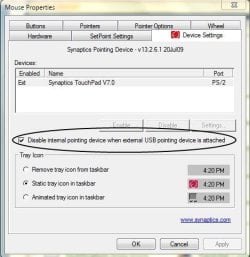
I use a Logitech USB wireless mouse, and have this option in the mouse properties. I would imagine you may have something along the lines of this somewhere. EDIT: I did notice that, on my moms netbook, there is no option to disable the touchpad. She also uses a wireless mouse, and it's a Synaptics touchpad, but it doesn't have an option to disable it when an external pointing device is detected.
This is mine | My System Specs | | System Manufacturer/Model Number Toshiba Satellite L455D OS Windows 7 Home Premium CPU Amd Semperon 2.10GHz Memory 2 Gig Graphics Card ATI Radeon 3100 Sound Card Realtek Monitor(s) Displays 15.6 inch Screen Resolution 1366x768 Mouse Logitech Wireless Hard Drives 250gig Internet Speed 16/2 cable |
02-08-2012
|
#4 | | Windows 7 Ultimate SP1 64-Bit |
| My System Specs | | System Manufacturer/Model Number HP Pavilion Elite 495UK OS Windows 7 Ultimate SP1 64-Bit CPU Intel Core i7 870 @ 2.93GHz Motherboard MSI 2A9C (CPU1) Memory 8Gb Dual-Channel DDR3 @ 664MHz Graphics Card nVidia GeForce GTX 460 1024MB dedicated RAM Sound Card Realtek HD Audio Monitor(s) Displays HP2310i Screen Resolution 1920 x 1080 Keyboard Logitech K750 solar-powered keyboard Mouse Logitech Wireless M180 mouse PSU 460W Case HP Elite Cooling Air cooled Hard Drives 1x1954GB Hitachi HDS22020ALA 330 (RAID), 1x1954GB Hitachi External for backup and storage Internet Speed 2Mb Other Info Pure Avanti Flow Internet Radio with iPod Dock, 64Gb iPod, HP USB Speakers, Sony MDR-V500 Headphones, Sony Vaio F-Series Laptop |
02-08-2012
|
#5 | | |
Which model is your Dell?
Also, if your Dell has an F key that has this on it, it toggles the touchpad on and off. It may be F6,F3, or right next to the F12 key.
Last edited by MWRed; 02-08-2012 at 07:16 PM..
| My System Specs | | System Manufacturer/Model Number Toshiba Satellite L455D OS Windows 7 Home Premium CPU Amd Semperon 2.10GHz Memory 2 Gig Graphics Card ATI Radeon 3100 Sound Card Realtek Monitor(s) Displays 15.6 inch Screen Resolution 1366x768 Mouse Logitech Wireless Hard Drives 250gig Internet Speed 16/2 cable |
02-08-2012
|
#6 | | Windows 7 Professional x64 |

Quote: Originally Posted by MWRed Which model is your Dell? It is an M5040 Inspiron 
Quote: Originally Posted by seavixen32 Andrew, that would be awesome, and I have the key, but it isn't working and I'm not sure why. Dell had all drivers preinstalled, and there are no drivers for this laptop model on their website. I could check the CD and see about that driver. But there are no markings to indicate that the driver isn't installed. I would imagine there to be 2 mouse drivers (touchpad and normal). It lists them both in device manager, and attempting to update the touchpad online brings up nothing. The key didn't even work before I installed the new mouse driver. But interestingly, the volume keys work... I may have to fiddle around and see whats up here.
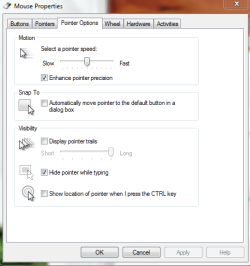
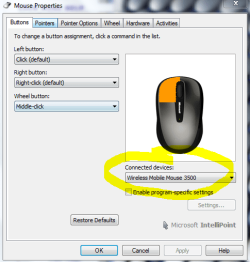
I have a microsoft wireless mobile 3500 mouse and this is what the intrface looks like: | My System Specs | | System Manufacturer/Model Number Custom Built PC (In French it is called "PC de moi") OS Windows 7 Professional x64 CPU Intel Core i7-3820 CPU OC @ 3.80GHz Motherboard Gigabyte G1.Assassin2 Memory 8.00GB (2GBx4) DDR3 1866MHz Graphics Card Nvidia-Gigabyte GeForce GTX 580 1.5GB SLI-soon 680 Sound Card On board Creative SB X-Fi Monitor(s) Displays acer 24" H243H Screen Resolution 1920x1080 Keyboard Microsoft Comfort Curve 2000 Mouse Tek Republic Wired Laser 3600 dpi Gaming Mouse PSU Silent Pro 1000w gold 80+ Case Azza Hurrican 2000 Cooling Liquid CPU cooler & fan Hard Drives 120GB OCZ Vertex III SSD,
500GB OS Hybrid Drive @ 7,200RPM Internet Speed 5.14Mbps Download Speed, .65Mbps Upload Speed & 5ms Ping Other Info You're such a good person for reading all the way down to the end. People like you truly do care! We should take all the people, and make them into people like you! :p |
02-08-2012
|
#7 | | Windows 7 Professional x64 |

Quote: Originally Posted by Qdos If you're sure your touchpad options don't include a 'disable when typing for X seconds' then a simple utility like this one should help out... Qdos, I would prefer not to install anything more, but for sure I will use something like that provided everything else falls through.
Thank you everyone for your replies so far | My System Specs | | System Manufacturer/Model Number Custom Built PC (In French it is called "PC de moi") OS Windows 7 Professional x64 CPU Intel Core i7-3820 CPU OC @ 3.80GHz Motherboard Gigabyte G1.Assassin2 Memory 8.00GB (2GBx4) DDR3 1866MHz Graphics Card Nvidia-Gigabyte GeForce GTX 580 1.5GB SLI-soon 680 Sound Card On board Creative SB X-Fi Monitor(s) Displays acer 24" H243H Screen Resolution 1920x1080 Keyboard Microsoft Comfort Curve 2000 Mouse Tek Republic Wired Laser 3600 dpi Gaming Mouse PSU Silent Pro 1000w gold 80+ Case Azza Hurrican 2000 Cooling Liquid CPU cooler & fan Hard Drives 120GB OCZ Vertex III SSD,
500GB OS Hybrid Drive @ 7,200RPM Internet Speed 5.14Mbps Download Speed, .65Mbps Upload Speed & 5ms Ping Other Info You're such a good person for reading all the way down to the end. People like you truly do care! We should take all the people, and make them into people like you! :p |
02-08-2012
|
#8 | | |
Guessing Fn+F3 does nothing either,eh?
Hmmm..this is odd...it's almost as if the real deiver isn't installed, but then you would think it wouldn't work at all. | My System Specs | | System Manufacturer/Model Number Toshiba Satellite L455D OS Windows 7 Home Premium CPU Amd Semperon 2.10GHz Memory 2 Gig Graphics Card ATI Radeon 3100 Sound Card Realtek Monitor(s) Displays 15.6 inch Screen Resolution 1366x768 Mouse Logitech Wireless Hard Drives 250gig Internet Speed 16/2 cable |
02-09-2012
|
#9 | | Windows 7 64 Bit Home Premium SP1 |
If your touchpad is Synaptics there will be a Synaptics icon in your tray.
Right click on that and uncheck: "Tap to click". | My System Specs | | System Manufacturer/Model Number DESKTOP - Home Built - March 2009 OS Windows 7 64 Bit Home Premium SP1 CPU i7-920 Motherboard Asus P6T - Bios 1408 Memory Corsair TR3X6G1333C9 - 6GB Graphics Card EVGA GeForce GTX260+ - Driver 296.10 Sound Card On board Realtek ACL1200 Monitor(s) Displays Dell 2007FP Screen Resolution 1280 x 960 Keyboard MS KC-0405 Mouse Intellimouse 5-button PSU Corsair CMPSU-750TX - 750 watt Case Lian Li PC-K10B Cooling Standard, 3 120mm case fans Hard Drives #1- Western Digital WD6401AALS Sata Black
#2- Western Digital WD6401AALS Sata Black Internet Speed 20Mbits/Sec (on a good day) |
02-10-2012
|
#10 | | Windows 7 Professional x64 |

Quote: Originally Posted by MWRed Guessing Fn+F3 does nothing either,eh? No, it doesn't. Perhaps it will when they start updating the laptop's drivers on the dell website. I think it is a newer laptop model.
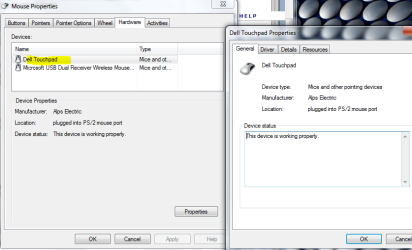
TVeblen, this is what my driver looks like:
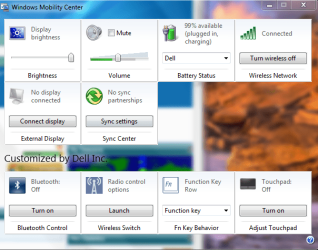
Additionally, I found this:
It wouldn't let me turn it "on", but it still works. I am almost sure that my own tampering in Ccleaner was the cause of this. The dell CD is confusing, but I'll see if I can't reinstall the driver from it, as Dell has yet to list the drivers on its website.
I did use Ccleaner in an attempt to get rid of all the extra Dell bloatware | My System Specs | | System Manufacturer/Model Number Custom Built PC (In French it is called "PC de moi") OS Windows 7 Professional x64 CPU Intel Core i7-3820 CPU OC @ 3.80GHz Motherboard Gigabyte G1.Assassin2 Memory 8.00GB (2GBx4) DDR3 1866MHz Graphics Card Nvidia-Gigabyte GeForce GTX 580 1.5GB SLI-soon 680 Sound Card On board Creative SB X-Fi Monitor(s) Displays acer 24" H243H Screen Resolution 1920x1080 Keyboard Microsoft Comfort Curve 2000 Mouse Tek Republic Wired Laser 3600 dpi Gaming Mouse PSU Silent Pro 1000w gold 80+ Case Azza Hurrican 2000 Cooling Liquid CPU cooler & fan Hard Drives 120GB OCZ Vertex III SSD,
500GB OS Hybrid Drive @ 7,200RPM Internet Speed 5.14Mbps Download Speed, .65Mbps Upload Speed & 5ms Ping Other Info You're such a good person for reading all the way down to the end. People like you truly do care! We should take all the people, and make them into people like you! :p Dell touchpad set to click after every tap, hard to type with it there problems? All times are GMT -5. The time now is 01:53 PM. |  |