Windows 7 Forums Search
Welcome to Windows 7 Forums. Our forum is dedicated to helping you find solutions with any problems, errors or issues you are experiencing with Windows 7. The Windows 7 forum also covers news and updates and has an extensive Windows 7 tutorial section that covers a wide range of tips and tricks.


Windows 7 - Remove 2.5 size iomega Ego drive from enclosure?

 
02-10-2012   #1


7 premeim


Remove 2.5 size iomega Ego drive from enclosure?

My 1 tb iomega ego HD won't spin down when connected to my streamer media player. I don't like this. Can I take the hard drive out and put it into another enclosure I have? Will it then spin down at idle? If not, can I take harddrive out of enclosure and put it in my laptopp? Is it a good drive to be in a laptop?
Drive model # says RPHD-UGC

My System SpecsSystem Spec
02-10-2012   #2


Windows 7 Ultimate 32-bit & 64-bit both SP1


Does it otherwise work OK apart from this not spinning down issue? Does it spin down if connected to other than your streamer media player?
My System SpecsSystem Spec
02-10-2012   #3


7 premeim


otherwise works fine yes. No, it doersn't ever spin down when connected to PC either.
My System SpecsSystem Spec
.


02-10-2012   #4


Windows 7 Ultimate 32-bit & 64-bit both SP1


As long as it is functioning as it should, I wouldn't worry too much about it.
My System SpecsSystem Spec
02-10-2012   #5


Windows 7 Ultimate 64 bit


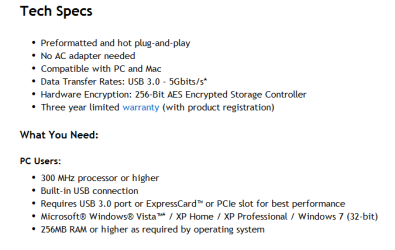
Is this a 3.0 usb external drive? If so do you have it connected to a usb 3.0 port?

http://go.iomega.com/en-us/products/..._specsItem_tab


Remove 2.5 size iomega Ego drive from enclosure?-specs.png
My System SpecsSystem Spec
02-10-2012   #6


7 premeim


I bought it about a year ago so I presume it't usb2.
My System SpecsSystem Spec
02-10-2012   #7


Windows 7 Ultimate 64 bit


What's the exact make and model of it?
My System SpecsSystem Spec
02-10-2012   #8


7 premeim


It says iomegega eGo on top. On bottom it says:
pn/ 31907600
model RPHD-UGC
SN BFAA472391

As I understand from Iomega customer support ; Iomega enclosures do not have a built in sleep state. The spin down behavior would be controlled by either the enclosure or the device to which the drive connects to.
Because of this and because this drive's enclosure is limited to usb2, I'd like to either put this in another enlosure that has esata port or put this in my laptop for HTPC. Iomega support says they don't know what drive is in enclosure but they think it's sata and 5400 rpm.

EDIT Drive came out pretty easy I guess. The case is still usable and the controller Is still operable and removable from case.
It's s a Samsung Model: HM 100UI 1 TB/5400 rpm/8M.
Unfortunantly it's a 12.5 mm. Oh well.

Last edited by leif; 02-13-2012 at 11:10 PM..
My System SpecsSystem Spec
Reply

 Remove 2.5 size iomega Ego drive from enclosure? problems?


Thread Tools


Similar Threads for: Remove 2.5 size iomega Ego drive from enclosure?
Thread Forum
iomega eGo External drive and Windows Seven compatibility Hardware & Devices
Iomega portable hard drive not recognised Hardware & Devices
Iomega 250GB USB 2.0 Hard Drive Drivers
Does driver exist to enable file access from old Iomega zip 100 drive? Drivers
NAS drive enclosure Network & Sharing


All times are GMT -5. The time now is 01:54 PM.


Windows 7 Forums is an independent web site and has not been authorized,
sponsored, or otherwise approved by Microsoft Corporation.
"Windows 7" and related materials are trademarks of Microsoft Corp.
© Designer Media Ltd
  

1 2 3 4 5 6 7 8 9 10 11 12 13 14 15 16 17 18 19 20 21 22 23 24 25 26 27 28 29 30