Windows 7 Forums


Windows 7: Blu ray drive issues

10 Feb 2012  
Bearcatrp

Win7 Pro 64
116 posts
 
 
Blu ray drive issues

Picked up a OEM Sony blu ray burner drive not long ago. Windows 7 64 recognizes it as a cd drive. Weird. Can't write anything. Can read discs though. Is it supposed to be recognized as a BD drive or cd drive? I do have another DVD/BD rom (LG) installed. No issues with this. Any help appreciated.

My System SpecsSystem Spec

13 Feb 2012  
Bearcatrp

Win7 Pro 64
116 posts


Does anyone who has a blu ray burner tell me how windows 7 labels their drive, CD, DVD or BD? The one I have is the BD5300S.
My System SpecsSystem Spec
13 Feb 2012  
Techymike

windows 7 home premium 64
328 posts
Northern California


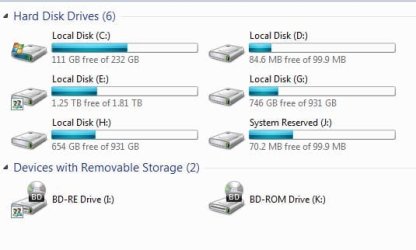
What firmware version do you have? Optiarc BD-5300S 1.04 Firmware Download - Firmware HQ is the newest one 15 march 2011
Attached Thumbnails
Blu ray drive issues-bd.jpg  
My System SpecsSystem Spec
.


13 Feb 2012  
James7679

Windows 7 Home Premium x64
1,418 posts
Central Florida


Go to microsoft fix it. Search for "dvd drive not recognized."
My System SpecsSystem Spec
13 Feb 2012  
Bearcatrp

Win7 Pro 64
116 posts


I have v2.0 firmware. Have looked at the 1.4 version and scratching my head on this one. Do OEM drives come different? Mine does show BD-RE but look into the properties. Shows different. Maybe that's the way it's supposed to I guess. Teckymike, I also have a DVD/BD rom drive. Do you have any conflicts? Was thinking this might be the case and just remove it to see what happens.
My System SpecsSystem Spec
13 Feb 2012  
James7679

Windows 7 Home Premium x64
1,418 posts
Central Florida


I had the same issue. Try what I suggested please. Or not.
My System SpecsSystem Spec
13 Feb 2012  
Bearcatrp

Win7 Pro 64
116 posts


Will go check it out. Thanks
My System SpecsSystem Spec
14 Feb 2012  
Techymike

windows 7 home premium 64
328 posts
Northern California


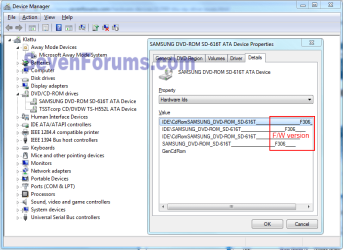
I have two drives also and there no conflicts. I did have to set up the drives as shared. According to Sony there is no version 2.0 listed for your drive on their website. That is why I listed the hyperlink for you.
In the device manager does the drive have any flags that might be a yellow color?
Attached Thumbnails
Blu ray drive issues-devices.jpg  
My System SpecsSystem Spec
14 Feb 2012  
Bearcatrp

Win7 Pro 64
116 posts


Quote   Quote: Originally Posted by Techymike View Post
I have two drives also and there no conflicts. I did have to set up the drives as shared. According to Sony there is no version 2.0 listed for your drive on their website. That is why I listed the hyperlink for you.
In the device manager does the drive have any flags that might be a yellow color?
That's why I'm scratching my head on the v2. Already tried the firmware installer for 1.4. Said no supporting drive found. No yellow flags in device manager either. Been working on computers since DOS 3.1 and have never seen this before. Have only been back to windows about 6 months, coming from OSX for past 8 years so still new to Windows 7. Any hacks to remove the firmware to get 1.4 installed?
My System SpecsSystem Spec
14 Feb 2012  
Techymike

windows 7 home premium 64
328 posts
Northern California


Iobit.com has a forced uninstall program in windowscareV5. That should help you uninstall it and check for any extra data in your system.
Have you tried uninstalling the drive in device manager and then doing an update in device manager? Most likely windows will see the drive and install the correct driver for you.
My System SpecsSystem Spec
Reply

 Blu ray drive issues problems?


Thread Tools


Similar help and support threads for: Blu ray drive issues
Thread Forum
Hard Drive Issues? Hardware & Devices
New hard drive issues Hardware & Devices
Targus USB 2.0 DVD-ROM drive issues Hardware & Devices
DVD drive issues Hardware & Devices
Hard drive issues Installation & Setup


All times are GMT -5. The time now is 12:45 AM.


Windows 7 Forums is an independent web site and has not been authorized,
sponsored, or otherwise approved by Microsoft Corporation.
"Windows 7" and related materials are trademarks of Microsoft Corp.
© Designer Media Ltd