
TasosGoudas
New member
- Local time
- 6:28 AM
- Messages
- 22
Hello guys,
Some days ago, after a sudden power cut in my area, I noticed that I can't use my network anymore... After some searching, I found out this:
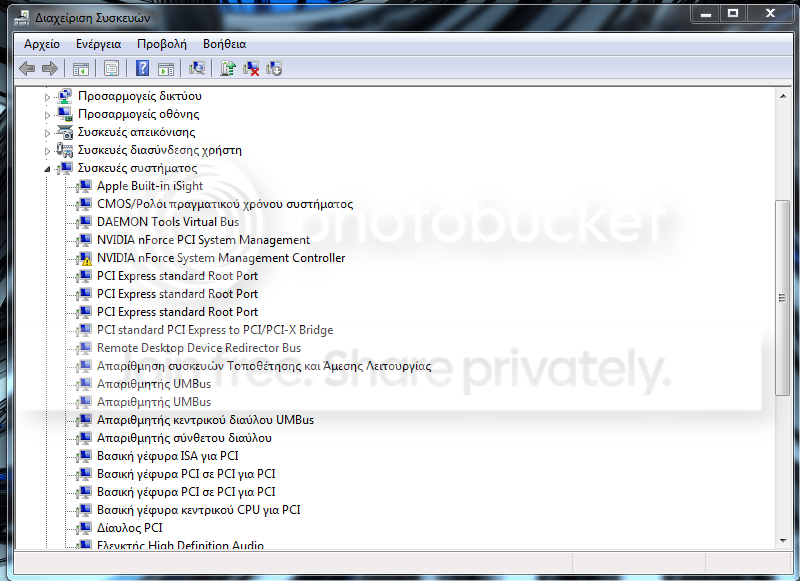
NVIDIA nForce system management controller has a yellow sign on the icon.
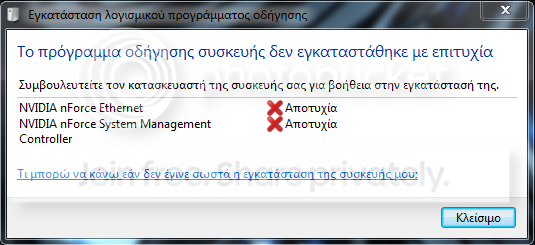
When I startup my computer, a message pops up in the task bar called Driver Installation (or something similar). It keeps loading, but then it says that it failed, and when I click on it, the driver that Windows was trying to install was:
NVIDIA nForce System management controller
Note:
There is also a red X on the network tray icon on the taskbar, like this:

This is not my desktop, but this is an example of how the icon looks like. ONLY the icon, as I said I can't connect nowhere, wireless doesn't detect anything, and wired network doesn't work either, and the icon with the red x is always there...
Thanks for your time.
EDIT:
I uninstalled the nvidia nforce system management controller, and now I 've got some more problematic drivers:
Some days ago, after a sudden power cut in my area, I noticed that I can't use my network anymore... After some searching, I found out this:
NVIDIA nForce system management controller has a yellow sign on the icon.
When I startup my computer, a message pops up in the task bar called Driver Installation (or something similar). It keeps loading, but then it says that it failed, and when I click on it, the driver that Windows was trying to install was:
NVIDIA nForce System management controller
Note:
There is also a red X on the network tray icon on the taskbar, like this:
This is not my desktop, but this is an example of how the icon looks like. ONLY the icon, as I said I can't connect nowhere, wireless doesn't detect anything, and wired network doesn't work either, and the icon with the red x is always there...
Thanks for your time.
EDIT:
I uninstalled the nvidia nforce system management controller, and now I 've got some more problematic drivers:
Last edited:
My Computer
At a glance
Windows 7 Ultimate
- OS
- Windows 7 Ultimate


