| Windows 7: is my ram running at the right speed? |
19 Feb 2012
|
#1 | | windows 7 64bit on both Fort Campbell, KY (tennessee side) |
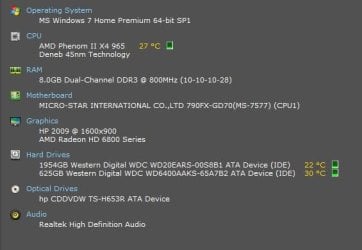
is my ram running at the right speed? ok, the specs on my motherboard from MSI say this here: MSI Global ? Mainboard - 790FX-GD70
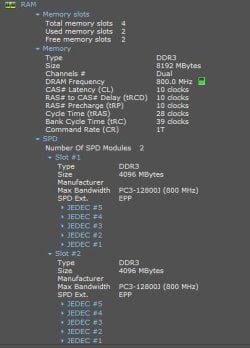
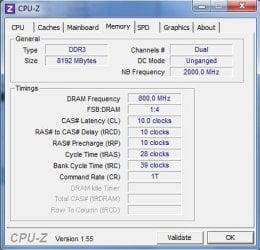
ill attach an image.
the board says DDR3 800/1066/1333/ 1600*/1800*/2133* (OC) DRAM, 16GB Max.
i'm using the program Speccy and it says my ram is PC3-12800j so it should be running at 1600mhz... but its running at 800mhz? even when ive got the power settings on high performance, instead of balanced, the green power settings of the motherboard are all turned off, it still says 800mhz. however, when i go into my BIOS it says both the Current DRAM frequency and the Adjusted DRAM frequency are 1600. but when i go in and look at the individual dimms and/or memory modules they separately say 800.
is my ram running at the proper speed? am i just confused about how it works? or do i need to change things to make it up to full speed? i know my ram is rated at a higher speed than my motherboard is, but the motherboard can do 1600 if its overclocked. at least thats what i gather from the msi website.
any input is appreciated.
Last edited by socrgy9; 19 Feb 2012 at 06:55 PM..
Reason: forgot information
| My System Specs |
| Computer type PC/Desktop System Manufacturer/Model Number Custom Build and MSI GE60 0ND laptop OS windows 7 64bit on both CPU AMD Phenom II X4 965 BE @3.4GHz/Intel Core i7-3610QM @2.3GHz Motherboard MSI 790FX-GD70/MS-16GA Memory 8GB dual channel 1333MHz/8GB dual channel 1600MHz Graphics Card XFX Radeon HD 6870 dual fan 1gb/Intel HD 4000 and GTX660M Sound Card Realtek HD Audio/Realtek HD Audio with THX TruStudio Pro Monitor(s) Displays Vizio 26" 1080p LED-LCD/Generic PnP Monitor Screen Resolution both 1920x1080p 60Hz Keyboard Logitech G510/laptop keyboard by steelseries Mouse Logitec G500/Logitec G5 PSU Corsair GS700 (700watt)/laptop psu Case Cougar Evolution black full tower/MSI awesome gaming looks Cooling CoolerMaster Hyper 212 Evo with Logisys SF120 + 5 case fans Hard Drives 256GB Crucial M4 SSD
625GB SATA 3G (3.0 Gb/sec) 7200rpm
two 2TB SATA 5400rpm
/laptop 750GB Hitachi 7200rpm Internet Speed 35-55Mbps down/1-3 Mbps up Other Info Scythe Kaze Master Pro 5.25 fan controller |
19 Feb 2012
|
#2 | | Windows 7 Ultimate SP1 X64/ linux in VM NW Florida |
Yes, it is running at the correct speed. DDR means double data rate so 1600 ram should show 800. 800 X2 = 1600. | My System Specs | | Computer type PC/Desktop System Manufacturer/Model Number Home Built- Always under construction OS Windows 7 Ultimate SP1 X64/ linux in VM CPU Intel i7-3770K Motherboard Asus Maximus V Extreme Z77 Memory 8GB G.Skill Ripjaws Z DDR3-2400 (2X4GB) Graphics Card EVGA GTX 670 SC 4GB Sound Card On Board Monitor(s) Displays Asus 24" LCD Screen Resolution 1920X1080 Keyboard Logitech G510 Mouse Logitech G500 PSU CORSAIR AX850 Case Cooler Master HAF X Cooling Custom Water Cooling Hard Drives Samsung 840 Pro 256 GB, Samsung 840 Pro 256 GB, Samsung 830 256GB, Samsung HD103SJ 1TB . External HD- Black X dock esata 1TB Samsung Spinpoint, Rosewill USB 3.0 dock 1TB Samsung Spinpoint Internet Speed carrier pigeon speed Antivirus MSE/MBAM Browser ie8 Other Info 2nd Rig,Windows 7 Ultimate SP1 X64, i7-2600K, Asrock P67 Extreme 4, 8GB DDR3-2133, HAF XM case, Noctua NH-D14, Gigabyte HD6950 OC 1GB, 2 X Crucial M4 128GB, Asus 24" LED.
Laptop- Samsung RF711-SO1 17" i5-2310M, 8GB DDR3-1333, Crucial M4 and OCZ vertex2, Nvidia GT540M.Win 7 HP X64 SP1. |
19 Feb 2012
|
#3 | | windows 7 64bit on both Fort Campbell, KY (tennessee side) |
ok, so if i did get 2 4gb sticks of DDR3 1333, which is not starred with the OC speeds as per the motherboard specs, it would run at 1333?
and, since i have 2 PC3-12800J sticks both rated at 1600, could i overclock those to get a faster total ram speed? is that what i'm understanding? | My System Specs | | Computer type PC/Desktop System Manufacturer/Model Number Custom Build and MSI GE60 0ND laptop OS windows 7 64bit on both CPU AMD Phenom II X4 965 BE @3.4GHz/Intel Core i7-3610QM @2.3GHz Motherboard MSI 790FX-GD70/MS-16GA Memory 8GB dual channel 1333MHz/8GB dual channel 1600MHz Graphics Card XFX Radeon HD 6870 dual fan 1gb/Intel HD 4000 and GTX660M Sound Card Realtek HD Audio/Realtek HD Audio with THX TruStudio Pro Monitor(s) Displays Vizio 26" 1080p LED-LCD/Generic PnP Monitor Screen Resolution both 1920x1080p 60Hz Keyboard Logitech G510/laptop keyboard by steelseries Mouse Logitec G500/Logitec G5 PSU Corsair GS700 (700watt)/laptop psu Case Cougar Evolution black full tower/MSI awesome gaming looks Cooling CoolerMaster Hyper 212 Evo with Logisys SF120 + 5 case fans Hard Drives 256GB Crucial M4 SSD
625GB SATA 3G (3.0 Gb/sec) 7200rpm
two 2TB SATA 5400rpm
/laptop 750GB Hitachi 7200rpm Internet Speed 35-55Mbps down/1-3 Mbps up Other Info Scythe Kaze Master Pro 5.25 fan controller |
19 Feb 2012
|
#4 | | Main - Windows 7 Pro SP1 64-Bit; 2nd - Windows Server 2008 R2 Westlake, Ohio |
I have my RAM clocked from 1600 to 1680, due to the fact that I've raised my FSB setting. RAM can be overclocked if it's good enough to handle the higher speed. If it's not you will get the good old BSOD on a regular basis. | My System Specs | | System Manufacturer/Model Number Self OS Main - Windows 7 Pro SP1 64-Bit; 2nd - Windows Server 2008 R2 CPU Main - Core i7 2600K; 2nd - Core i7 920 Motherboard Main - Asus P8Z68-V Pro/Gen3; 2nd - Gigabyte GA-EX58-UDR3 Memory Main - 16GB Corsair Vengeance; 2nd - 12GB Corsair Vengeance Graphics Card Main - XFX Radeon 6870 1GB; 2nd - XFX Radeon 4870 1GB Sound Card Both: Onboard Realtek Azalia Monitor(s) Displays Main - Hann 25" + I-INC 25" + Acer 23"; 2nd - Upgrading Soon Screen Resolution Main - 1920x1080 (All Three Monitors); 2nd - Upgrading Soon Keyboard Main - Razer Reclusa; 2nd - Old MS Keyboard Mouse Main - Logitech MX Revolution; 2nd - Old MS Mouse PSU Main - OCZ 600W Modular; 2nd - OCZ 600W Case Main - Thermaltake Element G; 2nd - NZXT something or other Cooling Main - Corsair H80; 2nd - Prolimatech Megahalems Hard Drives Main - (1) Crucial M4 128GB (Boot)
Main - (1) Seagate 2TB 64MB Cache (Data)
Main - (1) Seagate 2TB 64MB Cache (Data Backup)
2nd - (1) Intel X25-M SSD 80GB (Boot)
2nd - (3) Seagate 1TB 32MB Cache (Data Backup)
2nd - (1) Seagate 320GB (Because) Internet Speed 20Mbps Time-Warner Cable |
19 Feb 2012
|
#5 | | Windows 7 Pro-x64 South Texas |
The confusion (at least mine) is in the dual naming convention used for memory. PC3-12800 is DDR3-1600.
Combined memory modules will run at the speed of any lowest speed modules installed. If you install two DDR-1333 and two DDR3-1600, the memory will run at the 1333 speed. The DDR3-1600 modules cannot be overclocked in this case. If that's what you're asking.
DDR3-1600 memory modules can't normally be overclocked much beyond 1600. That's their rating. The stars or asterisks on MB memory speeds means that overclocking needs to be used if you want to use that speed. The default speeds of the memory will be whatever is installed--1333/1066/800. | My System Specs | | Computer type PC/Desktop System Manufacturer/Model Number Built 2/11/2011 OS Windows 7 Pro-x64 CPU i7-2600 3.4GHz - 3.8GHz Turbo Motherboard Intel DH67BL-B3 Memory 8Gb - 2x4GB, Muskin 991770 PC3-1333 Graphics Card Integrated Intel HD 2000 Sound Card Integrated Intel 10.1 HD, RealTek ALC892 Monitor(s) Displays Asus LCD VH222H, Haier HL24XSL2a Screen Resolution 1920x1080, 1920x1080 Keyboard Logitech EX100 Wireless Mouse Logitech EX100 Wireless PSU Seasonic 650W 80+ Gold Modular Case Rosewill Defender Cooling Stock CPU, Four 120mm case fans, PCH fan added Hard Drives Crucial C300-128Gb,
Western Digital WD5002AALX - 500Gb,
Western Digital WD7501AALS - 750Gb Internet Speed 2.5/1.5 Mbs Antivirus Microsoft Security Essentials Browser Microsoft Internet Explorer 10 Other Info Antec Veris Premier-Multimedia IR Station,
Cyber Accoustics-3602 Speakers,
AFT XM-5U Card Reader,
Hauppauge TV-HVR-2250,
Sony LX300 USB Turntable |
19 Feb 2012
|
#6 | | windows 7 64bit on both Fort Campbell, KY (tennessee side) |
ok, so i have 2 sticks of DDR3 1600 each. they are both running at 800mhz to make an adjusted dram speed of 1600mhz total. so it sounds like both memory sticks are running at half speed? in that case, i could overclock them slightly to get better results...meaning a higher adjusted speed, coming from both sticks running faster. (closer to their individually rated speeds at 1600)? | My System Specs | | Computer type PC/Desktop System Manufacturer/Model Number Custom Build and MSI GE60 0ND laptop OS windows 7 64bit on both CPU AMD Phenom II X4 965 BE @3.4GHz/Intel Core i7-3610QM @2.3GHz Motherboard MSI 790FX-GD70/MS-16GA Memory 8GB dual channel 1333MHz/8GB dual channel 1600MHz Graphics Card XFX Radeon HD 6870 dual fan 1gb/Intel HD 4000 and GTX660M Sound Card Realtek HD Audio/Realtek HD Audio with THX TruStudio Pro Monitor(s) Displays Vizio 26" 1080p LED-LCD/Generic PnP Monitor Screen Resolution both 1920x1080p 60Hz Keyboard Logitech G510/laptop keyboard by steelseries Mouse Logitec G500/Logitec G5 PSU Corsair GS700 (700watt)/laptop psu Case Cougar Evolution black full tower/MSI awesome gaming looks Cooling CoolerMaster Hyper 212 Evo with Logisys SF120 + 5 case fans Hard Drives 256GB Crucial M4 SSD
625GB SATA 3G (3.0 Gb/sec) 7200rpm
two 2TB SATA 5400rpm
/laptop 750GB Hitachi 7200rpm Internet Speed 35-55Mbps down/1-3 Mbps up Other Info Scythe Kaze Master Pro 5.25 fan controller |
19 Feb 2012
|
#7 | | Main - Windows 7 Pro SP1 64-Bit; 2nd - Windows Server 2008 R2 Westlake, Ohio |
Re-read what essenbe said. The "DDR" in "DDR3 1600" stands for Double Data Rate and means that they run at Double the 800MHz RAM speed. If they are running at 800 now they are already going full blast. DDR 1333 runs at 667, etc.
Here's my DDR 1600 running at 1680. Double the 840 number it shows and you get 1680. | My System Specs | | System Manufacturer/Model Number Self OS Main - Windows 7 Pro SP1 64-Bit; 2nd - Windows Server 2008 R2 CPU Main - Core i7 2600K; 2nd - Core i7 920 Motherboard Main - Asus P8Z68-V Pro/Gen3; 2nd - Gigabyte GA-EX58-UDR3 Memory Main - 16GB Corsair Vengeance; 2nd - 12GB Corsair Vengeance Graphics Card Main - XFX Radeon 6870 1GB; 2nd - XFX Radeon 4870 1GB Sound Card Both: Onboard Realtek Azalia Monitor(s) Displays Main - Hann 25" + I-INC 25" + Acer 23"; 2nd - Upgrading Soon Screen Resolution Main - 1920x1080 (All Three Monitors); 2nd - Upgrading Soon Keyboard Main - Razer Reclusa; 2nd - Old MS Keyboard Mouse Main - Logitech MX Revolution; 2nd - Old MS Mouse PSU Main - OCZ 600W Modular; 2nd - OCZ 600W Case Main - Thermaltake Element G; 2nd - NZXT something or other Cooling Main - Corsair H80; 2nd - Prolimatech Megahalems Hard Drives Main - (1) Crucial M4 128GB (Boot)
Main - (1) Seagate 2TB 64MB Cache (Data)
Main - (1) Seagate 2TB 64MB Cache (Data Backup)
2nd - (1) Intel X25-M SSD 80GB (Boot)
2nd - (3) Seagate 1TB 32MB Cache (Data Backup)
2nd - (1) Seagate 320GB (Because) Internet Speed 20Mbps Time-Warner Cable |
19 Feb 2012
|
#8 | | windows 7 64bit on both Fort Campbell, KY (tennessee side) |
oh! ok. i get it, except, if i were to take out one of the ram sticks, would the other one then run at 1600 all on its own?
and so ur saying it would be slower if i got 2 x4gb DDR3 1333 even tho they are the highest memory standard in the motherboard specs that aren't overclocked? | My System Specs | | Computer type PC/Desktop System Manufacturer/Model Number Custom Build and MSI GE60 0ND laptop OS windows 7 64bit on both CPU AMD Phenom II X4 965 BE @3.4GHz/Intel Core i7-3610QM @2.3GHz Motherboard MSI 790FX-GD70/MS-16GA Memory 8GB dual channel 1333MHz/8GB dual channel 1600MHz Graphics Card XFX Radeon HD 6870 dual fan 1gb/Intel HD 4000 and GTX660M Sound Card Realtek HD Audio/Realtek HD Audio with THX TruStudio Pro Monitor(s) Displays Vizio 26" 1080p LED-LCD/Generic PnP Monitor Screen Resolution both 1920x1080p 60Hz Keyboard Logitech G510/laptop keyboard by steelseries Mouse Logitec G500/Logitec G5 PSU Corsair GS700 (700watt)/laptop psu Case Cougar Evolution black full tower/MSI awesome gaming looks Cooling CoolerMaster Hyper 212 Evo with Logisys SF120 + 5 case fans Hard Drives 256GB Crucial M4 SSD
625GB SATA 3G (3.0 Gb/sec) 7200rpm
two 2TB SATA 5400rpm
/laptop 750GB Hitachi 7200rpm Internet Speed 35-55Mbps down/1-3 Mbps up Other Info Scythe Kaze Master Pro 5.25 fan controller |
19 Feb 2012
|
#9 | | windows 7 64bit on both Fort Campbell, KY (tennessee side) |
sorry, i'm just trying to understand all this, so if DDR3 1333 is the highest listed memory standard by the manufacturer specs, and the 1600 is *OC, and my memory right now is running at 1600, then is my memory already overclocked? and if i were to upgrade my ram to say an 8gb (2x4gb) DDR3 2133, would that even work? | My System Specs | | Computer type PC/Desktop System Manufacturer/Model Number Custom Build and MSI GE60 0ND laptop OS windows 7 64bit on both CPU AMD Phenom II X4 965 BE @3.4GHz/Intel Core i7-3610QM @2.3GHz Motherboard MSI 790FX-GD70/MS-16GA Memory 8GB dual channel 1333MHz/8GB dual channel 1600MHz Graphics Card XFX Radeon HD 6870 dual fan 1gb/Intel HD 4000 and GTX660M Sound Card Realtek HD Audio/Realtek HD Audio with THX TruStudio Pro Monitor(s) Displays Vizio 26" 1080p LED-LCD/Generic PnP Monitor Screen Resolution both 1920x1080p 60Hz Keyboard Logitech G510/laptop keyboard by steelseries Mouse Logitec G500/Logitec G5 PSU Corsair GS700 (700watt)/laptop psu Case Cougar Evolution black full tower/MSI awesome gaming looks Cooling CoolerMaster Hyper 212 Evo with Logisys SF120 + 5 case fans Hard Drives 256GB Crucial M4 SSD
625GB SATA 3G (3.0 Gb/sec) 7200rpm
two 2TB SATA 5400rpm
/laptop 750GB Hitachi 7200rpm Internet Speed 35-55Mbps down/1-3 Mbps up Other Info Scythe Kaze Master Pro 5.25 fan controller |
19 Feb 2012
|
#10 | | Windows 7 Ultimate SP1 X64/ linux in VM NW Florida |
If you were to install 2 sticks of DDR3-1333 they would run at 667, 2 stciks of DDR3- 2133 would run at 1066, 2 sticks of DDR3-1866 would run at 933. Again, DDR is Double data rate and the sticks are in dual chanel mode as they should be. Yes, you could probably overclock them, But, I would strongly advise against trying it unless you understand exactly what you are doing. One slight mistake and your computer will BSOD and cause all kind of trouble. It would also depend on the quality of the ram as Profdlp said. | My System Specs | | Computer type PC/Desktop System Manufacturer/Model Number Home Built- Always under construction OS Windows 7 Ultimate SP1 X64/ linux in VM CPU Intel i7-3770K Motherboard Asus Maximus V Extreme Z77 Memory 8GB G.Skill Ripjaws Z DDR3-2400 (2X4GB) Graphics Card EVGA GTX 670 SC 4GB Sound Card On Board Monitor(s) Displays Asus 24" LCD Screen Resolution 1920X1080 Keyboard Logitech G510 Mouse Logitech G500 PSU CORSAIR AX850 Case Cooler Master HAF X Cooling Custom Water Cooling Hard Drives Samsung 840 Pro 256 GB, Samsung 840 Pro 256 GB, Samsung 830 256GB, Samsung HD103SJ 1TB . External HD- Black X dock esata 1TB Samsung Spinpoint, Rosewill USB 3.0 dock 1TB Samsung Spinpoint Internet Speed carrier pigeon speed Antivirus MSE/MBAM Browser ie8 Other Info 2nd Rig,Windows 7 Ultimate SP1 X64, i7-2600K, Asrock P67 Extreme 4, 8GB DDR3-2133, HAF XM case, Noctua NH-D14, Gigabyte HD6950 OC 1GB, 2 X Crucial M4 128GB, Asus 24" LED.
Laptop- Samsung RF711-SO1 17" i5-2310M, 8GB DDR3-1333, Crucial M4 and OCZ vertex2, Nvidia GT540M.Win 7 HP X64 SP1. is my ram running at the right speed? problems? All times are GMT -5. The time now is 02:52 PM. | |