Windows 7 Forums


Windows 7: Desktop now almost dead after cleaning interior after thermal events

19 Feb 2012   #1

MS Windows 7 Home Premium 32-bit SP1
 
 
Desktop now almost dead after cleaning interior after thermal events

My computer used to shut down and a message used to be displayed that there was a thermal event. I opened the computer, remove the screws of the fan and cleaned the heat sink underneath it of dust which it had a lot( and of course other parts too). after that I put the fan back but I am not sure whether I put it in original upside down position or in wrong way, anyhow the wires connecting with the fan are now in between the fan and the heat sink but computer still continued to shut down suddenly off and on sometimes even before booting. I again opened the computer and this time even unscrewed the heat sink and cleaned it with air blow and a brush. After that computer has become like dead. When I turn it on a green light beneath the off on button lits but there is absolutely no sound which I used to hear when the computer used to boot. What should I do now? thanks

My System SpecsSystem Spec

19 Feb 2012   #2

Windows 7 Home Premium 64bit
Michigan


It sounds like you didn't put something back together properly. If you're not too keen about computer hardware, it is best left for the professionals because you can really screw something up if not put back together correctly. Usually CPU heat sinks have four notches that push down and lock into place. You will hear a click when that happens. Also, if you separated the heat sink from the CPU, you will need to reapply thermal paste to the bottom of the heat sink - Newegg.com - Arctic Silver 5 Thermal Compound - Thermal Compound / Grease


Can you take a picture of your motherboard and upload it here?
My System SpecsSystem Spec
19 Feb 2012   #3

MS Windows 7 Home Premium 32-bit SP1


Quote   Quote: Originally Posted by mgorman87 View Post
It sounds like you didn't put something back together properly. If you're not too keen about computer hardware, it is best left for the professionals because you can really screw something up if not put back together correctly. Usually CPU heat sinks have four notches that push down and lock into place. You will hear a click when that happens. Also, if you separated the heat sink from the CPU, you will need to reapply thermal paste to the bottom of the heat sink - Newegg.com - Arctic Silver 5 Thermal Compound - Thermal Compound / Grease


Can you take a picture of your motherboard and upload it here?
Can I upload a picture here on Windows 7 forum?
My System SpecsSystem Spec
.


19 Feb 2012   #4

Windows 7 Ultimate x64


Quote   Quote: Originally Posted by sdraza1 View Post
Can I upload a picture here on Windows 7 forum?
Yes, Screenshots and Files - Upload and Post in Seven Forums
My System SpecsSystem Spec
19 Feb 2012   #5

MS Windows 7 Home Premium 32-bit SP1


Quote   Quote: Originally Posted by sdraza1 View Post
Quote   Quote: Originally Posted by mgorman87 View Post
It sounds like you didn't put something back together properly. If you're not too keen about computer hardware, it is best left for the professionals because you can really screw something up if not put back together correctly. Usually CPU heat sinks have four notches that push down and lock into place. You will hear a click when that happens. Also, if you separated the heat sink from the CPU, you will need to reapply thermal paste to the bottom of the heat sink - Newegg.com - Arctic Silver 5 Thermal Compound - Thermal Compound / Grease


Can you take a picture of your motherboard and upload it here?
Can I upload a picture here on Windows 7 forum?
Sorry I found out how to upload a photo.
My System SpecsSystem Spec
20 Feb 2012   #6

Windows 7 64 Bit Home Premium SP1
In The Woods


Also could be that you dislodged the processor from the socket.

I suggest you find someone who has done this kind of thing before and have the processor reseated and the heat sink refitted with new thermal paste.
If you are going to do it be sure to read the manual and be sure of what you are doing.
My System SpecsSystem Spec
20 Feb 2012   #7

Windows 7 Ultimate x64
Solo.


Quote   Quote: Originally Posted by sdraza1 View Post
My computer used to shut down and a message used to be displayed that there was a thermal event. I opened the computer, remove the screws of the fan and cleaned the heat sink underneath it of dust which it had a lot( and of course other parts too)
It reminds what we usually do. Before deciding to disassemble the heat sink, it was actually useful to observe first how the processor fan worked. Was it slower or even not running.
My System SpecsSystem Spec
20 Feb 2012   #8

MS Windows 7 Home Premium 32-bit SP1


Quote   Quote: Originally Posted by mgorman87 View Post
It sounds like you didn't put something back together properly. If you're not too keen about computer hardware, it is best left for the professionals because you can really screw something up if not put back together correctly. Usually CPU heat sinks have four notches that push down and lock into place. You will hear a click when that happens. Also, if you separated the heat sink from the CPU, you will need to reapply thermal paste to the bottom of the heat sink - Newegg.com - Arctic Silver 5 Thermal Compound - Thermal Compound / Grease


Can you take a picture of your motherboard and upload it here?
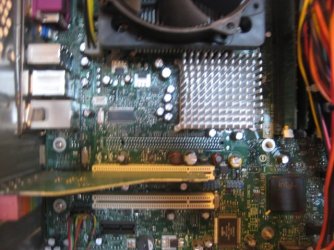
see the pictures please
Attached Thumbnails
Desktop now almost dead after cleaning interior after thermal events-echo-011.jpg   Desktop now almost dead after cleaning interior after thermal events-echo-012.jpg  
My System SpecsSystem Spec
20 Feb 2012   #9

Windows 7 Home Premium 64bit
Michigan


Thought that would help me but it doesn't. I would continue with what was recommended in previous posts
My System SpecsSystem Spec
Reply

 Desktop now almost dead after cleaning interior after thermal events problems?


Thread Tools


Similar help and support threads for: Desktop now almost dead after cleaning interior after thermal events
Thread Forum
Solved cleaning a laptop thermal pad? Hardware & Devices
Dead Slow Right Click on Desktop General Discussion
Desktop still having problems after cleaning interior after thermal ev General Discussion
Cleaning CPU's thermal paste. Performance & Maintenance
Cleaning the Interior of your PC Performance & Maintenance


All times are GMT -5. The time now is 01:27 AM.


Seven Forums Android App Seven Forums IOS App Follow us on Facebook

Windows 7 Forums is an independent web site and has not been authorized,
sponsored, or otherwise approved by Microsoft Corporation.
"Windows 7" and related materials are trademarks of Microsoft Corp.
© Designer Media Ltd
  

1 2 3 4 5 6 7 8 9 10 11 12 13 14 15 16 17 18 19 20 21 22 23 24 25 26 27 28 29 30 31 32