| Windows 7: SSD partition problems? advice neaded |
24 Feb 2012
|
#1 | | |
SSD partition problems? advice neaded Hello again 7 Forums!
My Corsair Force GT 60Gb SSD is behaving very weird and i'm hoping some SSD intelligent people can help me. let me just make a list of the problems I am seeing below:
also note:
this is NOT my boot drive ANYMORE it used to have Windows 7 on it but not anymore. i plan to use it solely for games now.
1. I can't update the firmware from corsair for some reason because the installer doesn't even detect my drive. any advice? the corsair forums are junk
2. I can't run "HD tune pro" write tests because it thinks the drive is partitioned i guess???
3. read speeds are low and write speeds are just pathetic using CrystalDiskMark
4. I also seem to be missing ~4Gb of space (im thinking its a lost partition or something)
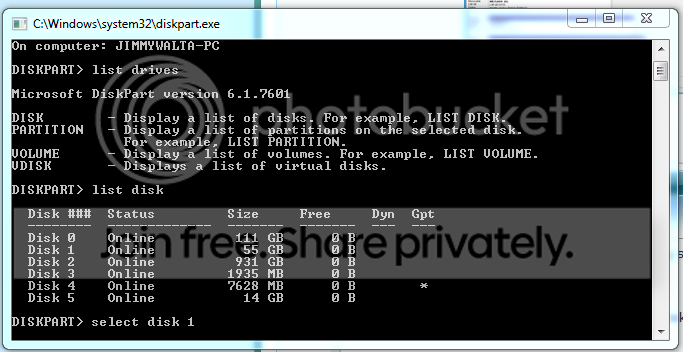
i have attached a screenshot of all the SDD info i have, maybe someone can help me. i dont see any extra partitions so i don't know what is going on, but if anyone can help me get this drive running the way it should i would much appreciate it!
my SSD is Disk 1: Drive G: | My System Specs |
| System Manufacturer/Model Number Custom Built OS Windows 7 Ultimate x64 CPU AMD Phenom II x4 955 ~4.1Ghz Motherboard AsRock Extreme 4 990FX Memory G.Skill 8Gb 1600 (2x 4Gb) Graphics Card 2x GTX 460 EVGA in SLI Sound Card Creative Sound Blaster X-Fi Surround 5.1 USB Sound Card Monitor(s) Displays ASUS 24 in LED Screen Resolution 1920x1080 Keyboard Logitech G110 Mouse mx518 PSU Corsair TX750W Case Azza mid tower Cooling Corsair H80 Liquid cooling Hard Drives 2x WD 500Gb @7200rpm in RAID 0
SATA3 Force GT 60Gb SSD
120Gb WD HDD (minor backup)
1Tb external nightly back-up of RAID 0 Drive Internet Speed 15mb/3mb |
24 Feb 2012
|
#2 | | Windows 7 SP1, Home Premium, 64-bit |
I don't see any signs of missing space or extra partitions.
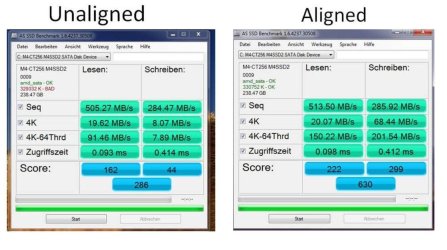
What about alignment?
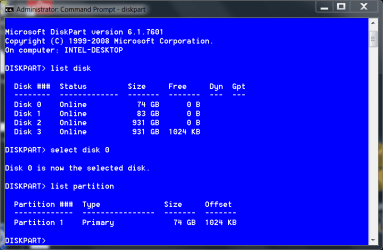
Post a picture of the drive in Diskpart so we can check the alignment. That has a major effect on performance. | My System Specs | | System Manufacturer/Model Number Ignatz Special; 4 speed manual gearbox; factory air conditioning; one of one OS Windows 7 SP1, Home Premium, 64-bit CPU Intel Sandy Bridge i5-2500, not overclocked Motherboard Gigabyte H67A-UD3H-B3, full ATX Memory 4 GB Crucial DDR3-1333 Graphics Card none; graphics are integrated on CPU Sound Card onboard: Realtek ALC892; external: USB Behringer UF0-202 Monitor(s) Displays NEC 90GX2-BK 19" LCD Screen Resolution 800 x 640 Keyboard Leopold Tenkeyless with Cherry Blue switches, USB Mouse Logitech or Microsoft optical wired; either USB or PS 2 PSU Seasonic SS-560KM, modular Case Antec Solo II Cooling CPU: Scythe Big Shuriken; Case: Scythe Slipstream 800 & 500 Hard Drives System: Intel 320 Series SSD, 80 GB;
Data: Samsung Spinpoint 103SJ, 1 TB;
Backup: WD Caviar Green WD15EADS-00P8B0, 1.5TB Other Info Power consumption of this system, including monitor: 68 watts at idle; 144 watts at full load |
24 Feb 2012
|
#3 | | |
that is what has my so confused. the preformance WAS good when Windows 7 was on it, but i wanted to update the firmware to 1.3.3 but to do so i couldn't have an active OS on the drive so i just installed Windows 7 on my RAID drive and was going to update it from that OS. i deleted all partitions on the SSD then formated it to be used. this is when i noticed the slightly smaller space, then i ran the speed tests.... this is where i KNOW something is wrong. its a 550mb/s read/Write SSD, the read spead is fine i guess but the write is pathetic, my 5000rpm drive could write faster. and worse yet, the corsair firmware updater doesn't even recognize my drive | My System Specs | | System Manufacturer/Model Number Custom Built OS Windows 7 Ultimate x64 CPU AMD Phenom II x4 955 ~4.1Ghz Motherboard AsRock Extreme 4 990FX Memory G.Skill 8Gb 1600 (2x 4Gb) Graphics Card 2x GTX 460 EVGA in SLI Sound Card Creative Sound Blaster X-Fi Surround 5.1 USB Sound Card Monitor(s) Displays ASUS 24 in LED Screen Resolution 1920x1080 Keyboard Logitech G110 Mouse mx518 PSU Corsair TX750W Case Azza mid tower Cooling Corsair H80 Liquid cooling Hard Drives 2x WD 500Gb @7200rpm in RAID 0
SATA3 Force GT 60Gb SSD
120Gb WD HDD (minor backup)
1Tb external nightly back-up of RAID 0 Drive Internet Speed 15mb/3mb |
24 Feb 2012
|
#4 | | Windows 7 SP1, Home Premium, 64-bit |
If you are willing to completely wipe the SSD, I'd do that in Diskpart with the Clean command and then attempt to create a new single primary partition on it. Then see what it shows for alignment.
I know nothing about RAID and wonder if it is part of your problem? | My System Specs | | System Manufacturer/Model Number Ignatz Special; 4 speed manual gearbox; factory air conditioning; one of one OS Windows 7 SP1, Home Premium, 64-bit CPU Intel Sandy Bridge i5-2500, not overclocked Motherboard Gigabyte H67A-UD3H-B3, full ATX Memory 4 GB Crucial DDR3-1333 Graphics Card none; graphics are integrated on CPU Sound Card onboard: Realtek ALC892; external: USB Behringer UF0-202 Monitor(s) Displays NEC 90GX2-BK 19" LCD Screen Resolution 800 x 640 Keyboard Leopold Tenkeyless with Cherry Blue switches, USB Mouse Logitech or Microsoft optical wired; either USB or PS 2 PSU Seasonic SS-560KM, modular Case Antec Solo II Cooling CPU: Scythe Big Shuriken; Case: Scythe Slipstream 800 & 500 Hard Drives System: Intel 320 Series SSD, 80 GB;
Data: Samsung Spinpoint 103SJ, 1 TB;
Backup: WD Caviar Green WD15EADS-00P8B0, 1.5TB Other Info Power consumption of this system, including monitor: 68 watts at idle; 144 watts at full load |
24 Feb 2012
|
#5 | | |
RAID should have all the AHCI commands in it so im a little confused as well... i'll try clean in diskpart and report back in a second
UPDATE:
okay, i ran the clean but it didn't fix anything, it cleared the ONE partition i can see and that's it, still crummy speeds and not able to update firmware | My System Specs | | System Manufacturer/Model Number Custom Built OS Windows 7 Ultimate x64 CPU AMD Phenom II x4 955 ~4.1Ghz Motherboard AsRock Extreme 4 990FX Memory G.Skill 8Gb 1600 (2x 4Gb) Graphics Card 2x GTX 460 EVGA in SLI Sound Card Creative Sound Blaster X-Fi Surround 5.1 USB Sound Card Monitor(s) Displays ASUS 24 in LED Screen Resolution 1920x1080 Keyboard Logitech G110 Mouse mx518 PSU Corsair TX750W Case Azza mid tower Cooling Corsair H80 Liquid cooling Hard Drives 2x WD 500Gb @7200rpm in RAID 0
SATA3 Force GT 60Gb SSD
120Gb WD HDD (minor backup)
1Tb external nightly back-up of RAID 0 Drive Internet Speed 15mb/3mb |
24 Feb 2012
|
#6 | | Windows 7 Ultimate SP1 X64/ linux in VM NW Florida |
Have you tried a secure erase using Parted Magic? A secure erase is supposed to restore an SSD to factory condition. I use Parted Magic and is fairly simple to do and works on any SSD. It simply issues a command to the firmware controller and the controller does the secure erase. The easiest way is to put it on a USB stick and boot from the stick, or download the ISO and burn it to a CD and boot from the Cd. Either way, download the ISO file from the link above, to put it on an USB stick I use Pendrive Linux Universal USB installer. Scroll down the list until you find Parted magic, show the installer where your ISO is located and it will do the rest. These are the instructions for a secure erase with the program. The only issue you may have is you may have to 'hot plug' the SSD to unfreeze it. I just go ahead and unplug the power cord to the SSD, then boot to the USB or CD, once the program is fully loaded, plug the power cable back in and it will be unfrozen. Use the last option, an internal secure erase. If it asks to do an 'enhanced serure erase' select no. It will take about 10 seconds. The message will tell you it will take longer, but as soon as the message goes away, it is done. | My System Specs | | Computer type PC/Desktop System Manufacturer/Model Number Home Built- Always under construction OS Windows 7 Ultimate SP1 X64/ linux in VM CPU Intel i7-3770K Motherboard Asus Maximus V Extreme Z77 Memory 8GB G.Skill Ripjaws Z DDR3-2400 (2X4GB) Graphics Card EVGA GTX 670 SC 4GB Sound Card On Board Monitor(s) Displays Asus 24" LCD Screen Resolution 1920X1080 Keyboard Logitech G510 Mouse Logitech G500 PSU CORSAIR AX850 Case Cooler Master HAF X Cooling Custom Water Cooling Hard Drives Samsung 840 Pro 256 GB, Samsung 840 Pro 256 GB, Samsung 830 256GB, Samsung HD103SJ 1TB . External HD- Black X dock esata 1TB Samsung Spinpoint, Rosewill USB 3.0 dock 1TB Samsung Spinpoint Internet Speed carrier pigeon speed Antivirus MSE/MBAM Browser ie9 Other Info 2nd Rig,Windows 7 Ultimate SP1 X64, i7-2600K, Asrock P67 Extreme 4, 8GB DDR3-2133, HAF XM case, Noctua NH-D14, Gigabyte HD6950 OC 1GB, 2 X Crucial M4 128GB, Asus 24" LED.
Laptop- Samsung RF711-SO1 17" i5-2310M, 8GB DDR3-1333, Samsung 830 256Gb, Nvidia GT540M.Win 7 HP X64 SP1. |
25 Feb 2012
|
#7 | | |
booted into the CD with no problem once i selected the partition method though it didn't give me any option to pick a drive to complete the task, the windows just simply went away... | My System Specs | | System Manufacturer/Model Number Custom Built OS Windows 7 Ultimate x64 CPU AMD Phenom II x4 955 ~4.1Ghz Motherboard AsRock Extreme 4 990FX Memory G.Skill 8Gb 1600 (2x 4Gb) Graphics Card 2x GTX 460 EVGA in SLI Sound Card Creative Sound Blaster X-Fi Surround 5.1 USB Sound Card Monitor(s) Displays ASUS 24 in LED Screen Resolution 1920x1080 Keyboard Logitech G110 Mouse mx518 PSU Corsair TX750W Case Azza mid tower Cooling Corsair H80 Liquid cooling Hard Drives 2x WD 500Gb @7200rpm in RAID 0
SATA3 Force GT 60Gb SSD
120Gb WD HDD (minor backup)
1Tb external nightly back-up of RAID 0 Drive Internet Speed 15mb/3mb |
25 Feb 2012
|
#8 | | Windows 7 Ultimate SP1 X64/ linux in VM NW Florida |
Once in you should click the icon on the bottom left where the start button on windows is, you will get a menu, select system tools, go to near the top of the list to Hard drive erase, select your SSD, click on the bottom option 'internal secure erase', click next, it will assign a password of 'null' select OK, if it asks if you want an enhanced secure erase select no, the message should come up asking if you are sure, if you are in fact sure, click yes and it will be through in about 15 seconds. Go back to the bottom and click the bottom left again, select log out and restart and boot back into windows. You will have to create an aligned partition and format it. If your drive comes with a utility that will do a secure erase, you can use that instead. Parted Magic is just the tool I always use and I find it quick and simple. | My System Specs | | Computer type PC/Desktop System Manufacturer/Model Number Home Built- Always under construction OS Windows 7 Ultimate SP1 X64/ linux in VM CPU Intel i7-3770K Motherboard Asus Maximus V Extreme Z77 Memory 8GB G.Skill Ripjaws Z DDR3-2400 (2X4GB) Graphics Card EVGA GTX 670 SC 4GB Sound Card On Board Monitor(s) Displays Asus 24" LCD Screen Resolution 1920X1080 Keyboard Logitech G510 Mouse Logitech G500 PSU CORSAIR AX850 Case Cooler Master HAF X Cooling Custom Water Cooling Hard Drives Samsung 840 Pro 256 GB, Samsung 840 Pro 256 GB, Samsung 830 256GB, Samsung HD103SJ 1TB . External HD- Black X dock esata 1TB Samsung Spinpoint, Rosewill USB 3.0 dock 1TB Samsung Spinpoint Internet Speed carrier pigeon speed Antivirus MSE/MBAM Browser ie9 Other Info 2nd Rig,Windows 7 Ultimate SP1 X64, i7-2600K, Asrock P67 Extreme 4, 8GB DDR3-2133, HAF XM case, Noctua NH-D14, Gigabyte HD6950 OC 1GB, 2 X Crucial M4 128GB, Asus 24" LED.
Laptop- Samsung RF711-SO1 17" i5-2310M, 8GB DDR3-1333, Samsung 830 256Gb, Nvidia GT540M.Win 7 HP X64 SP1. |
26 Feb 2012
|
#9 | | |
okay i finally got the secure erase to work. performance has not increased a bit though, still sluggish as ever and i'm not able to do the firmware update either because it still won't recognize it. I am very confused as to what could be causing my SSD issues... any thoughts???
i haven't really done any SSD optimization yet on this new install of Windows 7 but since it's not my OS drive I don't think that will affect it much... | My System Specs | | System Manufacturer/Model Number Custom Built OS Windows 7 Ultimate x64 CPU AMD Phenom II x4 955 ~4.1Ghz Motherboard AsRock Extreme 4 990FX Memory G.Skill 8Gb 1600 (2x 4Gb) Graphics Card 2x GTX 460 EVGA in SLI Sound Card Creative Sound Blaster X-Fi Surround 5.1 USB Sound Card Monitor(s) Displays ASUS 24 in LED Screen Resolution 1920x1080 Keyboard Logitech G110 Mouse mx518 PSU Corsair TX750W Case Azza mid tower Cooling Corsair H80 Liquid cooling Hard Drives 2x WD 500Gb @7200rpm in RAID 0
SATA3 Force GT 60Gb SSD
120Gb WD HDD (minor backup)
1Tb external nightly back-up of RAID 0 Drive Internet Speed 15mb/3mb |
26 Feb 2012
|
#10 | | Windows 7 Ultimate SP1 X64/ linux in VM NW Florida |

Quote: Originally Posted by CovertDeath okay i finally got the secure erase to work. performance has not increased a bit though, still sluggish as ever and i'm not able to do the firmware update either because it still won't recognize it. I am very confused as to what could be causing my SSD issues... any thoughts???
i haven't really done any SSD optimization yet on this new install of Windows 7 but since it's not my OS drive I don't think that will affect it much... If you have done a secure erase and created an aligned partition and still not getting any performance, I would pursue an RMA. | My System Specs | | Computer type PC/Desktop System Manufacturer/Model Number Home Built- Always under construction OS Windows 7 Ultimate SP1 X64/ linux in VM CPU Intel i7-3770K Motherboard Asus Maximus V Extreme Z77 Memory 8GB G.Skill Ripjaws Z DDR3-2400 (2X4GB) Graphics Card EVGA GTX 670 SC 4GB Sound Card On Board Monitor(s) Displays Asus 24" LCD Screen Resolution 1920X1080 Keyboard Logitech G510 Mouse Logitech G500 PSU CORSAIR AX850 Case Cooler Master HAF X Cooling Custom Water Cooling Hard Drives Samsung 840 Pro 256 GB, Samsung 840 Pro 256 GB, Samsung 830 256GB, Samsung HD103SJ 1TB . External HD- Black X dock esata 1TB Samsung Spinpoint, Rosewill USB 3.0 dock 1TB Samsung Spinpoint Internet Speed carrier pigeon speed Antivirus MSE/MBAM Browser ie9 Other Info 2nd Rig,Windows 7 Ultimate SP1 X64, i7-2600K, Asrock P67 Extreme 4, 8GB DDR3-2133, HAF XM case, Noctua NH-D14, Gigabyte HD6950 OC 1GB, 2 X Crucial M4 128GB, Asus 24" LED.
Laptop- Samsung RF711-SO1 17" i5-2310M, 8GB DDR3-1333, Samsung 830 256Gb, Nvidia GT540M.Win 7 HP X64 SP1. SSD partition problems? advice neaded problems? All times are GMT -5. The time now is 09:34 PM. | |