| Windows 7: Phenom II only showing 2 processors - HELP |
08 Mar 2012
|
#1 | | |
Phenom II only showing 2 processors - HELP Hello to all,
I hope this is a good place to post this. Today I upgraded my X2 processor with a AMD Phenom-II X4 965. Put it in, booted, went to bios and optimized default setting and saved. Reran the system performance and it increased, but noted that the cpu gadget only showed two cores. Downloaded CPU-Z and it only shows two cores. Can anyone point me in the direction of getting this issue solved?? Thanks for any assistance.
Glenn | My System Specs |
| System Manufacturer/Model Number Self-Built OS Windows 7 Ultimate CPU AMD Phenom-II X4 965 Motherboard Gigabyte GA-MA785GM-US2H Memory 8192 MB DDR2-SDRAM Graphics Card ATI Radeon HD 4200 Sound Card ATI Radeon HD 4200 High Definition Audo Monitor(s) Displays LG Electronics W1943 Screen Resolution 1360 X 768 Keyboard Acer Mouse Logitech PSU Ultra LSP 750 Case Ultra XBlaster Cooling 2 Fans, CPU Fan, PS Fan Hard Drives C: 500 GB Caviar Black SATA
E: 1 TB Caviar Green SATA Internet Speed 6 MB |
08 Mar 2012
|
#2 | | Windows 7 Home Premium Evansville, WI |
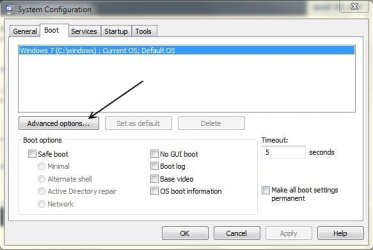
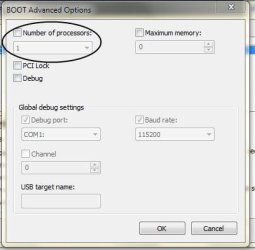
What does it show where I have it circled?
(Start>run>msconfig - Boot, then advanced options.
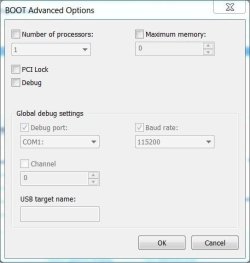
If it shows 2, and the box is checked, uncheck it, and hit "ok". ( this is assuming there is not an option to choose "4" there. If there is, change it to 4, leave it checked and restart.)
Restart, check again to see if it reset and recognized the 4 cores.
Note: I have only used CPU-Z with a 2 core system, never a 4 core. I wouldn't think it would be any different, but can't be positive. | My System Specs | | System Manufacturer/Model Number Toshiba Satellite L455D OS Windows 7 Home Premium CPU Amd Semperon 2.10GHz Memory 2 Gig Graphics Card ATI Radeon 3100 Sound Card Realtek Monitor(s) Displays 15.6 inch Screen Resolution 1366x768 Mouse Logitech Wireless Hard Drives 250gig Internet Speed 16/2 cable |
08 Mar 2012
|
#3 | | Windows 7 Ultimate AMD64 Sydney, Nova Scotia |
What does Device Manager show under Processors? | My System Specs | | Computer type PC/Desktop System Manufacturer/Model Number Home Built OS Windows 7 Ultimate AMD64 CPU AMD Phenom II X4 980 Black Edition Deneb 3.7GHz Motherboard Asus M4N68T-M V2 µATX Motherboard Memory 8GB 4GBx2 Kingston PC10600 DDR3 1333 Memory Graphics Card BFG NVIDIA Geforce 220GT 1 Gig DDR2 PCIe Sound Card VIA VT1708s High Definition Audio 8-channel Onboard Monitor(s) Displays 2 x 19" I-INC AG191D TFT Flat Panel Screen Resolution 1280x1024 x 2 Keyboard Logitech Internet 600 Mouse Logitech Wireless Trackman Wheel PSU Retail Plus 465 Watt Case Power Up Black ATX Mid-Tower Case Cooling Stock heatsink and fan Hard Drives 500 Gig WesternDigital SATA-300 Drive Internet Speed 80 Mbps Down 30 Mbps Up Antivirus Microsoft Security Essentials Browser Internet Explorer 10 Other Info HP DVD1040e Lightscribe - External USB2 |
08 Mar 2012
|
#4 | | |

Quote: Originally Posted by MWRed What does it show where I have it circled?
(Start>run>msconfig - Boot, then advanced options.
If it shows 2, and the box is checked, uncheck it, and hit "ok". ( this is assuming there is not an option to choose "4" there. If there is, change it to 4, leave it checked and restart.)
Restart, check again to see if it reset and recognized the 4 cores.
Note: I have only used CPU-Z with a 2 core system, never a 4 core. I wouldn't think it would be any different, but can't be positive. Hello MWRed,
I looked into the area, and it indeed was checked and set on 2. I unchecked the box, hit apply and it rebooted. Checked again and it had no number of cpu's, but a drop down included up to 4. I chose 4, hit apply and it rebooted. Seems to take a lot longer to boot??? But I reinstalled the desktop gadget and it shows 4 cpu's.
Is this correct and did I do it correctly? Many, many thanks for your help!
Glenn | My System Specs | | System Manufacturer/Model Number Self-Built OS Windows 7 Ultimate CPU AMD Phenom-II X4 965 Motherboard Gigabyte GA-MA785GM-US2H Memory 8192 MB DDR2-SDRAM Graphics Card ATI Radeon HD 4200 Sound Card ATI Radeon HD 4200 High Definition Audo Monitor(s) Displays LG Electronics W1943 Screen Resolution 1360 X 768 Keyboard Acer Mouse Logitech PSU Ultra LSP 750 Case Ultra XBlaster Cooling 2 Fans, CPU Fan, PS Fan Hard Drives C: 500 GB Caviar Black SATA
E: 1 TB Caviar Green SATA Internet Speed 6 MB |
08 Mar 2012
|
#5 | | |

Quote: Originally Posted by alphanumeric What does Device Manager show under Processors? Howdy Sir!
The Device manager showed 4 under CPU. I think with the above info, it may be correct, finger's crossed!
Thanks for responding!
Glenn | My System Specs | | System Manufacturer/Model Number Self-Built OS Windows 7 Ultimate CPU AMD Phenom-II X4 965 Motherboard Gigabyte GA-MA785GM-US2H Memory 8192 MB DDR2-SDRAM Graphics Card ATI Radeon HD 4200 Sound Card ATI Radeon HD 4200 High Definition Audo Monitor(s) Displays LG Electronics W1943 Screen Resolution 1360 X 768 Keyboard Acer Mouse Logitech PSU Ultra LSP 750 Case Ultra XBlaster Cooling 2 Fans, CPU Fan, PS Fan Hard Drives C: 500 GB Caviar Black SATA
E: 1 TB Caviar Green SATA Internet Speed 6 MB |
08 Mar 2012
|
#6 | | windows 7 home premium 64 bit Fairfield, CA, US |
Does task manager, performance tab, show 4 CPUs? | My System Specs | | System Manufacturer/Model Number HP/ Pavilion P6751C OS windows 7 home premium 64 bit CPU AMD Phenom(tm) II X4 830 Processor, 2800 Mhz, 4 core Motherboard N-Alvorix-RS880-uATX (Alvorix) motherboard Memory 12.00 GB Graphics Card ATI Radeon 4200 Sound Card Creative Labs Sound Blaster Recon3D Monitor(s) Displays 46" Sony TV KDL-46NX810 Screen Resolution 1920x1090P Keyboard Logitech USB Wireless K800 Mouse Logitech USB Wireless M305 PSU Internal 250W Case Mid-size ATX Cooling 1 rear case fan Hard Drives 1 TB Internet Speed 22mb-28mb |
08 Mar 2012
|
#7 | | |

Quote: Originally Posted by quickdraw2011 Does task manager, performance tab, show 4 CPUs? Howdy,
It didn't before I followed the above instructions. It does now!!
Thanks for your response!
Glenn | My System Specs | | System Manufacturer/Model Number Self-Built OS Windows 7 Ultimate CPU AMD Phenom-II X4 965 Motherboard Gigabyte GA-MA785GM-US2H Memory 8192 MB DDR2-SDRAM Graphics Card ATI Radeon HD 4200 Sound Card ATI Radeon HD 4200 High Definition Audo Monitor(s) Displays LG Electronics W1943 Screen Resolution 1360 X 768 Keyboard Acer Mouse Logitech PSU Ultra LSP 750 Case Ultra XBlaster Cooling 2 Fans, CPU Fan, PS Fan Hard Drives C: 500 GB Caviar Black SATA
E: 1 TB Caviar Green SATA Internet Speed 6 MB |
08 Mar 2012
|
#8 | | Windows 7 Ultimate SP1 X64/ linux in VM NW Florida |
Actually that check box is to limit the number of cores. You have 1 Processor with 4 cores. Windows will by default use all cores on startup. You check that box to limit the number of cores used. The reason it originally showed 2 cores was because the box was checked with 2 in it, thus limiting the CPU to use only 2 cores. | My System Specs | | Computer type PC/Desktop System Manufacturer/Model Number Home Built- Always under construction OS Windows 7 Ultimate SP1 X64/ linux in VM CPU Intel i7-3770K Motherboard Asus Maximus V Extreme Z77 Memory 8GB G.Skill Ripjaws Z DDR3-2400 (2X4GB) Graphics Card EVGA GTX 670 SC 4GB Sound Card On Board Monitor(s) Displays Asus 24" LCD Screen Resolution 1920X1080 Keyboard Logitech G510 Mouse Logitech G500 PSU CORSAIR AX850 Case Cooler Master HAF X Cooling Custom Water Cooling Hard Drives Samsung 840 Pro 256 GB, Samsung 840 Pro 256 GB, Samsung 830 256GB, Samsung HD103SJ 1TB . External HD- Black X dock esata 1TB Samsung Spinpoint, Rosewill USB 3.0 dock 1TB Samsung Spinpoint Internet Speed carrier pigeon speed Antivirus MSE/MBAM Browser ie8 Other Info 2nd Rig,Windows 7 Ultimate SP1 X64, i7-2600K, Asrock P67 Extreme 4, 8GB DDR3-2133, HAF XM case, Noctua NH-D14, Gigabyte HD6950 OC 1GB, 2 X Crucial M4 128GB, Asus 24" LED.
Laptop- Samsung RF711-SO1 17" i5-2310M, 8GB DDR3-1333, Crucial M4 and OCZ vertex2, Nvidia GT540M.Win 7 HP X64 SP1. |
08 Mar 2012
|
#9 | | windows 7 home premium 64 bit Fairfield, CA, US |
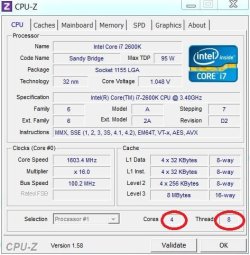
I downloaded CPU-Z to see what my Windows7 PC with a similar processer (AMD Phenom-II X4 880) would show. It should 4 cores. Prehaps, you have other software installed that is interferring with the way CPU-Z is displaying the results. Did you try reinstalling. You may need to use something like CCleaner to remove it completely before reinstalling. Or use REGEDIT to delete it. Google search results for CPU-Z "issues", shows other users having problems with this utility. Since, both Device Manager, and Task Manager display the core results properly. I would not be to concerned with the results of CPU-Z. Try using a different utility.
Last edited by quickdraw2011; 09 Mar 2012 at 12:17 PM..
| My System Specs | | System Manufacturer/Model Number HP/ Pavilion P6751C OS windows 7 home premium 64 bit CPU AMD Phenom(tm) II X4 830 Processor, 2800 Mhz, 4 core Motherboard N-Alvorix-RS880-uATX (Alvorix) motherboard Memory 12.00 GB Graphics Card ATI Radeon 4200 Sound Card Creative Labs Sound Blaster Recon3D Monitor(s) Displays 46" Sony TV KDL-46NX810 Screen Resolution 1920x1090P Keyboard Logitech USB Wireless K800 Mouse Logitech USB Wireless M305 PSU Internal 250W Case Mid-size ATX Cooling 1 rear case fan Hard Drives 1 TB Internet Speed 22mb-28mb |
08 Mar 2012
|
#10 | | |

Quote: Originally Posted by essenbe Actually that check box is to limit the number of cores. You have 1 Processor with 4 cores. Windows will by default use all cores on startup. You check that box to limit the number of cores used. The reason it originally showed 2 cores was because the box was checked with 2 in it, thus limiting the CPU to use only 2 cores. Attachment 201912 Attachment 201913 Hello essenbe,
Thank you for your confirmation. I wanted to make sure! It now shows the 4 cores.
Appreciate your time!
Glenn | My System Specs | | System Manufacturer/Model Number Self-Built OS Windows 7 Ultimate CPU AMD Phenom-II X4 965 Motherboard Gigabyte GA-MA785GM-US2H Memory 8192 MB DDR2-SDRAM Graphics Card ATI Radeon HD 4200 Sound Card ATI Radeon HD 4200 High Definition Audo Monitor(s) Displays LG Electronics W1943 Screen Resolution 1360 X 768 Keyboard Acer Mouse Logitech PSU Ultra LSP 750 Case Ultra XBlaster Cooling 2 Fans, CPU Fan, PS Fan Hard Drives C: 500 GB Caviar Black SATA
E: 1 TB Caviar Green SATA Internet Speed 6 MB Phenom II only showing 2 processors - HELP problems? All times are GMT -5. The time now is 01:34 PM. | |