| Windows 7: Converting ext. drive to internal. Tried Initialising, now shows RAW. |
11 Mar 2012
|
#1 | | Windows 7 Home Premium 64bit |
Converting ext. drive to internal. Tried Initialising, now shows RAW. I am trying to install my external drive as an internal drive (SATA connection, 3.5") without losing any data that I already have stored. It will not be used as a boot disc, only storage.
I've taken 3.5" SATA drive from the enclosure and connected to my system, but can't get it to access the existing NTFS file system. At first, the drive wouldn't show up in "Computer", so I looked around and found it listed as "unallocated" in the "Disk Management" area.
Now here's where I may have messed something up. I tried to initialize after reading advice from other forums, and believe (can't remember) that I chose to create a new volume. I was hoping this would allow the drive to read, but I was then prompted to format before I could use the drive. I did not format, and was hoping I could reverse what I had done, but now my drive shows up as having a RAW file system. Is there any way to get this to read, or even reverse the new volume so I can at least load it back in to the external enclosure to make a backup? | My System Specs |
| OS Windows 7 Home Premium 64bit CPU i5-2500k Motherboard Gigabyte GA-Z68XP-UD3 |
11 Mar 2012
|
#2 | | Windows 7 Home Premium x64 In the other room |
Try to find some data recovery software, that might do it. Here's a site and here's another. Might be hard to find some good freeware ones, though. | My System Specs | | System Manufacturer/Model Number Mine OS Windows 7 Home Premium x64 CPU AMD FX-8150 Motherboard ASUS Sabertooth 990FX Memory Corsair Vengeance Dual-Channel 1866MHz 8GB (2x4GB) Graphics Card x2 Galaxy GeForce GTX 560 2GB in SLI Sound Card (Onboard) Realtek ALC892 Monitor(s) Displays Dynex 42 inch HDTV Screen Resolution 1920x1080 Keyboard Logitech Wireless Solar K750 Mouse Logitech Wireless M305 PSU Kingwin KX-1000 Case Corsair Carbide 500R Cooling Corsair H100 Hard Drives Seagate Barracuda 2TB (SATA);
My Book 300GB (USB);
My Book 3TB (USB) Internet Speed DSL (unsure of details) Other Info LiteOn iHBS212 Blu-Ray Writer (SATA) |
12 Mar 2012
|
#4 | | Windows 7 Home Premium 64bit |
Thanks for all the tips IIllytch321 & jumanji
I''m really interested in the TestDisk since it's free for more than 1gb, but I'm not sure how to proceed after reading your thread Regain a lost drive using Test Disk - An Illustrated Guide. Part 2 where you talk about recovering an unallocated drive is what I should have read yesterday before I made the mistake of trying to initialize the drive. But now that I did the initialize I'm showing an unformated raw drive with a free huge partition. Do you know if this program can be used to delete the volume I created and return the entire drive to unallocated space? | My System Specs | | OS Windows 7 Home Premium 64bit CPU i5-2500k Motherboard Gigabyte GA-Z68XP-UD3 |
12 Mar 2012
|
#5 | | Windows 7 Home Premium 64bit |
Follow up question... Thanks for both of you help guys. I'm looking for something free (hopefully), so I'm very interested in TestDisk and your jumanji's illustrative guide. I wish I had read part 2 of that yesterday before I initialized the disk and created a new volume.
I want to return my drive to unallocated space so I can try the tutorial, but I'm unsure how to get back. Right now it is showing that I have an non-formated, raw drive. By right clicking on the volume in disc manager, I'm given the choice to delete the volume. Will this work or am I digging a deeper hole?
Last edited by Shepherd; 12 Mar 2012 at 08:45 PM..
Reason: mistake
| My System Specs | | OS Windows 7 Home Premium 64bit CPU i5-2500k Motherboard Gigabyte GA-Z68XP-UD3 |
12 Mar 2012
|
#6 | | Vista, Windows7, Mint Mate, Zorin, Windows 8 Florida in winter, Black Forest/Germany |

Quote: Originally Posted by Shepherd Thanks for both of you help guys. I'm looking for something free (hopefully), so I'm very interested in TestDisk and your jumanji's illustrative guide. I wish I had read part 2 of that yesterday before I initialized the disk and created a new volume.
I want to return my drive to unallocated space so I can try the tutorial, but I'm unsure how to get back. Right now it is showing that I have an non-formated, raw drive. By right clicking on the volume in disc manager, I'm given the choice to delete the volume. Will this work or am I digging a deeper hole? Don't do it. You are just getting into deeper trouble.
The data is most likely still there and intact. When you initialized the disk you did not erase the data, just a few control records. Use some of the recovery programs mentioned above. I am sure one of them will work. | My System Specs | | System Manufacturer/Model Number HP, Dell, Gateway, Toshiba - 4 laptops and 2 desktops OS Vista, Windows7, Mint Mate, Zorin, Windows 8 CPU from 1.6GHz Duo to i7 Monitor(s) Displays 2x HP w2207 Keyboard with trackball - no mices Mouse Trackball mice Hard Drives 5x HDD, 7x SSD, 12x Externals Internet Speed DSL 6000 |
12 Mar 2012
|
#7 | | Windows 7 Home Premium 32 bit |
Nope do not do anything other than asking the TestDisk to rewrite the Partition Table if it finds it and hopefully you will be able to recover the files.
EDIT: Ok, I understand that just because I started off making my HDD unallocated in my trial, you want to know whether you should start off like that making your disk unallocated before you run TestDisk.
No. Let your disk show RAW. You just carryout the process mentioned in Part2 to rewrite the partition table and/or copy the files.
Last edited by jumanji; 12 Mar 2012 at 09:37 PM..
| My System Specs | | OS Windows 7 Home Premium 32 bit |
12 Mar 2012
|
#8 | | Windows 7 Home Premium 64bit |
Analyzing Thanks for the EXTREMELY fast replies. I'm using testdisk to analyze the disc now, and it looks like it may take awhile with the size of the drive. I'll see what this finds and go from there. | My System Specs | | OS Windows 7 Home Premium 64bit CPU i5-2500k Motherboard Gigabyte GA-Z68XP-UD3 |
13 Mar 2012
|
#9 | | Windows 7 Home Premium 64bit |
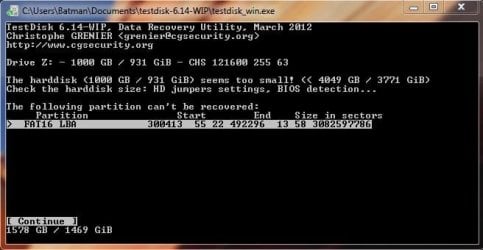
Test Disk Scan Results This is the result when analyzing in testdisk. Right now I have it running a deeper scan, and I'm estimating that will take about 11 hours. Would it make a difference if I put the drive back in it's enclosure and connect through USB, like I originally connected it? Right now I have it mounted internally and connected with a serial ata cable. | My System Specs | | OS Windows 7 Home Premium 64bit CPU i5-2500k Motherboard Gigabyte GA-Z68XP-UD3 |
13 Mar 2012
|
#10 | | Windows 7 Home Premium 32 bit |
Really difficult for me to answer this query since you have removed it from the enclosure and connected it internally.
I would have preferred not to complicate it in any manner since we are already in a dark alley  .
In any case do not break the process midway. Let it complete whatever it does and then - and if it does not show any worthwhile info to recover - you can quit, put the HDD back in its original condition and try running TestDisk again. | My System Specs | | OS Windows 7 Home Premium 32 bit Converting ext. drive to internal. Tried Initialising, now shows RAW. problems? All times are GMT -5. The time now is 11:38 AM. | |