| Windows 7: Coloured RAM channels |
14 Mar 2012
|
#1 | | Desk1 7 Home Prem / Desk2 7 Home Prem / Laptop 7 Pro all 64bit |
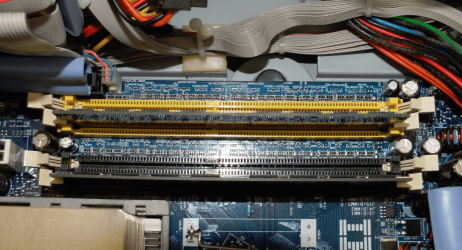
Coloured RAM channels Now a very basic query - when I have four RAM slots and they are in two colours say config 1 red-black / red-black or config 2 red - red / black - black and I only have two sticks of identical RAM to put in - do I put both sticks in the same colour slots regardless of the slot configuration?
I am only asking as I was under the impression that the same colour was to be used and some school machines I have here have the two sticks in different coloured slots. The machines were brought to me for tidying up -clogged with dust etc and they have been struggling all day with the boot and going from app to app.
So I threw in two sticks into the empty slots from one of the other machines and noticed an immediate difference. Would this be due purely to more RAM or that the slots are now configured correctly or both?
Have Googled this but am going round the houses - sorry just want to be doing the right thing
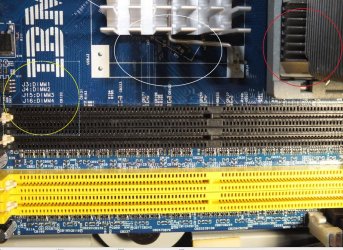
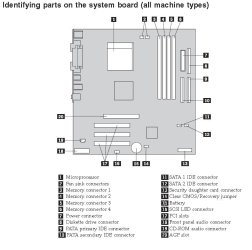
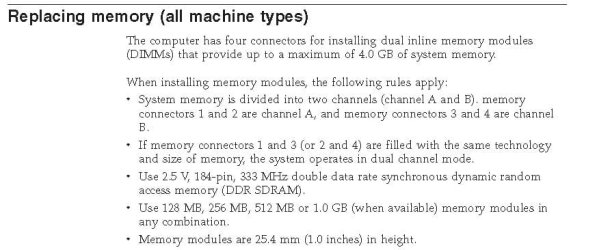
Example in pic which shows marking s for DIMM numbers. | My System Specs |
| Computer type PC/Desktop System Manufacturer/Model Number Own build (new) Desk1 / Toshiba L550 / Desk2 1st build OS Desk1 7 Home Prem / Desk2 7 Home Prem / Laptop 7 Pro all 64bit CPU Desk1 i5 3750K / Laptop i5 430m / Desk2 i5 2500 Motherboard Desk1 Asus P877-V / Desk2 Gigabyte H67 UD3H / Laptop ? Memory Desk1 8GB (1866) / Desk2 16GB (1333) / Laptop 8Gb DDR3 Graphics Card Desk 1& 2NVidia GTX 650 & Laptops on board Intel Sound Card Desk 1 & 2 -XONAR DG Realtek High Def audio Laptop Monitor(s) Displays Desk 1 Benq HD 2450 / Desk2 Philips 24" / Laptop 17.5" Screen Resolution 1920x1080 D1 & D2 Keyboard Desk 1 MS Sidewinder X6 Desk 2 MS Sidewinder X 4 Mouse Desk 1&2 - Gigabyte MS 900 gamer - laptop - Logitec wireless PSU Desk 1 Corsair HX 1050/ Laptop ? / Desk 2 Corsair HX 650 Case Desk 1 Cooler HAF XM ? Toshiba laptop / Desk2 Coolermaster Cooling Fans on all Desk1 -2 Desk2 - all Coolermasters 5 Laptop ? Hard Drives Desk1 Samsung 120GB 830 SSD
Toshiba Crucial 120GB SSD
Desk2 Samsung 120GB 830 SSD Internet Speed ADSL2+ Other Info One other Desktop (tester) and spare Toshba laptop both with SSD's
Running Kaspersky 2011 ISS on all machines config'd identically
Logitec audio stereo systems on each machine (x3)
Canon MG5250MFC
Router/modem TP-Link running WPA2SK |
14 Mar 2012
|
#2 | | Operating System : Windows 7 Home Premium Edition 6.01.7600 SP1 (x64) MILTON KEYNES |
hope this helps  go to the 4.00 mins section on video | My System Specs | | System Manufacturer/Model Number packard bell IXTREME M5722 OS Operating System : Windows 7 Home Premium Edition 6.01.7600 SP1 (x64) CPU Processor : Intel Core 2 Quad Q8300 @ 2500 MHz Motherboard Mainboard : Packard Bell (Acer EG43M ) Memory Physical Memory :8GB Corsair4x 2GB 800MHz C5 DDR2 Graphics Card Video Card : XFX 6700 AMD Monitor(s) Displays Maestro 234DL - BenQ V2220 - BenQ VW2420H Screen Resolution Current Display :1920x1080p pixels at 60 Hz in HD LED Keyboard Gigabyte Aivia K8100 Mouse TRUST-Wireless Laser Mouse - Carbon edition MI-7770C PSU XFX ProSeries 550W PSU Case PACKARD BELL IXTREME Cooling System Blower Current: 150mA Air Flow16CFM ;Akasa 90mm rear Hard Drives Hard Disks : WDC (1000 GB)
Drive C: (Hard Disk) : 428 GB available on 491 GB
Drive D: (Hard Disk) : 426 GB available on 492 GB
SAMSUNG spinpoint HD103SJ 1000.2 GB
(X 2) KINGSTON SSD NOW V 30GB Internet Speed TP-LINK > TL-WN951N / AV500 Gigabit Powerline Adapters Other Info EXTRA COOLING>(FAN CONTROLLER) PC Bay Cooler 3 x 40mm fans; Akasa AK-HD-BL Blue hard drive cooler 2 x 40 mm fan 4500 rpm 29.7 dBA
Bios> American Megatrends Inc.
Version : P01-A1
Date : 08/31/2009 |
14 Mar 2012
|
#3 | | Operating System : Windows 7 Home Premium Edition 6.01.7600 SP1 (x64) MILTON KEYNES |
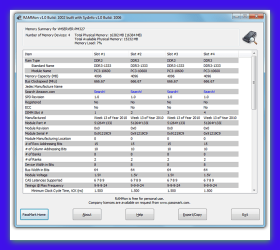
here is a very good program for ram rammon by passmark link >>> PassMark RAMMon - Identify RAM type, speed & memory timings Quote: RAMMon
is an easy to use Windows based application that allows users to quickly retrieve the Serial Presence Detect (SPD) data from their RAM modules. It will allow users to identify a multitude of attributes, of which, includes the manufacturer, the clockspeed and other data of their DDR2, DDR3, XMP and EPP memory devices and even some older memory types. It uses SysInfo DLL SDK to gather the SPD attributes from RAM devices. This information provides a snapshot of the available data for each RAM module installed on the system. | My System Specs | | System Manufacturer/Model Number packard bell IXTREME M5722 OS Operating System : Windows 7 Home Premium Edition 6.01.7600 SP1 (x64) CPU Processor : Intel Core 2 Quad Q8300 @ 2500 MHz Motherboard Mainboard : Packard Bell (Acer EG43M ) Memory Physical Memory :8GB Corsair4x 2GB 800MHz C5 DDR2 Graphics Card Video Card : XFX 6700 AMD Monitor(s) Displays Maestro 234DL - BenQ V2220 - BenQ VW2420H Screen Resolution Current Display :1920x1080p pixels at 60 Hz in HD LED Keyboard Gigabyte Aivia K8100 Mouse TRUST-Wireless Laser Mouse - Carbon edition MI-7770C PSU XFX ProSeries 550W PSU Case PACKARD BELL IXTREME Cooling System Blower Current: 150mA Air Flow16CFM ;Akasa 90mm rear Hard Drives Hard Disks : WDC (1000 GB)
Drive C: (Hard Disk) : 428 GB available on 491 GB
Drive D: (Hard Disk) : 426 GB available on 492 GB
SAMSUNG spinpoint HD103SJ 1000.2 GB
(X 2) KINGSTON SSD NOW V 30GB Internet Speed TP-LINK > TL-WN951N / AV500 Gigabit Powerline Adapters Other Info EXTRA COOLING>(FAN CONTROLLER) PC Bay Cooler 3 x 40mm fans; Akasa AK-HD-BL Blue hard drive cooler 2 x 40 mm fan 4500 rpm 29.7 dBA
Bios> American Megatrends Inc.
Version : P01-A1
Date : 08/31/2009 |
14 Mar 2012
|
#4 | | Windows 7 Ultimate AMD64 Sydney, Nova Scotia |
It's my understanding that the colors denote channels. Putting two identical modules in the same colored slots (channel) will let you use dual channel mode. They should still work if you split them up, you just won't get dual channel mode. The only way to be really sure would be to download the manual for that motherboard and see what it says. | My System Specs | | Computer type PC/Desktop System Manufacturer/Model Number Home Built OS Windows 7 Ultimate AMD64 CPU AMD Phenom II X4 980 Black Edition Deneb 3.7GHz Motherboard Asus M4N68T-M V2 µATX Motherboard Memory 8GB 4GBx2 Kingston PC10600 DDR3 1333 Memory Graphics Card BFG NVIDIA Geforce 220GT 1 Gig DDR2 PCIe Sound Card VIA VT1708s High Definition Audio 8-channel Onboard Monitor(s) Displays 2 x 19" I-INC AG191D TFT Flat Panel Screen Resolution 1280x1024 x 2 Keyboard Logitech Internet 600 Mouse Logitech Wireless Trackman Wheel PSU Retail Plus 465 Watt Case Power Up Black ATX Mid-Tower Case Cooling Stock heatsink and fan Hard Drives 500 Gig WesternDigital SATA-300 Drive Internet Speed 80 Mbps Down 30 Mbps Up Antivirus Microsoft Security Essentials Browser Internet Explorer 10 Other Info HP DVD1040e Lightscribe - External USB2 |
14 Mar 2012
|
#5 | | Windows 7 SP1, Home Premium, 64-bit |

Quote: Originally Posted by ICit2lol Now a very basic query - when I have four RAM slots and they are in two colours say config 1 red-black / red-black or config 2 red - red / black - black and I only have two sticks of identical RAM to put in - do I put both sticks in the same colour slots regardless of the slot configuration?
I am only asking as I was under the impression that the same colour was to be used and some school machines I have here have the two sticks in different coloured slots. The machines were brought to me for tidying up -clogged with dust etc and they have been struggling all day with the boot and going from app to app.
So I threw in two sticks into the empty slots from one of the other machines and noticed an immediate difference. Would this be due purely to more RAM or that the slots are now configured correctly or both? In my experience, the same color indicates the same RAM channel, but I am not sure that is universal across all brands.
So--installing to slots of the same color would allow the RAM to run in the preferred dual channel mode.
If you have a 4 slot board and two sticks were installed to different colored slots, the RAM would work, but would not be running in dual channel mode. But if you then installed 2 more sticks in the remaining 2 slots, you would then be in dual channel because each colored pair would then be fully occupied.
The improvement you see would be mostly due to simply having more RAM, rather than the change from single channel to dual channel.
At least that's how I think it works. But as I said, I'm not sure how universal that color-coding is.
Last edited by ignatzatsonic; 14 Mar 2012 at 09:22 AM..
| My System Specs | | System Manufacturer/Model Number Ignatz Special; 4 speed manual gearbox; factory air conditioning; one of one OS Windows 7 SP1, Home Premium, 64-bit CPU Intel Sandy Bridge i5-2500, not overclocked Motherboard Gigabyte H67A-UD3H-B3, full ATX Memory 4 GB Crucial DDR3-1333 Graphics Card none; graphics are integrated on CPU Sound Card onboard: Realtek ALC892; external: USB Behringer UF0-202 Monitor(s) Displays NEC 90GX2-BK 19" LCD Screen Resolution 800 x 640 Keyboard Leopold Tenkeyless with Cherry Blue switches, USB Mouse Logitech or Microsoft optical wired; either USB or PS 2 PSU Seasonic SS-560KM, modular Case Antec Solo II Cooling CPU: Scythe Big Shuriken; Case: Scythe Slipstream 800 & 500 Hard Drives System: Intel 320 Series SSD, 80 GB;
Data: Samsung Spinpoint 103SJ, 1 TB;
Backup: WD Caviar Green WD15EADS-00P8B0, 1.5TB Other Info Power consumption of this system, including monitor: 68 watts at idle; 144 watts at full load |
14 Mar 2012
|
#6 | | Windows 7 x64 Ultimate San Diego |
Agree with Ignatz, there seems to be no real standard. I would look up the information in the manual for your motherboard if you have one or find it on the web. Only it will "know" for sure what the best arrangement of slot use for only 2 sticks would be... | My System Specs | | System Manufacturer/Model Number Scratch built OS Windows 7 x64 Ultimate CPU i7 960 Motherboard Asus P6X58D Memory 12 Gig Corsair Dominator Graphics Card Nvidia 480 Sound Card Maudio Delta 44 + breakout box Monitor(s) Displays Dell UltraSharp U2410 24in and Samsung 21 dual monitors Screen Resolution 1920x1200 and 1280x1024 Keyboard Logitech G15 + N52 game pad Mouse Logitech MX518 PSU Corasair TX850 Case Cooler Master HAF Cooling Corsair H50 Hard Drives Primary: Intel X-25M G2 160G SSD
Secondary: Segate baracuda 1.0 TB
HDs in AHCI mode. Internet Speed 15kbs down 4.5kbps up Other Info WEI 7.6
CPU & RAM 7.6
Graphics 7.9
Hard disk 7.7 |
14 Mar 2012
|
#7 | | Operating System : Windows 7 Home Premium Edition 6.01.7600 SP1 (x64) MILTON KEYNES |
Paired memory chips should go in slots of same color.
If the motherboard has two pairs of differently colored DIMM sockets (the colors indicate which bank they belong to, bank 0 or bank 1), then one can place a matched pair of memory modules in bank 0, but a different-capacity pair of modules in bank 1, as long as they are of the same speed. Using this scheme, a pair of 1 GB memory modules in bank 0 and a pair of matched 512 MB modules in bank 1 would be acceptable for dual-channel operation | My System Specs | | System Manufacturer/Model Number packard bell IXTREME M5722 OS Operating System : Windows 7 Home Premium Edition 6.01.7600 SP1 (x64) CPU Processor : Intel Core 2 Quad Q8300 @ 2500 MHz Motherboard Mainboard : Packard Bell (Acer EG43M ) Memory Physical Memory :8GB Corsair4x 2GB 800MHz C5 DDR2 Graphics Card Video Card : XFX 6700 AMD Monitor(s) Displays Maestro 234DL - BenQ V2220 - BenQ VW2420H Screen Resolution Current Display :1920x1080p pixels at 60 Hz in HD LED Keyboard Gigabyte Aivia K8100 Mouse TRUST-Wireless Laser Mouse - Carbon edition MI-7770C PSU XFX ProSeries 550W PSU Case PACKARD BELL IXTREME Cooling System Blower Current: 150mA Air Flow16CFM ;Akasa 90mm rear Hard Drives Hard Disks : WDC (1000 GB)
Drive C: (Hard Disk) : 428 GB available on 491 GB
Drive D: (Hard Disk) : 426 GB available on 492 GB
SAMSUNG spinpoint HD103SJ 1000.2 GB
(X 2) KINGSTON SSD NOW V 30GB Internet Speed TP-LINK > TL-WN951N / AV500 Gigabit Powerline Adapters Other Info EXTRA COOLING>(FAN CONTROLLER) PC Bay Cooler 3 x 40mm fans; Akasa AK-HD-BL Blue hard drive cooler 2 x 40 mm fan 4500 rpm 29.7 dBA
Bios> American Megatrends Inc.
Version : P01-A1
Date : 08/31/2009 |
15 Mar 2012
|
#8 | | Desk1 7 Home Prem / Desk2 7 Home Prem / Laptop 7 Pro all 64bit |
Thanks fellas I have just poured over the Lenovo site/s and from what I can make out from the maintenance info the colours are like you say in their respective banks so it looks like whoever put these machines together put the two sticks in different channels.
Now as these are gov property perhaps they had a reason but I can't for the life of me think what that could be. Thats why I asked just in case one of you cleverer folks than myself knew of a reason.
Anyway I have just about finished cleaning these machines up and cloned them all to the best drive set up and will try and find out if using the same coloured slots for the two sticks makes any difference to the boot time - 2:30 mins before (old config of RAM) . The problem I am also guessing is that they all only had that 512MB RAM on board and loads of clutter anyway.
Just another seven machines to go http://www.hardwaresecrets.com/artic...tectures/133/5
Have found this since and again confused
Just as a by the by I have one of these machines myself and with 4GB and a 3.2Ghz in - running 7 the things really fast for an old but well made machine.
Last edited by ICit2lol; 15 Mar 2012 at 06:11 AM..
Reason: Addition
| My System Specs | | Computer type PC/Desktop System Manufacturer/Model Number Own build (new) Desk1 / Toshiba L550 / Desk2 1st build OS Desk1 7 Home Prem / Desk2 7 Home Prem / Laptop 7 Pro all 64bit CPU Desk1 i5 3750K / Laptop i5 430m / Desk2 i5 2500 Motherboard Desk1 Asus P877-V / Desk2 Gigabyte H67 UD3H / Laptop ? Memory Desk1 8GB (1866) / Desk2 16GB (1333) / Laptop 8Gb DDR3 Graphics Card Desk 1& 2NVidia GTX 650 & Laptops on board Intel Sound Card Desk 1 & 2 -XONAR DG Realtek High Def audio Laptop Monitor(s) Displays Desk 1 Benq HD 2450 / Desk2 Philips 24" / Laptop 17.5" Screen Resolution 1920x1080 D1 & D2 Keyboard Desk 1 MS Sidewinder X6 Desk 2 MS Sidewinder X 4 Mouse Desk 1&2 - Gigabyte MS 900 gamer - laptop - Logitec wireless PSU Desk 1 Corsair HX 1050/ Laptop ? / Desk 2 Corsair HX 650 Case Desk 1 Cooler HAF XM ? Toshiba laptop / Desk2 Coolermaster Cooling Fans on all Desk1 -2 Desk2 - all Coolermasters 5 Laptop ? Hard Drives Desk1 Samsung 120GB 830 SSD
Toshiba Crucial 120GB SSD
Desk2 Samsung 120GB 830 SSD Internet Speed ADSL2+ Other Info One other Desktop (tester) and spare Toshba laptop both with SSD's
Running Kaspersky 2011 ISS on all machines config'd identically
Logitec audio stereo systems on each machine (x3)
Canon MG5250MFC
Router/modem TP-Link running WPA2SK |
15 Mar 2012
|
#9 | | Windows 7 Ultimate x64 Service Pack 1 Doncaster, UK |
The best thing to do would be to check the motherboard manual for the actual physical location of the relevant memory slots for each channel and banks within the channels. Although many boards with 4 or more slots colour code them, there is no hard fast rule about this, and some group them in banks, whereas others do so in channels. It is also possible that the wrong coloured slots are inserted during manufacture (unlikely, but possible). | My System Specs | | System Manufacturer/Model Number Dwarf Dwf/11/2012 OS Windows 7 Ultimate x64 Service Pack 1 CPU Intel Core-i5-3570K 4-core @ 3.4GHz (Ivy Bridge) (OC 4.2GHz) Motherboard ASRock Z77 Extreme4-M Memory 4 x 4GB DDR3-1600 Corsair Vengeance CMZ8GX3M2A1600C9B (16GB) Graphics Card 2 x AMD Radeon HD7770 1GB CrossFired (OC 1100MHz/1250MHz) Sound Card Realtek High Definition on board solution (ALC 898) Monitor(s) Displays ViewSonic VA1912w Widescreen (VGA) Screen Resolution 1440x900 Keyboard Microsoft Comfort Curve Keyboard 3000 (USB) Mouse Microsoft Comfort Mouse 3000 for Business (USB) PSU XFX Pro Series 850W Semi-Modular Case Gigabyte IF233 Cooling 1 x 120mm Front Inlet 1 x 120mm Rear Exhaust Hard Drives OCZ Agility 3 SSD 120GB SATA III x2 (RAID 0)
Samsung HD501LJ 500GB SATA II x2
Hitachi HDS721010CLA332 1TB SATA II
Iomega 1.5TB Ext USB 2.0
WD 2.0TB Ext USB 3.0 Internet Speed NetGear DG834Gv3 ADSL Modem/Router (Ethernet) ~4.0 Mb/s (O2) Antivirus Avast! 7.0.1474 Browser IE 9 Other Info Optical Drive: HL-DT-ST BD-RE BH10LS30 SATA Bluray
Lexmark S305 Printer/Scanner/Copier (USB)
CTF-430 Tablet & Pen
WEI Score: 7.7/7.9/7.4/7.4/7.9
Asus Eee PC 1011PX Netbook (Windows 7 x86 Starter) |
15 Mar 2012
|
#10 | | Windows 7 Home Premium 64bit |

Quote: Originally Posted by ICit2lol ...Now as these are gov property perhaps they had a reason but I can't for the life of me think what that could be. Thats why I asked just in case one of you cleverer folks than myself knew of a reason... They just didn't know the colors have a reason for being or they were color-blind. Matching RAM goes into matching color slots, unless the RAM is not matched pairs. In earlier times, slots were populated in order A thru D (or 1 thru 4, or 0 thru 3), later, order did not matter, then dual-channel matched pairs. Sometimes the pairs are adjacent, sometimes interleaved. Look at the colors & the markings to be sure.
Things change & governments are the slowest to accept or implement change procedures. | My System Specs | | System Manufacturer/Model Number HP ProBook 4530s XU015UT#ABA OS Windows 7 Home Premium 64bit CPU Intel Core i3-2310M Motherboard Hewlett-Packard 167C Memory 8GB DDR3 SDRAM Graphics Card Intel HD Graphics 3000 (Sandy Bridge GT2) Sound Card Intel Cougar Point PCH High Definition Audio Monitor(s) Displays 15.6" LED LG Philips LP156WH4-TLD1 Screen Resolution 1366 x 768 Mouse Logitech M315 Case Notebook Hard Drives WDC WD3200BEKT-60PVMT0 Internet Speed 12Mbps/2Mbps Coloured RAM channels problems? All times are GMT -5. The time now is 03:02 AM. | |