Windows 7 Forums


Windows 7: partition hard drive in Windows 7 home basic Without Formatting

17 Mar 2012   #1

windows 7 home basic
 
 
partition hard drive in Windows 7 home basic Without Formatting

I've hp laptop windows 7 home basic with 3 drives :

C: 445 GB
D: Recovery 15.6 GB
E: HP_Tools 3.95

i wanna divide the 'C' , used shrink i got "212987" MB then used the "New simple volume wizard " after pressing finish i got the msg
The operation you selected will convert the selected basic disk to dynamic disk. if you convert the disk t dynamic , you will not be able to start installed operating systems from any volume on the disk (except the current boot volume). are you sure ?

when i press yes i got error msg
" Dynamic disk are not supported by this operating system or server configuration . dynamic disk are not supported on clusters.


can you help plz i dont wanna format plz advise me
My System SpecsSystem Spec

17 Mar 2012   #2

Windows 7 SP1, Home Premium, 64-bit


Thank your lucky stars that it did not convert to dynamic.

Dynamic disks are a pain and to be avoided except in unusual circumstances.

You need to make an extended partition from that shrunken space without going to dynamic.

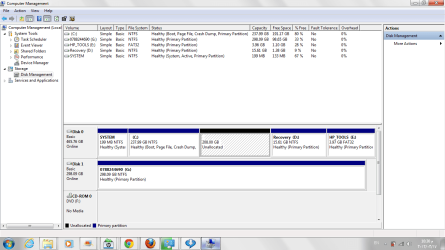
Post a picture of Windows Disk Management so we can see what is going on with your partitions.
My System SpecsSystem Spec
17 Mar 2012   #3

windows 7 home basic


i attached a pic for current disk mgm i wanna use the unallocated space to be my new drive what should i do now ????
Attached Thumbnails
partition hard drive in Windows 7 home basic Without Formatting-disk-mgmt.png  
My System SpecsSystem Spec
.


17 Mar 2012   #4
whs

Vista, Windows7, Mint Mate, Zorin, Windows 8
Florida in winter, Black Forest/Germany


Convert the C partition to a logical partition and then you can create further logical partition. For the conversion use the bootable CD version of this program: Free Download Magic Partition Manager Software - Partition Wizard Online (last entry on the webpage)

Highlight C: > Partition tab > Modify
My System SpecsSystem Spec
17 Mar 2012   #5

windows 7 home basic


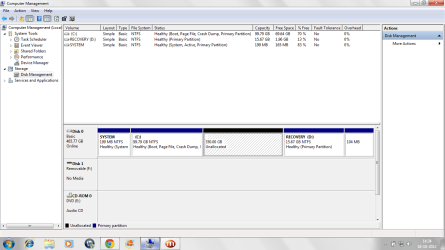
i attached another image ..... what should be my nxt step ??
Attached Thumbnails
partition hard drive in Windows 7 home basic Without Formatting-disk_mangment.png  
My System SpecsSystem Spec
17 Mar 2012   #6

Windows 7 SP1, Home Premium, 64-bit


You can also create an extended partition directly using the Diskpart command from a command prompt.

But WHS's method of using Partition Wizard might be easier.

You are a victim of having too many partitions---unfortunately, HP shipped the thing to you with 4 partitions and you are therefore forced to use an extended partition.

If you had only 1 or 2 partitions to begin with, you could easily create another without having to create an extended partition.
My System SpecsSystem Spec
18 Mar 2012   #7

windows 7 home basic


hi lsn i'm still confused if u still can help plz WHS i went to that link downloaded the last entry burned that to the CD but this didnt run so what should i do ???

so ignatzatsonic whats the Diskpart command ????
My System SpecsSystem Spec
18 Mar 2012   #8
whs

Vista, Windows7, Mint Mate, Zorin, Windows 8
Florida in winter, Black Forest/Germany


Did you boot with this CD - you have to change the boot order in the BIOS to boot from CD. Then you have to watch the screen because shortly after the CD starts spinning it aks you to "Press any key" - else it will not boot from CD and go back to your OS.
My System SpecsSystem Spec
18 Mar 2012   #9

windows 7 home basic


thnx thnx problem is solved i got my new drive 207 GB that is great
My System SpecsSystem Spec
18 Mar 2012   #10
whs

Vista, Windows7, Mint Mate, Zorin, Windows 8
Florida in winter, Black Forest/Germany


Well, that is good news. Glad we could help.
My System SpecsSystem Spec
Reply

 partition hard drive in Windows 7 home basic Without Formatting problems?


Thread Tools


Similar help and support threads for: partition hard drive in Windows 7 home basic Without Formatting
Thread Forum
Formatting Windows 7 Hard Drive General Discussion
Partition in Windows 7 Home Premium without formatting General Discussion
Solved can not see the second partition of my hard disk after formatting Performance & Maintenance
Solved Windows will not load onto a fresh hard drive after formatting. Installation & Setup
Not able to create partition in windows 7 Home Basic 64bit General Discussion


All times are GMT -5. The time now is 01:20 AM.


Seven Forums Android App Seven Forums IOS App Follow us on Facebook

Windows 7 Forums is an independent web site and has not been authorized,
sponsored, or otherwise approved by Microsoft Corporation.
"Windows 7" and related materials are trademarks of Microsoft Corp.
© Designer Media Ltd
  

1 2 3 4 5 6 7 8 9 10 11 12 13 14 15 16 17 18 19 20 21 22 23 24 25 26 27 28 29 30 31 32