Windows 7 Forums


Windows 7: External hard drive has delayed opening and can no longer play files

18 Mar 2012  
Katy3003

windows 7 starter
3 posts
 
 
External hard drive has delayed opening and can no longer play files

My external hard drive (Elements WD 1042) recently stopped working after my computer (Samsung Netbook N145) froze and restarted itself. At first I could only see it in 'devices and printers' and not in 'computer', but after several attempts it then appeared in 'computer' as Local Disk (E) and not the usual 'Elements', and I wasn't able to view or open any files. Now, however, it will appear as 'Elements' after a few minutes of being connected to my computer and I am able to view and open my files, but none of the files (music/ films) play properly, they freeze and stutter. Every time I connect it to my computer again it goes through the same process of only appearing in 'devices', then after a few minutes appearing as 'Local disk E' and the eventually as 'Elements'. I also eventually get the option to 'check disk options' but this just causes the computer to freeze with the 'Checking disk elements' window open.

I've tried plugging it into other computers and using a different connecting cable, but I still get the same result!


Please help, I've no idea where to go next with this problem!
Thanks in advance
My System SpecsSystem Spec

19 Mar 2012  
marsmimar

Win 7 Pro 64-bit
6,693 posts
South Central Texas


Hello Katy and welcome to Seven Forums.

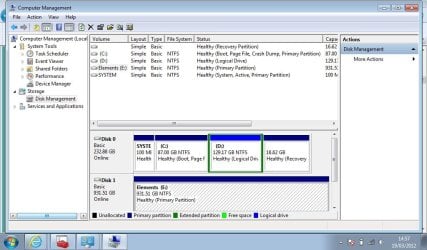
The fact that you've tried plugging the external HD into other computers with a different cable leads me to believe something happened to the HD when the netbook froze and restarted. (Did you ever find out why the netbook froze?) Couple of things you can try. First, with the Elements plugged in, can you post a screen shot of Disk Management? This might give a clue as to how the Elements is being seen by Windows 7.

Disk Management Windows 7 - How To Access Disk Management in Windows 7

Also, with the Elements still plugged in, try opening Device Manager. A quick way is to type devmgmt.msc into RUN or the start menu search box and pressing enter. When Device Manager dialog box opens, click the + sign next to Disk Drives. That should show you the netbook drive and the Elements drive. Double click on the Elements drive and another dialog box with several tabs should open. The General tab should indicate if the Elements is working properly. If it's not try using the Troubleshooting button. Please post back what you find out.
My System SpecsSystem Spec
19 Mar 2012  
Katy3003

windows 7 starter
3 posts


Thanks for getting back to me.
I followed your instructions and the general tab in device manager says that the device is working properly.
I also went into disk management and Windows 7 seems to view the device as healthy also
External hard drive has delayed opening and can no longer play files-scrnsht.jpg

Despite this my hard drive is still acting in exactly the same way

thanks for your help
My System SpecsSystem Spec
.


19 Mar 2012  
boohbah

Microsoft Windows 7 Home Premium 64-bit 7600
12,174 posts
cornwall UK


if you can see the external hard drive in "computer" right click on it and select properties/tools then click the error check button under the error checking box.
this may help,
it will ask if you want it to fix any errors found ,select ok.
My System SpecsSystem Spec
22 Mar 2012  
Katy3003

windows 7 starter
3 posts


I tried to check for errors, and windows began 'scanning and checking for error's but it just froze and 'computer' stop responding also.
I tried copying new files to the hard drive and got a message saying that this task could not be performed beacause of an i/o device error (error code 0x8007045d)
any ideas?
My System SpecsSystem Spec
Reply

 External hard drive has delayed opening and can no longer play files problems?


Thread Tools


Similar help and support threads for: External hard drive has delayed opening and can no longer play files
Thread Forum
Element external Hard drive no longer recognized by Win 7? Hardware & Devices
Solved External Hard Drive no longer recognized Hardware & Devices
Change back up files from D Partitioned Drive to External Hard Drive? Performance & Maintenance
External Hard Drive Constant Auto Play Hardware & Devices
Getting files off external hard drive Hardware & Devices


All times are GMT -5. The time now is 07:37 AM.


Windows 7 Forums is an independent web site and has not been authorized,
sponsored, or otherwise approved by Microsoft Corporation.
"Windows 7" and related materials are trademarks of Microsoft Corp.
© Designer Media Ltd