Windows 7 Forums


Windows 7: DVD/CD won't autorun

26 Mar 2012   #1

Windows 7
 
 
DVD/CD won't autorun

I'm pretty sure I have set all the options so that the disks _ought_ to autorun but they won't. I have to go into Powerdesk (File Manager) and select a vob file.


I' installed a codec package but that made no difference.

I have had problems with this drive, Samsung TSST CDDVDW 288BB, in fact I've had to swap it out twice already. I'm wondering if it has gone yest again?

HP Pavilion DV6-2113SA notebook
My System SpecsSystem Spec

02 Apr 2012   #2

Dual Booting Windows 7 Ultimate x64 & BackTrack 5
MY


If you change the setting to disable autorun your drive cannot autoplay/autorun. Please check your setting

To enable autorun/autoplay please follow the instructions :
1. Open Run dialogue box by pressing Win + R
2. Type " gpedit.msc "
3. When The Local Group Policy Editor launched, click Computer Configuration > Administrative Templates > Windows Components > AutoPlay Policies
4. Right-Click on Turn off Autoplay and select Edit
5. Click the Enabled option
6. Click Drop Down Menu under "Turn off Autoplay on :" on box "Options :" and select All Drive
7. Click Apply and click OK

I hope this helps

DragonARMY www.facebook.com/100003250779989
My System SpecsSystem Spec
03 Apr 2012   #3

Windows 7


My Windows 7 64 doesn't recognise gpedit.msc in Run, and I cannot find it in help or Control Panel either!
My System SpecsSystem Spec
.


03 Apr 2012   #4

Dual Booting Windows 7 64-Bit Ultimate Edition and Fedora 16.
India


Hi bertie11, Welcome to SF.

I believe that your computer is infected, you might want to scan your system for viruses.
Download and install MSE. Run a scan and post the results

YBL.
My System SpecsSystem Spec
03 Apr 2012   #5

Windows 7


Sorry, but are you saying my computer is infected because I can't run gpedit.msc as I just discovered that I don't get that option in Home Premium?

I just need another way to get to the Policy Editor.
My System SpecsSystem Spec
03 Apr 2012   #6

Windows 7 Ultimate SP1 (x64)
South Australia


Hi,

gpedit.msc is not available in Windows 7 Home Premium - only Windows 7 Ultimate.

http://answers.microsoft.com/en-us/w...b-f2251805e55e

This might be useful :
http://www.microsoft.com/download/en...ng=en&id=25250

Regards,
Golden
My System SpecsSystem Spec
03 Apr 2012   #7

Windows 7


I need to go back a few steps here. My win 7 64 HP used to autoplay but doesn't now ( for some time). I've been working round it as I don't play many DVDs these days but have been while I test out the new DVD drive I just fitted.

What might have caused autoplay to turn off? I was told that MS installed an update to turn it off as they were worried that just autoplaying a disk or usb stick could allow a virus to get onto the system. Is this true?

In any case, if I connect a usb stick or external drive, that does autoplay/run, I'm only getting problems trying to autoplay/run DVDs.

So is there another reason for this? I'm a bit overwhelmed with all the other stuff (Group Policy Settings Reference for Windows and Windows Server), I'm happy with just a fairly simple registry tweak though, I just need to find out what it is! If that is what is needed.

Thanks.
My System SpecsSystem Spec
03 Apr 2012   #8

Windows 7 Ultimate SP1 (x64)
South Australia


Hi,

I don't think any update would turn auto-run off, without your express approval.

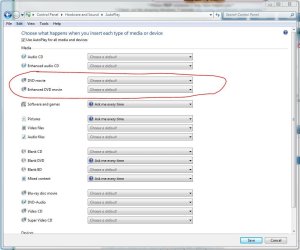
To change autoplay settings, please check adjust the settings shown in the image below.

Regards,
Golden
Attached Thumbnails
DVD/CD won't autorun-capture.jpg  
My System SpecsSystem Spec
03 Apr 2012   #9

Windows 7


I already have those setting set to autorun using VLC player. I used the same disk on another laptop and that started OK so I know the disk is OK.

I only mentioned the Win updates, as when I told the company who supplied my new DVD drive I was told that an update had caused this problem, suggesting they had come across it before.
My System SpecsSystem Spec
03 Apr 2012   #10

Windows 7 Home Premium 64 bit. (On both machines)
Lincolnshire, UK.
 
 
Autorun oughta Run.

Quote   Quote: Originally Posted by bertie11 View Post
I'm pretty sure I have set all the options so that the disks _ought_ to autorun but they won't. I have to go into Powerdesk (File Manager) and select a vob file.

I' installed a codec package but that made no difference.

I have had problems with this drive, Samsung TSST CDDVDW 288BB, in fact I've had to swap it out twice already. I'm wondering if it has gone yest again?

HP Pavilion DV6-2113SA notebook
I had exactly the same problem, but with an LG drive. I replaced it with a LiteOn, which works fine. However, I do not like Autorun as I have read elsewhere that it can lead to infections, which may be a pointer to the earlier advice from youlbelost. I have therefore disabled Autorun, but I do like to know that I can use it if necessary.

Stranger still: the friend who took the LG drive reports no problem in his XP machine. Computing throws up these anomalies all the time.

Last edited by Bertison; 03 Apr 2012 at 07:00 AM.. Reason: More info.
My System SpecsSystem Spec
Reply

 DVD/CD won't autorun problems?


Thread Tools


Similar help and support threads for: DVD/CD won't autorun
Thread Forum
No Autorun? General Discussion
recycled.scr and autorun.ini System Security
How to Autorun USB on Win 7 Software
USB autorun in W7 General Discussion
Autorun.dll Installation & Setup


All times are GMT -5. The time now is 01:24 PM.


Seven Forums Android App Seven Forums IOS App Follow us on Facebook

Windows 7 Forums is an independent web site and has not been authorized,
sponsored, or otherwise approved by Microsoft Corporation.
"Windows 7" and related materials are trademarks of Microsoft Corp.
© Designer Media Ltd
  

1 2 3 4 5 6 7 8 9 10 11 12 13 14 15 16 17 18 19 20 21 22 23 24 25 26 27 28 29 30 31 32