Windows 7 Forums


Windows 7: Twinmos Pendrive not detected-win 7

08 Apr 2012   #1

XP Propessional 32bit
Bangladesh
 
 
Twinmos Pendrive not detected-win 7

I have a Twinmos X2 Premium 4GB Pendrive. It works fine on XP. But Win 7 can’t detect it. When I insert it, Windows shows notification in taskbar without Drive letter or name. I added some screenshot below.


My Computer


Taskbar notification


Device Manager


Disk Management


My System SpecsSystem Spec

08 Apr 2012   #2

64-bit Windows 7 Ultimate SP1 & Windows 8 Enterprise
Texas


Hello Kamrul,

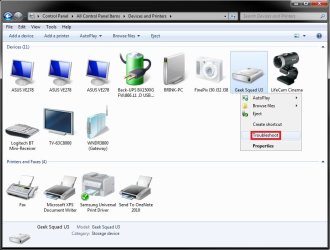
With the USB flash drive connected, you might open Devices and Printers to see if the USB flash drive may be displayed here. If so, right click on it, and click on Troubleshoot. Follow the instructions it gives you. If it finds a solution (ex: to install a driver), it may ask you to approve before it will.

Twinmos Pendrive not detected-win 7-usb.jpg

Hopefully this may help,
Shawn
My System SpecsSystem Spec
08 Apr 2012   #3

XP Propessional 32bit
Bangladesh


Quote   Quote: Originally Posted by Brink View Post
Hello Kamrul,

With the USB flash drive connected, you might open Devices and Printers to see if the USB flash drive may be displayed here. If so, right click on it, and click on Troubleshoot. Follow the instructions it gives you. If it finds a solution (ex: to install a driver), it may ask you to approve before it will.
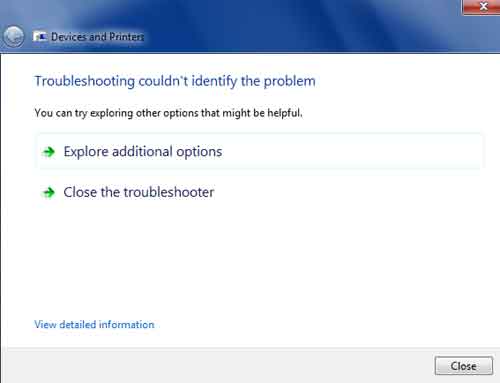
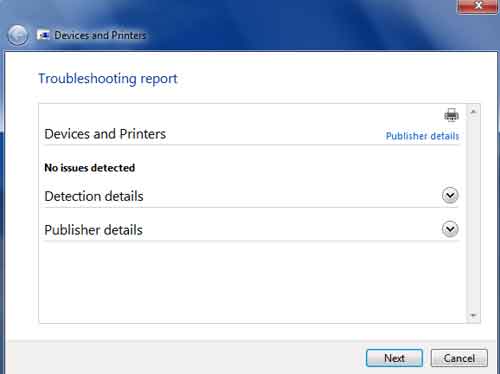
I tried it before. Now I tried again and included screenshot.


My System SpecsSystem Spec
.


08 Apr 2012   #4

64-bit Windows 7 Ultimate SP1 & Windows 8 Enterprise
Texas


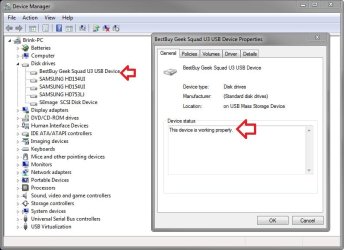
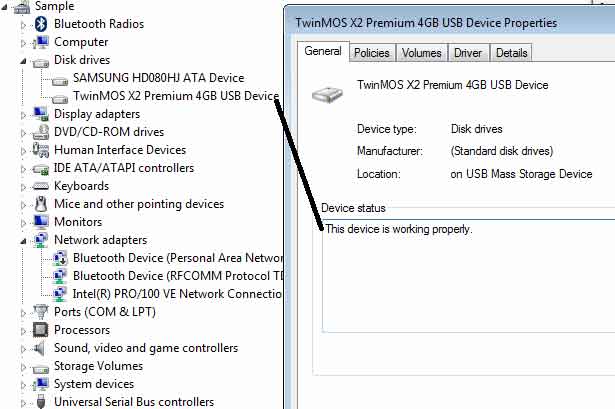
Does it show any errors under "Device status" for the USB drive in Device Manager?

Twinmos Pendrive not detected-win 7-device_manager.jpg
My System SpecsSystem Spec
10 Apr 2012   #5

XP Propessional 32bit
Bangladesh


Quote   Quote: Originally Posted by Brink View Post
Does it show any errors under "Device status" for the USB drive in Device Manager?
Yes, It shows- The device is working properly. I tried to update driver but windows tell- Driver is update.
My System SpecsSystem Spec
10 Apr 2012   #6

64-bit Windows 7 Ultimate SP1 & Windows 8 Enterprise
Texas


While in XP, you may need to backup what's on the USB, run a clean command on the USB, format it as NTFS or FAT32 again, see if you have access to it now in Windows 7, then copy the data back if so.
My System SpecsSystem Spec
12 Apr 2012   #7

XP Propessional 32bit
Bangladesh


Quote   Quote: Originally Posted by Brink View Post
While in XP, you may need to backup what's on the USB, run a clean command on the USB, format it as NTFS or FAT32 again, see if you have access to it now in Windows 7, then copy the data back if so.
I would like to Thank you Brink. Your post is very important and informative. I didn’t apply clean command ever before. I decided to follow your most important advises. Result below.

My Disk is in Online position.


I applied clean command but it shows error like below.


I got the system event log like below.


After Clean command my disk shows unallocated. Then I created new volume and tried to format it. But Windows 7 can’t perform format process. Then I formatted it in XP.
My System SpecsSystem Spec
12 Apr 2012   #8

64-bit Windows 7 Ultimate SP1 & Windows 8 Enterprise
Texas


You're most welcome Kamrul.

Does Windows 7 see and have access to it now?
My System SpecsSystem Spec
13 Apr 2012   #9

XP Propessional 32bit
Bangladesh


Quote   Quote: Originally Posted by Brink View Post
Does Windows 7 see and have access to it now?

No. Same result in my Desktop PC.

I tested this Pendrive in a Laptop (running Windows 7). No problem there and the pendrive works fine. Then I performed Clean command in this PC without no problem as your advices. I think this the fault of my Pendrive. So let the topics finish. I thank you very much for very helpful and informative instruction. I am pleased on your advices.
My System SpecsSystem Spec
13 Apr 2012   #10

64-bit Windows 7 Ultimate SP1 & Windows 8 Enterprise
Texas


You might run chkdsk on the USB flash drive to test it for bad sectors just to be safe.

Looking at the USB flash drive's website, it appeared to have security features that may have been the cause, but using the "clean" command should of wiped all that out.
My System SpecsSystem Spec
Reply

 Twinmos Pendrive not detected-win 7 problems?


Thread Tools


Similar help and support threads for: Twinmos Pendrive not detected-win 7
Thread Forum
BSOD twinmos 1600mhz ram problem Hardware & Devices
Pendrive not being detected - Please help Hardware & Devices
transend 4gb pendrive not getting detected Hardware & Devices
Pendrive Hardware & Devices
2 bootable ISO's on 1 pendrive Customization


All times are GMT -5. The time now is 06:56 PM.


Seven Forums Android App Seven Forums IOS App Follow us on Facebook

Windows 7 Forums is an independent web site and has not been authorized,
sponsored, or otherwise approved by Microsoft Corporation.
"Windows 7" and related materials are trademarks of Microsoft Corp.
© Designer Media Ltd
  

1 2 3 4 5 6 7 8 9 10 11 12 13 14 15 16 17 18 19 20 21 22 23 24 25 26 27 28 29 30 31 32