
Windows 7 Forums


Windows 7: How do I convert Logical Drive to Primary Partition?

23 Apr 2012   #1

Windows 8 Pro x64
 
 
How do I convert Logical Drive to Primary Partition?

Hi, I partitioned my hard drive and created a new simple volume but it has appeared as a logical drive. Why is this? I want to convert it back to primary partition so I can add the space back to my main drive. How do I do this?
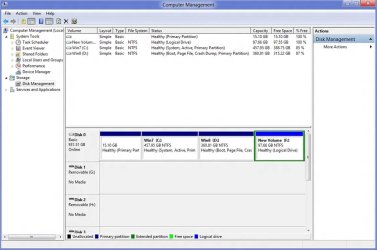
How do I convert Logical Drive to Primary Partition?-picture2.jpg

My System SpecsSystem Spec

23 Apr 2012   #2

Windows 7 SP1, Home Premium, 64-bit


Windows will normally create a logical partition for the 4th drive due to a limitation on the number of primary drives.

It looks like you have nothing on the logical drive F, so you should be able to just delete it in Disk Management.

That space will then become "unallocated space" and you could then extend D to take up that space.

If you want to add that space to C rather than D, you will need a third party tool such as Partition Wizard.
My System SpecsSystem Spec
23 Apr 2012   #3

Windows 8 Pro x64


Thanks m8 Partition Wizard worked perfectly
My System SpecsSystem Spec
.


Reply

 How do I convert Logical Drive to Primary Partition? problems?


Thread Tools


Similar help and support threads for: How do I convert Logical Drive to Primary Partition?
Thread Forum
Solved convert logical partition to primary General Discussion
How can i convert logical drive to primary? Installation & Setup
delete dual boot Ubuntu partition and convert to primary hard drive c: Installation & Setup
Solved Primary vs Logical Partition Installation & Setup


All times are GMT -5. The time now is 07:42 PM.


Seven Forums Android App Seven Forums IOS App Follow us on Facebook

Windows 7 Forums is an independent web site and has not been authorized,
sponsored, or otherwise approved by Microsoft Corporation.
"Windows 7" and related materials are trademarks of Microsoft Corp.
© Designer Media Ltd
  

1 2 3 4 5 6 7 8 9 10 11 12 13 14 15 16 17 18 19 20 21 22 23 24 25 26 27 28 29 30 31 32