
| Windows 7: USB ports inactive? |
15 May 2012
|
#1 | | Microsoft Windows 7 Home Premium 64-bit 7601 Multiprocessor Free Service Pack 1 |
USB ports inactive? I just upgraded to Win 7 Home Premium 64-bit with a fresh installation on a new HDD. I have only put on a few utilities so far, and allowed Windows to do all the updates it wanted.
When I plug a memory stick or externall HDD into the USB ports, nothing happens! I can't see the drive in the Computer view. Do I need to install a USB driver?
Thanks! | My System Specs |
| System Manufacturer/Model Number custom OS Microsoft Windows 7 Home Premium 64-bit 7601 Multiprocessor Free Service Pack 1 CPU Intel(R) Core(TM)2 Quad CPU Q9550 @ 2.83GHz Motherboard Gigabyte Technology Co., Ltd. EP45-DS3 Memory 2.00 GB Graphics Card ATI Radeon HD 4800 Series (Microsoft Corporation WDDM 1.1) Sound Card (1) High Definition Audio Device (2) High Definition Audio Monitor(s) Displays Dell UltraSharp 2711 Screen Resolution 1680 x 1050 x 32 bits (4294967296 colors) @ 59 Hz PSU Thermaltake Toughpower (750 W) Case Thermaltake Hard Drives (1) ST500DM002-1BC142 ATA Device (2) Generic Flash Disk USB Device Internet Speed bloody slow Other Info Secondary HDD (500 GB) with Win XP installed, not currently connected. External HDDs: 500 GB & 1 TB. |
15 May 2012
|
#2 | | Microsoft Windows 7 Professional & Ultimate 64-bit 7601 Multiprocessor Free Service Pack 1 Virginia |

Quote: Originally Posted by Allen0 I just upgraded to Win 7 Home Premium 64-bit with a fresh installation on a new HDD. I have only put on a few utilities so far, and allowed Windows to do all the updates it wanted.
When I plug a memory stick or externall HDD into the USB ports, nothing happens! I can't see the drive in the Computer view. Do I need to install a USB driver?
Thanks! Check in bios and make sure the USB is enabled. I usually enable all of them. Then check device manager and see if you have the usb root hubs. Do you have the motherboard CD? Not sure what motherboard you have but mine needs a driver from the CD to operate. | My System Specs | | System Manufacturer/Model Number My New Build OS Microsoft Windows 7 Professional & Ultimate 64-bit 7601 Multiprocessor Free Service Pack 1 CPU Intel(R) Core(TM) i7-3930K-C2 CPU @ 3.20GHz O.C. 4.50GHz Motherboard ASUSTeK COMPUTER INC. SABERTOOTH X79 Memory 32.00 GB - GSkill 32Gig Kit Graphics Card (1) NVIDIA GeForce GTX 680 (2) NVIDIA GeForce GTX 680 Sound Card (1) Realtek High Definition Audio (2) NVIDIA High Definiti Monitor(s) Displays Viewsonic 28", Samsung 40" Screen Resolution (1) 1600 x 1024 x 32 bits (4294967296 colors) @ 60 Hz (2) PSU Seasonic 80+ Platinum 860W Case Thermaltake Level 10 GT Snow Edition Cooling Phantek PH-TC14PE_RD Hard Drives (1) 2-Vertex 4 256G in Raid0 (2) Crusial C300-CTFDDAC256M SCSI Disk Device (3) WDC WD1002FAEX-007BA0 ATA Device (4) WDC WD1002FAEX-007BA0 ATA Device (5) 2 Vertex 3 240G Internet Speed 25M |
15 May 2012
|
#3 | | Windows 7 Ultimate SP1 (x64) South Australia |
Welcome Allen,
Please use this tutorial to give us more information about your system and hardware so we can help you better: System Info - See Your System Specs
Regards,
Golden | My System Specs | | Computer type PC/Desktop System Manufacturer/Model Number Golden Mk. I.3 OS Windows 7 Ultimate SP1 (x64) CPU Intel i7 860 @ 2.80 GHz Motherboard Gigabyte P55A-UD3R Rev.1. Award BIOS F13 Memory 16GB Corsair Vengance DDR3 @ 661 MHz Dual Channel (9-9-9-24) Graphics Card EVGA NVidia GTX 560 1024MB Sound Card Realtek Integrated Monitor(s) Displays Dual Samsung SyncMaster 2494HS Screen Resolution 1920*1080 and 1920*1080 Keyboard Logitech G110 Mouse Logitech MX518 PSU Thermaltake ToughPower QFan 750W Case Thermaltake Element S VK60001W2Z Cooling Corsair H60 Water Cooling, 2*230mm and 2*80mm case fans Hard Drives 1*OCZ Vertex 2 60GB SSD;
2*Samsung F3 SpinPoint 1TB in RAID0;
3*Samsung F1 SpinPoint 1TB in RAID5;
1*Western Digital 500GB External USB 3.0
1*Seagate 500GB External USB 2.0 Internet Speed Not fast enough!!! Antivirus MSE and Malwarebytes Pro Browser Chrome Version 25 Other Info Laptop: ASUS X54C, Intel Core i3-2330M @ 2.0Ghz, 4GB RAM, Intel HD on-board graphics, Windows 7 Professional SP1 (x64), LinuxMint 14 (x64), PepperMint 3 (x86) |
21 May 2012
|
#4 | | Microsoft Windows 7 Home Premium 64-bit 7601 Multiprocessor Free Service Pack 1 |
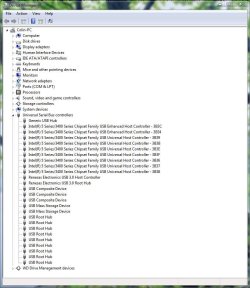
Thanks, Barry The USB hubs checked out. I then disvovered that it is only the USB ports on the front of the case that don't work. (This is still an issue, because when the PC is back in its place I won'tbe able to get at the rear ports, but at least I've got somewhere.)
I'm wondering if I disconnected something when I replaced the graphics card. I have a couple of unattached 2-wire leads/connectors (one marked HDD LED and one marked Power LED), but nothing suspicious looking. | My System Specs | | System Manufacturer/Model Number custom OS Microsoft Windows 7 Home Premium 64-bit 7601 Multiprocessor Free Service Pack 1 CPU Intel(R) Core(TM)2 Quad CPU Q9550 @ 2.83GHz Motherboard Gigabyte Technology Co., Ltd. EP45-DS3 Memory 2.00 GB Graphics Card ATI Radeon HD 4800 Series (Microsoft Corporation WDDM 1.1) Sound Card (1) High Definition Audio Device (2) High Definition Audio Monitor(s) Displays Dell UltraSharp 2711 Screen Resolution 1680 x 1050 x 32 bits (4294967296 colors) @ 59 Hz PSU Thermaltake Toughpower (750 W) Case Thermaltake Hard Drives (1) ST500DM002-1BC142 ATA Device (2) Generic Flash Disk USB Device Internet Speed bloody slow Other Info Secondary HDD (500 GB) with Win XP installed, not currently connected. External HDDs: 500 GB & 1 TB. |
21 May 2012
|
#5 | | Microsoft Windows 7 Professional & Ultimate 64-bit 7601 Multiprocessor Free Service Pack 1 Virginia |
Allen0, you should add more detail in your system specs as this will help in tracking down your problem. Just follow the link from Golden above.
Those two leads, HDD LED and Power LED should be connected to the motherboard in the same location as the power switch and reset . Look in the motherboard manual for the location of these. If you don't have the manual, you can download it from the Gigabyte site.
Also in the manual, it shows you where the USB headers are on the motherboard. This is where you connect the front panel USB cables. They are usually keyed and can only be connected one way.
Be sure you do not connect these USB connectors to the Firewire 1394 header as this will damage the board.
Be sure you do not connect the front panel USB cable to a Firewire 1394 header as this will damage your board. | My System Specs | | System Manufacturer/Model Number My New Build OS Microsoft Windows 7 Professional & Ultimate 64-bit 7601 Multiprocessor Free Service Pack 1 CPU Intel(R) Core(TM) i7-3930K-C2 CPU @ 3.20GHz O.C. 4.50GHz Motherboard ASUSTeK COMPUTER INC. SABERTOOTH X79 Memory 32.00 GB - GSkill 32Gig Kit Graphics Card (1) NVIDIA GeForce GTX 680 (2) NVIDIA GeForce GTX 680 Sound Card (1) Realtek High Definition Audio (2) NVIDIA High Definiti Monitor(s) Displays Viewsonic 28", Samsung 40" Screen Resolution (1) 1600 x 1024 x 32 bits (4294967296 colors) @ 60 Hz (2) PSU Seasonic 80+ Platinum 860W Case Thermaltake Level 10 GT Snow Edition Cooling Phantek PH-TC14PE_RD Hard Drives (1) 2-Vertex 4 256G in Raid0 (2) Crusial C300-CTFDDAC256M SCSI Disk Device (3) WDC WD1002FAEX-007BA0 ATA Device (4) WDC WD1002FAEX-007BA0 ATA Device (5) 2 Vertex 3 240G Internet Speed 25M |
21 May 2012
|
#6 | | Microsoft Windows 7 Home Premium 64-bit 7601 Multiprocessor Free Service Pack 1 |
Thanks again, Barry That System Info utility is awesome! (I hope the author has received due recognition and reward.)
I didn't know I had Firewire, but thank you very much for the warning. I shall study my motherboard doco before proceeding.
(Nb. This is the first PC I've built, and it's almost 4 years since it's birth, so that's why I'm a bit vague.) | My System Specs | | System Manufacturer/Model Number custom OS Microsoft Windows 7 Home Premium 64-bit 7601 Multiprocessor Free Service Pack 1 CPU Intel(R) Core(TM)2 Quad CPU Q9550 @ 2.83GHz Motherboard Gigabyte Technology Co., Ltd. EP45-DS3 Memory 2.00 GB Graphics Card ATI Radeon HD 4800 Series (Microsoft Corporation WDDM 1.1) Sound Card (1) High Definition Audio Device (2) High Definition Audio Monitor(s) Displays Dell UltraSharp 2711 Screen Resolution 1680 x 1050 x 32 bits (4294967296 colors) @ 59 Hz PSU Thermaltake Toughpower (750 W) Case Thermaltake Hard Drives (1) ST500DM002-1BC142 ATA Device (2) Generic Flash Disk USB Device Internet Speed bloody slow Other Info Secondary HDD (500 GB) with Win XP installed, not currently connected. External HDDs: 500 GB & 1 TB. |
21 May 2012
|
#7 | | Windows 7 Ultimate SP1 (x64) South Australia |
Hi Allen,
This is the manual for your motherboard: GIGABYTE - Motherboard - Socket 775 - GA-EP45-DS3 (rev. 1.0)
Use that to ensure the front panel cables are properly connected - see page 22 to page 30 for details.
Regards,
Golden | My System Specs | | Computer type PC/Desktop System Manufacturer/Model Number Golden Mk. I.3 OS Windows 7 Ultimate SP1 (x64) CPU Intel i7 860 @ 2.80 GHz Motherboard Gigabyte P55A-UD3R Rev.1. Award BIOS F13 Memory 16GB Corsair Vengance DDR3 @ 661 MHz Dual Channel (9-9-9-24) Graphics Card EVGA NVidia GTX 560 1024MB Sound Card Realtek Integrated Monitor(s) Displays Dual Samsung SyncMaster 2494HS Screen Resolution 1920*1080 and 1920*1080 Keyboard Logitech G110 Mouse Logitech MX518 PSU Thermaltake ToughPower QFan 750W Case Thermaltake Element S VK60001W2Z Cooling Corsair H60 Water Cooling, 2*230mm and 2*80mm case fans Hard Drives 1*OCZ Vertex 2 60GB SSD;
2*Samsung F3 SpinPoint 1TB in RAID0;
3*Samsung F1 SpinPoint 1TB in RAID5;
1*Western Digital 500GB External USB 3.0
1*Seagate 500GB External USB 2.0 Internet Speed Not fast enough!!! Antivirus MSE and Malwarebytes Pro Browser Chrome Version 25 Other Info Laptop: ASUS X54C, Intel Core i3-2330M @ 2.0Ghz, 4GB RAM, Intel HD on-board graphics, Windows 7 Professional SP1 (x64), LinuxMint 14 (x64), PepperMint 3 (x86) |
21 May 2012
|
#8 | | Microsoft Windows 7 Home Premium 64-bit 7601 Multiprocessor Free Service Pack 1 |
Thanks, Golden: System Info is brilliant! And I thought I was clever when I trained my Delphi app to include the machine name with the user info when it auto-reports application issues to me. I know nothing. | My System Specs | | System Manufacturer/Model Number custom OS Microsoft Windows 7 Home Premium 64-bit 7601 Multiprocessor Free Service Pack 1 CPU Intel(R) Core(TM)2 Quad CPU Q9550 @ 2.83GHz Motherboard Gigabyte Technology Co., Ltd. EP45-DS3 Memory 2.00 GB Graphics Card ATI Radeon HD 4800 Series (Microsoft Corporation WDDM 1.1) Sound Card (1) High Definition Audio Device (2) High Definition Audio Monitor(s) Displays Dell UltraSharp 2711 Screen Resolution 1680 x 1050 x 32 bits (4294967296 colors) @ 59 Hz PSU Thermaltake Toughpower (750 W) Case Thermaltake Hard Drives (1) ST500DM002-1BC142 ATA Device (2) Generic Flash Disk USB Device Internet Speed bloody slow Other Info Secondary HDD (500 GB) with Win XP installed, not currently connected. External HDDs: 500 GB & 1 TB. |
21 May 2012
|
#9 | | Microsoft Windows 7 Professional & Ultimate 64-bit 7601 Multiprocessor Free Service Pack 1 Virginia |
Wow Golden, you are fast. I just looked at the manual myself.
It shows the firewire header right next to the 2 USB headers.
You would only use the firwire header if your case has a front panel firewire connector or you purchase the optional 1394 rear bracket.
I am not sure which case you have, but some cases with USB front panel connectors have cables with complete headers and some only have single connectors for each wire. If your case has the latter, just use the manual to see where each wire goes.
I still have an older case that has single wires but all of my newer ones have headers. Makes life so much easier. | My System Specs | | System Manufacturer/Model Number My New Build OS Microsoft Windows 7 Professional & Ultimate 64-bit 7601 Multiprocessor Free Service Pack 1 CPU Intel(R) Core(TM) i7-3930K-C2 CPU @ 3.20GHz O.C. 4.50GHz Motherboard ASUSTeK COMPUTER INC. SABERTOOTH X79 Memory 32.00 GB - GSkill 32Gig Kit Graphics Card (1) NVIDIA GeForce GTX 680 (2) NVIDIA GeForce GTX 680 Sound Card (1) Realtek High Definition Audio (2) NVIDIA High Definiti Monitor(s) Displays Viewsonic 28", Samsung 40" Screen Resolution (1) 1600 x 1024 x 32 bits (4294967296 colors) @ 60 Hz (2) PSU Seasonic 80+ Platinum 860W Case Thermaltake Level 10 GT Snow Edition Cooling Phantek PH-TC14PE_RD Hard Drives (1) 2-Vertex 4 256G in Raid0 (2) Crusial C300-CTFDDAC256M SCSI Disk Device (3) WDC WD1002FAEX-007BA0 ATA Device (4) WDC WD1002FAEX-007BA0 ATA Device (5) 2 Vertex 3 240G Internet Speed 25M |
26 May 2012
|
#10 | | Microsoft Windows 7 Home Premium 64-bit 7601 Multiprocessor Free Service Pack 1 |
D-oh Your suspicions were spot on, guys -- I had the USB ports header in ther Firewire socket.
The USB hubs are working, now. I don't know if I caused any damage. If so, would it be localised to the F/USB or Firewire circuits, or could it be more systemic?
Thanks again!
- Al | My System Specs | | System Manufacturer/Model Number custom OS Microsoft Windows 7 Home Premium 64-bit 7601 Multiprocessor Free Service Pack 1 CPU Intel(R) Core(TM)2 Quad CPU Q9550 @ 2.83GHz Motherboard Gigabyte Technology Co., Ltd. EP45-DS3 Memory 2.00 GB Graphics Card ATI Radeon HD 4800 Series (Microsoft Corporation WDDM 1.1) Sound Card (1) High Definition Audio Device (2) High Definition Audio Monitor(s) Displays Dell UltraSharp 2711 Screen Resolution 1680 x 1050 x 32 bits (4294967296 colors) @ 59 Hz PSU Thermaltake Toughpower (750 W) Case Thermaltake Hard Drives (1) ST500DM002-1BC142 ATA Device (2) Generic Flash Disk USB Device Internet Speed bloody slow Other Info Secondary HDD (500 GB) with Win XP installed, not currently connected. External HDDs: 500 GB & 1 TB. USB ports inactive? problems? All times are GMT -5. The time now is 07:24 AM. | |