| Windows 7: The mysterious case of the dissapearing USB3 external drives ... |
15 May 2012
|
#1 | | Windows 7 Ultimate SP1 (x64) South Australia |
The mysterious case of the dissapearing USB3 external drives ... G'day,
I've spent the past few days tryng to help a friend sort out a mysterious case of dissapearing USB3 external drives, but it has me stumped. Computer:
LGA1155 Gigabyte GAZ68A-D3H-B3 Rev 1.0 motherboard with latest F13 BIOS
Etron EJ168 USB3.0 chip with 2nd from latest driver (version 1.0.0.0111)
Antec NEO ECO 620W PSU
Windows 7 Home Premium SP1 x64 fully updated USB 3.0 External Drives:
1 X WESTERN DIGITAL USB3 1024GB WDBPCK0010BBK mapped as Y:
1 X WESTERN DIGITAL USB3 1024GB WDBPCK0010BBK mapped as Z:
Both devices are less than 4 months old, purchased new a few weeks part from the same store (OfficeWorks). Typical sequence of events/symptoms:
Both USB devices are displaying fine in both Explorer and Disk Manager, and work exactly as expected. Absolutely no trouble with the devices at all. The LED light on the disks are lit up.
After an indeterminate time (typically somewhere between 1 to 3 hours), the devices dissapear (no longer show) from Explorer, as if they have been physically removed from the USB 3.0 ports - there is no disconnect sound (ding-dong) played. The LED lights on the devices stay lit as normal. Opening Disk Management, the devices are NOT shown. The disks appear to be disconnected from the computer, but they are definately plugged in and powered.
If I physically unplug one of these devices, I immediately get the the disconnect sound (ding-dong). If I then plug the device back in, the connect sound (ding-dong) plays, and after a second or two, the AutoPlay prompt appears, and the devices shown up in Explorer as normal. If I open Disk Manager, the drive displays exactly as expected. This also happens with the 2nd device.
This sequence of events can be replicated several times. What I have tried thus far:
1. Checked for any special BIOS settings
- USB3 setting = enabled
- other legacy settings = enabled
2. Checked the host system:
- sfc /scannow = no problems
- device manager = no yellow triangles on anything
3. Checked the Power Options:
- High Performance = Enabled
- USB Settings > USB selective suspend setting = disabled
4. Physically checked the devices:
- chkdsk /F = no problems
- cables and general condition of enclosures = no obvious problems
I also checked to see whether problem can be replicated in the front panel USB 2.0 ports - and this suprised me, it can. I get exactly the same behaviour in both USB 3.0 and USB 2.0 ports with both these devices. If I plug a different WD USB2 external device into the same USB 2.0 port, then I have not yet been able to replicate this problem.
Right now I'm unsure whether the issue is:
1. With the USB devices
2. The device drivers (standard Windows drivers)
3. The USB ports
4. The USB port drivers
5. Some hibernation/sleep option in either Windows, BIOS, or physical device
Right now, I am inclined to think its an issue with the devices, but I do plan to test this USB on my system at home for a few days. If anyone has other suggestions or experience with this, please offer your opinion.
Regards,
Golden | My System Specs |
| Computer type PC/Desktop System Manufacturer/Model Number Golden Mk. I.3 OS Windows 7 Ultimate SP1 (x64) CPU Intel i7 860 @ 2.80 GHz Motherboard Gigabyte P55A-UD3R Rev.1. Award BIOS F13 Memory 16GB Corsair Vengance DDR3 @ 661 MHz Dual Channel (9-9-9-24) Graphics Card EVGA NVidia GTX 560 1024MB Sound Card Realtek Integrated Monitor(s) Displays Dual Samsung SyncMaster 2494HS Screen Resolution 1920*1080 and 1920*1080 Keyboard Logitech G110 Mouse Logitech MX518 PSU Thermaltake ToughPower QFan 750W Case Thermaltake Element S VK60001W2Z Cooling Corsair H60 Water Cooling, 2*230mm and 2*80mm case fans Hard Drives 1*OCZ Vertex 2 60GB SSD;
2*Samsung F3 SpinPoint 1TB in RAID0;
3*Samsung F1 SpinPoint 1TB in RAID5;
1*Western Digital 500GB External USB 3.0
1*Seagate 500GB External USB 2.0 Internet Speed Not fast enough!!! Antivirus MSE and Malwarebytes Pro Browser Chrome Version 25 Other Info Laptop: ASUS X54C, Intel Core i3-2330M @ 2.0Ghz, 4GB RAM, Intel HD on-board graphics, Windows 7 Professional SP1 (x64), LinuxMint 14 (x64), PepperMint 3 (x86) |
15 May 2012
|
#2 | | Windows 7 Home Premium 64 Bit Colorado |
I had a similar problem at one point. You may want to try disabling and then enabling the automount feature in diskpart. Sometimes this will reset the automount feature if it is not working properly.
Open an Elevated Command Prompt. The commands are: diskpart
automount disable
automount enable | My System Specs | | System Manufacturer/Model Number HP Pavilion e9110t OS Windows 7 Home Premium 64 Bit CPU Intel(R) Core(TM)2 Quad CPU Q9550 @ 2.83GHz Motherboard Pegatron IPIEL-LA3 Memory 6.00 GB Hundai HMT125U6BFR8C-H9 Graphics Card ATI Radeon HD 4850 Sound Card Realtek High Definition Audio/ATI High Definition Audio Monitor(s) Displays Acer AL2216W Screen Resolution 1680x1050 Keyboard HP Keyboard Mouse HP Mouse PSU Unknown/installed by HP Case HP generic case Cooling Intel Stock Cooling Hard Drives Hitachi HDP725050GLA360 ATA Device 500 GB Internet Speed Download: 19.15 Mbps Upload: 1.67 Mbps Other Info Network Adapter Realtek RTL8168D/8111D Family PCI-E Gigabit Ethernet NIC (NDIS 6.20)
Network Adapter 802.11n Wireless PCI Express Card LAN Adapter |
15 May 2012
|
#3 | | Windows 7 Home Premium 64 bit Illinois |
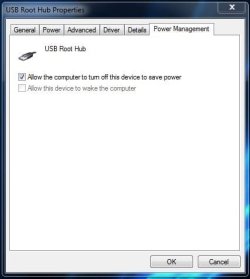
Check Power Management of the USB Root Hub and see if the computer is turning off the device to save power. | My System Specs | | System Manufacturer/Model Number Self-built OS Windows 7 Home Premium 64 bit CPU Intel Core i7-3770 Motherboard MSI Z77A-G45 Memory G.SKILL 8GB (2 x 4GB) DDR3 F3-10666CL9D-8GBNT Graphics Card Sapphire ATI Radeon HD 6670 Sound Card On-Board Realtek Monitor(s) Displays Samsung SyncMaster P2370HD, Dell 1703FPT Screen Resolution 1920 x 1080, 1280 x 1024 Keyboard Logitech K270 Mouse Logitech M705 PSU SeaSonic M12II SS-500GM Case Lian Li PC-9F Cooling Zalman CNPS9900ALED Hard Drives Samsung HD103SJ Internet Speed 16 Mbps Other Info Bose Companion 2 Multimedia Speakers |
15 May 2012
|
#4 | | Windows 7 Ultimate SP1 (x64) South Australia |
Thanks gentlemen - some good suggestions. I'll try those over the next few days and report back. | My System Specs | | Computer type PC/Desktop System Manufacturer/Model Number Golden Mk. I.3 OS Windows 7 Ultimate SP1 (x64) CPU Intel i7 860 @ 2.80 GHz Motherboard Gigabyte P55A-UD3R Rev.1. Award BIOS F13 Memory 16GB Corsair Vengance DDR3 @ 661 MHz Dual Channel (9-9-9-24) Graphics Card EVGA NVidia GTX 560 1024MB Sound Card Realtek Integrated Monitor(s) Displays Dual Samsung SyncMaster 2494HS Screen Resolution 1920*1080 and 1920*1080 Keyboard Logitech G110 Mouse Logitech MX518 PSU Thermaltake ToughPower QFan 750W Case Thermaltake Element S VK60001W2Z Cooling Corsair H60 Water Cooling, 2*230mm and 2*80mm case fans Hard Drives 1*OCZ Vertex 2 60GB SSD;
2*Samsung F3 SpinPoint 1TB in RAID0;
3*Samsung F1 SpinPoint 1TB in RAID5;
1*Western Digital 500GB External USB 3.0
1*Seagate 500GB External USB 2.0 Internet Speed Not fast enough!!! Antivirus MSE and Malwarebytes Pro Browser Chrome Version 25 Other Info Laptop: ASUS X54C, Intel Core i3-2330M @ 2.0Ghz, 4GB RAM, Intel HD on-board graphics, Windows 7 Professional SP1 (x64), LinuxMint 14 (x64), PepperMint 3 (x86) |
16 May 2012
|
#5 | | Windows 7 Ultimate SP1 (x64) South Australia |
OK. None of the USB Root Hubs have the "Allow the computer to turn off this device to save power" setting enabled.
I'll try automount disable, then enable from diskpart next | My System Specs | | Computer type PC/Desktop System Manufacturer/Model Number Golden Mk. I.3 OS Windows 7 Ultimate SP1 (x64) CPU Intel i7 860 @ 2.80 GHz Motherboard Gigabyte P55A-UD3R Rev.1. Award BIOS F13 Memory 16GB Corsair Vengance DDR3 @ 661 MHz Dual Channel (9-9-9-24) Graphics Card EVGA NVidia GTX 560 1024MB Sound Card Realtek Integrated Monitor(s) Displays Dual Samsung SyncMaster 2494HS Screen Resolution 1920*1080 and 1920*1080 Keyboard Logitech G110 Mouse Logitech MX518 PSU Thermaltake ToughPower QFan 750W Case Thermaltake Element S VK60001W2Z Cooling Corsair H60 Water Cooling, 2*230mm and 2*80mm case fans Hard Drives 1*OCZ Vertex 2 60GB SSD;
2*Samsung F3 SpinPoint 1TB in RAID0;
3*Samsung F1 SpinPoint 1TB in RAID5;
1*Western Digital 500GB External USB 3.0
1*Seagate 500GB External USB 2.0 Internet Speed Not fast enough!!! Antivirus MSE and Malwarebytes Pro Browser Chrome Version 25 Other Info Laptop: ASUS X54C, Intel Core i3-2330M @ 2.0Ghz, 4GB RAM, Intel HD on-board graphics, Windows 7 Professional SP1 (x64), LinuxMint 14 (x64), PepperMint 3 (x86) |
16 May 2012
|
#6 | | Windows 7 Ultimate SP1 (x64) South Australia |
OK.
automount disable/enable seems to have solved the USB 2.0 issues - when I reboot this PC, the drives show up straightaway when plugged into USB 2.0, but not USB 3.0 - previously nothing showed up at all (I neglected to mention that in my first post).
Doing some more reading, I was shocked to see the number of users with exactly the same issues and its been going on for some time now - the common denominator seems to be the Etron EJ168 chip. I even found some posts linking back here to SF where this chip and older driver combo caused regular BSOD's a while back!
Seems it even has some dramatic impact on Hyper-V in W8CP (interestingly, same mobo I'm trying to solve this issue on)! https://social.technet.microsoft.com...5-95b3abf42135
This seems to be a long standing problem with some mixed results: http://forums.whirlpool.net.au/archive/1884954 USB3 drive not present after PC boot
The last link suggests a format of the device.................odd why that should work, but I might just try it one day.
After installing driver 112 I still see the same trouble on the USB 3.0 ports. I think the only advice I can give here is if you plan on purchasing a motherboard, think twice if the name Etron appears anywhere...
Regards,
Golden | My System Specs | | Computer type PC/Desktop System Manufacturer/Model Number Golden Mk. I.3 OS Windows 7 Ultimate SP1 (x64) CPU Intel i7 860 @ 2.80 GHz Motherboard Gigabyte P55A-UD3R Rev.1. Award BIOS F13 Memory 16GB Corsair Vengance DDR3 @ 661 MHz Dual Channel (9-9-9-24) Graphics Card EVGA NVidia GTX 560 1024MB Sound Card Realtek Integrated Monitor(s) Displays Dual Samsung SyncMaster 2494HS Screen Resolution 1920*1080 and 1920*1080 Keyboard Logitech G110 Mouse Logitech MX518 PSU Thermaltake ToughPower QFan 750W Case Thermaltake Element S VK60001W2Z Cooling Corsair H60 Water Cooling, 2*230mm and 2*80mm case fans Hard Drives 1*OCZ Vertex 2 60GB SSD;
2*Samsung F3 SpinPoint 1TB in RAID0;
3*Samsung F1 SpinPoint 1TB in RAID5;
1*Western Digital 500GB External USB 3.0
1*Seagate 500GB External USB 2.0 Internet Speed Not fast enough!!! Antivirus MSE and Malwarebytes Pro Browser Chrome Version 25 Other Info Laptop: ASUS X54C, Intel Core i3-2330M @ 2.0Ghz, 4GB RAM, Intel HD on-board graphics, Windows 7 Professional SP1 (x64), LinuxMint 14 (x64), PepperMint 3 (x86) |
16 May 2012
|
#7 | | Windows 7 Home Premium 64 Bit Colorado |
Interesting that there are so many problems. I wonder, with the new driver installed, have you done the typical USB troubleshooting steps? - Start with USB Driver - General Fix for Problems to resolve the USB issues. Also, USB ports can sometimes enter a safe power state to protect the system from power surges due to USB devices. To reset the USB ports to a nominal power state:
- Shut down and turn off the computer.
- Unplug the computer from the wall or surge protector (then remove the battery if it is a laptop).
- "Remove the computer from any port replicator or docking station, disconnect
cables to printers or devices such as external monitors, USB memory sticks or SD cards, headset or external speakers, mouse or auxiliary keyboard, turn off WIFI and Bluetooth wireless devices." (Use Hard Reset to Resolve Hardware and Software Issues HP Pavilion dv5000 Notebook PC series - HP Customer Care (United States - English))
- Hold down the power button for 30 seconds. This closes the circuit and ensures all
power from components is drained to clear the software connections between the BIOS
and hardware and clear any corruption in the temporary memory.
- (If it is a laptop, plug the battery back into the laptop and then) Plug the computer back into the wall. Do not reconnect any unnecessary peripherals; monitor, keyboard,
and mouse should suffice and be the only peripherals reconnected.
- Turn it on to reinitialize the software connections between the BIOS and hardware
I do not know if they are the same for USB 3.0, but I would imagine so since it still is USB hardware. | My System Specs | | System Manufacturer/Model Number HP Pavilion e9110t OS Windows 7 Home Premium 64 Bit CPU Intel(R) Core(TM)2 Quad CPU Q9550 @ 2.83GHz Motherboard Pegatron IPIEL-LA3 Memory 6.00 GB Hundai HMT125U6BFR8C-H9 Graphics Card ATI Radeon HD 4850 Sound Card Realtek High Definition Audio/ATI High Definition Audio Monitor(s) Displays Acer AL2216W Screen Resolution 1680x1050 Keyboard HP Keyboard Mouse HP Mouse PSU Unknown/installed by HP Case HP generic case Cooling Intel Stock Cooling Hard Drives Hitachi HDP725050GLA360 ATA Device 500 GB Internet Speed Download: 19.15 Mbps Upload: 1.67 Mbps Other Info Network Adapter Realtek RTL8168D/8111D Family PCI-E Gigabit Ethernet NIC (NDIS 6.20)
Network Adapter 802.11n Wireless PCI Express Card LAN Adapter |
16 May 2012
|
#8 | | Windows 7 Ultimate SP1 (x64) South Australia |
Good suggestions. I must admit I haven't tried the classic fixes from the tutorial, but I will take a look at those now.
I saw your suggestion about the power state in a thread last night....and i wondered it that might help, but then i forgot to ask! I'll definately give that a crack.
Regards,
Goldn | My System Specs | | Computer type PC/Desktop System Manufacturer/Model Number Golden Mk. I.3 OS Windows 7 Ultimate SP1 (x64) CPU Intel i7 860 @ 2.80 GHz Motherboard Gigabyte P55A-UD3R Rev.1. Award BIOS F13 Memory 16GB Corsair Vengance DDR3 @ 661 MHz Dual Channel (9-9-9-24) Graphics Card EVGA NVidia GTX 560 1024MB Sound Card Realtek Integrated Monitor(s) Displays Dual Samsung SyncMaster 2494HS Screen Resolution 1920*1080 and 1920*1080 Keyboard Logitech G110 Mouse Logitech MX518 PSU Thermaltake ToughPower QFan 750W Case Thermaltake Element S VK60001W2Z Cooling Corsair H60 Water Cooling, 2*230mm and 2*80mm case fans Hard Drives 1*OCZ Vertex 2 60GB SSD;
2*Samsung F3 SpinPoint 1TB in RAID0;
3*Samsung F1 SpinPoint 1TB in RAID5;
1*Western Digital 500GB External USB 3.0
1*Seagate 500GB External USB 2.0 Internet Speed Not fast enough!!! Antivirus MSE and Malwarebytes Pro Browser Chrome Version 25 Other Info Laptop: ASUS X54C, Intel Core i3-2330M @ 2.0Ghz, 4GB RAM, Intel HD on-board graphics, Windows 7 Professional SP1 (x64), LinuxMint 14 (x64), PepperMint 3 (x86) |
16 May 2012
|
#9 | | Windows 7 Home Premium 64 Bit Colorado |
Yeah, I give that power state suggestion a bit. I'll admit it usually only works probablly 30-40% of the time for USB issues, but those are not horrible odds.
It worked on my old laptop 100% of the time, but that is because it had some power management issues with the USB hardware itself. I never found out what the problem was. I no longer have that system because it was serviced for a bad mouse pad, and the service technicians toasted the whole system.
Hopefully you have good luck and track down the problem. | My System Specs | | System Manufacturer/Model Number HP Pavilion e9110t OS Windows 7 Home Premium 64 Bit CPU Intel(R) Core(TM)2 Quad CPU Q9550 @ 2.83GHz Motherboard Pegatron IPIEL-LA3 Memory 6.00 GB Hundai HMT125U6BFR8C-H9 Graphics Card ATI Radeon HD 4850 Sound Card Realtek High Definition Audio/ATI High Definition Audio Monitor(s) Displays Acer AL2216W Screen Resolution 1680x1050 Keyboard HP Keyboard Mouse HP Mouse PSU Unknown/installed by HP Case HP generic case Cooling Intel Stock Cooling Hard Drives Hitachi HDP725050GLA360 ATA Device 500 GB Internet Speed Download: 19.15 Mbps Upload: 1.67 Mbps Other Info Network Adapter Realtek RTL8168D/8111D Family PCI-E Gigabit Ethernet NIC (NDIS 6.20)
Network Adapter 802.11n Wireless PCI Express Card LAN Adapter |
16 May 2012
|
#10 | | Windows 7 Home Premium 64 bit Illinois |

Quote: Originally Posted by Golden OK. None of the USB Root Hubs have the "Allow the computer to turn off this device to save power" setting enabled.
I'll try automount disable, then enable from diskpart next
If you click on properties, go to the Power Management tab, you can disable the computer from turning off the device. | My System Specs | | System Manufacturer/Model Number Self-built OS Windows 7 Home Premium 64 bit CPU Intel Core i7-3770 Motherboard MSI Z77A-G45 Memory G.SKILL 8GB (2 x 4GB) DDR3 F3-10666CL9D-8GBNT Graphics Card Sapphire ATI Radeon HD 6670 Sound Card On-Board Realtek Monitor(s) Displays Samsung SyncMaster P2370HD, Dell 1703FPT Screen Resolution 1920 x 1080, 1280 x 1024 Keyboard Logitech K270 Mouse Logitech M705 PSU SeaSonic M12II SS-500GM Case Lian Li PC-9F Cooling Zalman CNPS9900ALED Hard Drives Samsung HD103SJ Internet Speed 16 Mbps Other Info Bose Companion 2 Multimedia Speakers The mysterious case of the dissapearing USB3 external drives ... problems? All times are GMT -5. The time now is 04:41 PM. | |