JavaScript is disabled. For a better experience, please enable JavaScript in your browser before proceeding.
You are using an out of date browser. It may not display this or other websites correctly.
You should upgrade or use an
alternative browser .
my wd hdd is detected but not showing the drive in mycomputer
i tried to create a partition,and put it in offline,but i didn't its giving the error "the media is write protected"
You've got to place it online before creating the partition. Did you try that?
Won't work in his situation. The drive has been password protected and not by him. People password protect external drives for a good reason.
Computer Manufacturer/Model Number Toshiba Satellite S875D-S7239 laptop OS MS Windows 7 Ultimate SP1 64-bit CPU AMD A10-4600M Motherboard AMD Pumori (Socket FT1) Memory 6.00 GB Dual-Channel DDR3 @ 798MHz (11-11-12-28) Graphics Card(s) AMD Radeon HD 7660G Sound Card High Definition Audio Device Monitor(s) Displays Generic PnP Monitor (1600x900@60Hz) Screen Resolution 1600x900@60Hz Hard Drives SSD 119GB Corsair CSSD-V128GB2 ATA Device Keyboard Standard PS/2 Keyboard Mouse HP Wireless Optical Mobile Mouse Model FHA-3410 Internet Speed What the local pub, local coffee shop offers. Other Info Optical Drive:MATSHITA BD-CMB UJ160B ATA Device
Won't work in his situation. The drive has been password protected and not by him. People password protect external drives for a good reason.
Gotcha. Never messed with many password protected drives. Maybe none as a matter of fact, don't recall, so definitely don't remember how they appear in DM. Thanks for that...
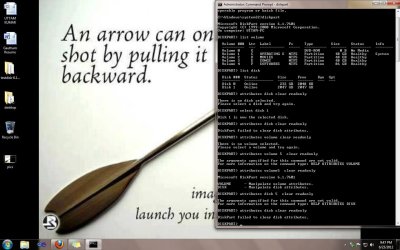
i have tried all possible ways but no use check this commands i have used...
OS windows 7 ultimate 32bit Hard Drives my WD external hdd is detected but not showing the drive in mycomputer how can i fix it could u please solve it and send me to my mail id [email protected]
i have tried all possible ways but no use check this commands i have used...
OS windows 7 ultimate 32bit Hard Drives my WD external hdd is detected but not showing the drive in mycomputer how can i fix it could u please solve it and send me to my mail id [email protected]
Won't work in his situation. The drive has been password protected and not by him. People password protect external drives for a good reason.
Op says he is the original buyer and that the warranty expired so he wants to fix it himself.
SoundS like either the drive or the enclose failed and is giving that write protect error, not due to someone password protecting the drive.
Computer Manufacturer/Model Number HAL-9000 OS Windows 7 Ultimate 64bit CPU Intel i7 3770K Motherboard Asus Sabertooth Z77 Memory 16GB DDR3 1333 Corsair XMS3 Graphics Card(s) XFX HD6950 2GB EyeFinity Sound Card Logitech G35 & Sennheiser PC135 & VIA HD Monitor(s) Displays 23" HP 2310e, 23" Samsung B2230, 21.5" Viewsonic Screen Resolution 5760x1080 Hard Drives 16TB of Storage PSU Antec True Power New 650watt Case Cooler Master HAF-932 Cooling Corsair H60 Hydro Cooler, 3x 230mm Fans, 2x120mm Fan Keyboard Logitech G15 and G13 Mouse Logitech G700 Gaming Mouse Internet Speed 50/10 Mbit Other Info Speakers : Alesis M1 Active Mk2 Studio Monitors , APC RS 1200 UPS, HP 4500DN Color Laser, HP P1006 mono Laser, Kodak 8500 Dye-Sub, Epson 1280 inkjet, Epson Worforce 610 MFC
I'll be a little gentler.
Computer Manufacturer/Model Number Toshiba Satellite S875D-S7239 laptop OS MS Windows 7 Ultimate SP1 64-bit CPU AMD A10-4600M Motherboard AMD Pumori (Socket FT1) Memory 6.00 GB Dual-Channel DDR3 @ 798MHz (11-11-12-28) Graphics Card(s) AMD Radeon HD 7660G Sound Card High Definition Audio Device Monitor(s) Displays Generic PnP Monitor (1600x900@60Hz) Screen Resolution 1600x900@60Hz Hard Drives SSD 119GB Corsair CSSD-V128GB2 ATA Device Keyboard Standard PS/2 Keyboard Mouse HP Wireless Optical Mobile Mouse Model FHA-3410 Internet Speed What the local pub, local coffee shop offers. Other Info Optical Drive:MATSHITA BD-CMB UJ160B ATA Device