| Windows 7: Motherboard or PSU issue? |
25 Jun 2012
|
#1 | | |
Motherboard or PSU issue? Guys ,
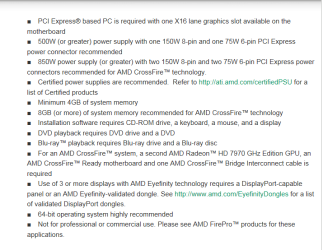
Been tinkering around with my pc , last week i brought a new 3TB Hard drive , when i installed it the system seemed very sluggish , and on occasions s i got a MBR1 error when re-booting , After some research i realized all my drives were in incorrect sata ports and in the bios is was set to IDE instead of AHCI , So i went to take out my 7970 and i think i accidentley pulled it out with too much force , as i thought i pushed down the release lever , however....i think i may of pulled out the PCI Ex port from the motherboard slightly , i carried on anyway connecting the drives to the right ports , and the installed the o/s , After loading all my programs and games back on , every now and then the system just re-booted and gave me no error signs , I can play some games like max payne , skyrim dirt , but there are a selected few that cause the system to re-boot like crysis2 , and re-boot will happen when there is no load on the pc , Ive tried to back (...... pc just re-booted while is was typing this - thanks to chrome i can carry on ) track and the changes ive have made recently are updated bios ( successfully ) installed new hard drive. Ive run the event viewer , but dont really understand it , so i am wondering if i have screwed over my motherboard or its a power issue now ive added an extra hard drive , btw , i have not had any bsod.... any ideas??
Thanks
Corsair Obsidian 800D Case
XFX Radeon 7970x2 In Xfire
i5 2500K O/C 4.5ghz
16gb Kingston RAM
GA Z68x UD3H-B3 Mobo Bios f12
Xonar DGX 5.1 PCI-E Soundcard
Corsair SP2500 2.1 Speakers
Corsair Hydro H100 Cooler
120GB Crucial SSD ( System Drive )
Seagate Baracuda 2TB HDD ( Storage )
Seagate Baracude 3TB HHD ( storage )
Dell Ultrasharp U2711 Monitor
XFX 850W PSU
Corsair 1300 Headphones
Corsair 2500 2.1 Speakers
Razor Death adder 3500dpi 3.5sg Mouse
RazorBlackwidow Mechanical Keyboard
Microsoft HD LifeCam | My System Specs |
| System Manufacturer/Model Number Custom OS Windows 7x64 CPU i5 2500K Motherboard Gigabyte GA-Z68X UD3H-B3 Memory 16GB KINGSTON HYPERX GENISIS 1600MHZ Graphics Card XFX RADEON 7970 X2 Sound Card XONAR 5.1 DGX Monitor(s) Displays DELL ULTRASHARP U2711 Screen Resolution 2560X1440 Keyboard RAZER BLACK WIDOW MECHANICAL Mouse RAZER DEATH ADDER PSU XFX PRO850W Case CORSAIR OBSIDIAN 800D Cooling CORSAIR HYDRO H100 WATER COOLING Hard Drives CRUCIAL M4 128GB SSD
1TB SEAGATE BARACUDA
3TB SEAGATE BARACUDA Internet Speed 2MB |
25 Jun 2012
|
#2 | | |
Just looking at the event viewer it all has critical errors with a source of kernel power , i would post a screenshot of it but i dont know how...lol | My System Specs | | System Manufacturer/Model Number Custom OS Windows 7x64 CPU i5 2500K Motherboard Gigabyte GA-Z68X UD3H-B3 Memory 16GB KINGSTON HYPERX GENISIS 1600MHZ Graphics Card XFX RADEON 7970 X2 Sound Card XONAR 5.1 DGX Monitor(s) Displays DELL ULTRASHARP U2711 Screen Resolution 2560X1440 Keyboard RAZER BLACK WIDOW MECHANICAL Mouse RAZER DEATH ADDER PSU XFX PRO850W Case CORSAIR OBSIDIAN 800D Cooling CORSAIR HYDRO H100 WATER COOLING Hard Drives CRUCIAL M4 128GB SSD
1TB SEAGATE BARACUDA
3TB SEAGATE BARACUDA Internet Speed 2MB |
25 Jun 2012
|
#3 | | |
this is what the event viewer critical error details gave me..........means nothing to me..
System
- Provider
[ Name] Microsoft-Windows-Kernel-Power
[ Guid] {331C3B3A-2005-44C2-AC5E-77220C37D6B4}
EventID 41
Version 2
Level 1
Task 63
Opcode 0
Keywords 0x8000000000000002
- TimeCreated
[ SystemTime] 2012-06-25T19:46:46.200403000Z
EventRecordID 5708
Correlation
- Execution
[ ProcessID] 4
[ ThreadID] 8
Channel System
Computer Steve-PC
- Security
[ UserID] S-1-5-18
- EventData
BugcheckCode 0
BugcheckParameter1 0x0
BugcheckParameter2 0x0
BugcheckParameter3 0x0
BugcheckParameter4 0x0
SleepInProgress false
PowerButtonTimestamp 0 | My System Specs | | System Manufacturer/Model Number Custom OS Windows 7x64 CPU i5 2500K Motherboard Gigabyte GA-Z68X UD3H-B3 Memory 16GB KINGSTON HYPERX GENISIS 1600MHZ Graphics Card XFX RADEON 7970 X2 Sound Card XONAR 5.1 DGX Monitor(s) Displays DELL ULTRASHARP U2711 Screen Resolution 2560X1440 Keyboard RAZER BLACK WIDOW MECHANICAL Mouse RAZER DEATH ADDER PSU XFX PRO850W Case CORSAIR OBSIDIAN 800D Cooling CORSAIR HYDRO H100 WATER COOLING Hard Drives CRUCIAL M4 128GB SSD
1TB SEAGATE BARACUDA
3TB SEAGATE BARACUDA Internet Speed 2MB |
25 Jun 2012
|
#4 | | Windows 7 64 Bit Home Premium SP1 In The Woods |
The first thing to do is simplify the system. You want to try and isolate what component is causing the issue.
Unlike a no-boot problem, yours is on the OS side of things so we need to connect just enough hardware to start and run the OS.
Remove everything from the system not needed. You will want to have: - the case and power supply and motherboard. Processor.
- One stick of RAM in the first (primary) slot A1 (see your manual)
- One video card - in the first PCI-e x16 slot. If that is the one you think may be damaged, then try the other one.
- One HDD: the SSD of course.
- Keyboard & Mouse. You should not use gaming mice and keyboards to test. And certainly not wireless ones. Borrow a wired keyboard and mouse if you need to.
Just that. Carefully remove all the other components. Disconnect all other USB connected devices.
Now run Windows and your games like that and try and recreate the problem. If it comes back then it is more likely to be one of the major components.
If it does not come back, then start adding components back one at a time to test to see if you can isolate which one triggers the event. Start with the RAM, adding one additional stick at a time.
Let us know what you discover. | My System Specs | | Computer type PC/Desktop System Manufacturer/Model Number Home Built - Jan 2013 OS Windows 7 64 Bit Home Premium SP1 CPU i7-3820 Motherboard Asus P9X79-PRO - Bios 3305 Memory GSkill F3-14900CL9Q - 16GB Graphics Card EVGA GeForce GTX660 - Driver 310.90 Sound Card On board Realtek ALC898 Monitor(s) Displays Acer S271HL Screen Resolution 1920 x 1080 Keyboard MS KC-0405 Mouse Intellimouse 5-button PSU Corsair CMPSU-850TX-V2 - 850 watt (by Seasonic) Case Corsair Obsidian 550D Cooling Standard 3 120mm case fans, Cooler Master Hyper 212 EVO Hard Drives #1- Samsung 840 Pro Series
#2- Western Digital WD1002FAEX Sata3 Black
#3- Western Digital WD1002FAEX Sata3 Black Internet Speed 25Mbits/Sec (on a good day) Antivirus Avast & Malwarebytes Browser Firefox Other Info Asus DVD - DRW-24B1ST 24X |
25 Jun 2012
|
#5 | | |
Thanks for the reply ,
I decided to take the the graphics card out as i think maybe thats where the problem lies , I took out the second card and ran the games that was crashing , and........ they worked , so i think its where i may off pulled out the pci e ex slot off the board , although it looks as though its in ok , other than that it could be a power issue , maybe too much for my xfx 850W??? | My System Specs | | System Manufacturer/Model Number Custom OS Windows 7x64 CPU i5 2500K Motherboard Gigabyte GA-Z68X UD3H-B3 Memory 16GB KINGSTON HYPERX GENISIS 1600MHZ Graphics Card XFX RADEON 7970 X2 Sound Card XONAR 5.1 DGX Monitor(s) Displays DELL ULTRASHARP U2711 Screen Resolution 2560X1440 Keyboard RAZER BLACK WIDOW MECHANICAL Mouse RAZER DEATH ADDER PSU XFX PRO850W Case CORSAIR OBSIDIAN 800D Cooling CORSAIR HYDRO H100 WATER COOLING Hard Drives CRUCIAL M4 128GB SSD
1TB SEAGATE BARACUDA
3TB SEAGATE BARACUDA Internet Speed 2MB |
25 Jun 2012
|
#6 | | |
update: I put only one card in the system , and put it in the port which i think is now faulty , but it works my games play fine , so i stuck my other card in , but never connected it to crossfire , and again they worked , i then tried them in crossfire , and it crashed again , so it looks like either a crossfire issue or not enough power.....what do you think? | My System Specs | | System Manufacturer/Model Number Custom OS Windows 7x64 CPU i5 2500K Motherboard Gigabyte GA-Z68X UD3H-B3 Memory 16GB KINGSTON HYPERX GENISIS 1600MHZ Graphics Card XFX RADEON 7970 X2 Sound Card XONAR 5.1 DGX Monitor(s) Displays DELL ULTRASHARP U2711 Screen Resolution 2560X1440 Keyboard RAZER BLACK WIDOW MECHANICAL Mouse RAZER DEATH ADDER PSU XFX PRO850W Case CORSAIR OBSIDIAN 800D Cooling CORSAIR HYDRO H100 WATER COOLING Hard Drives CRUCIAL M4 128GB SSD
1TB SEAGATE BARACUDA
3TB SEAGATE BARACUDA Internet Speed 2MB |
25 Jun 2012
|
#7 | | Windows 7 SP1, Home Premium, 64-bit |

Quote: Originally Posted by Dogfood09 what do you think? I think you ought to systematically work through the steps TVeblen gave you. | My System Specs | | System Manufacturer/Model Number Ignatz Special; 4 speed manual gearbox; factory air conditioning; one of one OS Windows 7 SP1, Home Premium, 64-bit CPU Intel Sandy Bridge i5-2500, not overclocked Motherboard Gigabyte H67A-UD3H-B3, full ATX Memory 4 GB Crucial DDR3-1333 Graphics Card none; graphics are integrated on CPU Sound Card onboard: Realtek ALC892; external: USB Behringer UF0-202 Monitor(s) Displays NEC 90GX2-BK 19" LCD Screen Resolution 800 x 640 Keyboard Leopold Tenkeyless with Cherry Blue switches, USB Mouse Logitech or Microsoft optical wired; either USB or PS 2 PSU Seasonic SS-560KM, modular Case Antec Solo II Cooling CPU: Scythe Big Shuriken; Case: Scythe Slipstream 800 & 500 Hard Drives System: Intel 320 Series SSD, 80 GB;
Data: Samsung Spinpoint 103SJ, 1 TB;
Backup: WD Caviar Green WD15EADS-00P8B0, 1.5TB Other Info Power consumption of this system, including monitor: 68 watts at idle; 144 watts at full load |
25 Jun 2012
|
#8 | | |
Ive now done that , and it only crashes when i have both my cards in Xfire , everything was fine a few days ago , all i changed was added a 3tb HDD and update my bios , so i am begining to think i did actually pull the pci slot out , although cant explain why a single card in that slot still works.. | My System Specs | | System Manufacturer/Model Number Custom OS Windows 7x64 CPU i5 2500K Motherboard Gigabyte GA-Z68X UD3H-B3 Memory 16GB KINGSTON HYPERX GENISIS 1600MHZ Graphics Card XFX RADEON 7970 X2 Sound Card XONAR 5.1 DGX Monitor(s) Displays DELL ULTRASHARP U2711 Screen Resolution 2560X1440 Keyboard RAZER BLACK WIDOW MECHANICAL Mouse RAZER DEATH ADDER PSU XFX PRO850W Case CORSAIR OBSIDIAN 800D Cooling CORSAIR HYDRO H100 WATER COOLING Hard Drives CRUCIAL M4 128GB SSD
1TB SEAGATE BARACUDA
3TB SEAGATE BARACUDA Internet Speed 2MB |
25 Jun 2012
|
#9 | | |
just notice my board has another bios update a uefi bios , is it worth trying that? | My System Specs | | System Manufacturer/Model Number Custom OS Windows 7x64 CPU i5 2500K Motherboard Gigabyte GA-Z68X UD3H-B3 Memory 16GB KINGSTON HYPERX GENISIS 1600MHZ Graphics Card XFX RADEON 7970 X2 Sound Card XONAR 5.1 DGX Monitor(s) Displays DELL ULTRASHARP U2711 Screen Resolution 2560X1440 Keyboard RAZER BLACK WIDOW MECHANICAL Mouse RAZER DEATH ADDER PSU XFX PRO850W Case CORSAIR OBSIDIAN 800D Cooling CORSAIR HYDRO H100 WATER COOLING Hard Drives CRUCIAL M4 128GB SSD
1TB SEAGATE BARACUDA
3TB SEAGATE BARACUDA Internet Speed 2MB |
25 Jun 2012
|
#10 | | Windows 7 Home Premium 64bit sp1 Laguna Hills Southern California |
You need just that much to run X2 7970's and 90's in Xfire you need atleast 1000w | My System Specs | | Computer type PC/Desktop System Manufacturer/Model Number Built by me FX - Series Scorpious OS Windows 7 Home Premium 64bit sp1 CPU Vishera FX 8350 Oc' 4.812Ghz 1.488 V-core full load 50c Motherboard Asus Sabertooth 990fx rev 2.0 Memory 16gb Corsair Vengeance ram 1600mhz Oc'ed to 1750mhz Graphics Card VisionTek HD7970 Ghz.ed Bios Crossfire 1150/1560 power 10% Sound Card AC97 Monitor(s) Displays 27" ViewSonic 1920/1080dp hdmi 37in vizio hdmi dual monitors Screen Resolution 1920x1080 27"- 1920x1080 37" Keyboard Logitech wireless keyboard Mouse Logitech wireless mouse PSU HX1050w Corsair Silver 80plus certified crosfire/sli Case Thermaltake Element V Cooling Antec 620 Water cooling system and 4 120 mm LED fans Hard Drives Ocz Agility 120Gb SSD Seagate baracuda 500 Gb WD Mybook 500Gb Internet Speed Cable 25+ mb Antivirus WebRoot Spysweeper with Antivirus Browser IE-9, Chrome, Opera Other Info I have 2 systems FX AM3+ 8350-K15 Oc'ed 4.812Ghz AM2+ 965 BE Stock 3.4 Ghz Both stable Both Gaming Rigs Also Hp Notebook 1.65 ghz Dual core amd E-450 8gb Patriot Ram DDR3 Discrete Gpu Hd6320 dedicated ram 1973 mb 15.5 screen Motherboard or PSU issue? problems? All times are GMT -5. The time now is 02:06 AM. | |