| Windows 7: Old Hard Disk now fitted into a caddy but it is not being recognised |
13 Jul 2012
|
#1 | | |
Old Hard Disk now fitted into a caddy but it is not being recognised I took my old SATA hard disk & fitted it into a caddy. On caddy I am getting a green light indicating HDD is connected & the hard disk is idle, a red light should go on if hard disk is being accessed.
Although caddy is Plug & Play it is not being recognised. The old hard disk previously was my primary hard disk running VISTA while my computer is now running Windows 7.
I would appreciate any help as to how I can resolve!! | My System Specs |
| System Manufacturer/Model Number Median Akoya E4320 D OS Windows 7 64 CPU Intel® Core™2 Duo Processor E7300 2.66 Ghz Motherboard with LAN and 8 Channel high definition Audio onboard Memory 4GB Graphics Card NVIDIA® GEFORCE® 9500 GS graphics Monitor(s) Displays Iiyama E2201W-B2 Case Tower Cooling fan Hard Drives Western Digital 1tb WD10000SRTL2 |
13 Jul 2012
|
#2 | | Windows 7 Ultimate SP1 X64/ linux in VM NW Florida |
Click start, right click computer, select manage, choose disk management in the left column and see if your hard drive is recognized. If it is, it will probably not have a drive letter, right click it, choose 'change drive letter or path' on the next screen click add then select a letter from the drop down menu. If it wants to initialize it, select no. It will format it and anything on it will be gone. | My System Specs | | Computer type PC/Desktop System Manufacturer/Model Number Home Built- Always under construction OS Windows 7 Ultimate SP1 X64/ linux in VM CPU Intel i7-3770K Motherboard Asus Maximus V Extreme Z77 Memory 8GB G.Skill Ripjaws Z DDR3-2400 (2X4GB) Graphics Card EVGA GTX 670 SC 4GB Sound Card On Board Monitor(s) Displays Asus 24" LCD Screen Resolution 1920X1080 Keyboard Logitech G510 Mouse Logitech G500 PSU CORSAIR AX850 Case Cooler Master HAF X Cooling Custom Water Cooling Hard Drives Samsung 840 Pro 256 GB, Samsung 840 Pro 256 GB, Samsung 830 256GB, Samsung HD103SJ 1TB . External HD- Black X dock esata 1TB Samsung Spinpoint, Rosewill USB 3.0 dock 1TB Samsung Spinpoint Internet Speed carrier pigeon speed Antivirus MSE/MBAM Browser ie8 Other Info 2nd Rig,Windows 7 Ultimate SP1 X64, i7-2600K, Asrock P67 Extreme 4, 8GB DDR3-2133, HAF XM case, Noctua NH-D14, Gigabyte HD6950 OC 1GB, 2 X Crucial M4 128GB, Asus 24" LED.
Laptop- Samsung RF711-SO1 17" i5-2310M, 8GB DDR3-1333, Crucial M4 and OCZ vertex2, Nvidia GT540M.Win 7 HP X64 SP1. |
13 Jul 2012
|
#3 | | |
Dear Essenbe,
Thank you for taking time to help me.
Sadly nothing changed when I changed designated letters. Other than C:/ & DVD Drive I do not know what the others are!
Under Disk Management I see:- C:/ Main Hard disk Disc 0 F:/ Disc 1 G:/ Disc 2 H:/ Disc 3 D:/ DVD Drive | My System Specs | | System Manufacturer/Model Number Median Akoya E4320 D OS Windows 7 64 CPU Intel® Core™2 Duo Processor E7300 2.66 Ghz Motherboard with LAN and 8 Channel high definition Audio onboard Memory 4GB Graphics Card NVIDIA® GEFORCE® 9500 GS graphics Monitor(s) Displays Iiyama E2201W-B2 Case Tower Cooling fan Hard Drives Western Digital 1tb WD10000SRTL2 |
13 Jul 2012
|
#4 | | Windows 7 Ultimate SP1 X64/ linux in VM NW Florida |
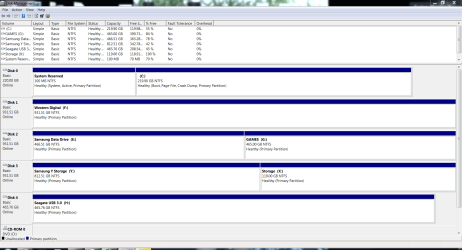
What I was trying to see is if you had a drive listed that had no drive letter assigned to it. Explorer cannot 'see' a drive with no letter. In the bottom portion of disk management the drives and drive letters are listed. If you do not have a drive letter assigned to one of them, assign one. It is not necessary to re assign letters. Below is a snip of my disk management. Notice the bottom portion and see each drive with a drive letter. | My System Specs | | Computer type PC/Desktop System Manufacturer/Model Number Home Built- Always under construction OS Windows 7 Ultimate SP1 X64/ linux in VM CPU Intel i7-3770K Motherboard Asus Maximus V Extreme Z77 Memory 8GB G.Skill Ripjaws Z DDR3-2400 (2X4GB) Graphics Card EVGA GTX 670 SC 4GB Sound Card On Board Monitor(s) Displays Asus 24" LCD Screen Resolution 1920X1080 Keyboard Logitech G510 Mouse Logitech G500 PSU CORSAIR AX850 Case Cooler Master HAF X Cooling Custom Water Cooling Hard Drives Samsung 840 Pro 256 GB, Samsung 840 Pro 256 GB, Samsung 830 256GB, Samsung HD103SJ 1TB . External HD- Black X dock esata 1TB Samsung Spinpoint, Rosewill USB 3.0 dock 1TB Samsung Spinpoint Internet Speed carrier pigeon speed Antivirus MSE/MBAM Browser ie8 Other Info 2nd Rig,Windows 7 Ultimate SP1 X64, i7-2600K, Asrock P67 Extreme 4, 8GB DDR3-2133, HAF XM case, Noctua NH-D14, Gigabyte HD6950 OC 1GB, 2 X Crucial M4 128GB, Asus 24" LED.
Laptop- Samsung RF711-SO1 17" i5-2310M, 8GB DDR3-1333, Crucial M4 and OCZ vertex2, Nvidia GT540M.Win 7 HP X64 SP1. |
14 Jul 2012
|
#5 | | |
Thanks again for your diligence.
All the drives shown had a letter assigned to them other than the DVD Drive. | My System Specs | | System Manufacturer/Model Number Median Akoya E4320 D OS Windows 7 64 CPU Intel® Core™2 Duo Processor E7300 2.66 Ghz Motherboard with LAN and 8 Channel high definition Audio onboard Memory 4GB Graphics Card NVIDIA® GEFORCE® 9500 GS graphics Monitor(s) Displays Iiyama E2201W-B2 Case Tower Cooling fan Hard Drives Western Digital 1tb WD10000SRTL2 |
14 Jul 2012
|
#6 | | Windows 7 Ultimate SP1 X64/ linux in VM NW Florida |
I presume the hard drive is a 3.5" desktop hard drive. Does the caddy you put it into have it's own power source? When you installed Windows did you also install the motherbosrd drivers? If not, you can download them here if it is the computer in your specs. Especially the chipset drivers. If the caddy is USB and not self powered (has it's own power source) the USB port will not have enough power to run a 3.5" hard drive and will have problems with some 2.5" hard drives. From looking at your disk management description, I assume you have 4 internal hard drives and a DVD. Your system specs only list 1 internal hard drive. Could you post a screenshot of your expanded disk management like the one I posted of mine, showing the top and bottom half. Also tell us how many hard drives you have in your computer. | My System Specs | | Computer type PC/Desktop System Manufacturer/Model Number Home Built- Always under construction OS Windows 7 Ultimate SP1 X64/ linux in VM CPU Intel i7-3770K Motherboard Asus Maximus V Extreme Z77 Memory 8GB G.Skill Ripjaws Z DDR3-2400 (2X4GB) Graphics Card EVGA GTX 670 SC 4GB Sound Card On Board Monitor(s) Displays Asus 24" LCD Screen Resolution 1920X1080 Keyboard Logitech G510 Mouse Logitech G500 PSU CORSAIR AX850 Case Cooler Master HAF X Cooling Custom Water Cooling Hard Drives Samsung 840 Pro 256 GB, Samsung 840 Pro 256 GB, Samsung 830 256GB, Samsung HD103SJ 1TB . External HD- Black X dock esata 1TB Samsung Spinpoint, Rosewill USB 3.0 dock 1TB Samsung Spinpoint Internet Speed carrier pigeon speed Antivirus MSE/MBAM Browser ie8 Other Info 2nd Rig,Windows 7 Ultimate SP1 X64, i7-2600K, Asrock P67 Extreme 4, 8GB DDR3-2133, HAF XM case, Noctua NH-D14, Gigabyte HD6950 OC 1GB, 2 X Crucial M4 128GB, Asus 24" LED.
Laptop- Samsung RF711-SO1 17" i5-2310M, 8GB DDR3-1333, Crucial M4 and OCZ vertex2, Nvidia GT540M.Win 7 HP X64 SP1. |
15 Jul 2012
|
#7 | | |
Many thanks again:-
presume the hard drive is a 3.5" desktop hard drive. Yes Does the caddy you put it into have it's own power source? Yes
When you installed Windows did you also install the motherbosrd drivers? If not, you can download them here (http://www.medion.com/gb/service/download/) if it is the computer in your specs. Especially the chipset drivers. I did not!!!!
From looking at your disk management description, I assume you have 4 internal hard drives and a DVD. Your system specs only list 1 internal hard drive. Could you post a screenshot (http://www.sevenforums.com/tutorials/9733-screenshots-files-upload-post-seven-forums.html)of your expanded disk management like the one I posted of mine, showing the top and bottom half. I do not have 4 internal drives!!! Screenshot attached. I am puzzed about number shown!!!
Also tell us how many hard drives you have in your computer. Only one. Since previous communictions I am now using a USB modem which shows up as VMC. As you know I have been struggling to get my caddy working. I decided therefore to open up the caddy but keep the hard disk & end plate with the plug still connected & see if it works. When I took end off it was disconnected from the disk!! Realised that the caddy was 61/2” long, internally while the disk is 6”. What must have happened as the disk slid away from the end plate before I got the chance to screw disk in place. I fitted a 1/2” thick packing piece & refitted disk. SUCCESS.
| My System Specs | | System Manufacturer/Model Number Median Akoya E4320 D OS Windows 7 64 CPU Intel® Core™2 Duo Processor E7300 2.66 Ghz Motherboard with LAN and 8 Channel high definition Audio onboard Memory 4GB Graphics Card NVIDIA® GEFORCE® 9500 GS graphics Monitor(s) Displays Iiyama E2201W-B2 Case Tower Cooling fan Hard Drives Western Digital 1tb WD10000SRTL2 |
15 Jul 2012
|
#8 | | Windows 7 Ultimate SP1 X64/ linux in VM NW Florida |
That's great news. Glad you have it working, well done. I also assume you have a memory card reader installed. If so, that is what the extra hard drives are. Windows assigns them a drive letter. You will notice the removable drive designation on the left column. Also, be sure to download and install all of the motherboard drivers from the manufacturers web site. They are much more current than the supplied driver DVD. | My System Specs | | Computer type PC/Desktop System Manufacturer/Model Number Home Built- Always under construction OS Windows 7 Ultimate SP1 X64/ linux in VM CPU Intel i7-3770K Motherboard Asus Maximus V Extreme Z77 Memory 8GB G.Skill Ripjaws Z DDR3-2400 (2X4GB) Graphics Card EVGA GTX 670 SC 4GB Sound Card On Board Monitor(s) Displays Asus 24" LCD Screen Resolution 1920X1080 Keyboard Logitech G510 Mouse Logitech G500 PSU CORSAIR AX850 Case Cooler Master HAF X Cooling Custom Water Cooling Hard Drives Samsung 840 Pro 256 GB, Samsung 840 Pro 256 GB, Samsung 830 256GB, Samsung HD103SJ 1TB . External HD- Black X dock esata 1TB Samsung Spinpoint, Rosewill USB 3.0 dock 1TB Samsung Spinpoint Internet Speed carrier pigeon speed Antivirus MSE/MBAM Browser ie8 Other Info 2nd Rig,Windows 7 Ultimate SP1 X64, i7-2600K, Asrock P67 Extreme 4, 8GB DDR3-2133, HAF XM case, Noctua NH-D14, Gigabyte HD6950 OC 1GB, 2 X Crucial M4 128GB, Asus 24" LED.
Laptop- Samsung RF711-SO1 17" i5-2310M, 8GB DDR3-1333, Crucial M4 and OCZ vertex2, Nvidia GT540M.Win 7 HP X64 SP1. Old Hard Disk now fitted into a caddy but it is not being recognised problems? All times are GMT -5. The time now is 12:45 AM. | |