Windows 7 Forums


Windows 7: How to eject an external eSata drive?

23 Jul 2012   #1

Windows 7 Home 64bit
 
 
How to eject an external eSata drive?

I am fairly new to Windows 7 and I was wondering how you safely remove an external eSATA hard drive that is connected to a Sumvision 3.5" HDD docking station? Iv'e looked everywhere and cannot find anything that says eject. I did look in the Sumvision manual and it says supports plug and play?


Thanks!
My System SpecsSystem Spec

23 Jul 2012   #2

Windows 7 Ultimate 64 bit
NC


My System SpecsSystem Spec
23 Jul 2012   #3
whs

Vista, Windows7, Mint Mate, Zorin, Windows 8
Florida in winter, Black Forest/Germany


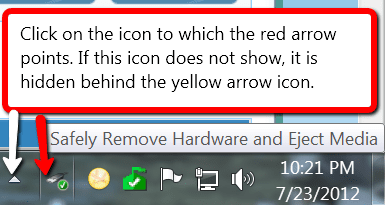
See picture:
Attached Thumbnails
How to eject an external eSata drive?-2012-07-23_1233.png  
My System SpecsSystem Spec
.


23 Jul 2012   #4

Windows 7 Home 64bit


Cheers

I followed the instructions and when I got to the policies tab within the hard drive properties, he says tick the "quick removal option" All's I have is "turn off Windows write-cache buffer flushing on the device". Will this be the same thing? I am used to using a Mac and all's you do is right click on the drive and select "eject". All though I have ticked the latter, I am still reluctant to pull it out as it seems to still be spinning to me.
My System SpecsSystem Spec
23 Jul 2012   #5

Windows 7 Home Premium 64 bit
Illinois


Quote   Quote: Originally Posted by daz1761 View Post
Cheers

I followed the instructions and when I got to the policies tab within the hard drive properties, he says tick the "quick removal option" All's I have is "turn off Windows write-cache buffer flushing on the device". Will this be the same thing? I am used to using a Mac and all's you do is right click on the drive and select "eject". All though I have ticked the latter, I am still reluctant to pull it out as it seems to still be spinning to me.
Well, the first question would be...is the AHCI mode selected in your BIOS?
Without it selected, the Quick removal options probably won't appear.
Not all motherboards support AHCI, so you need to do some checking to see what is supported and selected on your board.
My System SpecsSystem Spec
23 Jul 2012   #6

Windows 7 Home 64bit


Well that could be problem, as I am running Windows 7 via Mac OS X's BootCamp so I cannot access the BIOS.

Thanks
My System SpecsSystem Spec
Reply

 How to eject an external eSata drive? problems?


Thread Tools


Similar help and support threads for: How to eject an external eSata drive?
Thread Forum
Solved unable to 'safely eject' my new external drive. Hardware & Devices
Solved My external eSata drive not seen. Hardware & Devices
My external drive is missing when I try to remove or eject Hardware & Devices
External hard drive won't eject Hardware & Devices
Can't eject USB connect external hard drive Hardware & Devices


All times are GMT -5. The time now is 08:20 AM.


Windows 7 Forums is an independent web site and has not been authorized,
sponsored, or otherwise approved by Microsoft Corporation.
"Windows 7" and related materials are trademarks of Microsoft Corp.
© Designer Media Ltd