
Solved BIOS beep, PC posts, but red LED light on GPU and no monitor signal

MelancholyRose

New member
Member
VIP
Local time
9:19 PM
Messages
156
A couple of weeks ago the fan on my graphics card stopped working, it was buzzing a lot and periodically slowing down. I bought a new heatsink for the card, an Arctic Cooling Accelero L2. I installed everything on the card correctly and carefully. Now when I put the graphics card back on the mobo, the red light (the one ON the actual card, not on the mobo) is lit up and my monitor stays black.

The GPU itself worked perfectly fine (even if the fan wasn't working) before I installed this new cooler. I wouldn't use it much while the fan was breaking down so that it wouldn't overheat.

There IS a POST beep on power-up. Just a normal single beep. It recognizes there is a graphics card in my PCI-E slot but the card itself has a red light on it now. I tried swapping different SATA cables, even tried connecting the card to a molex instead. It just won't respond.

The fan on the new heatsink spins fine, however I have the fan connected only to molex power (it comes with a molex cable for direct-to-PSU use in case the fan connector doesn't fit the header, which in this case, it definitely wouldn't). I don't know whether or not that's an issue.

Now prior to all of this happening I had just contracted the Trojan virus Sirefef/ZeroAccess. I don't know if that would affect graphics card power settings.

GPU: Sapphire ATI Radeon HD5770 PCI-E 2.1
 

My Computer My Computer

At a glance

Windows 7 64-Bit Home Premium Service Pack 1AMD Phenom II Black x4G. Skill Ripjaws Gaming series DDR3 2 x2GBSapphire ATI Radeon HD 5770 PCIe
OS
Windows 7 64-Bit Home Premium Service Pack 1
CPU
AMD Phenom II Black x4
Motherboard
Asus M4A89TD Pro USB3
Memory
G. Skill Ripjaws Gaming series DDR3 2 x2GB
Graphics Card(s)
Sapphire ATI Radeon HD 5770 PCIe
Hard Drives
Western Digital Caviar Blue 500gb SATA 6.0
PSU
Corsair HX 650w
Case
Cooler Master CM690 II Advanced
Think you answered your own question,

The fan on the new heatsink spins fine, however I have the fan connected only to molex power (it comes with a molex cable for direct-to-PSU use in case the fan connector doesn't fit the header, which in this case, it definitely wouldn't). I don't know whether or not that's an issue.

Pretty sure the card won't initialize if there isn't a fan connected to the fan header. Are you sure that the connector from the fan won't fit on the card? From what I can see it has either a 3 or 4 pin connector (or both depending on which model it is) that should fit on the fan header on the card.
 

My Computer My Computer

At a glance

Win 7 Ultimate x64FX-8350 @ 4.6 GHz so farADATA XPG V1 Series Black 8GB DDR3 1600Sapphire R9 270x Dual-X
Computer type
PC/Desktop
Computer Manufacturer/Model Number
Me
OS
Win 7 Ultimate x64
CPU
FX-8350 @ 4.6 GHz so far
Motherboard
Asus M5A97 EVO
Memory
ADATA XPG V1 Series Black 8GB DDR3 1600
Graphics Card(s)
Sapphire R9 270x Dual-X
Sound Card
Xonar DGX w/ Corsair Vengence 1300
Monitor(s) Displays
Acer S232HL Abid
Screen Resolution
1920x1080
Hard Drives
120 GB OCZ Vertex 3
500 GB Seagate 7200.12
PSU
Antec Earthwatts 650W Green
Case
Antec Three Hundred
Cooling
Cooler Master 212 EVO
Keyboard
Logitech G510
Mouse
Logitech G500s
Internet Speed
35000/3000
No, my damn card is only a 2-pin. Anything bigger won't fit. Now I hear that in some cases people broke the plastic around the header if it's a 2-pin, but I also heard other people say it could be connected to molex only as well. Perhaps I read/heard them incorrectly.

If I do need to connect the plug to the card itself, what would be recommended to break the plastic surrounding the header to fit it?
 

My Computer My Computer

At a glance

Windows 7 64-Bit Home Premium Service Pack 1AMD Phenom II Black x4G. Skill Ripjaws Gaming series DDR3 2 x2GBSapphire ATI Radeon HD 5770 PCIe
OS
Windows 7 64-Bit Home Premium Service Pack 1
CPU
AMD Phenom II Black x4
Motherboard
Asus M4A89TD Pro USB3
Memory
G. Skill Ripjaws Gaming series DDR3 2 x2GB
Graphics Card(s)
Sapphire ATI Radeon HD 5770 PCIe
Hard Drives
Western Digital Caviar Blue 500gb SATA 6.0
PSU
Corsair HX 650w
Case
Cooler Master CM690 II Advanced
Stormy is right, with the fan not connected to the GPU, it doesn't "know" there is a fan in use. I would try soldering the connector from the original cooler to the fan leads on the new one.
What is the model number of your GPU card?
 

My Computer My Computer

At a glance

Windows 7 Ultimate X64 SP1Intel i5-2550K, Differing ~4.4-4.8GHz No buil...16GB G.Skill Sniper 1866MHz @ 2133MHz 2x8GBASUS GTX650TIB-DC2OC-2GD5, (650TI Boost)
Computer type
PC/Desktop
Computer Manufacturer/Model Number
Home Built Desktop By DataTech
OS
Windows 7 Ultimate X64 SP1
CPU
Intel i5-2550K, Differing ~4.4-4.8GHz No built in GPU
Motherboard
ASUS P8Z68-V PRO/GEN3
Memory
16GB G.Skill Sniper 1866MHz @ 2133MHz 2x8GB
Graphics Card(s)
ASUS GTX650TIB-DC2OC-2GD5, (650TI Boost)
Sound Card
Onboard Realtek 5-1
Monitor(s) Displays
Samsung P2570HD
Screen Resolution
1920x1080
Hard Drives
Samsung 840 Pro 256GB SSD for OS, 500GB Seagate Constellation (Enterprise drive) for Data
PSU
Corsair HX650W
Case
Inwin Dragon Rider
Cooling
Hyper 212 EVO w/two Noctua fans, push-pull, @1300 RPM
Keyboard
E-Z Eyes, bright yellow keys with large characters
Mouse
steelseries SENSEI Laser Pro Gaming
Internet Speed
48-51Mbs Mbs down, 11 Mbs up Xfinity Cable
Antivirus
Norton Internet Security 2013
Browser
IE 10, Opera, Pale Moon if needed
Other Info
4 case fans, LG BluRay-RE, ASUS DVD-RW, Mr. Fusion power supply, 1.21 gigawatts.
I don't know the first thing about soldering, nor do I own a soldering iron or know anyone that does. I can't afford a whole new card if I screw something up anyway. There has to be some other way to get the connecter onto the header.

It's a Sapphire Radeon HD 5770 GDDR5 PCI-E 2.1,1GB
 

My Computer My Computer

At a glance

Windows 7 64-Bit Home Premium Service Pack 1AMD Phenom II Black x4G. Skill Ripjaws Gaming series DDR3 2 x2GBSapphire ATI Radeon HD 5770 PCIe
OS
Windows 7 64-Bit Home Premium Service Pack 1
CPU
AMD Phenom II Black x4
Motherboard
Asus M4A89TD Pro USB3
Memory
G. Skill Ripjaws Gaming series DDR3 2 x2GB
Graphics Card(s)
Sapphire ATI Radeon HD 5770 PCIe
Hard Drives
Western Digital Caviar Blue 500gb SATA 6.0
PSU
Corsair HX 650w
Case
Cooler Master CM690 II Advanced

My Computer My Computer

At a glance

Windows 7 Ultimate X64 SP1Intel i5-2550K, Differing ~4.4-4.8GHz No buil...16GB G.Skill Sniper 1866MHz @ 2133MHz 2x8GBASUS GTX650TIB-DC2OC-2GD5, (650TI Boost)
Computer type
PC/Desktop
Computer Manufacturer/Model Number
Home Built Desktop By DataTech
OS
Windows 7 Ultimate X64 SP1
CPU
Intel i5-2550K, Differing ~4.4-4.8GHz No built in GPU
Motherboard
ASUS P8Z68-V PRO/GEN3
Memory
16GB G.Skill Sniper 1866MHz @ 2133MHz 2x8GB
Graphics Card(s)
ASUS GTX650TIB-DC2OC-2GD5, (650TI Boost)
Sound Card
Onboard Realtek 5-1
Monitor(s) Displays
Samsung P2570HD
Screen Resolution
1920x1080
Hard Drives
Samsung 840 Pro 256GB SSD for OS, 500GB Seagate Constellation (Enterprise drive) for Data
PSU
Corsair HX650W
Case
Inwin Dragon Rider
Cooling
Hyper 212 EVO w/two Noctua fans, push-pull, @1300 RPM
Keyboard
E-Z Eyes, bright yellow keys with large characters
Mouse
steelseries SENSEI Laser Pro Gaming
Internet Speed
48-51Mbs Mbs down, 11 Mbs up Xfinity Cable
Antivirus
Norton Internet Security 2013
Browser
IE 10, Opera, Pale Moon if needed
Other Info
4 case fans, LG BluRay-RE, ASUS DVD-RW, Mr. Fusion power supply, 1.21 gigawatts.

My Computer My Computer

At a glance

Windows 7 64-Bit Home Premium Service Pack 1AMD Phenom II Black x4G. Skill Ripjaws Gaming series DDR3 2 x2GBSapphire ATI Radeon HD 5770 PCIe
OS
Windows 7 64-Bit Home Premium Service Pack 1
CPU
AMD Phenom II Black x4
Motherboard
Asus M4A89TD Pro USB3
Memory
G. Skill Ripjaws Gaming series DDR3 2 x2GB
Graphics Card(s)
Sapphire ATI Radeon HD 5770 PCIe
Hard Drives
Western Digital Caviar Blue 500gb SATA 6.0
PSU
Corsair HX 650w
Case
Cooler Master CM690 II Advanced
Here are the photos.
 

Attachments

  • IMG_0260.JPG
    IMG_0260.JPG
    53.8 KB · Views: 8
  • IMG_0261.JPG
    IMG_0261.JPG
    142 KB · Views: 9
  • IMG_0263.JPG
    IMG_0263.JPG
    63.6 KB · Views: 9
  • IMG_0264.JPG
    IMG_0264.JPG
    75.9 KB · Views: 8

My Computer My Computer

At a glance

Windows 7 64-Bit Home Premium Service Pack 1AMD Phenom II Black x4G. Skill Ripjaws Gaming series DDR3 2 x2GBSapphire ATI Radeon HD 5770 PCIe
OS
Windows 7 64-Bit Home Premium Service Pack 1
CPU
AMD Phenom II Black x4
Motherboard
Asus M4A89TD Pro USB3
Memory
G. Skill Ripjaws Gaming series DDR3 2 x2GB
Graphics Card(s)
Sapphire ATI Radeon HD 5770 PCIe
Hard Drives
Western Digital Caviar Blue 500gb SATA 6.0
PSU
Corsair HX 650w
Case
Cooler Master CM690 II Advanced
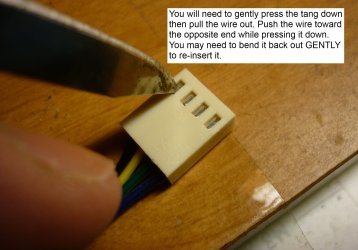
Hey nice, clear pics! You may be able to use the tip of a sharp knife to slip the wires out of the connectors and swap them. Just be sure to get the wire colors in the same position..
Likely you only need the red and black to run the fan, yellow being the RPM sensor.
EDIT: Here's a couple of pics to help. Those tangs are delicate but can be swapped around, I've done a few myself with fans and front panel connectors.
tang.JPG knife.JPG
 
Last edited:

My Computer My Computer

At a glance

Windows 7 Ultimate X64 SP1Intel i5-2550K, Differing ~4.4-4.8GHz No buil...16GB G.Skill Sniper 1866MHz @ 2133MHz 2x8GBASUS GTX650TIB-DC2OC-2GD5, (650TI Boost)
Computer type
PC/Desktop
Computer Manufacturer/Model Number
Home Built Desktop By DataTech
OS
Windows 7 Ultimate X64 SP1
CPU
Intel i5-2550K, Differing ~4.4-4.8GHz No built in GPU
Motherboard
ASUS P8Z68-V PRO/GEN3
Memory
16GB G.Skill Sniper 1866MHz @ 2133MHz 2x8GB
Graphics Card(s)
ASUS GTX650TIB-DC2OC-2GD5, (650TI Boost)
Sound Card
Onboard Realtek 5-1
Monitor(s) Displays
Samsung P2570HD
Screen Resolution
1920x1080
Hard Drives
Samsung 840 Pro 256GB SSD for OS, 500GB Seagate Constellation (Enterprise drive) for Data
PSU
Corsair HX650W
Case
Inwin Dragon Rider
Cooling
Hyper 212 EVO w/two Noctua fans, push-pull, @1300 RPM
Keyboard
E-Z Eyes, bright yellow keys with large characters
Mouse
steelseries SENSEI Laser Pro Gaming
Internet Speed
48-51Mbs Mbs down, 11 Mbs up Xfinity Cable
Antivirus
Norton Internet Security 2013
Browser
IE 10, Opera, Pale Moon if needed
Other Info
4 case fans, LG BluRay-RE, ASUS DVD-RW, Mr. Fusion power supply, 1.21 gigawatts.
Do you mean taking the two wires out of the three-pin plug and putting them into the two-pin plug from the old heatsink? Or just pulling the wires out and plugging them directly into the card's connector? What do I swap the wires with/what do I do with them when I pull the wires out? I've never had to do it before so I want to make sure I do everything right.
 

My Computer My Computer

At a glance

Windows 7 64-Bit Home Premium Service Pack 1AMD Phenom II Black x4G. Skill Ripjaws Gaming series DDR3 2 x2GBSapphire ATI Radeon HD 5770 PCIe
OS
Windows 7 64-Bit Home Premium Service Pack 1
CPU
AMD Phenom II Black x4
Motherboard
Asus M4A89TD Pro USB3
Memory
G. Skill Ripjaws Gaming series DDR3 2 x2GB
Graphics Card(s)
Sapphire ATI Radeon HD 5770 PCIe
Hard Drives
Western Digital Caviar Blue 500gb SATA 6.0
PSU
Corsair HX 650w
Case
Cooler Master CM690 II Advanced
Almost. When you take out the 3 wires, use 2 of them and put them in the old cooler fan connector. Just make sure you have the black one in the same orientation as the original or the fan will spin the wrong way. You'll have an extra, tape it over so it won't touch anything else.
What I want you to end up with is a 2 pin connector on the new fan.
 

My Computer My Computer

At a glance

Windows 7 Ultimate X64 SP1Intel i5-2550K, Differing ~4.4-4.8GHz No buil...16GB G.Skill Sniper 1866MHz @ 2133MHz 2x8GBASUS GTX650TIB-DC2OC-2GD5, (650TI Boost)
Computer type
PC/Desktop
Computer Manufacturer/Model Number
Home Built Desktop By DataTech
OS
Windows 7 Ultimate X64 SP1
CPU
Intel i5-2550K, Differing ~4.4-4.8GHz No built in GPU
Motherboard
ASUS P8Z68-V PRO/GEN3
Memory
16GB G.Skill Sniper 1866MHz @ 2133MHz 2x8GB
Graphics Card(s)
ASUS GTX650TIB-DC2OC-2GD5, (650TI Boost)
Sound Card
Onboard Realtek 5-1
Monitor(s) Displays
Samsung P2570HD
Screen Resolution
1920x1080
Hard Drives
Samsung 840 Pro 256GB SSD for OS, 500GB Seagate Constellation (Enterprise drive) for Data
PSU
Corsair HX650W
Case
Inwin Dragon Rider
Cooling
Hyper 212 EVO w/two Noctua fans, push-pull, @1300 RPM
Keyboard
E-Z Eyes, bright yellow keys with large characters
Mouse
steelseries SENSEI Laser Pro Gaming
Internet Speed
48-51Mbs Mbs down, 11 Mbs up Xfinity Cable
Antivirus
Norton Internet Security 2013
Browser
IE 10, Opera, Pale Moon if needed
Other Info
4 case fans, LG BluRay-RE, ASUS DVD-RW, Mr. Fusion power supply, 1.21 gigawatts.
All right, hopefully I'll have a chance today to take a shot at it. I'll let you know how it went after I try it out.

Thanks for the tip, I didn't know those pins could be removed.
 

My Computer My Computer

At a glance

Windows 7 64-Bit Home Premium Service Pack 1AMD Phenom II Black x4G. Skill Ripjaws Gaming series DDR3 2 x2GBSapphire ATI Radeon HD 5770 PCIe
OS
Windows 7 64-Bit Home Premium Service Pack 1
CPU
AMD Phenom II Black x4
Motherboard
Asus M4A89TD Pro USB3
Memory
G. Skill Ripjaws Gaming series DDR3 2 x2GB
Graphics Card(s)
Sapphire ATI Radeon HD 5770 PCIe
Hard Drives
Western Digital Caviar Blue 500gb SATA 6.0
PSU
Corsair HX 650w
Case
Cooler Master CM690 II Advanced
Plugged fan directly into card this time. Light is still red. Nothing's happening. The red light is still in the same place it was before, on the actual card. POST beep and everything, and the fan is running, but nothing else.

Here's some pictures of where the light is showing up. I don't know what else to attribute this to.

And this is the cooler on Newegg: http://www.newegg.com/Product/Product.aspx?Item=N82E16835186041&Tpk=arctic%20cooling%20accelero%20l2%20pro

And the fan IS running, so I know it's plugged in and everything. I put the right color pins in the right spots.
 

Attachments

  • IMG_0265.JPG
    IMG_0265.JPG
    80.4 KB · Views: 8
  • IMG_0266.JPG
    IMG_0266.JPG
    75 KB · Views: 5
  • IMG_0267.JPG
    IMG_0267.JPG
    57.4 KB · Views: 6
Last edited:

My Computer My Computer

At a glance

Windows 7 64-Bit Home Premium Service Pack 1AMD Phenom II Black x4G. Skill Ripjaws Gaming series DDR3 2 x2GBSapphire ATI Radeon HD 5770 PCIe
OS
Windows 7 64-Bit Home Premium Service Pack 1
CPU
AMD Phenom II Black x4
Motherboard
Asus M4A89TD Pro USB3
Memory
G. Skill Ripjaws Gaming series DDR3 2 x2GB
Graphics Card(s)
Sapphire ATI Radeon HD 5770 PCIe
Hard Drives
Western Digital Caviar Blue 500gb SATA 6.0
PSU
Corsair HX 650w
Case
Cooler Master CM690 II Advanced
Don't take this the wrong way. Did you reconnect the monitor cable? Also try pulling the card and reinserting it to make sure it's fully seated. If this doesn't help, I'll have someone else look in here.
I'm not saying you are incompetent, I've done silly things like forgetting things, many times. I've also forgot to flip the PSU switch on.:o
 

My Computer My Computer

At a glance

Windows 7 Ultimate X64 SP1Intel i5-2550K, Differing ~4.4-4.8GHz No buil...16GB G.Skill Sniper 1866MHz @ 2133MHz 2x8GBASUS GTX650TIB-DC2OC-2GD5, (650TI Boost)
Computer type
PC/Desktop
Computer Manufacturer/Model Number
Home Built Desktop By DataTech
OS
Windows 7 Ultimate X64 SP1
CPU
Intel i5-2550K, Differing ~4.4-4.8GHz No built in GPU
Motherboard
ASUS P8Z68-V PRO/GEN3
Memory
16GB G.Skill Sniper 1866MHz @ 2133MHz 2x8GB
Graphics Card(s)
ASUS GTX650TIB-DC2OC-2GD5, (650TI Boost)
Sound Card
Onboard Realtek 5-1
Monitor(s) Displays
Samsung P2570HD
Screen Resolution
1920x1080
Hard Drives
Samsung 840 Pro 256GB SSD for OS, 500GB Seagate Constellation (Enterprise drive) for Data
PSU
Corsair HX650W
Case
Inwin Dragon Rider
Cooling
Hyper 212 EVO w/two Noctua fans, push-pull, @1300 RPM
Keyboard
E-Z Eyes, bright yellow keys with large characters
Mouse
steelseries SENSEI Laser Pro Gaming
Internet Speed
48-51Mbs Mbs down, 11 Mbs up Xfinity Cable
Antivirus
Norton Internet Security 2013
Browser
IE 10, Opera, Pale Moon if needed
Other Info
4 case fans, LG BluRay-RE, ASUS DVD-RW, Mr. Fusion power supply, 1.21 gigawatts.
Naw, I know you're not saying I'm incompetent. I'm not offended :P I've done silly things, too.

Yes, the monitor is connected.
I've tried re-seating many times, it doesn't work. I have it in as far as it'll go. It's screwed in and secure.
I've tired plugging it into both DVI slots, still doesn't help.
I know my PSU is switched on, because the rest of the computer boots just fine.
I've also tried using a different power cable for the card to see if maybe the cable I was using had a short, but that didn't work either.

I'm actually really concerned the VRAM coolers on the card may have caused damage or something. The cooler itself comes with a bunch of additional memory heatsinks that glue onto the chips.
 

My Computer My Computer

At a glance

Windows 7 64-Bit Home Premium Service Pack 1AMD Phenom II Black x4G. Skill Ripjaws Gaming series DDR3 2 x2GBSapphire ATI Radeon HD 5770 PCIe
OS
Windows 7 64-Bit Home Premium Service Pack 1
CPU
AMD Phenom II Black x4
Motherboard
Asus M4A89TD Pro USB3
Memory
G. Skill Ripjaws Gaming series DDR3 2 x2GB
Graphics Card(s)
Sapphire ATI Radeon HD 5770 PCIe
Hard Drives
Western Digital Caviar Blue 500gb SATA 6.0
PSU
Corsair HX 650w
Case
Cooler Master CM690 II Advanced
More stupid questions:
Did you apply thermal paste to the heatsink?

There should be 4 LEDs on the card, from what I have read. At least the Sapphire 4800 series had 4. There should be numbers next to each LED. If D1601 is lit red it means a "critical temperature fault".

See post #14
Sapphire 4850 LED codes?

The other thing I think of, reading your thread and assuming you have made all the connections and installations correctly, is that the card was critically damaged when the original fan failed. I know that is not what you want to hear, but it remains a possibility regardless.

And I have a WAG:
Remove all of the installed RAM from the system and try booting with just one stick in the first RAM slot.
And for good measure you could also perform a Clear CMOS too.

Sounds far fetched but I have read posts where these actions have cleared the red LED!
 

My Computer My Computer

At a glance

Windows 7 64 Bit Home Premium SP1i7-3820GSkill F3-14900CL9Q - 16GBEVGA GeForce GTX660 - Driver 352.86
Computer type
PC/Desktop
Computer Manufacturer/Model Number
Home Built - Jan 2013
OS
Windows 7 64 Bit Home Premium SP1
CPU
i7-3820
Motherboard
Asus P9X79-PRO - Bios 4608
Memory
GSkill F3-14900CL9Q - 16GB
Graphics Card(s)
EVGA GeForce GTX660 - Driver 352.86
Sound Card
On board Realtek ALC898
Monitor(s) Displays
Acer S271HL
Screen Resolution
1920 x 1080
Hard Drives
#1- Samsung 840 Pro Series
#2- Western Digital WD1002FAEX Sata3 Black
#3- Western Digital WD1002FAEX Sata3 Black
PSU
Corsair CMPSU-850TX-V2 - 850 watt (by Seasonic)
Case
Corsair Obsidian 550D
Cooling
Standard 3 120mm case fans, Cooler Master Hyper 212 EVO
Keyboard
MS KC-0405
Mouse
Intellimouse 5-button
Internet Speed
56 Mbits/Sec (on a good day)
Antivirus
Avast & Malwarebytes
Browser
Firefox
Other Info
Asus DVD - DRW-24B1ST 24X
Thermal paste came pre-applied on the heatsink, and I didn't touch it or remove it. I did clear off the previous thermal paste first before putting the new heatsink on.

Right after my other fan failed, my card was definitely still functioning just fine. I had run it once or twice to check the old fan (when it was still on the old heatsink) and the card would boot up and work, even with the failed fan in it, and I shut the PC off before the card could get too hot, just so it wouldn't damage it. Is it possible for it to completely die while it wasn't connected to the motherboard or being used? I imagine it could be possible, but was there something I might have done wrong?

When I have time I'll check the light and see what number the LED is and get back to you ASAP.
 

My Computer My Computer

At a glance

Windows 7 64-Bit Home Premium Service Pack 1AMD Phenom II Black x4G. Skill Ripjaws Gaming series DDR3 2 x2GBSapphire ATI Radeon HD 5770 PCIe
OS
Windows 7 64-Bit Home Premium Service Pack 1
CPU
AMD Phenom II Black x4
Motherboard
Asus M4A89TD Pro USB3
Memory
G. Skill Ripjaws Gaming series DDR3 2 x2GB
Graphics Card(s)
Sapphire ATI Radeon HD 5770 PCIe
Hard Drives
Western Digital Caviar Blue 500gb SATA 6.0
PSU
Corsair HX 650w
Case
Cooler Master CM690 II Advanced

My Computer My Computer

At a glance

Windows 7 64-Bit Home Premium Service Pack 1AMD Phenom II Black x4G. Skill Ripjaws Gaming series DDR3 2 x2GBSapphire ATI Radeon HD 5770 PCIe
OS
Windows 7 64-Bit Home Premium Service Pack 1
CPU
AMD Phenom II Black x4
Motherboard
Asus M4A89TD Pro USB3
Memory
G. Skill Ripjaws Gaming series DDR3 2 x2GB
Graphics Card(s)
Sapphire ATI Radeon HD 5770 PCIe
Hard Drives
Western Digital Caviar Blue 500gb SATA 6.0
PSU
Corsair HX 650w
Case
Cooler Master CM690 II Advanced
Just a though. Could the red light be on because the card no longer picks up the rpm's with a two wire connection. Their for the card thinks the fan isn't working. Because of that the video card is shutting it self down.
 

My Computer My Computer

At a glance

Windows 10 Pro. 64/ version 1709 Windows 7 Pr...Intel i7-6800K @ 4.3Corsair Platinum 16 gig @2400EVGA GTX 1070 OC
Computer type
PC/Desktop
Computer Manufacturer/Model Number
Home made Desktop
OS
Windows 10 Pro. 64/ version 1709 Windows 7 Pro/64
CPU
Intel i7-6800K @ 4.3
Motherboard
ASUS X-99 Deluxe II
Memory
Corsair Platinum 16 gig @2400
Graphics Card(s)
EVGA GTX 1070 OC
Monitor(s) Displays
Asus 27" LED LCD/VE278Q
Screen Resolution
1920-1080 or 1280-720 HDMI
Hard Drives
INTEL SSD 730-240 Gb Sata 3.0/
PSU
EVGA Platium 1200W
Case
Phanteks Luxe Tempered Glass 8 fans/ one radiator
Cooling
XSPC/ Water Cooled CPU
Keyboard
Das 4 Professional
Mouse
Logitech M705/MX Anywhere 2-S
Internet Speed
100 mbits
Antivirus
Microsoft Security Essentials/ Malwarebytes Premium 3.0/ SAS
Browser
I.E. 11 default/Firefox/ ISP Time Warner Cable/Spectrum
Other Info
LG BluRay Burner/
Sound system-KLipsch-THX/
Icy Dock ssd Hot Swap bays.
If all else fails with this cooler, I can try putting the old one back on. I had purchased a new fan and stuck it on there, and it's a 2-pin, but the plug didn't fit the connector, so I bought the new heatsink instead, figuring it might help with temperatures too in the long run. But now that I know I can pull the wires out of a plug and put them in another one, I can try that with the fan and see if it's the cooler or not.

The only problem with that would be, I wouldn't be able to re-attach the small memory heatsinks. If nothing else helps I'll try the old heatsink with the new fan on it. It would be nice if this cooler worked out though. Cost 35 bucks to order it.
 

My Computer My Computer

At a glance

Windows 7 64-Bit Home Premium Service Pack 1AMD Phenom II Black x4G. Skill Ripjaws Gaming series DDR3 2 x2GBSapphire ATI Radeon HD 5770 PCIe
OS
Windows 7 64-Bit Home Premium Service Pack 1
CPU
AMD Phenom II Black x4
Motherboard
Asus M4A89TD Pro USB3
Memory
G. Skill Ripjaws Gaming series DDR3 2 x2GB
Graphics Card(s)
Sapphire ATI Radeon HD 5770 PCIe
Hard Drives
Western Digital Caviar Blue 500gb SATA 6.0
PSU
Corsair HX 650w
Case
Cooler Master CM690 II Advanced
Back
Top