Windows 7 Forums


Windows 7: Should I be concerned about the 59 deg temperature reading

31 Jul 2012   #1

Windows 7 Home Premium 64bit
 
 
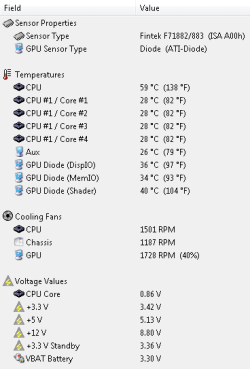
Should I be concerned about the 59 deg temperature reading

Should I be concerned about the 59 deg temperature reading-sensor.png


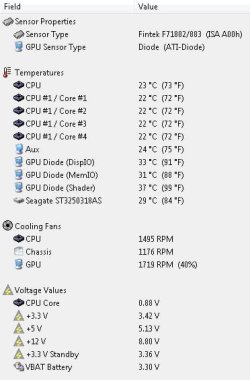
Strange, the last time I checked it was 23 deg.
Should I be concerned about the 59 deg temperature reading-03b.jpg
My System SpecsSystem Spec

31 Jul 2012   #2

Windows 7 Professional


Run RealTemp and look at the distance from TJ max. If you're seeing single digit values in there you can probably benefit from more robust cooling. But, I wouldn't be especially concerned about 59C on a Core i7.
My System SpecsSystem Spec
31 Jul 2012   #3

Windows 7 Home Premium x64
In the other room


Not knowing what the average temperatures of the i7 860 are, what were you doing before/during both of those snapshots?
My System SpecsSystem Spec
.


01 Aug 2012   #4

Windows 7 Home Premium 64bit


Thanks for taking the trouble to respond, here is the screenshot from RealTemp
Should I be concerned about the 59 deg temperature reading-realtemp.png

I note that only the core temps are measured, not the higher 59 deg.

The snapshots are taken when browsing only, the lower one at a colder time earlier in the year.

The only change to my machine has been the installation of SP1, but I don't see that as a factor, and the change to a SSD.
My System SpecsSystem Spec
01 Aug 2012   #5

Windows 7 Home Premium x64
In the other room


I may be missing something, but that shot from RealTemp looks like you're doing great. From what I've read on TJMax: when it reaches said temperature it'll throttle and/or shutdown via the BIOS or CPU itself. I read that your (i7-860) TJMax is 100 degrees Celsius, and your shot seems to confirm that. Did you try stress testing using Prime95 for an hour or so? Then try running RealTemp again and see what's up, just monitoring it periodically to make sure your CPU doesn't have a horrible problem and melt, heh.
My System SpecsSystem Spec
02 Aug 2012   #6

Windows 7 Home Premium 64bit


Thanks for taking an interest.

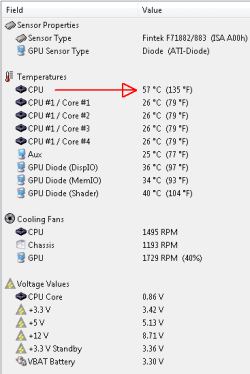
The core temps are fine and have not really changed since I got the machine, its the 57 (indicated) that has somehow jumped from 23.

Should I be concerned about the 59 deg temperature reading-57deg.png
My System SpecsSystem Spec
02 Aug 2012   #7

Windows 7 Ultimate SP1 X64/ linux in VM
NW Florida


What I am about to say is my personal opinion and has no basis in fact. But, I do not use hardware Monitor because I don't trust it. I primarily use Core Temp or Real Temp. They seem to be more accurate. As has been pointed out, some of the readings are, without a doubt wrong. In your screenshot above it shows your +12V as 8.71V. We know that that reading is wrong, otherwise your computer would not have booted. There is too big a difference in your CPU temp and your core temps. When I run HW Monitor on my systems I get the same type of readings. If I know that some readings are wrong, why should I believe that the others are right? I don't. Personally, I don't trust the program. Others here use it and probably disagree. That is OK with me. But, if I am going to monitor my computer with a program, I have to have some confidence that the readings are at least close to accurate. In my opinion, with most of the temp monitoring programs, that is the best you can hope for, close to right. Others who want to disagree with me, feel free. It is just my personal opinion that if I get readings from a program that I know or have good reason to believe are wrong, I can't trust the other readings.

My System SpecsSystem Spec
03 Aug 2012   #8

Windows 7 Ult x64 - SP1/ Windows 8 Pro x64
Wanderer


If your CPU temp is 59°C and the CPU core temps are 28°C, then there is something wrong with hardware Monitor.
CPU temp is the CPU case, Core temps are the sensors inside the CPU on each core, so it's not possible to have those temperatures.
When you get a reading like that use other apps to compare/confirm, like Core Temp, Real Temp, HWiNFO64, Speccy, etc.

No need to worry about it.
My System SpecsSystem Spec
07 Aug 2012   #9

Windows 7 Home Premium 64bit


My sincere thanks to everyone who responded to my query.
My System SpecsSystem Spec
07 Aug 2012   #10

Windows 7 Ultimate SP1 X64/ linux in VM
NW Florida


I hope you have your problem solved or at least have some peace of mind about your temp readings. If you have any further problems just post back. We have a lot of experts here who are more than happy to help.
My System SpecsSystem Spec
Reply

 Should I be concerned about the 59 deg temperature reading problems?


Thread Tools


Similar help and support threads for: Should I be concerned about the 59 deg temperature reading
Thread Forum
Locking Up When the Internet is Concerned BSOD Help and Support
Core temperature or CPU temperature? Hardware & Devices
Which temperature reading should i go by? General Discussion
I'm concerned now. Gaming
Maybe, just maybe, Apple is concerned General Discussion


All times are GMT -5. The time now is 01:50 PM.


Seven Forums Android App Seven Forums IOS App Follow us on Facebook

Windows 7 Forums is an independent web site and has not been authorized,
sponsored, or otherwise approved by Microsoft Corporation.
"Windows 7" and related materials are trademarks of Microsoft Corp.
© Designer Media Ltd
  

1 2 3 4 5 6 7 8 9 10 11 12 13 14 15 16 17 18 19 20 21 22 23 24 25 26 27 28 29 30 31 32