
| Windows 7: 8gb ddr3 windows 7 ulitmate x64 3.87 usable |
02 Aug 2012
|
#1 | | |
8gb ddr3 windows 7 ulitmate x64 3.87 usable i am running
AMD QUAD CORE FX-4170 4200MHz Bulldozer
8GB DDR3 memory (2 x 4GB 1333MHz)
ASUS M5A78L-M/USB3 Motherboard
680W G7 Power Extreme ATX PSU
ASUS NVIDIA GeForce GT610 2GB Graphics Card
Anyway my problem is that in windows 7 under system, sometimes it will say i can only use 3.87gb out of 8gb memory i have also noticed that in my bios it does not always register 8gb but in windows it will. I no my board can support this memory because it can support up to 16gb so why in the bios does it not always register 8gb and why in windows does it not always let me use the full 8gb  thanks (: | My System Specs |
| OS windows 7 ultimate x64 CPU AMD QUAD CORE FX-4170 4200MHz Bulldozer Motherboard ASUS M5A78L-M/USB3 Memory 8GB DDR3 memory (2 x 4GB 1333MHz) Graphics Card Geforce Gt610 2gb PSU 680W G7 Power Extreme ATX PSU Case icute Super Cool Turbine Gamer Case |
02 Aug 2012
|
#2 | | MS Windows 7 Ultimate 64-bit SP1 Somewhere in the middle of Desert :-) |
Try removing the memory boards from the motherboard, clean the sockets with a blast of compressed air, wipe clean the RAM contacts. Always make sure you touch a large metallic surface before you handle memory boards!!! This will prevent any static electricity damaging the memory. Now replace them back in memory sockets. Check in Bios whether the registered memory is 8GB or not. If it is not 8GB, try swapping the boards or change the sockets (if your motherboard has more than 2 memory sockets).
You can also try to reset the bios to defaults and check. Once the memory appears correctly in Bios then you can check in windows.
If windows still show usable memory is 3.87 GB, type msconfig in the command field inside start button and press enter whein msconfig.exe appears on the top of the start menu. The System Configuration dialog box will pop up.
In this dialog box go to Boot tab on top, and click on Advanced Options. In the Boot Advanced Options dialog box, remove the checkmark on Maximum memory setting. Click OK twice to close the MSCONFIG program. Reboot the system and check again. | My System Specs | | System Manufacturer/Model Number Toshiba Satellite P775-S7232 OS MS Windows 7 Ultimate 64-bit SP1 CPU i5-2410M 2.3GHz (2.9GHz Turbo-Boost) Sandy Bridge 32nm Motherboard Toshiba PHRAA ver. PSBY1U-00F003 Memory 4GB+4GB Samsung DDR3 PC3-10700 (1333 MHz) Graphics Card Video Intel(R) HD Graphics Family, 1696MB available memory Sound Card Realtek High Definition Audio version=6.0.1.6323 Monitor(s) Displays 17.3 " Trubrite TFT LCD, LED Backlit Screen Resolution 1600x900 32 bit, Native support for 720P content Keyboard Premium Raised Tile keyboard Mouse Logitech M215 wireless mouse PSU Toshiba AC/DC Adapter Case Notebook Cooling Built-in Fan Hard Drives TOSHIBA MK6476GSXN
580.614 [GB] partitioned C: 80GB and D: 500GB with hidden recovery partitons.
Spare bay for 2nd HDD but no SATA connector :-( Internet Speed Not fast enough Other Info Built-in Harman Kardon speakers with Dolby Advanced Audio, Waves MaxxAudio® 3. HDMI, 1xUSB3+3xUSB2 ports, WebCam, Battery life 4hrs 11mins, 4GB Readyboost SDHC card, WD My Book Essential Ext HDDs 2 TB, 2x1TB, My Passport SE 1TB and WDTV 1st Gen for Multimedia playing on a Sony Wega 32" LCD.
Recent addition to my toys are Asus Transformer Pad TF300T with 32GB onboard sd card + 32GB microsd card. |
02 Aug 2012
|
#3 | | Windows 7 Ultimate x64 SP1 Philadelphia, PA |
Are you certain you are running the x64 version? We've had people before state that they were, with your same problem, and after a closer look, they weren't. | My System Specs | | OS Windows 7 Ultimate x64 SP1 CPU Intel Core i7-2600 Motherboard Gigabyte GA-P67A-UD3P-B3 Memory 12 GB Patriot Extreme DDR3-1333 Graphics Card Nvidia GTX 470 Monitor(s) Displays Dell UltraSharp 2209WA PSU OCZ ModStream 700W Case CoolerMaster HAF 912 Advanced Cooling CoolerMaster Hyper 212 Plus Hard Drives OCZ Agility3 240 GB, WD5001AALS, WD7501AALS |
02 Aug 2012
|
#4 | | MS Windows 7 Professional 64-bit SP1 United States |
I've also seen the problem with integrated graphics using that memory. | My System Specs | | System Manufacturer/Model Number Custom Built OS MS Windows 7 Professional 64-bit SP1 CPU Intel(R) Core(TM) i5-2400 CPU @ 3.10GHz Motherboard Asus P8Z77-V LK Memory G.SKILL Ares 8GB (2x4GB) Graphics Card EVGA nVidia GeForce GTX 550 Ti Sound Card Realtek High Definition Audio Monitor(s) Displays 22 inch LG Flatron W2240T Screen Resolution 1920x1080 Keyboard Logitech K360 (Wireless) Mouse Logitech M215 (Wireless) PSU Raidmax RX-630SS Case NZXT Crafted Series Tempest 410 Elite Cooling Air Cooled Hard Drives Mushkin Chronos 120GB SSD (OS), 1TB Seagate HDD (Data) Internet Speed 1.14 MB/s (9.6 mbps) |
02 Aug 2012
|
#5 | | |
im 100% sure its 64bit i checked plus if i wasnt using 64bit it wouldnt let me use the full 8gb some of the time (: and i have tried reseating the memory i have 4 memory sockets it is still doing the same thing i will try reseting the bios see if that makes any difference | My System Specs | | OS windows 7 ultimate x64 CPU AMD QUAD CORE FX-4170 4200MHz Bulldozer Motherboard ASUS M5A78L-M/USB3 Memory 8GB DDR3 memory (2 x 4GB 1333MHz) Graphics Card Geforce Gt610 2gb PSU 680W G7 Power Extreme ATX PSU Case icute Super Cool Turbine Gamer Case |
02 Aug 2012
|
#6 | | MS Windows 7 Professional 64-bit SP1 United States |

Quote: Originally Posted by UnknownReverent I've also seen the problem with integrated graphics using that memory. I didn't notice it said 8gb. I thought you had 4. In that case, are they both 4gb modules? If so, then one could be faulty. | My System Specs | | System Manufacturer/Model Number Custom Built OS MS Windows 7 Professional 64-bit SP1 CPU Intel(R) Core(TM) i5-2400 CPU @ 3.10GHz Motherboard Asus P8Z77-V LK Memory G.SKILL Ares 8GB (2x4GB) Graphics Card EVGA nVidia GeForce GTX 550 Ti Sound Card Realtek High Definition Audio Monitor(s) Displays 22 inch LG Flatron W2240T Screen Resolution 1920x1080 Keyboard Logitech K360 (Wireless) Mouse Logitech M215 (Wireless) PSU Raidmax RX-630SS Case NZXT Crafted Series Tempest 410 Elite Cooling Air Cooled Hard Drives Mushkin Chronos 120GB SSD (OS), 1TB Seagate HDD (Data) Internet Speed 1.14 MB/s (9.6 mbps) |
03 Aug 2012
|
#7 | | Windows 7 Ult x64 - SP1/ Windows 8 Pro x64 Wanderer |
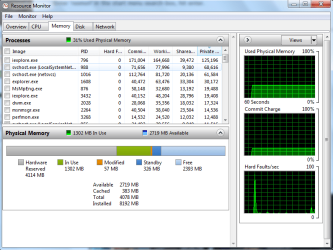
Enter 'resmon' in the start menu search box, hit enter.
In the 'Memory' tab, take a snip including the Processes section and post here.
For posting the information , enter 'Snipping tool' in the Start button > Search box, hit enter. Select the area you want to post and save to a convenient place. How to Post a Screenshot in Seven Forums | My System Specs | | Computer type PC/Desktop System Manufacturer/Model Number 76~2.0 OS Windows 7 Ult x64 - SP1/ Windows 8 Pro x64 CPU Intel Core i5-3570K 4.6GHz Motherboard Gigabyte GA-Z77X UD3H, f18 Memory 8GB (2X4GB) DDR3 1600 Corsair Vengeance CL8 1.5v Graphics Card Sapphire HD 7770 Vapor-X OC 1GB DDR5 Sound Card Onboard VIA VT2021 Monitor(s) Displays 22" LCD Dell Screen Resolution 1680x1050 Keyboard Logitech Wave Mouse CM Sentinel PSU Corsair HX650W Case Cooler Master Storm Scout Cooling Corsair H80 2x12cm Noctua NF P12 , 2x14cm case fans Hard Drives Samsung 840Pro 128GB SSD,
Seagate Barracuda 500GB SATA2 7200rpm 32MB cache, Seagate Barracuda 1TB SATA2 7200rpm 32MB cache, Internet Speed Dismal Antivirus Avast Browser Opera Next Other Info eSATA ports,
External eSATA Seagate 500GB SATA2 7200rpm,
External USB WD 500GB |
03 Aug 2012
|
#8 | | |
i have tried both sticks on there own and they appear to work fine aswell | My System Specs | | OS windows 7 ultimate x64 CPU AMD QUAD CORE FX-4170 4200MHz Bulldozer Motherboard ASUS M5A78L-M/USB3 Memory 8GB DDR3 memory (2 x 4GB 1333MHz) Graphics Card Geforce Gt610 2gb PSU 680W G7 Power Extreme ATX PSU Case icute Super Cool Turbine Gamer Case |
03 Aug 2012
|
#9 | | Windows 7 Ult x64 - SP1/ Windows 8 Pro x64 Wanderer |
The Hardware Reserved, 4GB, is for system resources and onboard graphics.
That is very high, if you don't need the onboard graphics go to your BIOS and you can disable it. That should give most of the 4GB back for other use. | My System Specs | | Computer type PC/Desktop System Manufacturer/Model Number 76~2.0 OS Windows 7 Ult x64 - SP1/ Windows 8 Pro x64 CPU Intel Core i5-3570K 4.6GHz Motherboard Gigabyte GA-Z77X UD3H, f18 Memory 8GB (2X4GB) DDR3 1600 Corsair Vengeance CL8 1.5v Graphics Card Sapphire HD 7770 Vapor-X OC 1GB DDR5 Sound Card Onboard VIA VT2021 Monitor(s) Displays 22" LCD Dell Screen Resolution 1680x1050 Keyboard Logitech Wave Mouse CM Sentinel PSU Corsair HX650W Case Cooler Master Storm Scout Cooling Corsair H80 2x12cm Noctua NF P12 , 2x14cm case fans Hard Drives Samsung 840Pro 128GB SSD,
Seagate Barracuda 500GB SATA2 7200rpm 32MB cache, Seagate Barracuda 1TB SATA2 7200rpm 32MB cache, Internet Speed Dismal Antivirus Avast Browser Opera Next Other Info eSATA ports,
External eSATA Seagate 500GB SATA2 7200rpm,
External USB WD 500GB |
03 Aug 2012
|
#10 | | |
it shouldnt be reserved should it because i put a graphics card in my self? | My System Specs | | OS windows 7 ultimate x64 CPU AMD QUAD CORE FX-4170 4200MHz Bulldozer Motherboard ASUS M5A78L-M/USB3 Memory 8GB DDR3 memory (2 x 4GB 1333MHz) Graphics Card Geforce Gt610 2gb PSU 680W G7 Power Extreme ATX PSU Case icute Super Cool Turbine Gamer Case 8gb ddr3 windows 7 ulitmate x64 3.87 usable problems? All times are GMT -5. The time now is 07:06 PM. | |