| Windows 7: System Page File On Diff Disk!! |
05 Aug 2012
|
#1 | | Windows 7 Professional Version 6.1 Build 7601 SP1 |
System Page File On Diff Disk!! Hi,
I was up late and wasn't paying attention when i deleted the system reserved partition during a re-install of windows, and then made another system reserved file partition. The SSD the the OS is on, now has a system reserved file partition on a separate internal drive.
How do i fix this? Will I be okay? It took a long time to load and even get to my PW screen.
Can i create a 100 MB system reserved partition on my ssd, then make a backup image of the system reserved partition, then apply it to the 100MB page file partition that i created from my SSD?
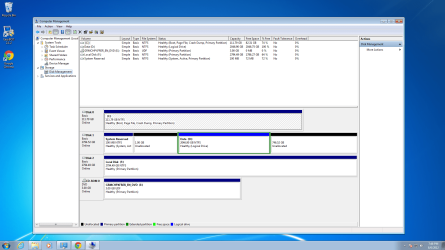
Is that confusing? Sorry if it is. Here is a screen shot of what my device manager looks like.
THanks in advance.
Last edited by exitPr0gram; 05 Aug 2012 at 06:13 PM..
Reason: rewording
| My System Specs |
| System Manufacturer/Model Number Custom Built OS Windows 7 Professional Version 6.1 Build 7601 SP1 CPU 3.40 gigahertz Intel Core i7-2600K Motherboard Gigabyte Technology Co., Ltd. Z68X-UD3H-B3 Memory Two 4GB Ripjaw Graphics Card NVIDIA GeForce GTX 560 Ti Sound Card Onboard Monitor(s) Displays LG E2370 120Hz 23 inch IP Super LED Keyboard Logitech G510 Mouse Logitech G500 PSU Antec 750 Watt Case Phantom 410 Cooling H100 Antec Liquid Cooling Hard Drives 120 GB SSD
3TB Internal SATA
And a 3TB External. Internet Speed Eh, its okay. Other Info I loooove my computer. |
05 Aug 2012
|
#2 | | Windows 7 SP1, Home Premium, 64-bit |
System Reserved and page file are 2 different things.
Page file is typically kept on C, but I don't think it's a problem if it is elsewhere.
System Reserved is normally on the same drive as C, but you can operate with it elsewhere.
You don't need to have a System Reserved partition at all. I don't have one.
You DO need to have boot files, which are most often in the System Reserved partition, BUT they can be moved to C. Once the boot files are on C, you can get rid of System Reserved.
Look here for WHS's tutorial on moving boot files to C. Bootmgr - Move to C:\ with EasyBCD
If you ever do a clean install, you can create your C partition in Diskpart early in the installation. If you do that, you will not have a System Reserved. That's what I did.
You could always just start over rather than using Easy BCD, if you would find that easier and you don't have a lot of time invested in your current installation. | My System Specs | | System Manufacturer/Model Number Ignatz Special; 4 speed manual gearbox; factory air conditioning; one of one OS Windows 7 SP1, Home Premium, 64-bit CPU Intel Sandy Bridge i5-2500, not overclocked Motherboard Gigabyte H67A-UD3H-B3, full ATX Memory 4 GB Crucial DDR3-1333 Graphics Card none; graphics are integrated on CPU Sound Card onboard: Realtek ALC892; external: USB Behringer UF0-202 Monitor(s) Displays NEC 90GX2-BK 19" LCD Screen Resolution 800 x 640 Keyboard Leopold Tenkeyless with Cherry Blue switches, USB Mouse Logitech or Microsoft optical wired; either USB or PS 2 PSU Seasonic SS-560KM, modular Case Antec Solo II Cooling CPU: Scythe Big Shuriken; Case: Scythe Slipstream 800 & 500 Hard Drives System: Intel 320 Series SSD, 80 GB;
Data: Samsung Spinpoint 103SJ, 1 TB;
Backup: WD Caviar Green WD15EADS-00P8B0, 1.5TB Other Info Power consumption of this system, including monitor: 68 watts at idle; 144 watts at full load |
05 Aug 2012
|
#3 | | Windows 7 Professional Version 6.1 Build 7601 SP1 |

Quote: Originally Posted by ignatzatsonic System Reserved and page file are 2 different things.
Page file is typically kept on C, but I don't think it's a problem if it is elsewhere.
System Reserved is normally on the same drive as C, but you can operate with it elsewhere.
You don't need to have a System Reserved partition at all. I don't have one.
You DO need to have boot files, which are most often in the System Reserved partition, BUT they can be moved to C. Once the boot files are on C, you can get rid of System Reserved.
Look here for WHS's tutorial on moving boot files to C. Bootmgr - Move to C:\ with EasyBCD
If you ever do a clean install, you can create your C partition in Diskpart early in the installation. If you do that, you will not have a System Reserved. That's what I did.
You could always just start over rather than using Easy BCD, if you would find that easier and you don't have a lot of time invested in your current installation. Thanks for your reply.
Its good to know that it will operate fine, but what i want to know is that since the OS is on the SSD, which is faster, and the other file is stored on a 7200RPM hitachi which is obviously slower ... will there be any notice in performance? Any BIOS settings i should configure to optimize?
One other thing ... Since the 100MB partition is on my other,slower, drive, will that prevent me from creating a new volume on the unallocated space? I am having problems with it not allowing me to do so in Disk Management. DOS Commands for WinRecovery disk, maybe? Disk management also seems to be loading slower than before i reformatted and this happened as well, which is why i'm worried about speed and optimization.
And i will be installing Linux soon, will the System Reserve Partition being on the same drive i'm going to install Linux on cause problems? I wouldn't think so since people sometimes partition their OS drive and install it. Just wanted your opinion on this, that's all.
Thanks again! | My System Specs | | System Manufacturer/Model Number Custom Built OS Windows 7 Professional Version 6.1 Build 7601 SP1 CPU 3.40 gigahertz Intel Core i7-2600K Motherboard Gigabyte Technology Co., Ltd. Z68X-UD3H-B3 Memory Two 4GB Ripjaw Graphics Card NVIDIA GeForce GTX 560 Ti Sound Card Onboard Monitor(s) Displays LG E2370 120Hz 23 inch IP Super LED Keyboard Logitech G510 Mouse Logitech G500 PSU Antec 750 Watt Case Phantom 410 Cooling H100 Antec Liquid Cooling Hard Drives 120 GB SSD
3TB Internal SATA
And a 3TB External. Internet Speed Eh, its okay. Other Info I loooove my computer. |
05 Aug 2012
|
#4 | | Windows 7 SP1, Home Premium, 64-bit |
See comments in bold: 
Quote: Originally Posted by exitPr0gram
since the OS is on the SSD, which is faster, and the other file is stored on a 7200RPM hitachi which is obviously slower ... will there be any notice in performance? Any BIOS settings i should configure to optimize? Having the boot files on the HDD might have some small effect on boot speed, but it may not be noticeable. What is your boot speed now?
If it boots OK as it is, I wouldn't think any BIOS changes are in order.
One other thing ... Since the 100MB partition is on my other,slower, drive, will that prevent me from creating a new volume on the unallocated space? I am having problems with it not allowing me to do so in Disk Management. DOS Commands for WinRecovery disk, maybe? Disk management also seems to be loading slower than before i reformatted and this happened as well, which is why i'm worried about speed and optimization. Offhand, I don't know why Disk Management is complaining. Disk 1 has only a single partition now. It's also odd that there are 2 contiguous instances of "unallocated space" on that drive, rather than 1 large space.
Partition Wizard is always an alternative for partitioning purposes.
You say you are worried about speed and optimization.
Why worry when you can easily fix it by either reinstalling or using BCD to put boot files on SSD and then delete System Reserved??
And i will be installing Linux soon, will the System Reserve Partition being on the same drive i'm going to install Linux on cause problems? I wouldn't think so since people sometimes partition their OS drive and install it. I know little about Linux---haven't used it in 15 years. But everything I have read says that the least problematic method is to confine Linux to its own drive, completely unrelated to Windows----not just to a separate partition on the same drive.
I can't say having System Reserved and Windows on the same drive will necessarily cause problems, but again, why worry when it's fixable?
| My System Specs | | System Manufacturer/Model Number Ignatz Special; 4 speed manual gearbox; factory air conditioning; one of one OS Windows 7 SP1, Home Premium, 64-bit CPU Intel Sandy Bridge i5-2500, not overclocked Motherboard Gigabyte H67A-UD3H-B3, full ATX Memory 4 GB Crucial DDR3-1333 Graphics Card none; graphics are integrated on CPU Sound Card onboard: Realtek ALC892; external: USB Behringer UF0-202 Monitor(s) Displays NEC 90GX2-BK 19" LCD Screen Resolution 800 x 640 Keyboard Leopold Tenkeyless with Cherry Blue switches, USB Mouse Logitech or Microsoft optical wired; either USB or PS 2 PSU Seasonic SS-560KM, modular Case Antec Solo II Cooling CPU: Scythe Big Shuriken; Case: Scythe Slipstream 800 & 500 Hard Drives System: Intel 320 Series SSD, 80 GB;
Data: Samsung Spinpoint 103SJ, 1 TB;
Backup: WD Caviar Green WD15EADS-00P8B0, 1.5TB Other Info Power consumption of this system, including monitor: 68 watts at idle; 144 watts at full load |
05 Aug 2012
|
#5 | | Windows 7 Professional Version 6.1 Build 7601 SP1 |

Quote: Originally Posted by ignatzatsonic See comments in bold: 
Quote: Originally Posted by exitPr0gram
since the OS is on the SSD, which is faster, and the other file is stored on a 7200RPM hitachi which is obviously slower ... will there be any notice in performance? Any BIOS settings i should configure to optimize? Having the boot files on the HDD might have some small effect on boot speed, but it may not be noticeable. What is your boot speed now?
If it boots OK as it is, I wouldn't think any BIOS changes are in order.
One other thing ... Since the 100MB partition is on my other,slower, drive, will that prevent me from creating a new volume on the unallocated space? I am having problems with it not allowing me to do so in Disk Management. DOS Commands for WinRecovery disk, maybe? Disk management also seems to be loading slower than before i reformatted and this happened as well, which is why i'm worried about speed and optimization. Offhand, I don't know why Disk Management is complaining. Disk 1 has only a single partition now. It's also odd that there are 2 contiguous instances of "unallocated space" on that drive, rather than 1 large space.
Partition Wizard is always an alternative for partitioning purposes.
You say you are worried about speed and optimization.
Why worry when you can easily fix it by either reinstalling or using BCD to put boot files on SSD and then delete System Reserved??
And i will be installing Linux soon, will the System Reserve Partition being on the same drive i'm going to install Linux on cause problems? I wouldn't think so since people sometimes partition their OS drive and install it. I know little about Linux---haven't used it in 15 years. But everything I have read says that the least problematic method is to confine Linux to its own drive, completely unrelated to Windows----not just to a separate partition on the same drive.
I can't say having System Reserved and Windows on the same drive will necessarily cause problems, but again, why worry when it's fixable?
The boot time took about 1.5 minutes, got stuck on windows Log On screen. My system usually boots up in about 30 seconds. That's why i was worried. Although, that was without a system password setup.
I've reformatted several times already i quite frankly i'm just tired of messing with it. I just want it fixed, i'm sure you can understand
The two drives are separated because i split them. One for the Linux OS, and the other for space to hold my media, etc in Windows, instead of on my 120GB SSD.
Finally, i will research the link you gave me about moving the system files to see if its easier than just imaging it, creating another on the OS drive, and then applying the image.
If i have time i will get back to you, to let you know the results after i manage to install Linux.
I learned from you and i thank you for that. | My System Specs | | System Manufacturer/Model Number Custom Built OS Windows 7 Professional Version 6.1 Build 7601 SP1 CPU 3.40 gigahertz Intel Core i7-2600K Motherboard Gigabyte Technology Co., Ltd. Z68X-UD3H-B3 Memory Two 4GB Ripjaw Graphics Card NVIDIA GeForce GTX 560 Ti Sound Card Onboard Monitor(s) Displays LG E2370 120Hz 23 inch IP Super LED Keyboard Logitech G510 Mouse Logitech G500 PSU Antec 750 Watt Case Phantom 410 Cooling H100 Antec Liquid Cooling Hard Drives 120 GB SSD
3TB Internal SATA
And a 3TB External. Internet Speed Eh, its okay. Other Info I loooove my computer. |
05 Aug 2012
|
#6 | | Windows 7 SP1, Home Premium, 64-bit |
Gigabyte boards have a way of looking for a DVD drive to boot from. That can add 20 seconds to the boot time.
Are you sure your BIOS is set to boot from SSD first?
I always left my DVD as first boot device and it would be skipped quickly if no bootable disk was found in the DVD tray.
But when I switched to a Gigabyte board, the DVD drive was NOT skipped quickly. It delayed for 20 seconds.
Solution: set SSD to boot first and use a function key to bring up a one-time boot menu for those occasions in which you want to boot from DVD.
That may not be your problem, but it's worth a look.
An SSD normally boots in around 30 seconds. You've got something going on. | My System Specs | | System Manufacturer/Model Number Ignatz Special; 4 speed manual gearbox; factory air conditioning; one of one OS Windows 7 SP1, Home Premium, 64-bit CPU Intel Sandy Bridge i5-2500, not overclocked Motherboard Gigabyte H67A-UD3H-B3, full ATX Memory 4 GB Crucial DDR3-1333 Graphics Card none; graphics are integrated on CPU Sound Card onboard: Realtek ALC892; external: USB Behringer UF0-202 Monitor(s) Displays NEC 90GX2-BK 19" LCD Screen Resolution 800 x 640 Keyboard Leopold Tenkeyless with Cherry Blue switches, USB Mouse Logitech or Microsoft optical wired; either USB or PS 2 PSU Seasonic SS-560KM, modular Case Antec Solo II Cooling CPU: Scythe Big Shuriken; Case: Scythe Slipstream 800 & 500 Hard Drives System: Intel 320 Series SSD, 80 GB;
Data: Samsung Spinpoint 103SJ, 1 TB;
Backup: WD Caviar Green WD15EADS-00P8B0, 1.5TB Other Info Power consumption of this system, including monitor: 68 watts at idle; 144 watts at full load |
05 Aug 2012
|
#7 | | Windows 7 Professional Version 6.1 Build 7601 SP1 |

Quote: Originally Posted by ignatzatsonic Gigabyte boards have a way of looking for a DVD drive to boot from. That can add 20 seconds to the boot time.
Are you sure your BIOS is set to boot from SSD first?
I always left my DVD as first boot device and it would be skipped quickly if no bootable disk was found in the DVD tray.
But when I switched to a Gigabyte board, the DVD drive was NOT skipped quickly. It delayed for 20 seconds.
Solution: set SSD to boot first and use a function key to bring up a one-time boot menu for those occasions in which you want to boot from DVD.
That may not be your problem, but it's worth a look.
An SSD normally boots in around 30 seconds. You've got something going on. Indeed. I did change boot order ... but i am sure that I've put it back to boot from HDD, first. I guess i gotta check to see if there is a way to specify the SSD.
Does it matter if i have it boot from the OS drive or from the drive with the System Partition? | My System Specs | | System Manufacturer/Model Number Custom Built OS Windows 7 Professional Version 6.1 Build 7601 SP1 CPU 3.40 gigahertz Intel Core i7-2600K Motherboard Gigabyte Technology Co., Ltd. Z68X-UD3H-B3 Memory Two 4GB Ripjaw Graphics Card NVIDIA GeForce GTX 560 Ti Sound Card Onboard Monitor(s) Displays LG E2370 120Hz 23 inch IP Super LED Keyboard Logitech G510 Mouse Logitech G500 PSU Antec 750 Watt Case Phantom 410 Cooling H100 Antec Liquid Cooling Hard Drives 120 GB SSD
3TB Internal SATA
And a 3TB External. Internet Speed Eh, its okay. Other Info I loooove my computer. |
05 Aug 2012
|
#8 | | Windows 7 Professional Version 6.1 Build 7601 SP1 |

Quote: Originally Posted by ignatzatsonic Gigabyte boards have a way of looking for a DVD drive to boot from. That can add 20 seconds to the boot time.
Are you sure your BIOS is set to boot from SSD first?
I always left my DVD as first boot device and it would be skipped quickly if no bootable disk was found in the DVD tray.
But when I switched to a Gigabyte board, the DVD drive was NOT skipped quickly. It delayed for 20 seconds.
Solution: set SSD to boot first and use a function key to bring up a one-time boot menu for those occasions in which you want to boot from DVD.
That may not be your problem, but it's worth a look.
An SSD normally boots in around 30 seconds. You've got something going on. 28sec to boot up to the login screen. You were right. The Gigabyte BIOS setting had an option to specify an exact HDD, and my SSD was NOT first.
It also had a feature for "Fast Boot" or "Quick Boot" or something like that.
I am about to create a windows restore point and then use the program you referred me to. Afterwards, its on to installing Linux.
I'll keep you posted if your curious. | My System Specs | | System Manufacturer/Model Number Custom Built OS Windows 7 Professional Version 6.1 Build 7601 SP1 CPU 3.40 gigahertz Intel Core i7-2600K Motherboard Gigabyte Technology Co., Ltd. Z68X-UD3H-B3 Memory Two 4GB Ripjaw Graphics Card NVIDIA GeForce GTX 560 Ti Sound Card Onboard Monitor(s) Displays LG E2370 120Hz 23 inch IP Super LED Keyboard Logitech G510 Mouse Logitech G500 PSU Antec 750 Watt Case Phantom 410 Cooling H100 Antec Liquid Cooling Hard Drives 120 GB SSD
3TB Internal SATA
And a 3TB External. Internet Speed Eh, its okay. Other Info I loooove my computer. |
06 Aug 2012
|
#9 | | Windows 7 SP1, Home Premium, 64-bit |

Quote: Originally Posted by exitPr0gram
It also had a feature for "Fast Boot" or "Quick Boot" or something like that. That's worthwhile---could shave off another second or two.
You can also run msconfig and look at the boot tab. Put a checkmark in "no GUI boot". That will keep the Gigabyte logo from being shown during the boot and will save a second or two. | My System Specs | | System Manufacturer/Model Number Ignatz Special; 4 speed manual gearbox; factory air conditioning; one of one OS Windows 7 SP1, Home Premium, 64-bit CPU Intel Sandy Bridge i5-2500, not overclocked Motherboard Gigabyte H67A-UD3H-B3, full ATX Memory 4 GB Crucial DDR3-1333 Graphics Card none; graphics are integrated on CPU Sound Card onboard: Realtek ALC892; external: USB Behringer UF0-202 Monitor(s) Displays NEC 90GX2-BK 19" LCD Screen Resolution 800 x 640 Keyboard Leopold Tenkeyless with Cherry Blue switches, USB Mouse Logitech or Microsoft optical wired; either USB or PS 2 PSU Seasonic SS-560KM, modular Case Antec Solo II Cooling CPU: Scythe Big Shuriken; Case: Scythe Slipstream 800 & 500 Hard Drives System: Intel 320 Series SSD, 80 GB;
Data: Samsung Spinpoint 103SJ, 1 TB;
Backup: WD Caviar Green WD15EADS-00P8B0, 1.5TB Other Info Power consumption of this system, including monitor: 68 watts at idle; 144 watts at full load |
06 Aug 2012
|
#10 | | Windows 7 Professional Version 6.1 Build 7601 SP1 |
Why is this happening ? 
Quote: Originally Posted by ignatzatsonic 
Quote: Originally Posted by exitPr0gram
It also had a feature for "Fast Boot" or "Quick Boot" or something like that. That's worthwhile---could shave off another second or two.
You can also run msconfig and look at the boot tab. Put a checkmark in "no GUI boot". That will keep the Gigabyte logo from being shown during the boot and will save a second or two. Yea i saw that as well. ... but i have another problem.
I coudln't figure out how to use that program that you referred me to....
so i booted into windows recovery from the home premium disc to use DOS...
I tried to delete the system partition thats on my Hitachi (after i used macrium to image it) and attempted to create another partition from my C: drive, which is my Intel SSD, and then flash the system partition image on to the partition i created from my C drive. No luck.
Bottom line... i started windows setup and deleted ALL partitions, except the one holding my data. Then installed windows, AGAIN.
Device manager STILL shows the system partition on a separate disk! What's going on here?! I want the system partition to be on my SSD, not a slower disk....
Please help!
Here is a screenshot of disk management.
The 1GB is going to be for my swap when i install Linux. (which keeps giving me an error saying cant find a certain file, i think its related to system part not being on the OS drive).
And as you can see the system reserved is, once again, on Disk 1 instead of OS Disk 0 | My System Specs | | System Manufacturer/Model Number Custom Built OS Windows 7 Professional Version 6.1 Build 7601 SP1 CPU 3.40 gigahertz Intel Core i7-2600K Motherboard Gigabyte Technology Co., Ltd. Z68X-UD3H-B3 Memory Two 4GB Ripjaw Graphics Card NVIDIA GeForce GTX 560 Ti Sound Card Onboard Monitor(s) Displays LG E2370 120Hz 23 inch IP Super LED Keyboard Logitech G510 Mouse Logitech G500 PSU Antec 750 Watt Case Phantom 410 Cooling H100 Antec Liquid Cooling Hard Drives 120 GB SSD
3TB Internal SATA
And a 3TB External. Internet Speed Eh, its okay. Other Info I loooove my computer. System Page File On Diff Disk!! problems? All times are GMT -5. The time now is 02:41 AM. | |