Windows 7 Forums


Windows 7: How to use a hard drive as an external hard drive?

27 Aug 2012   #1

Windows 7 Ultimate x64
 
 
How to use a hard drive as an external hard drive?

Hi, I was going to get a new computer but due to unprecedented events I need to wait longer in order to be able to do that. So in the meanwhile, I dont have a place to put my hard drive in and be able to use the files within.

I was wondering if there's a way for me to be able to adjust it, what would I have to do and whether the windows installed in that hard drive cause issues when plugging it in to a computer with windows already installed..?

Thanks a lot in advance


btw, I found this and it made me think it could be possible:

Newegg.com - Rosewill RX35-AT-SU BLK Aluminum 3.5" Black USB 2.0 External Enclosure
My System SpecsSystem Spec

27 Aug 2012   #2

Win 7 Ultimate (64-bit), Win 7 Pro (32-bit)
N. Calif


You can install your drive in that enclosure (assuming it is a SATA drive) and access the files on it without issue. The fact that it has Windows on it doesn't matter, your computer will continue to boot from it's boot drive.
My System SpecsSystem Spec
27 Aug 2012   #3

Windows 7 Ultimate x64


yes its a sata drive, and thanks a lot, i didnt want to buy it and then realize it doesn't work.
My System SpecsSystem Spec
.


28 Aug 2012   #4

Win 7 Ultimate 64 bit
At home.


I use a dock with my notebook to access my spare internal drives (it's much cheaper than enclosures when using multiple drives and the drives require less room to store). One can either use a USB 2.0 or e-SATA connection (sadly, my notebook doesn't have an e-SATA port).
My System SpecsSystem Spec
28 Aug 2012   #5
whs

Vista, Windows7, Mint Mate, Zorin, Windows 8
Florida in winter, Black Forest/Germany


Quote   Quote: Originally Posted by angelmichu View Post
yes its a sata drive, and thanks a lot, i didnt want to buy it and then realize it doesn't work.
The only additional suggestion I could make is to buy the open enclosure below. It is more versatile and easier to handle.

Newegg.com - Rosewill RX-DU101 Plastic 2.5" & 3.5" Black USB 2.0 Docking Station
My System SpecsSystem Spec
28 Aug 2012   #6

Windows 7 Ultimate 64
Southern California


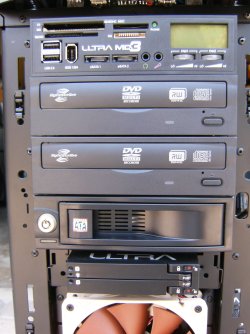
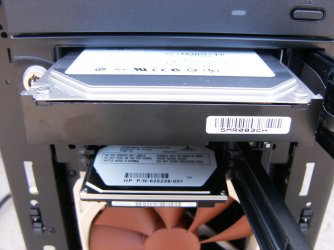
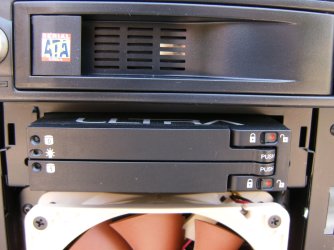
I've added three hot swap bays to the front of my desk top and I use them regularly.
How to use a hard drive as an external hard drive?-hpim2273.jpg

How to use a hard drive as an external hard drive?-hpim2274.jpg

How to use a hard drive as an external hard drive?-hpim2277.jpg
My System SpecsSystem Spec
28 Aug 2012   #7
bej

Windows 7 Home Premium SP1 64bit


I'm using four of the exact Rosewill units you referenced in the OP. They have worked perfectly for three years.
Just be sure and get the "3.5 SATA TO USB 2.0". I made a mistake, didn't look closely, and ordered one "TO USB 3.0".
Couldn't get it to work.
My System SpecsSystem Spec
28 Aug 2012   #8

Windows 7 Ultimate x64


Oh ok. Good points every one and thanks a lot for the replies

the swap bays are interesting....
My System SpecsSystem Spec
Reply

 How to use a hard drive as an external hard drive? problems?


Thread Tools


Similar help and support threads for: How to use a hard drive as an external hard drive?
Thread Forum
Samsung s2 external hard drive not loading showing local disk F drive Hardware & Devices
External Hard Drive - Drive Letter changed - unable to change back Hardware & Devices
how to make your internal hard drive into and external hard drive ? Hardware & Devices
Internal Hard Drive acting like an External Hard Drive Hardware & Devices
Change back up files from D Partitioned Drive to External Hard Drive? Performance & Maintenance


All times are GMT -5. The time now is 09:36 PM.


Seven Forums Android App Seven Forums IOS App Follow us on Facebook

Windows 7 Forums is an independent web site and has not been authorized,
sponsored, or otherwise approved by Microsoft Corporation.
"Windows 7" and related materials are trademarks of Microsoft Corp.
© Designer Media Ltd
  

1 2 3 4 5 6 7 8 9 10 11 12 13 14 15 16 17 18 19 20 21 22 23 24 25 26 27 28 29 30 31 32