Windows 7 Forums


Windows 7: Cannot do anything with unallocated space

01 Sep 2012   #1

Windows 7 Professional x64
Wyoming County, NY, USA
 
 
Cannot do anything with unallocated space

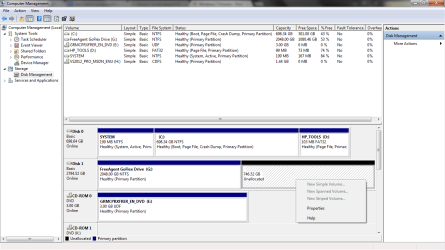
I have a 3TB external drive that I've been using for backup and general storage, and decided to make a new partition on it to keep the two things separated better. Using Windows' Disk Management tool I tried to shrink the volume by 775GB, but ended up with two new slots of unallocated space, one was about 28GB and the other is 746GB. I was able to create a new volume using the 28GB, but deleted it since it wasn't enough and extended the primary partition using that space. HOWEVER, the larger block of unallocated space I can't seem to be able to do anything with. As you can see in the screens, everything is grey'd out.
Do I need to reformat the whole drive to be able to use this space again?

Attached Thumbnails
Cannot do anything with unallocated space-unallocated-1.png   Cannot do anything with unallocated space-unallocated-2.png  
My System SpecsSystem Spec

01 Sep 2012   #2

W 7 64-bit Ultimate
The Lowcountry


Hello mate, how does Partition Wizard see that space?


Partition Wizard Free Home Edition
My System SpecsSystem Spec
01 Sep 2012   #3

Windows 7 Ultimate x64 Service Pack 1
Doncaster, UK


There is nothing wrong with what you are seeing, it is just a limitation of the MBR which means that disks larger than 2TiB (2048GiB) are only recognised up to that size limit (anything over that is not recognised, even if it is just a couple of GiB or one or more TiB). This is because the partition pointers in the MBR cannot exceed the 2TiB limit.
My System SpecsSystem Spec
.


01 Sep 2012   #4

Windows 7 64 Bit Home Premium SP1
In The Woods


It looks an awful lot like you are dealing with the legacy 2.2TB limitation in NTFS formatting. That should not be an issue since you are running Windows 7 64 bit, but perhaps it is coming up because of the external drive or an older enclosure.
Perhaps you need to utilize a driver/partitioning utility (from Paragon Software or Partition Wizard as Barefoot suggests) to use the entire drive.

See here for more info:
Everything You Need to Know About 3TB Hard Drives | PCWorld

EDIT: Yikes. It took me 6 minutes to write that? Sorry Dwarf!
My System SpecsSystem Spec
01 Sep 2012   #5

Windows 7 Professional x64
Wyoming County, NY, USA


I was able to use partition wizard to extend the drive to its full size. Thank you very much Bare Foot Kid
My System SpecsSystem Spec
01 Sep 2012   #6

W 7 64-bit Ultimate
The Lowcountry


Good to see you found a solution.
My System SpecsSystem Spec
01 Sep 2012   #7

Windows 7 64 Bit Home Premium SP1
In The Woods


Another happy customer!
Glad you got it sorted!
My System SpecsSystem Spec
01 Sep 2012   #8

Windows 7 Professional x64
Wyoming County, NY, USA


Quote   Quote: Originally Posted by TVeblen View Post
It looks an awful lot like you are dealing with the legacy 2.2TB limitation in NTFS formatting. That should not be an issue since you are running Windows 7 64 bit, but perhaps it is coming up because of the external drive or an older enclosure.
Perhaps you need to utilize a driver/partitioning utility (from Paragon Software or Partition Wizard as Barefoot suggests) to use the entire drive.

See here for more info:
Everything You Need to Know About 3TB Hard Drives | PCWorld

EDIT: Yikes. It took me 6 minutes to write that? Sorry Dwarf!
haha it took me about 15 minutes to download and install partition wizard then reply
My System SpecsSystem Spec
01 Sep 2012   #9

Windows 7 Professional x64
Wyoming County, NY, USA


also that's an interesting read TVeblen thanks for the reference. and thank you Dwarf and TVeblen for clarifying what i was seeing
My System SpecsSystem Spec
Reply

 Cannot do anything with unallocated space problems?


Thread Tools


Similar help and support threads for: Cannot do anything with unallocated space
Thread Forum
Solved Can't Use Unallocated Space Hardware & Devices
Unallocated Space? General Discussion
Unallocated 7.84 mb space materializes (from Outer Space?) General Discussion
Unallocated Space General Discussion
Unallocated Space Hardware & Devices


All times are GMT -5. The time now is 05:36 PM.


Seven Forums Android App Seven Forums IOS App Follow us on Facebook

Windows 7 Forums is an independent web site and has not been authorized,
sponsored, or otherwise approved by Microsoft Corporation.
"Windows 7" and related materials are trademarks of Microsoft Corp.
© Designer Media Ltd
  

1 2 3 4 5 6 7 8 9 10 11 12 13 14 15 16 17 18 19 20 21 22 23 24 25 26 27 28 29 30 31 32