
Windows 7 Forums


Windows 7: Asus N61Ja laptop CMOS Battery

03 Sep 2012   #1
zKs

Windows 7 Professional x64
 
 
Asus N61Ja laptop CMOS Battery

Hi,

I need to know what type of CMOS Battery is in the Asus N61Ja-JX046X laptop, because I need to replace it

Anyone here able to tell me what type it is?


ps. I've already done all the research and this is the only solution. Please do not reply with something like 'i advise against it', post if you can help me out someway, otherwise please just don't post. Thanks
My System SpecsSystem Spec

03 Sep 2012   #2

win7 ultimate 32bit


cannot find out any specifics on the CMOS battery--nor it's specific location.

you'll need to open the laptop, locate the battery--the number 'should' be on the top side of it--if you're not comfortable dismantling your machine--a shop would be useful.

you could try contacting asus about the specific battery #

try this address

cl-jeffrey@asus.com

I did find this guide--it's for a different model--but--process should be similar--see step 16 as it seems asus puts the cmos under the palmrest

http://www.insidemylaptop.com/how-to...s-k53u-laptop/
My System SpecsSystem Spec
04 Sep 2012   #3
zKs

Windows 7 Professional x64


Hi!

Thanks for your reply I will be dismantling my laptop once I get a new battery, but problem is I don't have anywhere here I can leave it 'opened up', dustfree.. so then I would have to disassemble and reassemble twice, which idno, once is already enough of a hassle for me (quite new to it).
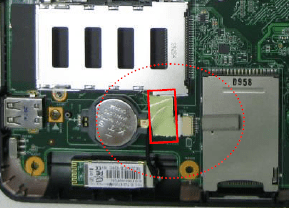
People on other forums have been saying it's probably a 3v CR 2032, but I can't be sure of course. I attached a picture a guy from the Belgian Asus TSD sent me showing me the location of the CMOS battery and that it's not soldered onto the motherboard. I do have a disassembly guide for the N61VN, which should also work for my model.

Here's a link to my initial thread about the problem, btw: Asus n61Ja bios update problem
Attached Images
 
My System SpecsSystem Spec
.


05 Sep 2012   #4

win7 ultimate 32bit


re: your post about BIOS flash--if you improperly flashed the BIOS (which it sounds like you did) you've basically killed your motherboard--the data that is written to the eProm (a chip on the MOBO) is hosed--it 'may' be able to be fixed, but you'll need to take it to a shop to see if they can dismantle the machine and connect the MOBO to 'something (?)' to fix it--other than that--you'll need a new MOBO.
the CMOS battery probably won't make any difference--because even if the CMOS battery were dead--the machine should still boot

good luck
My System SpecsSystem Spec
05 Sep 2012   #5

W7 Home Premium 32bit


Laptop motherboard batteries are almost always cr1220.
2032 is desktop size.
My System SpecsSystem Spec
05 Sep 2012   #6
zKs

Windows 7 Professional x64


Hey! I sure hope that's not the case. It actually seemed to flash the bios correctly. Finished the checking and then it shut down and wouldn't come back on. But err, look at the first post here: CMOS Battery needs to be replaced frequently - AnandTech Forums

could still be the case right

My plan is to prepare a usb stick which will auto-flash the old, 'standard' bios.. replace the cmos battery, boot with that usb stick.. well, if it will boot..
My System SpecsSystem Spec
05 Sep 2012   #7

Win 7 Pro 64-bit 7601
Italy


in case you nuked the BIOS chip, you can replace the chip with a brand-new one. (and really hope it works) these guys sold me a couple new chips I used to perform some necromancy on dead mobos after some guys screwed up big way a BIOS update.

Maybe they have the right chip for you, maybe not. Google around.

Take note that its pretty damn small and you'll have to use tiny solders to do the soldering and that it's a complete and total pain in the backside to do so even for someone with soldering experience.

Last edited by bobafetthotmail; 05 Sep 2012 at 12:57 PM..
My System SpecsSystem Spec
05 Sep 2012   #8

win7 ultimate 32bit


zKs,

"It actually seemed to flash the bios correctly. Finished the checking and then it shut down and wouldn't come back on."

if it won't come back on, then the pRom data 'may' be hosed...have you tried pulling the main battery from the laptop, letting it set awhile, putting battery back in and connecting the laptop to AC power?

CMOS batteries should last for years.
My System SpecsSystem Spec
Reply

 Asus N61Ja laptop CMOS Battery problems?


Thread Tools


Similar help and support threads for: Asus N61Ja laptop CMOS Battery
Thread Forum
Solved Battery Meter shows CMOS battery not charging Hardware & Devices
Asus n61Ja bios update problem, part 2. Please help! Hardware & Devices
Asus n61Ja bios update problem Hardware & Devices
Asus laptop battery won't charge Hardware & Devices
cmos battery replacement Hardware & Devices


All times are GMT -5. The time now is 09:37 AM.


Seven Forums Android App Seven Forums IOS App Follow us on Facebook

Windows 7 Forums is an independent web site and has not been authorized,
sponsored, or otherwise approved by Microsoft Corporation.
"Windows 7" and related materials are trademarks of Microsoft Corp.
© Designer Media Ltd
  

1 2 3 4 5 6 7 8 9 10 11 12 13 14 15 16 17 18 19 20 21 22 23 24 25 26 27 28 29 30 31 32