|  | | |
04 Sep 2012
|
#1 | | |
USB probem Hello..
I have a problem with a USB device.
When I plug it in, I can't find it in my computer. I can't get into my folders or format it.
I can see it in Device Manager and in the Device status box it said "This device is working properly."
a little help.. thank you!! | My System Specs |
| |
04 Sep 2012
|
#2 | | |
Knowing exactly what device this is may be helpful information | My System Specs | | System Manufacturer/Model Number Insane hobo technologies. ;-) OS Windows 7 x64 CPU Intel i7 2600k Motherboard Asrock z68 extreme 4 gen 3 Memory G.skill Ripjaw 16gigs @ 1866 Graphics Card Nvidia gtx580 (evga) Sound Card Integrated HD audio + hdmi Monitor(s) Displays 24" ASUS widescreen + 42" insignia Screen Resolution 1080p (1920x1080) Keyboard Microsoft wireless 3000 (v2) Mouse MS - wireless 5000 (bluetrack) PSU 1 kilowatt SLI/Crossfire rated Silverstone modular Case NZXT Phantom + additional 220 fan Cooling Zalmann Hard Drives 128 Samsung 830
256 Samsung 840
3 x 1tb storage drive (various)
1 western digital 1tb (eSATA)
1 Seagate 1tb (eSATA) Internet Speed depends on if you ask me or my provider. Other Info The above information is provided as is, and the author assumes no responsibility for issues it may cause with your sanity or fanboyism. |
04 Sep 2012
|
#3 | | |
The truth is that I can't read the name..
It is just an 4Gb usb device.
I had plug it in on my PC when I made a system update in windows and after that it stop working... (sorry for my english :S ) | My System Specs | | |
04 Sep 2012
|
#4 | | Windows 7 Ultimate 64 bit NC |
Is this a flash drive - thumb drive? | My System Specs | | System Manufacturer/Model Number Custom built OS Windows 7 Ultimate 64 bit CPU AMD Phenom II X4 940 Black Edition Motherboard Asus M4N78 Pro Memory GSkill 4 X 2 GB PC 8500 Graphics Card XFX Radeon HD 6790 D Sound Card On board VIA High Definition Audio Monitor(s) Displays Dual monitors:Samsung SyncMaster S20B300 Screen Resolution 1600 X 900 Keyboard Logitech G510 Mouse Razor DeathAdder PSU Ultra X4 750 watt fully modular Case Thermaltake Overseer RX 1 full tower Cooling Core-Contact 92 mm CPU Cooler Hard Drives Seagate Barracuda 1TB (primary)
Seagate Barracuda 2 X 320 GB Internet Speed 50/5 Mbps UL/DL Other Info Optical: Super Muliti DVD burner w/lightscribe, Hauppauge WinTV HVR-1800 |
04 Sep 2012
|
#5 | | |
according to what I read the difference is that the Thumb drives has a switch located at the bottom of the drive.
My usb has one, so Thumb drive. But I try to switch it and there is no difference. | My System Specs | | |
04 Sep 2012
|
#6 | | Win 7 Pro 64-bit 7601 Italy |
it could have lost somehow its partition. Stuff without partitions is usually hidden from the Computer menu. (so you cannot even reformat it, dumb thing)
you need to open up Disk Management and from there you can see what is happened (i.e. if there is still a partition with data or not). how to open disk management
Post a screenshot of it if you can. how to post a screenshot into sevenforums | My System Specs | | Computer type PC/Desktop System Manufacturer/Model Number custom built OS Win 7 Pro 64-bit 7601 CPU AMD Phenom 9650 Quad-Core (a revision without the bug) Motherboard ASUS M4A78 Memory 4,00 GB Graphics Card NVIDIA GeForce 9800 GT Sound Card Realtek High Definition Audio Monitor(s) Displays Fujitsu Siemens P19-3P Screen Resolution 1280 x 1024 x 32 bits @ 60 Hz Oh yeah, 4:3 rocks! Keyboard Microsoft, whatever. Mouse Optical, logitec. PSU whatever, around 450w Case Scavenged from old company PC, 10+ years old Cooling CPU fan, GPU fan, case fan, nothing fancy Hard Drives (1) MAXTOR S TM3320613AS SATA Disk Device (2) STM35004 18AS SATA Disk Device (3) TOSHIBA USB 2.5"-HDD Internet Speed effective max speeds: 70-ish kB/s down 30-ish kB/s up Antivirus Avira, free endition. Browser Firefox with FXChrome to make it look like Google Chrome Other Info Was discarded by previous owner due to "horrible performance".
Was running Win Xp from a IDE drive. Yeah. Was a pain.
SATA II drive and Win7 and it zips away! Yay! |
04 Sep 2012
|
#7 | | |
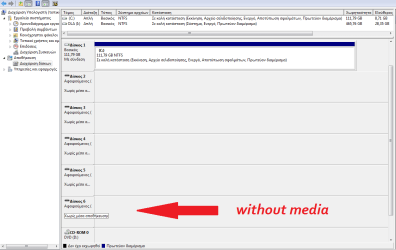
I had done that before and nothing..
It is in Greek so I put a translate...
the place with the arrow is my usb (the others are the mouse etc.)... | My System Specs | | |
04 Sep 2012
|
#8 | | |
And thank you for the detailed and helpfull description. | My System Specs | | |
04 Sep 2012
|
#9 | | Windows 7 Ultimate SP1 X64/ linux in VM NW Florida |
Helen23, I'm sorry but I can't read the language. Under drive # 6, if that word means offline, right click it and select online. | My System Specs | | Computer type PC/Desktop System Manufacturer/Model Number Home Built- Always under construction OS Windows 7 Ultimate SP1 X64/ linux in VM CPU Intel i7-3770K Motherboard Asus Maximus V Extreme Z77 Memory 8GB G.Skill Ripjaws Z DDR3-2400 (2X4GB) Graphics Card EVGA GTX 670 SC 4GB Sound Card On Board Monitor(s) Displays Asus 24" LCD Screen Resolution 1920X1080 Keyboard Logitech G510 Mouse Logitech G500 PSU CORSAIR AX850 Case Cooler Master HAF X Cooling Custom Water Cooling Hard Drives Samsung 840 Pro 256 GB, Samsung 840 Pro 256 GB, Samsung 830 256GB, Samsung HD103SJ 1TB . External HD- Black X dock esata 1TB Samsung Spinpoint, Rosewill USB 3.0 dock 1TB Samsung Spinpoint Internet Speed carrier pigeon speed Antivirus MSE/MBAM Browser ie8 Other Info 2nd Rig,Windows 7 Ultimate SP1 X64, i7-2600K, Asrock P67 Extreme 4, 8GB DDR3-2133, HAF XM case, Noctua NH-D14, Gigabyte HD6950 OC 1GB, 2 X Crucial M4 128GB, Asus 24" LED.
Laptop- Samsung RF711-SO1 17" i5-2310M, 8GB DDR3-1333, Crucial M4 and OCZ vertex2, Nvidia GT540M.Win 7 HP X64 SP1. |
05 Sep 2012
|
#10 | | |
of course you can't understand. Thank for been patient. I didn't know what you want to read to translate it..
no, it said:
device 6
removable (K: )
without data
when I right klik with my mouse I have this options:
change the letter or the root of the device...
(export (can't klik it))
properties
help
There is nowhere the option offline-online... | My System Specs | | All times are GMT -5. The time now is 04:39 AM. | |