Solved Win 7 Cannot Format Ext HD

hcour

New member
Member
Local time
3:15 AM
Messages
88
I have a Maxtor Sata 250 GB hd that I had in a computer at work that failed (the computer will no longer boot up at all, even into the bios, so I'm assuming it's not the hd). I put the hd in a Calvalry ext case and connected it to my home system via USB. The ext case works fine with other hd's, and Windows can see this drive and give it a partition, but it cannot format it or diagnose it for errors. Is the drive shot? Thanks.
 

My Computer My Computer

At a glance

Windows 7
OS
Windows 7
Can you post a screenshot of Disk Management with the drive connected?

What program are you using to diagnose it?

And what program are you using to format it?
 

My Computer My Computer

At a glance

Windows 7 Ultimate x64
OS
Windows 7 Ultimate x64
I'm just using Win 7 to try to format it. I tried diagnosing it with Seatools for Windows, it will give me info on the drive but the tests fail.

I've attached a ss of Disk Management. Drive "O".
 

Attachments

  • HD SS.jpg
    HD SS.jpg
    207.7 KB · Views: 22

My Computer My Computer

At a glance

Windows 7
OS
Windows 7
Right click on it (in the lower window) and remove its "active" flag. That should allow you to do what you want with it (format and such).

External HDD cases connected via USB and diagnostic apps can have issues, because you're converting the connection from USB to SATA/IDE. In order to fully access the drive's firmware it's best to connect directly via its native connection rather through a converter.

You can try this:

WD Support / Downloads / SATA & SAS / WD VelociRaptor
 

My Computer My Computer

At a glance

Windows 7 Ultimate x64
OS
Windows 7 Ultimate x64
When I right-clicked that option was grayed out. I ran the WD tool, they failed, except the extended test said "too many bad sectors". It also deleted the partition, disk is now "unallocated" in Disk Management and isn't even giving me the option to create a partion on right click. Everything is grayed out except Properties and Help.

So, this disk is shot?

Edit: Well, I closed and reopened Disk Management and I was able to partition it again but still can't format it. And it is no longer "active".
 

My Computer My Computer

At a glance

Windows 7
OS
Windows 7
Did WD's SMART show PASS, WARN, or FAIL?
 

My Computer My Computer

At a glance

Windows 7 Ultimate x64
OS
Windows 7 Ultimate x64
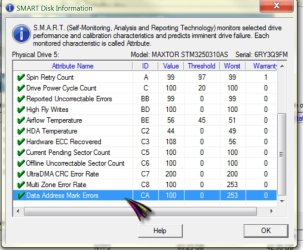
Everything on SMART has a green check next to it.

I'll post a ss of the SMART window. I don't know how to read them.
 

My Computer My Computer

At a glance

Windows 7
OS
Windows 7
Snart 1.jpg

Snart 2.jpg

Here are the SMART shots.
 

My Computer My Computer

At a glance

Windows 7
OS
Windows 7
Never used Diskpart before.
 

My Computer My Computer

At a glance

Windows 7
OS
Windows 7
The only attribute that appears to me that may be an issue is the spin retry count. Seems rather close to the threshold value.

Would've been interesting to see what the numbers were before the diagnostics were run. We should've seen some numbers change due to the bad sectors that it found. Did the test run to completion, or did it abort on its own?
 

My Computer My Computer

At a glance

Windows 7 Ultimate x64
OS
Windows 7 Ultimate x64
Aborted on its own.
 

My Computer My Computer

At a glance

Windows 7
OS
Windows 7
Try the WD test again to see if it gets any farther and to see if we can see the SMART attributes related to sector health change accordingly.

Then read through that tutorial on using Diskpart. See if you can do the clean command on that drive (not 'clean all'). Ask if you've got questions before using it.
 

My Computer My Computer

At a glance

Windows 7 Ultimate x64
OS
Windows 7 Ultimate x64
Ok. I'll have to do that tomorrow. I'll post the results then. Thanks for all your help!

Well, I went ahead and tried Diskpart. It cleaned the disk but I still can't format it after creating a partition. I tried NTFS and exFAT.
 
Last edited:

My Computer My Computer

At a glance

Windows 7
OS
Windows 7
Quite welcome of course!

Sounds like there's likely no controller/electronics problem with the disk (if the Diskpart commands completed successfully). The clean command clears out the first MB of the disk, so you can feel comfortable that that area is good. After creating the partition and then formatting it most of the writing will be done farther into the disk.

I would go ahead and do the WD test tomorrow then grab and post screenshots. If the WD test has failed again, and no one responds to your post, then try using Diskpart to see if it'll do a "clean all" command without error.

Do you get any messages after the following:

I tried NTFS and exFAT.

Post them if you can.
 

My Computer My Computer

At a glance

Windows 7 Ultimate x64
OS
Windows 7 Ultimate x64
Ok, it just seems to be something glitchy between this particular hd and the ext case (which works fine with other hd's). I disconnected one of my internal hd's, connected the Maxtor, and Windows formatted and read it fine. When I connected it back to the ext case, the tests won't run, a msg popped up saying I needed to format the drive, but it's still formatted and I can still read and write files on it.

So I'm going to connect it back as an internal drive and then run the tests to make sure it's ok before I use it for a backup. Which test should I run, the quick or extended?
 

My Computer My Computer

At a glance

Windows 7
OS
Windows 7
I'd run the extended, if you really want to know how reliable it can be. Keep note of those SMART numbers.

Another good piece of software to use to monitor drive health over time (SMART doesn't do it on its own); it can keep track of those SMART numbers for you:

CrystalDiskInfo - Software - Crystal Dew World

Download the portable version to avoid add on advertising software.
 

My Computer My Computer

At a glance

Windows 7 Ultimate x64
OS
Windows 7 Ultimate x64
Will do. Thanks again.
 

My Computer My Computer

At a glance

Windows 7
OS
Windows 7
You're welcome. Let us know how it goes.
 

My Computer My Computer

At a glance

Windows 7 Ultimate x64
OS
Windows 7 Ultimate x64
Back
Top