Stuck with 2 32GB usbs that won't function!

salmanftw

New member
Local time
1:44 PM
Messages
5
Hello everyone,

I have 2 usbs that I got from my dad. He mentioned that weren't working.
The first one just won't format, it says that the disk is right protected.


And the second one says that the USB device is not recognized. It shows this in the device manager.


Would appreciate if I could get some help with these or are they done and dusted?
They appear to be of strange brands, the first being from '7dayshop.com' and the 2nd from 'conteck'.

I am an a-level student and heavily reliant on the capacity of these USBs, and have to use an 8GB sandisk (which isn't too bad).

Cheers ;)
 

My Computer My Computer

At a glance

Windows 7 64 Bit
OS
Windows 7 64 Bit
Go to Computer, and right click on your USB drive and click on 'Properties'. Once there go to the 'Security' tab (top of window). Below 'Permissions for authenticated users' there is an 'Advanced' button. Click on it. On the 'Owners' tab, there should be an 'Edit' button. Now, select your username in the bottom box, and make sure the checkbox at the bottom is checked. Click on okay, then once it has changed ownership, click on Ok on all 'Properties' windows. You should now have full control of your USB memory stick.
 

My Computer My Computer

At a glance

Windows 7 Home PreQ8200 Intell 2.333DDR3 1333 4gigAti HD4870
Computer Manufacturer/Model Number
Home Build.
OS
Windows 7 Home Pre
CPU
Q8200 Intell 2.333
Motherboard
Asus P5Q3 Delux
Memory
DDR3 1333 4gig
Graphics Card(s)
Ati HD4870
Sound Card
Onboard Soundmax. 7.1
Monitor(s) Displays
1, 20" Samsung
Screen Resolution
1600/900
PSU
Good enough
Case
Le Shark
Cooling
FAN FAN FAN FAN, Thermaltake Minitype 90 with speed fan 4.
Keyboard
Standard, Gaming Wolfking
Mouse
Cm-storm-inferno-wired-gaming-mouse
Internet Speed
Sky Crappy upto 20meg I get a whapping 5.8mbs.

My Computer My Computer

At a glance

win 7 ultimate32bit, Win8.1pro wmc 32bitamd phenom x4 9600corsair twinxs 2x2gb2x nvidia 1gb 8500gt
Computer type
PC/Desktop
Computer Manufacturer/Model Number
self build
OS
win 7 ultimate32bit, Win8.1pro wmc 32bit
CPU
amd phenom x4 9600
Motherboard
asus m2n32-sli deluxe
Memory
corsair twinxs 2x2gb
Graphics Card(s)
2x nvidia 1gb 8500gt
Sound Card
onboard
Monitor(s) Displays
23" PB Viseo 233d
Screen Resolution
1920x1080
Hard Drives
maxtor sata 500gb
maxtor sata 320gb
fujitsu sata200gb
PSU
oryxx tornado 750w
Case
thermaltake xaser lll
Cooling
artic freezer64 pro + 7 case fans
I dont see a security option when i click properties on the usb,
 

My Computer My Computer

At a glance

Windows 7 64 Bit
OS
Windows 7 64 Bit
Hi Salmanftw,

(My last post of the day before retiring.)

I shall limit myself to the "write-protected" pendrive.

If the pendrive has been used for quite sometime, has been behaving normally for that time, and has turned "write-protected" one day all of a sudden, it means only one thing. It has become unusable.

The theory behind:

All pendrives have a certain fixed and finite number of reserved sectors wherein the bad sectors are remapped automatically as and when weak cells are generated due to normal wearing of the cells. When the reserved sectors are exhausted and it cannot take in any further bad sectors, the flash controller chip's safety mechanism is triggered and makes the drive write protected. You can no longer write to it since the data integrity cannot be ensured. With more bad sectors created and no reserve sectors available any longer, your files will only get corrupted, if you are allowed to write.

So .....throw it away.

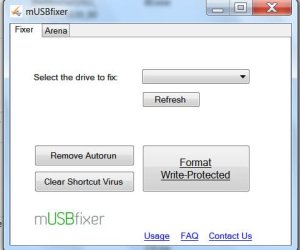
If you still insist, there is a recent program mUSBfixer which says it can remove write protection. Download it and try. Be aware that during installation it will ask for installing many other crapware, search/tool bars. Say no to them.

mUSBfixer.in

musbfixer.jpg

Even if you succeed in removing write-protection , be aware that data integrity cannot be guaranteed. You do at your own risk. :)
 

My Computer My Computer

At a glance

Windows 7 Home Premium 32 bit
OS
Windows 7 Home Premium 32 bit
Thanks for your response.

I dont have any data on either usbs. I just want to virginfy them both.
 

My Computer My Computer

At a glance

Windows 7 64 Bit
OS
Windows 7 64 Bit

My Computers My Computers

  • At a glance

    7 X64i5 84002x8gb 3200mhz
    Computer type
    PC/Desktop
    OS
    7 X64
    CPU
    i5 8400
    Motherboard
    gigabyte b365m ds3h
    Memory
    2x8gb 3200mhz
    Hard Drives
    various
    PSU
    pure power 11 400w cm
    Case
    Coolermaster
    Cooling
    cryorig m9i
  • At a glance

    7x64g54008gb ddr4 2400
    Computer type
    PC/Desktop
    OS
    7x64
    CPU
    g5400
    Motherboard
    ga b365m ds3h
    Memory
    8gb ddr4 2400
    PSU
    xfx pro 450w
Tried it, it claims to be formatted but the same issue arises.
 

My Computer My Computer

At a glance

Windows 7 64 Bit
OS
Windows 7 64 Bit
Might be fake usb sticks - it happens.

There may be one or two other utilities you could find by googling , but it's a long shot.
 

My Computers My Computers

  • At a glance

    7 X64i5 84002x8gb 3200mhz
    Computer type
    PC/Desktop
    OS
    7 X64
    CPU
    i5 8400
    Motherboard
    gigabyte b365m ds3h
    Memory
    2x8gb 3200mhz
    Hard Drives
    various
    PSU
    pure power 11 400w cm
    Case
    Coolermaster
    Cooling
    cryorig m9i
  • At a glance

    7x64g54008gb ddr4 2400
    Computer type
    PC/Desktop
    OS
    7x64
    CPU
    g5400
    Motherboard
    ga b365m ds3h
    Memory
    8gb ddr4 2400
    PSU
    xfx pro 450w
Might be fake usb sticks - it happens.

There may be one or two other utilities you could find by googling , but it's a long shot.
Yep I agree, they both seem to be from un-reputable manufacturers.

Thanks for your help!
 

My Computer My Computer

At a glance

Windows 7 64 Bit
OS
Windows 7 64 Bit
Back
Top