| Windows 7: Query i5 2500K or i5 3750K? |
08 Oct 2012
|
#1 | | Desk1 7 Home Prem / Desk2 7 Home Prem / Laptop 7 Pro all 64bit |
Query i5 2500K or i5 3750K? Have just been asked which is best for new build (see title).
I am new building and getting stuff together and have my board - Asus P8Z77-V and was intending to get the Ivy Bridge but have seen a few Googles where the Sandy Bridge comes out a tad better than the Ivy Bridge.
So now I am wondering what to do / get?? | My System Specs |
| Computer type PC/Desktop System Manufacturer/Model Number Own build (new) Desk1 / Toshiba L550 / Desk2 1st build OS Desk1 7 Home Prem / Desk2 7 Home Prem / Laptop 7 Pro all 64bit CPU Desk1 i5 3750K / Laptop i5 430m / Desk2 i5 2500 Motherboard Desk1 Asus P877-V / Desk2 Gigabyte H67 UD3H / Laptop ? Memory Desk1 8GB (1866) / Desk2 16GB (1333) / Laptop 8Gb DDR3 Graphics Card Desk 1& 2NVidia GTX 650 & Laptops on board Intel Sound Card Desk 1 & 2 -XONAR DG Realtek High Def audio Laptop Monitor(s) Displays Desk 1 Benq HD 2450 / Desk2 Philips 24" / Laptop 17.5" Screen Resolution 1920x1080 D1 & D2 Keyboard Desk 1 MS Sidewinder X6 Desk 2 MS Sidewinder X 4 Mouse Desk 1&2 - Gigabyte MS 900 gamer - laptop - Logitec wireless PSU Desk 1 Corsair HX 1050/ Laptop ? / Desk 2 Corsair HX 650 Case Desk 1 Cooler HAF XM ? Toshiba laptop / Desk2 Coolermaster Cooling Fans on all Desk1 -2 Desk2 - all Coolermasters 5 Laptop ? Hard Drives Desk1 Samsung 120GB 830 SSD
Toshiba Crucial 120GB SSD
Desk2 Samsung 120GB 830 SSD Internet Speed ADSL2+ Other Info One other Desktop (tester) and spare Toshba laptop both with SSD's
Running Kaspersky 2011 ISS on all machines config'd identically
Logitec audio stereo systems on each machine (x3)
Canon MG5250MFC
Router/modem TP-Link running WPA2SK |
08 Oct 2012
|
#2 | | Windows 7 64 Bit Home Premium SP1 In The Woods |
I say Ivy Bridge.
2 Reasons: native USB 3.0 support and PCI-e 3.0. | My System Specs | | Computer type PC/Desktop System Manufacturer/Model Number Home Built - Jan 2013 OS Windows 7 64 Bit Home Premium SP1 CPU i7-3820 Motherboard Asus P9X79-PRO - Bios 3305 Memory GSkill F3-14900CL9Q - 16GB Graphics Card EVGA GeForce GTX660 - Driver 310.90 Sound Card On board Realtek ALC898 Monitor(s) Displays Acer S271HL Screen Resolution 1920 x 1080 Keyboard MS KC-0405 Mouse Intellimouse 5-button PSU Corsair CMPSU-850TX-V2 - 850 watt (by Seasonic) Case Corsair Obsidian 550D Cooling Standard 3 120mm case fans, Cooler Master Hyper 212 EVO Hard Drives #1- Samsung 840 Pro Series
#2- Western Digital WD1002FAEX Sata3 Black
#3- Western Digital WD1002FAEX Sata3 Black Internet Speed 25Mbits/Sec (on a good day) Antivirus Avast & Malwarebytes Browser Firefox Other Info Asus DVD - DRW-24B1ST 24X |
08 Oct 2012
|
#3 | | Windows 7 SP1, Home Premium, 64-bit |

Quote: Originally Posted by ICit2lol So now I am wondering what to do / get??  Didn't you post recently that you originally built an i5-2500 and felt it was a mistake and that you should have gone with something stronger? | My System Specs | | System Manufacturer/Model Number Ignatz Special; 4 speed manual gearbox; factory air conditioning; one of one OS Windows 7 SP1, Home Premium, 64-bit CPU Intel Sandy Bridge i5-2500, not overclocked Motherboard Gigabyte H67A-UD3H-B3, full ATX Memory 4 GB Crucial DDR3-1333 Graphics Card none; graphics are integrated on CPU Sound Card onboard: Realtek ALC892; external: USB Behringer UF0-202 Monitor(s) Displays NEC 90GX2-BK 19" LCD Screen Resolution 800 x 640 Keyboard Leopold Tenkeyless with Cherry Blue switches, USB Mouse Logitech or Microsoft optical wired; either USB or PS 2 PSU Seasonic SS-560KM, modular Case Antec Solo II Cooling CPU: Scythe Big Shuriken; Case: Scythe Slipstream 800 & 500 Hard Drives System: Intel 320 Series SSD, 80 GB;
Data: Samsung Spinpoint 103SJ, 1 TB;
Backup: WD Caviar Green WD15EADS-00P8B0, 1.5TB Other Info Power consumption of this system, including monitor: 68 watts at idle; 144 watts at full load |
08 Oct 2012
|
#4 | | Desk1 7 Home Prem / Desk2 7 Home Prem / Laptop 7 Pro all 64bit |
Yes ignatzatsonic I did that was a build I did about a year ago now when the choice was a H67 or P67 board and as I was not intending to do any graphical stuff I thought I would get out of it cheaper. But now am kicking myself for going that way because I have been playing around a bit with graphics and want to try overclocking too.( In hindsight I wasn't thinking too bright eh?)
So I Googled SB v IB and it sort of seemed that the 2500K had the grunt and the 3750K had the graphics and not so much grunt. As I intend as does a friend who is doing a very similar build - to use a GTX 650 GPU I thought well get the CPU with the grunt as the card will take care of the graphics.
TV the current 2500 handles 3.0 USB and I am not sure what is meant by native support in the Ivy Bridge - is that better than what I have now?
I suppose the other thing that was swaying me at first towards the Ivy Bridge was the lower power consumption too. | My System Specs | | Computer type PC/Desktop System Manufacturer/Model Number Own build (new) Desk1 / Toshiba L550 / Desk2 1st build OS Desk1 7 Home Prem / Desk2 7 Home Prem / Laptop 7 Pro all 64bit CPU Desk1 i5 3750K / Laptop i5 430m / Desk2 i5 2500 Motherboard Desk1 Asus P877-V / Desk2 Gigabyte H67 UD3H / Laptop ? Memory Desk1 8GB (1866) / Desk2 16GB (1333) / Laptop 8Gb DDR3 Graphics Card Desk 1& 2NVidia GTX 650 & Laptops on board Intel Sound Card Desk 1 & 2 -XONAR DG Realtek High Def audio Laptop Monitor(s) Displays Desk 1 Benq HD 2450 / Desk2 Philips 24" / Laptop 17.5" Screen Resolution 1920x1080 D1 & D2 Keyboard Desk 1 MS Sidewinder X6 Desk 2 MS Sidewinder X 4 Mouse Desk 1&2 - Gigabyte MS 900 gamer - laptop - Logitec wireless PSU Desk 1 Corsair HX 1050/ Laptop ? / Desk 2 Corsair HX 650 Case Desk 1 Cooler HAF XM ? Toshiba laptop / Desk2 Coolermaster Cooling Fans on all Desk1 -2 Desk2 - all Coolermasters 5 Laptop ? Hard Drives Desk1 Samsung 120GB 830 SSD
Toshiba Crucial 120GB SSD
Desk2 Samsung 120GB 830 SSD Internet Speed ADSL2+ Other Info One other Desktop (tester) and spare Toshba laptop both with SSD's
Running Kaspersky 2011 ISS on all machines config'd identically
Logitec audio stereo systems on each machine (x3)
Canon MG5250MFC
Router/modem TP-Link running WPA2SK |
08 Oct 2012
|
#5 | | Windows 7 64 Bit Home Premium SP1 In The Woods |
USB 3.0 was integrated into the Sandy Bridge system boards by the manufacturers if they decided to do so. But this was an add-on system, much like a secondary SATA controller, and there were a lot of issues with performance in the system.
Ivy Bridge chipsets have USB 3.0 built in. So it is a part of the Intel system and should perform better. The only problem is the Intel chipset only allows for 2 ports. | My System Specs | | Computer type PC/Desktop System Manufacturer/Model Number Home Built - Jan 2013 OS Windows 7 64 Bit Home Premium SP1 CPU i7-3820 Motherboard Asus P9X79-PRO - Bios 3305 Memory GSkill F3-14900CL9Q - 16GB Graphics Card EVGA GeForce GTX660 - Driver 310.90 Sound Card On board Realtek ALC898 Monitor(s) Displays Acer S271HL Screen Resolution 1920 x 1080 Keyboard MS KC-0405 Mouse Intellimouse 5-button PSU Corsair CMPSU-850TX-V2 - 850 watt (by Seasonic) Case Corsair Obsidian 550D Cooling Standard 3 120mm case fans, Cooler Master Hyper 212 EVO Hard Drives #1- Samsung 840 Pro Series
#2- Western Digital WD1002FAEX Sata3 Black
#3- Western Digital WD1002FAEX Sata3 Black Internet Speed 25Mbits/Sec (on a good day) Antivirus Avast & Malwarebytes Browser Firefox Other Info Asus DVD - DRW-24B1ST 24X |
08 Oct 2012
|
#6 | | Windows 7 Professional 64bit SP1 Kentucky |
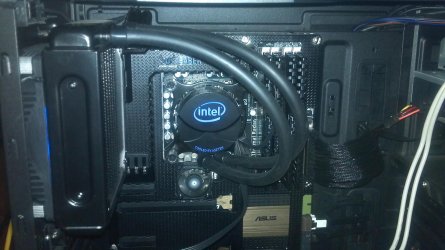
3570K........it is an absolute beast. While SB can hit higher OC numbers ON AVERAGE, IB can reach damn near the same numbers and runs 10-15% more efficient. Basically 4.6GHz IB is equivalent to a SB clocked at 4.8GHz..........that is a basic generalization I've read on many hardware reviewer sites. The 3570K will be able to handle anything you throw at it without breaking a sweat, no question about that. Plus, you have the Z77 motherboard so you get the new technology upgrades that come with that. I know Z77 and Ivy Bridge CPU's utilize RAM more efficiently as well as USB 3.0 and PCI Express 3.0 which was mentioned earlier. Anybody that said that the 3570K doesn't have as much "grunt" as the 2500K is outside their mind. Go with the 3570K with the HD 4000 graphics, figure out how to use the 4000 graphics along with your discrete graphics card, and rock on. Should be a no-brainer since you already have the Z77 motherboard. | My System Specs | | Computer type PC/Desktop System Manufacturer/Model Number Custom Built OS Windows 7 Professional 64bit SP1 CPU Intel Core i5-3570K @ 4.5GHz Motherboard Asus Sabertooth Z77 Memory Corsair Vengeance 16GB (4x4) @1866MHz Graphics Card Intel HD4000 Sound Card Onboard Audio Monitor(s) Displays Dell S2309W Screen Resolution 1920x1080 Keyboard Max Nighthawk X8 Mechanical keyboard Mouse Logitech MX 500 Wired PSU Seasonic X750 80+ Gold Full Modular Case Antec Eleven Hundred Super Mid Tower Cooling Intel Liquid Cooler Hard Drives Samsung 830 128GB SSD - OS
2 x 2TB Seagate Barracuda 7200.14 HDD - Storage Internet Speed 50Mbps DL / 10Mbps UL Antivirus Microsoft Security Essentials Browser Chrome/Firefox Other Info Klipsch ProMedia 2.1's
Asus RT-N66R Wireless Router |
08 Oct 2012
|
#7 | | Windows 7 Home Premium 64 bit Illinois |
It sounds like a step backwards to have a Z77 board and put a Sandy Bridge chip in it, when you can get an Ivy Bridge.
From a gaming standpoint it might make sense, but in terms of having the new technology, go Ivy Bridge. | My System Specs | | System Manufacturer/Model Number Self-built OS Windows 7 Home Premium 64 bit CPU Intel Core i7-3770 Motherboard MSI Z77A-G45 Memory G.SKILL 8GB (2 x 4GB) DDR3 F3-10666CL9D-8GBNT Graphics Card Sapphire ATI Radeon HD 6670 Sound Card On-Board Realtek Monitor(s) Displays Samsung SyncMaster P2370HD, Dell 1703FPT Screen Resolution 1920 x 1080, 1280 x 1024 Keyboard Logitech K270 Mouse Logitech M705 PSU SeaSonic M12II SS-500GM Case Lian Li PC-9F Cooling Zalman CNPS9900ALED Hard Drives Samsung HD103SJ Internet Speed 16 Mbps Other Info Bose Companion 2 Multimedia Speakers |
08 Oct 2012
|
#8 | | Windows 7 Professional 64bit SP1 Kentucky |
With a Z77 mobo, there is no reason whatsoever to go with a 2500K, unless you have a friend that is willing to sell it to you on the cheap.......because he has upgraded to the 3570K. If you are straight up buying a new CPU and you aren't counting every penny, get the 3570K. | My System Specs | | Computer type PC/Desktop System Manufacturer/Model Number Custom Built OS Windows 7 Professional 64bit SP1 CPU Intel Core i5-3570K @ 4.5GHz Motherboard Asus Sabertooth Z77 Memory Corsair Vengeance 16GB (4x4) @1866MHz Graphics Card Intel HD4000 Sound Card Onboard Audio Monitor(s) Displays Dell S2309W Screen Resolution 1920x1080 Keyboard Max Nighthawk X8 Mechanical keyboard Mouse Logitech MX 500 Wired PSU Seasonic X750 80+ Gold Full Modular Case Antec Eleven Hundred Super Mid Tower Cooling Intel Liquid Cooler Hard Drives Samsung 830 128GB SSD - OS
2 x 2TB Seagate Barracuda 7200.14 HDD - Storage Internet Speed 50Mbps DL / 10Mbps UL Antivirus Microsoft Security Essentials Browser Chrome/Firefox Other Info Klipsch ProMedia 2.1's
Asus RT-N66R Wireless Router |
08 Oct 2012
|
#9 | | Desk1 7 Home Prem / Desk2 7 Home Prem / Laptop 7 Pro all 64bit |
Thanks everyone that explanation of the 3.0 was really what I needed to know so am going the 3570K
As it is my usual supplier has dropped the 2500K and also the 3570K price too from $245 to $233
I can honestly say from these few posts I have gained so much and again I cannot thank you folks enough | My System Specs | | Computer type PC/Desktop System Manufacturer/Model Number Own build (new) Desk1 / Toshiba L550 / Desk2 1st build OS Desk1 7 Home Prem / Desk2 7 Home Prem / Laptop 7 Pro all 64bit CPU Desk1 i5 3750K / Laptop i5 430m / Desk2 i5 2500 Motherboard Desk1 Asus P877-V / Desk2 Gigabyte H67 UD3H / Laptop ? Memory Desk1 8GB (1866) / Desk2 16GB (1333) / Laptop 8Gb DDR3 Graphics Card Desk 1& 2NVidia GTX 650 & Laptops on board Intel Sound Card Desk 1 & 2 -XONAR DG Realtek High Def audio Laptop Monitor(s) Displays Desk 1 Benq HD 2450 / Desk2 Philips 24" / Laptop 17.5" Screen Resolution 1920x1080 D1 & D2 Keyboard Desk 1 MS Sidewinder X6 Desk 2 MS Sidewinder X 4 Mouse Desk 1&2 - Gigabyte MS 900 gamer - laptop - Logitec wireless PSU Desk 1 Corsair HX 1050/ Laptop ? / Desk 2 Corsair HX 650 Case Desk 1 Cooler HAF XM ? Toshiba laptop / Desk2 Coolermaster Cooling Fans on all Desk1 -2 Desk2 - all Coolermasters 5 Laptop ? Hard Drives Desk1 Samsung 120GB 830 SSD
Toshiba Crucial 120GB SSD
Desk2 Samsung 120GB 830 SSD Internet Speed ADSL2+ Other Info One other Desktop (tester) and spare Toshba laptop both with SSD's
Running Kaspersky 2011 ISS on all machines config'd identically
Logitec audio stereo systems on each machine (x3)
Canon MG5250MFC
Router/modem TP-Link running WPA2SK |
08 Oct 2012
|
#10 | | Windows 7 Professional SP1 - x64 Lost In Space, Vol 8-New Kind Of Kick |

Quote: Originally Posted by ICit2lol Thanks everyone that explanation of the 3.0 was really what I needed to know so am going the 3570K
As it is my usual supplier has dropped the 2500K and also the 3570K price too from $245 to $233
I can honestly say from these few posts I have gained so much and again I cannot thank you folks enough  May have a look there if you don't already know it... Ivy Bridge Overclocking Guide
Choosed IB more for the HD Graphics & pci-e 3.0, than overclocking | My System Specs | | Computer type PC/Desktop System Manufacturer/Model Number [May-Dec-2012] - New Mid-tower - (is done!) OS Windows 7 Professional SP1 - x64 CPU Ivy Bridge Core i5 K Motherboard Asus H77 Chipset (ATX) Memory G.Skill DDR3 PC3-12800 (16Gb) Graphics Card Sapphire HD 7770 Vapor-X Oc Sound Card SBXi-Fi Xtreme Audio (w/5.1 sound system) Monitor(s) Displays Asus Led 21,5" Screen Resolution 16/9 Keyboard Razer + Razer gamepad Mouse Razer PSU 700w 80+ Gold (ErP 6 ready) Case Cooler Master Silencio 550-v2 (modded) Cooling Gelid Solutions (PWM Push/pull Fans) Hard Drives Internal:
500Go Sata 6Gb/s (x2)
500Go Sata 3Gb/s (x2)
SSD 60Go Sata 6Gb/s Antivirus MSE 4.2 Browser IE10 Rtm Query i5 2500K or i5 3750K? problems? All times are GMT -5. The time now is 04:07 AM. | |