Solved Windows won't boot of SSD

srikns

New member
Local time
2:30 AM
Messages
3
I got a new SSD OCZ vertex4 few months back and replaced my HDD and installed Windows 7 64b on it and everything was fine until last week. I downloaded last weeks windows update and since then my computer would not boot. It will go to repair window and always fails with various reason ( corrupt driver files ( different everytime ) or OS bootloader not found etc). System restore or even format and re-install has not helped. I mean windows will install properly but as soon as i download the updates and reboot it will go into repair/recovery. I ran disk checker and everything looks ok. I replaced it with my old HDD and things came up fine and I can even access my SSD as disk. I even tried raw copy of HDD to SSD and tried to boot off of SSD and same issue. not sure if it is some kind driver conflict or what but after the initial install of windows 7, which seems to be ok, it goes into repair state after the update install.


Any idea
 

My Computer My Computer

At a glance

windows 7 64 bit
OS
windows 7 64 bit
Have you checked that you have the latest OCZ firmware for your SSD?

I assume you are installing all the last Patch Tuesday (Oct 9, 2012) updates together and that is causing your problem.
Get a clean running OS on the SSD and then install one Windows update at a time to determine which update is causing your problem.
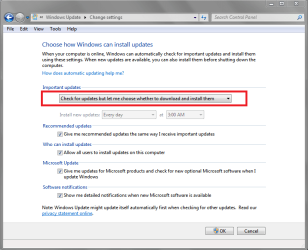
You probably need to set Windows Update to allow you to install updates rather than let Windows do automatic updates (see screen print below).
I also assume you don't have any personal data on the SSD OS partition that you can not afford to lose.

You should be able to create a System Image Backup of your HD OS partition and Restore it to the SSD.
This tutorial by whs explains this.
http://www.sevenforums.com/tutorials/149969-ssd-install-transfer-operating-system.html

These tutorials explain how to create a System Image:
http://www.sevenforums.com/tutorials/663-backup-complete-computer-create-image-backup.html by Brink
http://www.sevenforums.com/tutorials/73828-imaging-free-macrium.html by whs

I reccommend Macrium over the Windows Backup Image utility.
It's easier to use and you have more control.
If you have a WD or Seagate HD you can also get a free version of Acronis for imaging.

When you do get a clean system you should initially and periodically create a system image backup.
That way you can recover without re-installing Windows and all programs.

WUSP01.PNG

Welcome to Seven Forums and hope this helps,
David
 

My Computer My Computer

At a glance

Multi-Boot W7_Pro_x64 W8.1_Pro_x64 W10_Pro_x6...AMD Athlon II x4 6206GB GSkill DDR2 800AMD 4670 GPU + AMD 4200 IGP
Computer type
PC/Desktop
Computer Manufacturer/Model Number
home built
OS
Multi-Boot W7_Pro_x64 W8.1_Pro_x64 W10_Pro_x64 +Linux_VMs +Chromium_VM
CPU
AMD Athlon II x4 620
Motherboard
Gigabyte GA-MA785G-UD3H
Memory
6GB GSkill DDR2 800
Graphics Card(s)
AMD 4670 GPU + AMD 4200 IGP
Sound Card
on board Realtek ALC889A
Monitor(s) Displays
RCA 40" LCD TV, Insignia 32" LCD TV, HP 15" LCD monitor
Screen Resolution
1680 x 1050
Hard Drives
OCZ Vertex 3 120GB,
Samsung F3 1TB (3),
Several others - WD, Seagate, Hitachi, ...
PSU
Corsair 500 W
Case
Rosewill mid tower
Cooling
CM 90mm rifle
Keyboard
Gyration wireless, Logitech wireless, Dell USB wired
Mouse
Gyration wireless, Logitech wireless, V7 USB wired
Internet Speed
Spectrum - 100Mbps D / 10Mbps U
Antivirus
Avast, MBAM3, EMET, WinPatrol
Browser
Pale Moon, Firefox, IE
Other Info
2 multi-boot PC's
Mainly HTPC/Office/Gen purpose (no gaming).
Trendnet USB KVM.
LG DVD burner/Blue Ray Player.
Tray system for removable SATA backup drives.

Not currently OCd, under-volted.
I use Hybrid sleep, rarely re-boot or shutdown.

Hauppauge HD-PVR, Avermedia PCIe TV Tuner, Hauppauge PCI TV Tuner.
So configured it to update manually and selected my own update one by one. first I selected all 2011 update and it went fine ok i.e it installed and rebooted fine. Next I tried installing updates upto Mar 2012 and it blew up.

I thought I had it figured out and did a clean reinstall one more time ( diskpart, select disk 0, clean and install). i tried narrowing it down the offending update but unfortunately this time one of the 2011 update killed the windows :(.
 

My Computer My Computer

At a glance

windows 7 64 bit
OS
windows 7 64 bit
So, you have no problems using the HD OS, right?
You only have problems when using the SSD as the OS partition?

To me that sounds like all PC hardware is ok when using the HD as the OS partition.
The problem is with the SSD, when using it for the OS partition.
And, you have run check disk and diagnostics on the SSD...?

Did you check that you have the latest SSD firmware?
Did you disconnect the HD when installing the OS on the SSD?

You could also try a BIOS reset after you connect the SSD for the OS install.
Just make sure you have the correct mode set (IDE, AHCI, or RAID) especially if you restore the OS.
AHCI is the preferred mode for an SSD, single drive.

You could also try downloading and burning a new OS ISO image with SP1 to use for an install.
This tutorial by gregrocker has instructions for this:
http://www.sevenforums.com/tutorials/219487-clean-reinstall-factory-oem-windows-7-a.html

After a clean install you could run a System File Check to make sure there are no issues found.
http://www.sevenforums.com/tutorials/1538-sfc-scannow-command-system-file-checker.html by Brink.

Beyond this, I'm out of ideas :(
If none of this helps I'd ask OCZ and RMA if needed.
 

My Computer My Computer

At a glance

Multi-Boot W7_Pro_x64 W8.1_Pro_x64 W10_Pro_x6...AMD Athlon II x4 6206GB GSkill DDR2 800AMD 4670 GPU + AMD 4200 IGP
Computer type
PC/Desktop
Computer Manufacturer/Model Number
home built
OS
Multi-Boot W7_Pro_x64 W8.1_Pro_x64 W10_Pro_x64 +Linux_VMs +Chromium_VM
CPU
AMD Athlon II x4 620
Motherboard
Gigabyte GA-MA785G-UD3H
Memory
6GB GSkill DDR2 800
Graphics Card(s)
AMD 4670 GPU + AMD 4200 IGP
Sound Card
on board Realtek ALC889A
Monitor(s) Displays
RCA 40" LCD TV, Insignia 32" LCD TV, HP 15" LCD monitor
Screen Resolution
1680 x 1050
Hard Drives
OCZ Vertex 3 120GB,
Samsung F3 1TB (3),
Several others - WD, Seagate, Hitachi, ...
PSU
Corsair 500 W
Case
Rosewill mid tower
Cooling
CM 90mm rifle
Keyboard
Gyration wireless, Logitech wireless, Dell USB wired
Mouse
Gyration wireless, Logitech wireless, V7 USB wired
Internet Speed
Spectrum - 100Mbps D / 10Mbps U
Antivirus
Avast, MBAM3, EMET, WinPatrol
Browser
Pale Moon, Firefox, IE
Other Info
2 multi-boot PC's
Mainly HTPC/Office/Gen purpose (no gaming).
Trendnet USB KVM.
LG DVD burner/Blue Ray Player.
Tray system for removable SATA backup drives.

Not currently OCd, under-volted.
I use Hybrid sleep, rarely re-boot or shutdown.

Hauppauge HD-PVR, Avermedia PCIe TV Tuner, Hauppauge PCI TV Tuner.
Hi
Thanks for your response, after abt 3/4 days of struggle and wandering in dark, finally managed to figure that it was the BIOS issue. Once I flashed my BIOS yesterday from A06 to A12 ( on Dell latitude 6510) the SSD and dell and good friends again. SSD seems to be a happy camper

thanks all for your help
 

My Computer My Computer

At a glance

windows 7 64 bit
OS
windows 7 64 bit
Back
Top