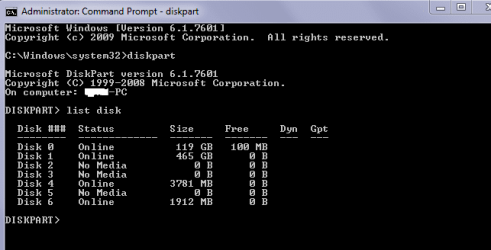
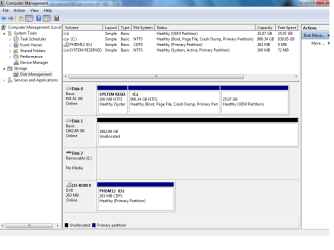
The usb port got disconnected from the board. Minutes before this the drive was working fine. Took the case off and tried the drive in an external dock, also tried plugging it into the computer using sata cables. Both times the computer said installing new driver software sucessful but the drive never popped up. Any suggestions on how to solve this problem?
My Computer
At a glance
Microsoft Windows 7 Home Premium 64-bit 7601 ...Intel(R) Core(TM) i3-2120 CPU @ 3.30GHz8.00 GBIntel(R) HD Graphics
- Computer Manufacturer/Model Number
- Lenovo Desktop PC
- OS
- Microsoft Windows 7 Home Premium 64-bit 7601 Multiprocessor Free Service Pack 1
- CPU
- Intel(R) Core(TM) i3-2120 CPU @ 3.30GHz
- Motherboard
- LENOVO MAHOBAY
- Memory
- 8.00 GB
- Graphics Card(s)
- Intel(R) HD Graphics
- Sound Card
- (1) Realtek High Definition Audio (2) Intel(R) Display Aud
- Hard Drives
- (1) ST31000524AS (2) WDC WD20EARS-00MVWB0 (3) HP Photosmart 6510 USB Device