| Windows 7: poor SSD write performance |
05 Nov 2012
|
#1 | | |
poor SSD write performance I just discovered that my Samsung SSD (830 series, MZ-7PC064D/EU) shows a very poor write performance (161 MB) though my read performance is pretty fair (448 MB).
[IMG]http://s11.**************/qkuuvairn/05_11_2012_20_59_46.png[/IMG]
I searched the web for a while now and tried every suggestion anyone wrote - nothing worked, my speed stays low (in comparison to values other users of this SSD get: ~500MB read ~300MB write - without RAID!)
Here are my system specifications:
Mainboard: M4A87TD EVO
CPU: AMD Phenom II X6 1055T
RAM: 8GB 1333 MHz
OS: Windows 7 Ultimate 64bit, up to date
My SSD is plugged into the first SATA connector. All my drivers, my BIOS and the SSD's firmware are the latest ones, TRIM and AHCI are activated, all the usual SSD tweaks have been made (no defragmentation, no search indexing etc.).
I tried: - using the Microsoft AHCI driver instead of the AMD SATA one
- disabling the write cache
- installing the latest chipset drivers provided on AMD's website
- installing the latest chipset drivers provided on ASUS' website
- forcing SATA 6gb/s support in the BIOS
I really don't know what I should try next - any suggestions? | My System Specs |
| OS Windows 7 Ultimate x64 CPU AMD Phenom II X6 1055T Motherboard Asus M4A87TD EVO Memory Kingston Hyper X 1333 4 GB Graphics Card Ati Radeon 5750 XXX Sound Card EMU 0404 USB Monitor(s) Displays Samsung P2450 Screen Resolution 1920x1080 PSU be quiet! 530W Hard Drives Samsung Spinpoint F3 HD103SJ Internet Speed 2,5 MB/s |
05 Nov 2012
|
#2 | | Windows 7 SP1, Home Premium, 64-bit |
The write number of 161 is considerably faster than many SSDs.
Are you disappointed only because of the benchmark?
The most important factor is access time and that looks fine. | My System Specs | | System Manufacturer/Model Number Ignatz Special; 4 speed manual gearbox; factory air conditioning; one of one OS Windows 7 SP1, Home Premium, 64-bit CPU Intel Sandy Bridge i5-2500, not overclocked Motherboard Gigabyte H67A-UD3H-B3, full ATX Memory 4 GB Crucial DDR3-1333 Graphics Card none; graphics are integrated on CPU Sound Card onboard: Realtek ALC892; external: USB Behringer UF0-202 Monitor(s) Displays NEC 90GX2-BK 19" LCD Screen Resolution 800 x 640 Keyboard Leopold Tenkeyless with Cherry Blue switches, USB Mouse Logitech or Microsoft optical wired; either USB or PS 2 PSU Seasonic SS-560KM, modular Case Antec Solo II Cooling CPU: Scythe Big Shuriken; Case: Scythe Slipstream 800 & 500 Hard Drives System: Intel 320 Series SSD, 80 GB;
Data: Samsung Spinpoint 103SJ, 1 TB;
Backup: WD Caviar Green WD15EADS-00P8B0, 1.5TB Other Info Power consumption of this system, including monitor: 68 watts at idle; 144 watts at full load |
05 Nov 2012
|
#3 | | |
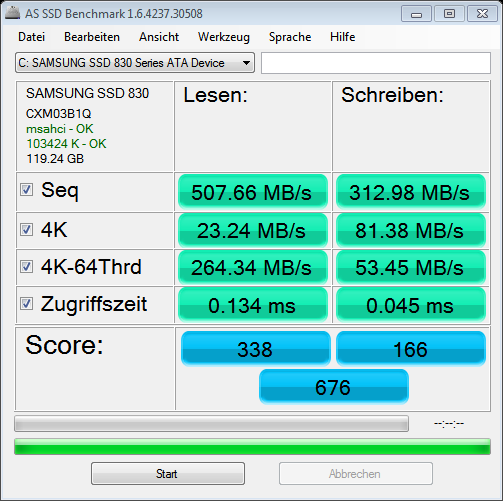
Well I just stumbled upon the following result
and was wondering why I didn't get those values. There has to be some problem in my configuration, otherwise I would get the same values?! | My System Specs | | OS Windows 7 Ultimate x64 CPU AMD Phenom II X6 1055T Motherboard Asus M4A87TD EVO Memory Kingston Hyper X 1333 4 GB Graphics Card Ati Radeon 5750 XXX Sound Card EMU 0404 USB Monitor(s) Displays Samsung P2450 Screen Resolution 1920x1080 PSU be quiet! 530W Hard Drives Samsung Spinpoint F3 HD103SJ Internet Speed 2,5 MB/s |
05 Nov 2012
|
#4 | | Windows 7 SP1, Home Premium, 64-bit |
For one thing, small SSDs do not have the same performance as larger SSDs. How much difference I'm not sure.
Hard drives don't exist in isolation. If you benchmarked 100 Samsung 830s, I'd expect to see 100 different scores, even if properly configured.
Personally, I wouldn't lose much sleep over it, but that's up to you. | My System Specs | | System Manufacturer/Model Number Ignatz Special; 4 speed manual gearbox; factory air conditioning; one of one OS Windows 7 SP1, Home Premium, 64-bit CPU Intel Sandy Bridge i5-2500, not overclocked Motherboard Gigabyte H67A-UD3H-B3, full ATX Memory 4 GB Crucial DDR3-1333 Graphics Card none; graphics are integrated on CPU Sound Card onboard: Realtek ALC892; external: USB Behringer UF0-202 Monitor(s) Displays NEC 90GX2-BK 19" LCD Screen Resolution 800 x 640 Keyboard Leopold Tenkeyless with Cherry Blue switches, USB Mouse Logitech or Microsoft optical wired; either USB or PS 2 PSU Seasonic SS-560KM, modular Case Antec Solo II Cooling CPU: Scythe Big Shuriken; Case: Scythe Slipstream 800 & 500 Hard Drives System: Intel 320 Series SSD, 80 GB;
Data: Samsung Spinpoint 103SJ, 1 TB;
Backup: WD Caviar Green WD15EADS-00P8B0, 1.5TB Other Info Power consumption of this system, including monitor: 68 watts at idle; 144 watts at full load |
05 Nov 2012
|
#5 | | |
I just found an answer (after hours of useless surfing because of some useless numbers  ) - its definitely just the size of the SSD. All the benchmarks I found refer to bigger versions of my drive.
Now I just regret (a little  ) I didn't invest a little more. | My System Specs | | OS Windows 7 Ultimate x64 CPU AMD Phenom II X6 1055T Motherboard Asus M4A87TD EVO Memory Kingston Hyper X 1333 4 GB Graphics Card Ati Radeon 5750 XXX Sound Card EMU 0404 USB Monitor(s) Displays Samsung P2450 Screen Resolution 1920x1080 PSU be quiet! 530W Hard Drives Samsung Spinpoint F3 HD103SJ Internet Speed 2,5 MB/s |
05 Nov 2012
|
#6 | | Windows 7 SP1, Home Premium, 64-bit |

Quote: Originally Posted by tomluft I just found an answer (after hours of useless surfing because of some useless numbers  ) - its definitely just the size of the SSD. All the benchmarks I found refer to bigger versions of my drive.
Now I just regret (a little  ) I didn't invest a little more. Nah.....enjoy the money you didn't spend. Blow it on a good dinner or girlfriend. You likely would never have noticed the difference without a benchmark.
If you need more capacity, that's another question. | My System Specs | | System Manufacturer/Model Number Ignatz Special; 4 speed manual gearbox; factory air conditioning; one of one OS Windows 7 SP1, Home Premium, 64-bit CPU Intel Sandy Bridge i5-2500, not overclocked Motherboard Gigabyte H67A-UD3H-B3, full ATX Memory 4 GB Crucial DDR3-1333 Graphics Card none; graphics are integrated on CPU Sound Card onboard: Realtek ALC892; external: USB Behringer UF0-202 Monitor(s) Displays NEC 90GX2-BK 19" LCD Screen Resolution 800 x 640 Keyboard Leopold Tenkeyless with Cherry Blue switches, USB Mouse Logitech or Microsoft optical wired; either USB or PS 2 PSU Seasonic SS-560KM, modular Case Antec Solo II Cooling CPU: Scythe Big Shuriken; Case: Scythe Slipstream 800 & 500 Hard Drives System: Intel 320 Series SSD, 80 GB;
Data: Samsung Spinpoint 103SJ, 1 TB;
Backup: WD Caviar Green WD15EADS-00P8B0, 1.5TB Other Info Power consumption of this system, including monitor: 68 watts at idle; 144 watts at full load |
05 Nov 2012
|
#7 | | Windows 7 Professional 64 bit UK Warwickshire |
Yes, as you have now found out.
The actual quoted speeds from Samsung are 520/160 for the 64GB, 520/320 for the 128GB and 520/400 for the 256GB | My System Specs | | Computer type PC/Desktop System Manufacturer/Model Number Paulpicks Special Edition OS Windows 7 Professional 64 bit CPU i7 3770K @ 4.6ghz Motherboard Asus Z77 Sabertooth Memory 16GB G.Skill Trident X DDR3 2400Mhz 10-12-12-30 1t Graphics Card Sapphire Vapor-X HD7970 GHZ Edition Sound Card Xear 3d C Media PCI Monitor(s) Displays 27" Hanns-G HL272 LED Screen Resolution 1920x1080 Keyboard Cyborg V5 Mouse Coolermaster Storm Inferno PSU Antec Truepower New 750 Case Antec 1100 Cooling Antec Kuhler 920 Hard Drives OCZ Vertex 4 128gb (OS), Crucial M4 64gb (Origin), Corsair F60 (Steam). Internet Speed 76 meg down, 16 meg up Browser Chrome Other Info My constant upgrades get me into a lot of trouble with her indoors, its a battle but the build must go on! poor SSD write performance problems? All times are GMT -5. The time now is 04:09 AM. | |