| Windows 7: Advice please re speaker hook up |
05 Nov 2012
|
#1 | | Desk1 7 Home Prem / Desk2 7 Home Prem / Laptop 7 Pro all 64bit |
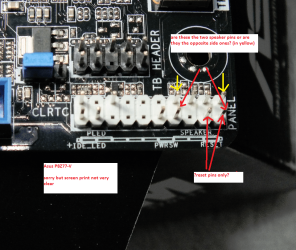
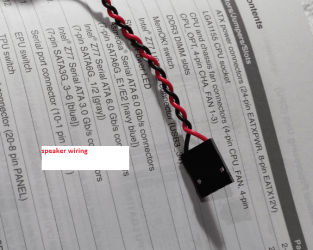
Advice please re speaker hook up Am just doing a pre build mobo test (Asus P8Z77-V) and I cannot be absolutely sure of where to plug the speaker in.
On the board it lists speaker as the two pins as marked but it seems to bridge over one of the reset pins or can I take it the screen print (Asus) assumes one knows it is opposite sides of that block?
Manual is pretty ordinary too
I don't want to wreck this board so can someone advise please? | My System Specs |
| Computer type PC/Desktop System Manufacturer/Model Number Own build (new) Desk1 / Toshiba L550 / Desk2 1st build OS Desk1 7 Home Prem / Desk2 7 Home Prem / Laptop 7 Pro all 64bit CPU Desk1 i5 3750K / Laptop i5 430m / Desk2 i5 2500 Motherboard Desk1 Asus P877-V / Desk2 Gigabyte H67 UD3H / Laptop ? Memory Desk1 8GB (1866) / Desk2 16GB (1333) / Laptop 8Gb DDR3 Graphics Card Desk 1& 2NVidia GTX 650 & Laptops on board Intel Sound Card Desk 1 & 2 -XONAR DG Realtek High Def audio Laptop Monitor(s) Displays Desk 1 Benq HD 2450 / Desk2 Philips 24" / Laptop 17.5" Screen Resolution 1920x1080 D1 & D2 Keyboard Desk 1 MS Sidewinder X6 Desk 2 MS Sidewinder X 4 Mouse Desk 1&2 - Gigabyte MS 900 gamer - laptop - Logitec wireless PSU Desk 1 Corsair HX 1050/ Laptop ? / Desk 2 Corsair HX 650 Case Desk 1 Cooler HAF XM ? Toshiba laptop / Desk2 Coolermaster Cooling Fans on all Desk1 -2 Desk2 - all Coolermasters 5 Laptop ? Hard Drives Desk1 Samsung 120GB 830 SSD
Toshiba Crucial 120GB SSD
Desk2 Samsung 120GB 830 SSD Internet Speed ADSL2+ Other Info One other Desktop (tester) and spare Toshba laptop both with SSD's
Running Kaspersky 2011 ISS on all machines config'd identically
Logitec audio stereo systems on each machine (x3)
Canon MG5250MFC
Router/modem TP-Link running WPA2SK |
05 Nov 2012
|
#2 | | Windows 7 Ultimate SP1 X64/ linux in VM NW Florida |
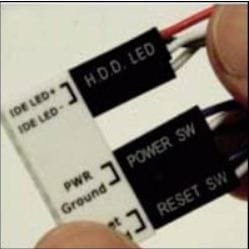
John, don't you have a Q connect with that board? Asus usually sends one in the package. Connect the front panel connectors to that and I think the speakers go on that, then just plug it in. | My System Specs | | Computer type PC/Desktop System Manufacturer/Model Number Home Built- Always under construction OS Windows 7 Ultimate SP1 X64/ linux in VM CPU Intel i7-3770K Motherboard Asus Maximus V Extreme Z77 Memory 8GB G.Skill Ripjaws Z DDR3-2400 (2X4GB) Graphics Card EVGA GTX 670 SC 4GB Sound Card On Board Monitor(s) Displays Asus 24" LCD Screen Resolution 1920X1080 Keyboard Logitech G510 Mouse Logitech G500 PSU CORSAIR AX850 Case Cooler Master HAF X Cooling Custom Water Cooling Hard Drives Samsung 840 Pro 256 GB, Samsung 840 Pro 256 GB, Samsung 830 256GB, Samsung HD103SJ 1TB . External HD- Black X dock esata 1TB Samsung Spinpoint, Rosewill USB 3.0 dock 1TB Samsung Spinpoint Internet Speed carrier pigeon speed Antivirus MSE/MBAM Browser ie8 Other Info 2nd Rig,Windows 7 Ultimate SP1 X64, i7-2600K, Asrock P67 Extreme 4, 8GB DDR3-2133, HAF XM case, Noctua NH-D14, Gigabyte HD6950 OC 1GB, 2 X Crucial M4 128GB, Asus 24" LED.
Laptop- Samsung RF711-SO1 17" i5-2310M, 8GB DDR3-1333, Crucial M4 and OCZ vertex2, Nvidia GT540M.Win 7 HP X64 SP1. |
05 Nov 2012
|
#3 | | Desk1 7 Home Prem / Desk2 7 Home Prem / Laptop 7 Pro all 64bit |
Ha ha just found that I saw that listed as a Q connector in the manual and didn't really take much notice of it
Thanks for the heads up my friend now heads down again LOL!! | My System Specs | | Computer type PC/Desktop System Manufacturer/Model Number Own build (new) Desk1 / Toshiba L550 / Desk2 1st build OS Desk1 7 Home Prem / Desk2 7 Home Prem / Laptop 7 Pro all 64bit CPU Desk1 i5 3750K / Laptop i5 430m / Desk2 i5 2500 Motherboard Desk1 Asus P877-V / Desk2 Gigabyte H67 UD3H / Laptop ? Memory Desk1 8GB (1866) / Desk2 16GB (1333) / Laptop 8Gb DDR3 Graphics Card Desk 1& 2NVidia GTX 650 & Laptops on board Intel Sound Card Desk 1 & 2 -XONAR DG Realtek High Def audio Laptop Monitor(s) Displays Desk 1 Benq HD 2450 / Desk2 Philips 24" / Laptop 17.5" Screen Resolution 1920x1080 D1 & D2 Keyboard Desk 1 MS Sidewinder X6 Desk 2 MS Sidewinder X 4 Mouse Desk 1&2 - Gigabyte MS 900 gamer - laptop - Logitec wireless PSU Desk 1 Corsair HX 1050/ Laptop ? / Desk 2 Corsair HX 650 Case Desk 1 Cooler HAF XM ? Toshiba laptop / Desk2 Coolermaster Cooling Fans on all Desk1 -2 Desk2 - all Coolermasters 5 Laptop ? Hard Drives Desk1 Samsung 120GB 830 SSD
Toshiba Crucial 120GB SSD
Desk2 Samsung 120GB 830 SSD Internet Speed ADSL2+ Other Info One other Desktop (tester) and spare Toshba laptop both with SSD's
Running Kaspersky 2011 ISS on all machines config'd identically
Logitec audio stereo systems on each machine (x3)
Canon MG5250MFC
Router/modem TP-Link running WPA2SK |
05 Nov 2012
|
#4 | | Windows 7 Ultimate SP1 X64/ linux in VM NW Florida |
No problem. If you never had a Q connector before, you wouldn't know to look for it and they hide them pretty well. | My System Specs | | Computer type PC/Desktop System Manufacturer/Model Number Home Built- Always under construction OS Windows 7 Ultimate SP1 X64/ linux in VM CPU Intel i7-3770K Motherboard Asus Maximus V Extreme Z77 Memory 8GB G.Skill Ripjaws Z DDR3-2400 (2X4GB) Graphics Card EVGA GTX 670 SC 4GB Sound Card On Board Monitor(s) Displays Asus 24" LCD Screen Resolution 1920X1080 Keyboard Logitech G510 Mouse Logitech G500 PSU CORSAIR AX850 Case Cooler Master HAF X Cooling Custom Water Cooling Hard Drives Samsung 840 Pro 256 GB, Samsung 840 Pro 256 GB, Samsung 830 256GB, Samsung HD103SJ 1TB . External HD- Black X dock esata 1TB Samsung Spinpoint, Rosewill USB 3.0 dock 1TB Samsung Spinpoint Internet Speed carrier pigeon speed Antivirus MSE/MBAM Browser ie8 Other Info 2nd Rig,Windows 7 Ultimate SP1 X64, i7-2600K, Asrock P67 Extreme 4, 8GB DDR3-2133, HAF XM case, Noctua NH-D14, Gigabyte HD6950 OC 1GB, 2 X Crucial M4 128GB, Asus 24" LED.
Laptop- Samsung RF711-SO1 17" i5-2310M, 8GB DDR3-1333, Crucial M4 and OCZ vertex2, Nvidia GT540M.Win 7 HP X64 SP1. |
05 Nov 2012
|
#5 | | Desk1 7 Home Prem / Desk2 7 Home Prem / Laptop 7 Pro all 64bit |
Hum what a let down DIMM slot B2 is dead well at least I think it is dead the red error light is on continuously and no single beep.
All the other slots are working and I get the splash screen and beep etc etc so I know it isn't the RAM sticks (2X4GB) so am at a loss as to what to do as my dealer is closed today for the local main horse race of the year VERY ANNOYED after the cost of the gear I have bought from them. | My System Specs | | Computer type PC/Desktop System Manufacturer/Model Number Own build (new) Desk1 / Toshiba L550 / Desk2 1st build OS Desk1 7 Home Prem / Desk2 7 Home Prem / Laptop 7 Pro all 64bit CPU Desk1 i5 3750K / Laptop i5 430m / Desk2 i5 2500 Motherboard Desk1 Asus P877-V / Desk2 Gigabyte H67 UD3H / Laptop ? Memory Desk1 8GB (1866) / Desk2 16GB (1333) / Laptop 8Gb DDR3 Graphics Card Desk 1& 2NVidia GTX 650 & Laptops on board Intel Sound Card Desk 1 & 2 -XONAR DG Realtek High Def audio Laptop Monitor(s) Displays Desk 1 Benq HD 2450 / Desk2 Philips 24" / Laptop 17.5" Screen Resolution 1920x1080 D1 & D2 Keyboard Desk 1 MS Sidewinder X6 Desk 2 MS Sidewinder X 4 Mouse Desk 1&2 - Gigabyte MS 900 gamer - laptop - Logitec wireless PSU Desk 1 Corsair HX 1050/ Laptop ? / Desk 2 Corsair HX 650 Case Desk 1 Cooler HAF XM ? Toshiba laptop / Desk2 Coolermaster Cooling Fans on all Desk1 -2 Desk2 - all Coolermasters 5 Laptop ? Hard Drives Desk1 Samsung 120GB 830 SSD
Toshiba Crucial 120GB SSD
Desk2 Samsung 120GB 830 SSD Internet Speed ADSL2+ Other Info One other Desktop (tester) and spare Toshba laptop both with SSD's
Running Kaspersky 2011 ISS on all machines config'd identically
Logitec audio stereo systems on each machine (x3)
Canon MG5250MFC
Router/modem TP-Link running WPA2SK |
06 Nov 2012
|
#6 | | Windows 7 Ultimate SP1 X64/ linux in VM NW Florida |
Try reseating the ram and use the mem OK button. It will restart several times trying to find a configuration that will boot. Once it does, enter bios and use XMP if your ram has it or manual and input the timings and voltage by hand. | My System Specs | | Computer type PC/Desktop System Manufacturer/Model Number Home Built- Always under construction OS Windows 7 Ultimate SP1 X64/ linux in VM CPU Intel i7-3770K Motherboard Asus Maximus V Extreme Z77 Memory 8GB G.Skill Ripjaws Z DDR3-2400 (2X4GB) Graphics Card EVGA GTX 670 SC 4GB Sound Card On Board Monitor(s) Displays Asus 24" LCD Screen Resolution 1920X1080 Keyboard Logitech G510 Mouse Logitech G500 PSU CORSAIR AX850 Case Cooler Master HAF X Cooling Custom Water Cooling Hard Drives Samsung 840 Pro 256 GB, Samsung 840 Pro 256 GB, Samsung 830 256GB, Samsung HD103SJ 1TB . External HD- Black X dock esata 1TB Samsung Spinpoint, Rosewill USB 3.0 dock 1TB Samsung Spinpoint Internet Speed carrier pigeon speed Antivirus MSE/MBAM Browser ie8 Other Info 2nd Rig,Windows 7 Ultimate SP1 X64, i7-2600K, Asrock P67 Extreme 4, 8GB DDR3-2133, HAF XM case, Noctua NH-D14, Gigabyte HD6950 OC 1GB, 2 X Crucial M4 128GB, Asus 24" LED.
Laptop- Samsung RF711-SO1 17" i5-2310M, 8GB DDR3-1333, Crucial M4 and OCZ vertex2, Nvidia GT540M.Win 7 HP X64 SP1. |
06 Nov 2012
|
#7 | | Desk1 7 Home Prem / Desk2 7 Home Prem / Laptop 7 Pro all 64bit |

Quote: Originally Posted by essenbe Try reseating the ram and use the mem OK button. It will restart several times trying to find a configuration that will boot. Once it does, enter bios and use XMP if your ram has it or manual and input the timings and voltage by hand. Ok so this might not be a dead board? I'll try but I have never used this UEFI before so I will be wading in muddy waters
Just as a by the by I don't have this board in the case yet I was just running it up just as showed in that Newegg YT video and how Gary did it. So I guess I shall have to hook up a KB and mouse through the USB and hope I can control it.
Sorry to be such a nuisance | My System Specs | | Computer type PC/Desktop System Manufacturer/Model Number Own build (new) Desk1 / Toshiba L550 / Desk2 1st build OS Desk1 7 Home Prem / Desk2 7 Home Prem / Laptop 7 Pro all 64bit CPU Desk1 i5 3750K / Laptop i5 430m / Desk2 i5 2500 Motherboard Desk1 Asus P877-V / Desk2 Gigabyte H67 UD3H / Laptop ? Memory Desk1 8GB (1866) / Desk2 16GB (1333) / Laptop 8Gb DDR3 Graphics Card Desk 1& 2NVidia GTX 650 & Laptops on board Intel Sound Card Desk 1 & 2 -XONAR DG Realtek High Def audio Laptop Monitor(s) Displays Desk 1 Benq HD 2450 / Desk2 Philips 24" / Laptop 17.5" Screen Resolution 1920x1080 D1 & D2 Keyboard Desk 1 MS Sidewinder X6 Desk 2 MS Sidewinder X 4 Mouse Desk 1&2 - Gigabyte MS 900 gamer - laptop - Logitec wireless PSU Desk 1 Corsair HX 1050/ Laptop ? / Desk 2 Corsair HX 650 Case Desk 1 Cooler HAF XM ? Toshiba laptop / Desk2 Coolermaster Cooling Fans on all Desk1 -2 Desk2 - all Coolermasters 5 Laptop ? Hard Drives Desk1 Samsung 120GB 830 SSD
Toshiba Crucial 120GB SSD
Desk2 Samsung 120GB 830 SSD Internet Speed ADSL2+ Other Info One other Desktop (tester) and spare Toshba laptop both with SSD's
Running Kaspersky 2011 ISS on all machines config'd identically
Logitec audio stereo systems on each machine (x3)
Canon MG5250MFC
Router/modem TP-Link running WPA2SK |
06 Nov 2012
|
#8 | | Desk1 7 Home Prem / Desk2 7 Home Prem / Laptop 7 Pro all 64bit |
Actually that has worked to the point where I am in the new BIOS window and ok I am trying to find that XMP you spoke of. | My System Specs | | Computer type PC/Desktop System Manufacturer/Model Number Own build (new) Desk1 / Toshiba L550 / Desk2 1st build OS Desk1 7 Home Prem / Desk2 7 Home Prem / Laptop 7 Pro all 64bit CPU Desk1 i5 3750K / Laptop i5 430m / Desk2 i5 2500 Motherboard Desk1 Asus P877-V / Desk2 Gigabyte H67 UD3H / Laptop ? Memory Desk1 8GB (1866) / Desk2 16GB (1333) / Laptop 8Gb DDR3 Graphics Card Desk 1& 2NVidia GTX 650 & Laptops on board Intel Sound Card Desk 1 & 2 -XONAR DG Realtek High Def audio Laptop Monitor(s) Displays Desk 1 Benq HD 2450 / Desk2 Philips 24" / Laptop 17.5" Screen Resolution 1920x1080 D1 & D2 Keyboard Desk 1 MS Sidewinder X6 Desk 2 MS Sidewinder X 4 Mouse Desk 1&2 - Gigabyte MS 900 gamer - laptop - Logitec wireless PSU Desk 1 Corsair HX 1050/ Laptop ? / Desk 2 Corsair HX 650 Case Desk 1 Cooler HAF XM ? Toshiba laptop / Desk2 Coolermaster Cooling Fans on all Desk1 -2 Desk2 - all Coolermasters 5 Laptop ? Hard Drives Desk1 Samsung 120GB 830 SSD
Toshiba Crucial 120GB SSD
Desk2 Samsung 120GB 830 SSD Internet Speed ADSL2+ Other Info One other Desktop (tester) and spare Toshba laptop both with SSD's
Running Kaspersky 2011 ISS on all machines config'd identically
Logitec audio stereo systems on each machine (x3)
Canon MG5250MFC
Router/modem TP-Link running WPA2SK |
06 Nov 2012
|
#9 | | Windows 7 Ultimate SP1 X64/ linux in VM NW Florida |
First you set optimized defaults, the XMP is in the overclocking section. Be sure to set your boot order too.
BTW, if you want to, connect a USB drive before entering bios. On every page you can push F12 (I think) and it will put a picture of the page you are looking at on the USB drive. It may be good for future reference, especially when you get it running like you want to. | My System Specs | | Computer type PC/Desktop System Manufacturer/Model Number Home Built- Always under construction OS Windows 7 Ultimate SP1 X64/ linux in VM CPU Intel i7-3770K Motherboard Asus Maximus V Extreme Z77 Memory 8GB G.Skill Ripjaws Z DDR3-2400 (2X4GB) Graphics Card EVGA GTX 670 SC 4GB Sound Card On Board Monitor(s) Displays Asus 24" LCD Screen Resolution 1920X1080 Keyboard Logitech G510 Mouse Logitech G500 PSU CORSAIR AX850 Case Cooler Master HAF X Cooling Custom Water Cooling Hard Drives Samsung 840 Pro 256 GB, Samsung 840 Pro 256 GB, Samsung 830 256GB, Samsung HD103SJ 1TB . External HD- Black X dock esata 1TB Samsung Spinpoint, Rosewill USB 3.0 dock 1TB Samsung Spinpoint Internet Speed carrier pigeon speed Antivirus MSE/MBAM Browser ie8 Other Info 2nd Rig,Windows 7 Ultimate SP1 X64, i7-2600K, Asrock P67 Extreme 4, 8GB DDR3-2133, HAF XM case, Noctua NH-D14, Gigabyte HD6950 OC 1GB, 2 X Crucial M4 128GB, Asus 24" LED.
Laptop- Samsung RF711-SO1 17" i5-2310M, 8GB DDR3-1333, Crucial M4 and OCZ vertex2, Nvidia GT540M.Win 7 HP X64 SP1. Advice please re speaker hook up problems? All times are GMT -5. The time now is 10:57 PM. | |