| Windows 7: First Mobo Install - 3 Beeps, No System! Asus Experts Needed! |
10 Nov 2012
|
#1 | | Windows 7 Home Premium 64-bit |
First Mobo Install - 3 Beeps, No System! Asus Experts Needed! Hi all
Got a Asus Crosshair V Formula Z AMD 990FX today.
My first ever new mobo proceedure, and I need help.
I believe I've connected everything up correctly, but I'm getting three beeps and nothing else (apart from power).
The Error Code is '50' which is memory related, but my RAM is only about a fortnight old and hasn't been overclocked (not that I'd be reckless anyway).
The RAM is also in the correct slots (A2 and B2 if I recall correctly).
I know some of you have these mobos, so I'm looking for some excellent advice.
Best
AD | My System Specs |
| Computer type PC/Desktop System Manufacturer/Model Number Overclockers UK OS Windows 7 Home Premium 64-bit CPU AMD Phenom II X4 965 Black Edition Motherboard ASUS Crosshair V Formula-Z Memory GeIL 16GB @ 1866MHz Graphics Card ASUS Radeon HD 7950 DirectCU II TOP Sound Card On-board 7.1 Monitor(s) Displays LG 22'' LCD Screen Resolution 1680 x 1050 Keyboard Gigabyte Mouse Microsoft Mobile Mouse 3000 PSU Corsair Enthusiast Series TX 850W V2 Case Corsair Vengeance C70 Cooling Corsair A50 CPU & Scythe Gentle Typhoon 3000RPM Hard Drives SSD - Intel 335 Series
HDD - Western Digital Internet Speed Fiber-optic -- Virgin Antivirus avast! Browser Mozilla Aurora |
10 Nov 2012
|
#2 | | |
How far did you get your system to boot into? Are you sure the memory are compatible? Since you only have 2 sticks, try them out individually. Are your 4 pin power for ram slots plugged? All beep troubleshooting and reasons are in the manual. | My System Specs | | System Manufacturer/Model Number Self Built OS 64 CPU Core i7 Hexa 3930k @ 3.20 Motherboard ASUS Rampage IV Extreme Memory Hyper X DDR 3 XMP (4x4) 2 Sets Graphics Card ASUS RADEON HD 7970 DCU2T Sound Card Onboard Monitor(s) Displays Samsung Sync Master 27" Screen Resolution 1920x1080 Keyboard Microsoft Razer Reclusa Mouse Razer Diamondback 3G PSU 1200W CM Silent Pro Gold Case CM Cosmos 2 Cooling 6 Case Fans + CPU HS CM TC812 Hard Drives SSD - Corsaire Force GT 120 GB
HDD - WD CAVIAR BLACK SATA 6 Internet Speed 20 Mbps |
10 Nov 2012
|
#3 | | Windows 7 Home Premium 64-bit |
Cheers 
Quote: Originally Posted by shawnglory How far did you get your system to boot into? Are you sure the memory are compatible? Since you only have 2 sticks, try them out individually. Are your 4 pin power for ram slots plugged? All beep troubleshooting and reasons are in the manual. Hi
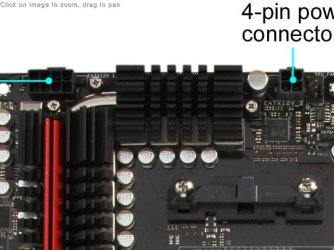
The board has four different power ports:
24 Pin ATX
8 Pin
4 Pin
Molex
I have the 24 pin connected (obviously) and the 8 Pin, but not the other two.
My PSU is the Corsair TX850 (if I haven't listed it).
So do all these need to be connected? Even the Molex?
Cheers | My System Specs | | Computer type PC/Desktop System Manufacturer/Model Number Overclockers UK OS Windows 7 Home Premium 64-bit CPU AMD Phenom II X4 965 Black Edition Motherboard ASUS Crosshair V Formula-Z Memory GeIL 16GB @ 1866MHz Graphics Card ASUS Radeon HD 7950 DirectCU II TOP Sound Card On-board 7.1 Monitor(s) Displays LG 22'' LCD Screen Resolution 1680 x 1050 Keyboard Gigabyte Mouse Microsoft Mobile Mouse 3000 PSU Corsair Enthusiast Series TX 850W V2 Case Corsair Vengeance C70 Cooling Corsair A50 CPU & Scythe Gentle Typhoon 3000RPM Hard Drives SSD - Intel 335 Series
HDD - Western Digital Internet Speed Fiber-optic -- Virgin Antivirus avast! Browser Mozilla Aurora |
11 Nov 2012
|
#4 | | |
In your manual it states which is for which. I'm using a rampage 4 ex an Asus board too so manuals shouldn't differ much. I'm guessing the 8 pin is for the pcie lanes as mine is 6. The 4 pin is usually for the rams. | My System Specs | | System Manufacturer/Model Number Self Built OS 64 CPU Core i7 Hexa 3930k @ 3.20 Motherboard ASUS Rampage IV Extreme Memory Hyper X DDR 3 XMP (4x4) 2 Sets Graphics Card ASUS RADEON HD 7970 DCU2T Sound Card Onboard Monitor(s) Displays Samsung Sync Master 27" Screen Resolution 1920x1080 Keyboard Microsoft Razer Reclusa Mouse Razer Diamondback 3G PSU 1200W CM Silent Pro Gold Case CM Cosmos 2 Cooling 6 Case Fans + CPU HS CM TC812 Hard Drives SSD - Corsaire Force GT 120 GB
HDD - WD CAVIAR BLACK SATA 6 Internet Speed 20 Mbps |
11 Nov 2012
|
#5 | | Windows 7 Home Premium 32-Bit - Build 7600 SP1 Houston, Texas |
What kind of RAM do you have? It appears you System Specs are for your old PC. | My System Specs | | System Manufacturer/Model Number Custom Build OS Windows 7 Home Premium 32-Bit - Build 7600 SP1 CPU Intel Core i3-2120 3.30Ghz Motherboard Asus P8Z68-V LX Intel Z68 Socket H2 ATX Memory Kingston 4 GB DDR3 1333 mhz Graphics Card Zotac GeForce 9400 GT 512MB Sound Card Sound Blaster Audigy SE 24-Bit Monitor(s) Displays Samsung Sync Master 940 = 19 inch Screen Resolution 1440 X 900 Keyboard Microsoft Natural 4000 Mouse Microsoft Custom Optical 3000 PSU 500 watt Case NZXT Apollo - Silver with Clear Side Panel Cooling Three 120 mm Fans Hard Drives OCZ Vertex 3 120 GB Sata 3 SSD ==
Western Digital 160 GB Caviar Blue 7200 RPM ==
Western Digital 500 GB Caviar Green 7200 RPM == Internet Speed AT&T Fiber Optic Wireless Network Other Info 120 mm Blue LED Fan -- Three Blue LED Lazer Light Sticks |
11 Nov 2012
|
#6 | | Windows 7 Ultimate SP1 X64/ linux in VM NW Florida |
I would suggest reinstalling the ram and make sure it is completely seated. I would also suggest you connect the 8 pin ATX as well as the 4 pin ATX. They provide power to your CPU. I realize the manual says that it will run with just the 8pin connected, but I have seen several cases where it needed the 4 pin connected also. Recheck all connections to be sure they are completely seated. Make sure all standoffs are installed and tughtened and that there are no standoffs installed that are not needed. The manual should give you the beep codes, and there should be lights on the board to tell you what the problem is. | My System Specs | | Computer type PC/Desktop System Manufacturer/Model Number Home Built- Always under construction OS Windows 7 Ultimate SP1 X64/ linux in VM CPU Intel i7-3770K Motherboard Asus Maximus V Extreme Z77 Memory 8GB G.Skill Ripjaws Z DDR3-2400 (2X4GB) Graphics Card EVGA GTX 670 SC 4GB Sound Card On Board Monitor(s) Displays Asus 24" LCD Screen Resolution 1920X1080 Keyboard Logitech G510 Mouse Logitech G500 PSU CORSAIR AX850 Case Cooler Master HAF X Cooling Custom Water Cooling Hard Drives Samsung 840 Pro 256 GB, Samsung 840 Pro 256 GB, Samsung 830 256GB, Samsung HD103SJ 1TB . External HD- Black X dock esata 1TB Samsung Spinpoint, Rosewill USB 3.0 dock 1TB Samsung Spinpoint Internet Speed carrier pigeon speed Antivirus MSE/MBAM Browser ie8 Other Info 2nd Rig,Windows 7 Ultimate SP1 X64, i7-2600K, Asrock P67 Extreme 4, 8GB DDR3-2133, HAF XM case, Noctua NH-D14, Gigabyte HD6950 OC 1GB, 2 X Crucial M4 128GB, Asus 24" LED.
Laptop- Samsung RF711-SO1 17" i5-2310M, 8GB DDR3-1333, Crucial M4 and OCZ vertex2, Nvidia GT540M.Win 7 HP X64 SP1. |
11 Nov 2012
|
#7 | | Windows 7 Home Premium 64-bit |

Quote: Originally Posted by essenbe I would suggest reinstalling the ram and make sure it is completely seated. I would also suggest you connect the 8 pin ATX as well as the 4 pin ATX. They provide power to your CPU. I realize the manual says that it will run with just the 8pin connected, but I have seen several cases where it needed the 4 pin connected also. Recheck all connections to be sure they are completely seated. Make sure all standoffs are installed and tughtened and that there are no standoffs installed that are not needed. The manual should give you the beep codes, and there should be lights on the board to tell you what the problem is. You were right! Man, you have to be a bit tough with that RAM!
Last problem is getting it to recognise my old HDD (Western Digital 2TB Green) as my new backup.
It keeps sending me back to the BIOS?
Any idea which setting it is? I'm getting the manual back out now!
Thank you | My System Specs | | Computer type PC/Desktop System Manufacturer/Model Number Overclockers UK OS Windows 7 Home Premium 64-bit CPU AMD Phenom II X4 965 Black Edition Motherboard ASUS Crosshair V Formula-Z Memory GeIL 16GB @ 1866MHz Graphics Card ASUS Radeon HD 7950 DirectCU II TOP Sound Card On-board 7.1 Monitor(s) Displays LG 22'' LCD Screen Resolution 1680 x 1050 Keyboard Gigabyte Mouse Microsoft Mobile Mouse 3000 PSU Corsair Enthusiast Series TX 850W V2 Case Corsair Vengeance C70 Cooling Corsair A50 CPU & Scythe Gentle Typhoon 3000RPM Hard Drives SSD - Intel 335 Series
HDD - Western Digital Internet Speed Fiber-optic -- Virgin Antivirus avast! Browser Mozilla Aurora |
11 Nov 2012
|
#8 | | Windows 7 Ultimate SP1 X64/ linux in VM NW Florida |
Do you have Windows installed yet? If you do, right click computer, select manage, in the left column click disk management. If you see your drive there, right click it, select change drive letter or path, next screen click add, then accept whatever windows chooses, or from the dropdown, select what you want it to be. If it wants to format it, do not do it if there is data on it you want to keep. Formatting it will lose everything on it.
I don't have your board, but it can usually be found under advanced, sata configuration, or boot options. Let us know if bios sees the drive. | My System Specs | | Computer type PC/Desktop System Manufacturer/Model Number Home Built- Always under construction OS Windows 7 Ultimate SP1 X64/ linux in VM CPU Intel i7-3770K Motherboard Asus Maximus V Extreme Z77 Memory 8GB G.Skill Ripjaws Z DDR3-2400 (2X4GB) Graphics Card EVGA GTX 670 SC 4GB Sound Card On Board Monitor(s) Displays Asus 24" LCD Screen Resolution 1920X1080 Keyboard Logitech G510 Mouse Logitech G500 PSU CORSAIR AX850 Case Cooler Master HAF X Cooling Custom Water Cooling Hard Drives Samsung 840 Pro 256 GB, Samsung 840 Pro 256 GB, Samsung 830 256GB, Samsung HD103SJ 1TB . External HD- Black X dock esata 1TB Samsung Spinpoint, Rosewill USB 3.0 dock 1TB Samsung Spinpoint Internet Speed carrier pigeon speed Antivirus MSE/MBAM Browser ie8 Other Info 2nd Rig,Windows 7 Ultimate SP1 X64, i7-2600K, Asrock P67 Extreme 4, 8GB DDR3-2133, HAF XM case, Noctua NH-D14, Gigabyte HD6950 OC 1GB, 2 X Crucial M4 128GB, Asus 24" LED.
Laptop- Samsung RF711-SO1 17" i5-2310M, 8GB DDR3-1333, Crucial M4 and OCZ vertex2, Nvidia GT540M.Win 7 HP X64 SP1. |
11 Nov 2012
|
#9 | | Windows 7 Pro X64 SP1 Danbury, CT |

Quote: Originally Posted by Aderes Devorah 
Quote: Originally Posted by shawnglory How far did you get your system to boot into? Are you sure the memory are compatible? Since you only have 2 sticks, try them out individually. Are your 4 pin power for ram slots plugged? All beep troubleshooting and reasons are in the manual. Hi
The board has four different power ports:
24 Pin ATX
8 Pin
4 Pin
Molex
I have the 24 pin connected (obviously) and the 8 Pin, but not the other two.
My PSU is the Corsair TX850 (if I haven't listed it).
So do all these need to be connected? Even the Molex?
Cheers Using the 24 pin and the 8 pin should be adequate. I'm a little surprised that the board has a separate 4 pin ATX12V connector; the boards I've owned could use a 4 pin male connector, plugged into the proper half of the 8 pin female connector on the motherboard. (My boards came with a plastic cap over half the 8 pins, which I removed because my power supply has an 8 pin ATX12V connector.)
The 4 pin Molex is to supply additional current to the graphics cards if you are using multiple cards in SLI or Crossfire. If you're using a single graphics card, it is probably of little or no value. | My System Specs | | System Manufacturer/Model Number homegrown OS Windows 7 Pro X64 SP1 CPU Intel Core I7-3930k Motherboard Asus P9X79 Pro Memory 16 GB Gskill DDR3-2133 Graphics Card eVGA GTX680 Sound Card Creative X-Fi Titanium Monitor(s) Displays As PA246Q Screen Resolution 1920 X 1200 Keyboard cheap Logitech USB Mouse Microsoft Intellimouse Explorer (old optical) USB PSU PCP&C Silencer 750 Crossfire Case Silverstone FT02 Cooling Noctua NH-D14 Hard Drives Corsair Force GT, 120 GB
WDC 1.5TB Caviar Black Internet Speed 6Mb cable Other Info Pioneer BDR-205
Samsung SH-203B
Monsoon 5.1 speakers |
11 Nov 2012
|
#10 | | Windows 7 Ultimate SP1 X64/ linux in VM NW Florida |
That board, like mine, has an 8 pin and a 4 pin ATX connection. It should run with only the 8 pin, but I have helped several people who needed both the 8 pin and 4 pin connected. | My System Specs | | Computer type PC/Desktop System Manufacturer/Model Number Home Built- Always under construction OS Windows 7 Ultimate SP1 X64/ linux in VM CPU Intel i7-3770K Motherboard Asus Maximus V Extreme Z77 Memory 8GB G.Skill Ripjaws Z DDR3-2400 (2X4GB) Graphics Card EVGA GTX 670 SC 4GB Sound Card On Board Monitor(s) Displays Asus 24" LCD Screen Resolution 1920X1080 Keyboard Logitech G510 Mouse Logitech G500 PSU CORSAIR AX850 Case Cooler Master HAF X Cooling Custom Water Cooling Hard Drives Samsung 840 Pro 256 GB, Samsung 840 Pro 256 GB, Samsung 830 256GB, Samsung HD103SJ 1TB . External HD- Black X dock esata 1TB Samsung Spinpoint, Rosewill USB 3.0 dock 1TB Samsung Spinpoint Internet Speed carrier pigeon speed Antivirus MSE/MBAM Browser ie8 Other Info 2nd Rig,Windows 7 Ultimate SP1 X64, i7-2600K, Asrock P67 Extreme 4, 8GB DDR3-2133, HAF XM case, Noctua NH-D14, Gigabyte HD6950 OC 1GB, 2 X Crucial M4 128GB, Asus 24" LED.
Laptop- Samsung RF711-SO1 17" i5-2310M, 8GB DDR3-1333, Crucial M4 and OCZ vertex2, Nvidia GT540M.Win 7 HP X64 SP1. First Mobo Install - 3 Beeps, No System! Asus Experts Needed! problems? All times are GMT -5. The time now is 04:04 PM. | |