Windows 7 Forums


Windows 7: DVD+RW not recognized as valid disc

24 Nov 2012   #1

Windows 7 Home 64bit
Nottingham, Maryland
 
 
DVD+RW not recognized as valid disc

OK....This can't be seen as a hardware issue. I have one disc that I formatted with XP that works fine. My new computer runs Windows 7 and is an EMachine 1850....
Now the darn thing will not recognize an unformatted disc at all...I have about 20 DVD+RW discs that I need to use, but can't format them....I've been to many sites with the Microsoft Support site as most solutions.....That was a dead end.
I've had problems with the Windows Software from the beginning....Most minor...but the Restore Option does not work and some other probs have ocurred.....
I have had a lot of good times with Windows products until 7 hit my system...now only trouble.......If I don't get a solution I will go back to XP...and that is no solution....
Thanks for the help in advance....I need to format my DVD+RW discs...Thats All!

My System SpecsSystem Spec

24 Nov 2012   #2

Windows 7 Home Premium 32 bit


I am a doubting Thomas .

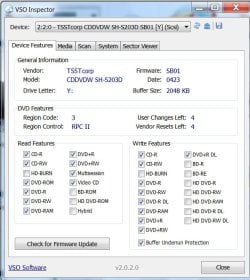
Download and install VSO Inspector,

VSO Download - free trial of Convert X to DVD, Copy To DVD, Blu-ray Converter, Photo DVD, Free Media Player

check the device features and confirm whether your ODD is a DVD Writer.

DVD+RW not recognized as valid disc-oddfeatures.jpg
My System SpecsSystem Spec
24 Nov 2012   #3

Windows 7 x64 x86
North Western Indianapolis


Quote   Quote: Originally Posted by superyutz View Post
OK....This can't be seen as a hardware issue. I have one disc that I formatted with XP that works fine. My new computer runs Windows 7 and is an EMachine 1850....
Now the darn thing will not recognize an unformatted disc at all...I have about 20 DVD+RW discs that I need to use, but can't format them....I've been to many sites with the Microsoft Support site as most solutions.....That was a dead end.
I've had problems with the Windows Software from the beginning....Most minor...but the Restore Option does not work and some other probs have ocurred.....
I have had a lot of good times with Windows products until 7 hit my system...now only trouble.......If I don't get a solution I will go back to XP...and that is no solution....
Thanks for the help in advance....I need to format my DVD+RW discs...Thats All!
Try image burn The Official ImgBurn Website
If that cannot format the discs then you have a hardware problem and it will be the burner. These are easily replaced yourself and good drives can be got for $20
DVD Burners, DVD Media - Newegg.com
My System SpecsSystem Spec
.


10 Dec 2012   #4

Windows 7 Home 64bit
Nottingham, Maryland


According to VSO Inspector my hardware supports DVD+RW yet my system does not recognize an unformatted disc.......Any other wild ideas?..........
My System SpecsSystem Spec
10 Dec 2012   #5

Windows 7 Home Premium 32 bit


I have seen a user comment that the machine only has a DVD ROM drive and not a writer. Does the VSO Inspector show that it can write DVD-RWs?

Also ascertain the exact model/manufacturer - which you can get from Device Manager/VSO Inspector and check its specs from the manufacturer's website.
My System SpecsSystem Spec
10 Dec 2012   #6

Windows 7 Home 64bit
Nottingham, Maryland


Of course its a writer. How can I burn a formatted DVD+RW.....and my DVD-R's
My System SpecsSystem Spec
10 Dec 2012   #7

Windows 7 Home 64bit
Nottingham, Maryland


Interesting finding while using the VSO Inspector. Upper Filter driver GEARAspiWDM shows 'file not found'. Yet, I checked the 'System Information' drivers section and it shows this file present, started, and OK. Whats going on?
Also checked for the newest drivers and firmware for my model drive. All the latest are installed
My System SpecsSystem Spec
10 Dec 2012   #8

Windows 7 Home 64bit
Nottingham, Maryland


Hey!!!! I'm a genius....I was browsing other posts in desperation and found one that suggested I use the disk management utility..... I typed 'diskmgmt.msc' in the Run prompt and inserted the unformatted DVD+RW. In the utility it showed 'NO DISK'...but I double clicked the drive and it prompted me to Format the disk....which I did....IT WORKED BY GOLLY!!!
Thanks to all who have replied!!!!!!
My System SpecsSystem Spec
10 Dec 2012   #9

Windows 7 Home Premium 32 bit


Good to know that your problem is resolved and with your own effort. Good going.
My System SpecsSystem Spec
Reply

 DVD+RW not recognized as valid disc problems?


Thread Tools


Similar help and support threads for: DVD+RW not recognized as valid disc
Thread Forum
Solved Install 7 on new hard drive with valid key, windows saying not valid Installation & Setup
Windows 7 installation disc not recognized. Installation & Setup
Burning content - disc drive not recognising blank disc Hardware & Devices
My Operating disc isn't recognized and password isn't working General Discussion
Windows 7 upgrade disc not recognized by DVD Installation & Setup


All times are GMT -5. The time now is 07:36 AM.


Seven Forums Android App Seven Forums IOS App Follow us on Facebook

Windows 7 Forums is an independent web site and has not been authorized,
sponsored, or otherwise approved by Microsoft Corporation.
"Windows 7" and related materials are trademarks of Microsoft Corp.
© Designer Media Ltd
  

1 2 3 4 5 6 7 8 9 10 11 12 13 14 15 16 17 18 19 20 21 22 23 24 25 26 27 28 29 30 31 32