Windows 7 Forums


Windows 7: Windows detects speakers that aren't plugged in?

06 Dec 2012   #1

Microsoft Windows 7 Ultimate 64-bit 7601 Multiprocessor Free Service Pack 1
 
 
Windows detects speakers that aren't plugged in?

Would anyone know why Windows would be detecting speakers under playback devices when absolutely no speakers are plugged in?


The result is I can not get sound out of any speakers I plug in, presumably because Windows is trying to use these phantom nonexistent speakers. USB headphones work fine, but USB speakers do not (Guessing because headphones show up as a different type of device ).

I've tried disconnecting everything from the system not required to boot into Windows, so the only output device is coming from my video card to a standard VGA monitor.

If it provides any additional info, I get no audio booting into a Linux Mint live OS either, but I didn't do too much troubleshooting when I was in there, more just wanted to check and see if it was exclusive to Windows.

The board is a ASRock 970 Extreme3 with RealTek audio. I've tried fully uninstalling and reinstalling the drivers and restoring BIOS defaults, neither made any difference.
This seems like the onboard audio card is completely malfunctioning but I hope there is some other explanation. Thanks.
My System SpecsSystem Spec

06 Dec 2012   #2

Windows 7 Home Premium 32-Bit - Build 7600 SP1
Houston, Texas


Have they ever worked or did they just stop recently? If they just stopped recently, you might try a System Restore to a date when they were working.
My System SpecsSystem Spec
06 Dec 2012   #3

Windows 7 Ultimate X64 SP1
Mt. Crumpit/Whoville


Welcome to Seven Forums.
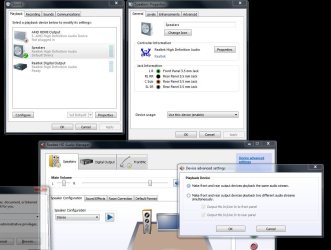
Can you post a snip of where you are seeing the ghost speakers?
Screenshots and Files - Upload and Post in Seven Forums
My System SpecsSystem Spec
.


06 Dec 2012   #4

Microsoft Windows 7 Ultimate 64-bit 7601 Multiprocessor Free Service Pack 1


The speakers were working yesterday, I did a big reshuffle of my two desktops and swapped a monitor to this system as well as installed a USB 3.0 PCIe card. The very first thing I did when I realized the sound had stopped working was remove and completely uninstall the drivers for the USB 3.0 card and hook the original monitor up. When that didn't work I did a system restore to the previous day with a reinstall/uninstall of the audio drivers then restored BIOS defaults, none of these produced any change.

The snip below is with absolutely no audio device attached to the computer, nor any front panel audio jacks or anything similar.
Attached Thumbnails
Windows detects speakers that aren't plugged in?-capture.jpg  
My System SpecsSystem Spec
06 Dec 2012   #5

Windows 7 Ultimate X64 SP1
Mt. Crumpit/Whoville


If you connected the monitor via HDMI it may be detecting the monitor's speakers since that carries audio as well.

Try clicking on RealTek Digital Output in the Sound window and set is as default.

Retrace all of your steps in moving things around to see if you missed something. I don't think the sound chip would go out like that.
My System SpecsSystem Spec
06 Dec 2012   #6

Microsoft Windows 7 Ultimate 64-bit 7601 Multiprocessor Free Service Pack 1


Quote   Quote: Originally Posted by Britton30 View Post
If you connected the monitor via HDMI it may be detecting the monitor's speakers since that carries audio as well.

Try clicking on RealTek Digital Output in the Sound window and set is as default.

Retrace all of your steps in moving things around to see if you missed something. I don't think the sound chip would go out like that.
No HDMI inputs on either the old or the new monitor, and the RealTek Digital Output is only for digital audio outputs I don't have.

Something else strange happened a few hours ago. The little RealTek notification icon on the taskbar was constantly popping up saying an audio device had either been plugged in or unplugged. It would usually do a dozen or so of unplugged, then switch to plugged in. This lasted about an hour and just abruptly stopped.

I've never had onboard audio crap out like this, nor have even heard of it happening. To know without a doubt it was hardware related, I did a fresh Win 7 installation on a different hard drive and using the original monitor with no new hardware at all.

After installing the RealTek audio drivers in the new installation I got the exact same behavior. Speakers detected when they weren't plugged in, and absolutely no audio when speakers were plugged in.

If I had to make a wild guess, I think something about that USB PCIe card had something to do with it. The card is easily the most poorly designed and cheap PCB I've ever seen, but how it could have ruined onboard audio is beyond me.
My System SpecsSystem Spec
06 Dec 2012   #7

Windows 7 Ultimate X64 SP1
Mt. Crumpit/Whoville


It is very odd behavior. Did you get the RealTek driver from your motherboard's page?


Since you did a fresh install I think that points to some bad hardware. I will ask some others to have a look.
My System SpecsSystem Spec
06 Dec 2012   #8

Microsoft Windows 7 Ultimate 64-bit 7601 Multiprocessor Free Service Pack 1


It gets a bit weirder, I purchased a PCI sound card this evening and after disabling onboard audio in the BIOS and installing the new card I get absolutely no reaction from the computer when plugging in a 3.5mm audio jack. This was the same thing happening with the onboard audio.

I popped the sound card in my other desktop and it works perfectly. What could possibly cause the onboard 3.5mm jack AND a soundcard 3.5mm jack to malfunction? This is with a new Win 7 install and only the basic peripherals attached (VGA monitor, mouse and keyboard). I'm completely at a loss.
My System SpecsSystem Spec
06 Dec 2012   #9

Windows 7 Ultimate X64 SP1
Mt. Crumpit/Whoville


Does the USB and sound card use the same type of slot, i.e., PCIe X1, X4 or PCI?
My System SpecsSystem Spec
06 Dec 2012   #10

Microsoft Windows 7 Ultimate 64-bit 7601 Multiprocessor Free Service Pack 1


The USB card I installed yesterday used a PCIe x1 port but I removed that the moment I noticed the audio problems and haven't plugged it in since. The new sound card uses PCI (non-express).

I'm not sure where along the way this happened, but I can now get sound out of USB speakers (probably after fully uninstalling and disabling the onboard), still nothing out of the 3.5s though.
My System SpecsSystem Spec
Reply

 Windows detects speakers that aren't plugged in? problems?


Thread Tools


Similar help and support threads for: Windows detects speakers that aren't plugged in?
Thread Forum
Solved No speakers or headphones are plugged in Sound & Audio
Internal Speakers Aren't Working Sound & Audio
Windows 7 can't find the speakers/headphones being plugged in Sound & Audio
No Speakers or Headphones are Plugged In - Windows 7 Sound & Audio
'Speakers: Not plugged in' issue. No sound from speakers/headphones? Sound & Audio


All times are GMT -5. The time now is 05:11 PM.


Windows 7 Forums is an independent web site and has not been authorized,
sponsored, or otherwise approved by Microsoft Corporation.
"Windows 7" and related materials are trademarks of Microsoft Corp.
© Designer Media Ltd