Windows 7 Forums


Windows 7: Disable webcam permanently

29 Dec 2012   #1

Windows 7 Ultimate x64
 
 
Disable webcam permanently

hi, I have a problem with my webcam on a acer 3935 with Windows 7 x64.


The webcam is broken and i really dont care, but it keeps switching in and out all the time, and it makes me crazy! A massage in the systemtray pops up saying "unknown device" and if I go to device manager I can see it swiching on and off all along.

I tryed disable and uninstall in devicemanager, but it is reinstalls automaticly at restart.

Is there any way to uninstall it permanently or do I have to physicaly remove it (because thats a problem)?
My System SpecsSystem Spec

29 Dec 2012   #2

win 7 pro x64


Hrmm..
You have "tried" to disable it in device manager and what happens?
Because that's your best bet in disabling it..
Dont uninstall it, or yet it will try to reinstall the drivers everytime you do that.
My System SpecsSystem Spec
29 Dec 2012   #3

Windows 7 Ultimate x64
 
 
disable

disableing it does nothing really.. It still keeps switching on and off, only difference is that I am not able to use the webcam. (it`s not possible anyway) but still...
My System SpecsSystem Spec
.


29 Dec 2012   #4

Windows 7 64 Bit Home Premium SP1
In The Woods


If you are Uninstalling the device and the problem persists then you may need to disconnect it. To do that you really should find and download a Service Manual for that laptop. The SM will show how to remove/replace the webcam.

Not all webcams are the same. Some have the camera and control chip in one unit that is connected to the motherboard through a long cable that snakes along the edge of the display bezel.
But others have just the camera in the display bezel and the long cable connects to a control chip on the motherboard.
If the control chip is on the motherboard it will be difficult to disconnect the device completely.

Always a good idea to check in the BIOS settings to see if you can disable the webcam there (although I have never seen this setting).
My System SpecsSystem Spec
30 Dec 2012   #5

Windows 7 Ultimate x64
 
 
thanks

Thank you for good advice. Cant find anything in bios as expected. So then my only hope is to disconnect the damn thing. Downloaded SM, but I suspect the Webcam is a built in part of the LCD-unit, or they just forgot the whole Webcam.

I really wish there was a way around the "hardware remove" solution..

feel free to share if any of you out there have a software "quick- fix" for this problem
My System SpecsSystem Spec
30 Dec 2012   #6

Windows 7 64 Bit Home Premium SP1
In The Woods


Put up a link to the SM and we can take a look. Maybe see something that can help.

But a lot of manufacturers do not put out good manuals these days. It's a throw-away mentality.
My System SpecsSystem Spec
30 Dec 2012   #7

Windows 7 Ultimate x64


Yeah I know, but I am not a throw away guy

Here is the link:

http://support.acer.com/acerpanam/Ma...K_05132009.pdf

I think the manual is ok, but regarding the webcam I did not get any wiser...

regards Dahl
My System SpecsSystem Spec
30 Dec 2012   #8

Windows 7 64 Bit Home Premium SP1
In The Woods


I found it!

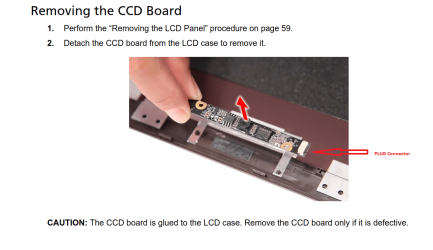
On Pg 62: "Removing the CCD Board"
It's part of the "LCD Module Disassembly" chapter.

Better yet, the control chip is part of the assembly, and it can easily be disconnected with the plug:

Disable webcam permanently-capture.png

Hope that helps!
My System SpecsSystem Spec
Reply

 Disable webcam permanently problems?


Thread Tools


Similar help and support threads for: Disable webcam permanently
Thread Forum
how to disable laptop monitor permanently General Discussion
Webcam mic permanently on, causing feedback Hardware & Devices
globally / permanently change webcam settings Hardware & Devices
Disable autorun for sidebar.exe permanently General Discussion
Want to permanently disable ip protection in MBAM System Security


All times are GMT -5. The time now is 01:01 PM.


Seven Forums Android App Seven Forums IOS App Follow us on Facebook

Windows 7 Forums is an independent web site and has not been authorized,
sponsored, or otherwise approved by Microsoft Corporation.
"Windows 7" and related materials are trademarks of Microsoft Corp.
© Designer Media Ltd
  

1 2 3 4 5 6 7 8 9 10 11 12 13 14 15 16 17 18 19 20 21 22 23 24 25 26 27 28 29 30 31 32