| Windows 7: Motherboard temperature? |
02 Jan 2013
|
#1 | | |
Motherboard temperature? Hey all,
I've installed a prog called Speccy to check out temperatures while playing games and the thing that concerns me is that my motherboard gets really hot (around 80'C) while the game is on, but when idle it is about 40-45'C...
Is that too hot??
I'll attach a snapshot so someone with that program can see what are my PC specs..
Cheers guys and thanks for the help | My System Specs |
| OS Windows 7 Ultimate x64 CPU Intel Core i3 2100 @ 3.10GHz Motherboard MSI H61M-P22 (MS-7680) Memory 8.00 GB Dual-Channel DDR3 @ 665MHz Graphics Card AMD Radeon HD 6770 (MSI) Monitor(s) Displays Panasonic-TV (1920x1080@60Hz) Hard Drives 466GB Seagate ST9500325AS ATA Device (SATA) |
02 Jan 2013
|
#2 | | Windows 7 Professional X64 So Cal |
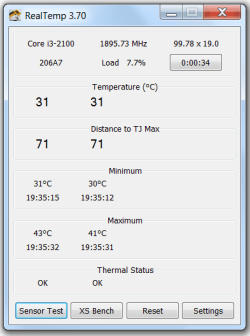
Download this program- Real Temp - CPU temperature monitoring
It will tell you how much leeway you have.
Mine says 100 degrees is max. | My System Specs | | Computer type PC/Desktop System Manufacturer/Model Number Self-Built OS Windows 7 Professional X64 CPU Core i7 (2nd gen) i7-2600K / 3.40GHz Motherboard ASUS P8Z77-V Intel 7 Series Motherboard Memory DDR3 2400MHz (OC) 16gb Graphics Card Intel(R) HD Graphics 3000, -1988 Mb Sound Card 8 ChannelsAudio Chipset Realtek ALC892 Monitor(s) Displays Acer X223 W Screen Resolution 1680 x 1050 Keyboard Microsoft Digital Media Pro Mouse Microsoft Wireless 6000 PSU 750 watt Case Thermaltake RX -1 Cooling 2120mm Fans Included 1Other Fan Ports 5x 200mm Fan Ports Hard Drives 128 GB Samsung 830 series SSD;2tb;Seagate;1tb Seagate; 750 gb Seagate; wd ext (2) 750 gb Internet Speed U-verse 16 mbps Antivirus MSE Browser Firefox and Chrome Other Info Hdhomerun Dual Tuner. |
02 Jan 2013
|
#3 | | Windows 7 Ultimate 64 bit NC |
What type of mobo do you have? Have you checked with you mobo manufacturer for the temp tolerances? Is this a laptop or desktop? If a desktop is this a custom build or retail PC? Could you fill in your system specs in your user profile area. | My System Specs | | System Manufacturer/Model Number Custom built OS Windows 7 Ultimate 64 bit CPU AMD Phenom II X4 940 Black Edition Motherboard Asus M4N78 Pro Memory GSkill 4 X 2 GB PC 8500 Graphics Card XFX Radeon HD 6790 D Sound Card On board VIA High Definition Audio Monitor(s) Displays Dual monitors:Samsung SyncMaster S20B300 Screen Resolution 1600 X 900 Keyboard Logitech G510 Mouse Razor DeathAdder PSU Ultra X4 750 watt fully modular Case Thermaltake Overseer RX 1 full tower Cooling Core-Contact 92 mm CPU Cooler Hard Drives Seagate Barracuda 1TB (primary)
Seagate Barracuda 2 X 320 GB Internet Speed 50/5 Mbps UL/DL Other Info Optical: Super Muliti DVD burner w/lightscribe, Hauppauge WinTV HVR-1800 |
02 Jan 2013
|
#4 | | |
Hey bassfisher,
It is store bought desktop PC connected to a TV via HDMI cable,
Windows 7 64bit
CPU: Intel Core i3 2100 @ 3.10GHz
RAM: 8.00 GB Dual-Channel DDR3 @ 665MHz
Motherboard: MSI H61M-P22 (MS-7680)
GPU: AMD Radeon HD 6770 (MSI)
HDD: 466GB Seagate ST9500325AS ATA Device (SATA)
Audio: Realtek High Definition Audio
Could you please maybe tell me how to setup SpeedFan properly (step by step if it is not too much of a bother, that software is quite complicated for me) , I've been reading/watching tutorials but it seems every PC configuration needs it's own setup in SpeedFan. That would be a huge help
Please tell me if you need any more info..
Cheers mate!! | My System Specs | | OS Windows 7 Ultimate x64 CPU Intel Core i3 2100 @ 3.10GHz Motherboard MSI H61M-P22 (MS-7680) Memory 8.00 GB Dual-Channel DDR3 @ 665MHz Graphics Card AMD Radeon HD 6770 (MSI) Monitor(s) Displays Panasonic-TV (1920x1080@60Hz) Hard Drives 466GB Seagate ST9500325AS ATA Device (SATA) |
03 Jan 2013
|
#5 | | |
Anyone pls? | My System Specs | | OS Windows 7 Ultimate x64 CPU Intel Core i3 2100 @ 3.10GHz Motherboard MSI H61M-P22 (MS-7680) Memory 8.00 GB Dual-Channel DDR3 @ 665MHz Graphics Card AMD Radeon HD 6770 (MSI) Monitor(s) Displays Panasonic-TV (1920x1080@60Hz) Hard Drives 466GB Seagate ST9500325AS ATA Device (SATA) |
03 Jan 2013
|
#6 | | Windows 7 Home Premium 32-Bit - Build 7600 SP1 Houston, Texas |

Quote: Originally Posted by egoran Anyone pls?  I don't know what is in your zip file on the first message, but you won't find anyone that will download it. Use this tutorial to post any info for us. Screenshots and Files - Upload and Post in Seven Forums | My System Specs | | System Manufacturer/Model Number Custom Build OS Windows 7 Home Premium 32-Bit - Build 7600 SP1 CPU Intel Core i3-2120 3.30Ghz Motherboard Asus P8Z68-V LX Intel Z68 Socket H2 ATX Memory Kingston 4 GB DDR3 1333 mhz Graphics Card Zotac GeForce 9400 GT 512MB Sound Card Sound Blaster Audigy SE 24-Bit Monitor(s) Displays Samsung Sync Master 940 = 19 inch Screen Resolution 1440 X 900 Keyboard Microsoft Natural 4000 Mouse Microsoft Custom Optical 3000 PSU 500 watt Case NZXT Apollo - Silver with Clear Side Panel Cooling Three 120 mm Fans Hard Drives OCZ Vertex 3 120 GB Sata 3 SSD ==
Western Digital 160 GB Caviar Blue 7200 RPM ==
Western Digital 500 GB Caviar Green 7200 RPM == Internet Speed AT&T Fiber Optic Wireless Network Other Info 120 mm Blue LED Fan -- Three Blue LED Lazer Light Sticks |
03 Jan 2013
|
#7 | | |
Hey bigmck,
That is a snapshot file of a application called Speccy, one of the members that helped me with BSOD issue recommended me to upload it for him, so I figured that everyone here uses it.. My bad, sorry.
Anyways I have written down my PC specs and the problem in posts above, so please help me with these temperatures if possible.
Cheers! | My System Specs | | OS Windows 7 Ultimate x64 CPU Intel Core i3 2100 @ 3.10GHz Motherboard MSI H61M-P22 (MS-7680) Memory 8.00 GB Dual-Channel DDR3 @ 665MHz Graphics Card AMD Radeon HD 6770 (MSI) Monitor(s) Displays Panasonic-TV (1920x1080@60Hz) Hard Drives 466GB Seagate ST9500325AS ATA Device (SATA) OS Windows 7 Ultimate x64 CPU Intel Core i3 2100 @ 3.10GHz Motherboard MSI H61M-P22 (MS-7680) Memory 8.00 GB Dual-Channel DDR3 @ 665MHz Graphics Card AMD Radeon HD 6770 (MSI) Monitor(s) Displays Panasonic-TV (1920x1080@60Hz) Hard Drives 466GB Seagate ST9500325AS ATA Device (SATA) |
06 Jan 2013
|
#9 | | win7 ultimate / virtual box weston super mare, UK |
why haven't you downloaded and used realtemp ? | My System Specs | | System Manufacturer/Model Number built my own OS win7 ultimate / virtual box CPU Intel Core i7 3770K,1155, Ivy Bridge Motherboard MSI Z77A-G43 Memory GSkill Ripjaws Z Series 1600 CL 9.0 16GB Graphics Card KFA2 GeForce GTX 670 EX OC 2048MB GDDR5 PCI-E gfx card Sound Card onboard Nvidia HDMI audio Monitor(s) Displays ASUS VK222H 22" widescreen LCD monitor Screen Resolution 1680x1050 Keyboard logitech Mouse logitech MX518 PSU Corsair HX 750W ATX2.2 Modular Cooling Antec 25 Kuhler H2O 620 Hard Drives Kingston 128gb SSD
OCZ Vertex 90gb SSD
500GB WDCaviar 16mb 5000KS
320GB WDCaviar 16mb 3200AAKS sata 2
1TB Samsung 16mb HD103SJ sata 2 Internet Speed 7mb adsl |
06 Jan 2013
|
#10 | | Win 7 Ultimate 64 bit At home. |

Quote: Originally Posted by ickymay why haven't you downloaded and used realtemp ? Because the OP may be intemidated by it. I looked at the screenshots on the website that was linked and was a bit overwhelmed. I use Speccy because it's easy to read at a glance. It will indicate if the CPU temperature is in operating range with a little, vertical bar graph (it looks more like a box). As long as the box doesn't get filled with a solid color, the maximum operating temperature hasn't been exceeded. Still, it's usually not good to continuously run anything near its max capacity. | My System Specs | | Computer type PC/Desktop System Manufacturer/Model Number Custom Build OS Win 7 Ultimate 64 bit CPU Intel i7-3930K Motherboard ASUS P9X79 WS Memory Kingston HyperX Genesis 32GB Kit (8x4GB Modules) 1600MHz DDR Graphics Card MSI R7850 Twin Frozr 2GD5/OC Radeon HD 7850 2GB 256-bit GDDR Sound Card On board Realtek HD Monitor(s) Displays HP w2207h Screen Resolution 1680 x 1050 Keyboard Logitech G110 Mouse Logitech M525 (two in use) PSU Corsair HX750w Case Antec Two Hundred v2 Cooling Cooler Master GeminII S524 120mm (fan replaced with a 140mm) Hard Drives Samsun 128GB 840 Pro
Western Digital WD Black WD2002FAEX 2TB
Western Digital WD Black WD2002FAEX 2TB Internet Speed fair to middlin' Antivirus AVAST!, MBAM, SAS, Spybot S&D (all but MBAM free) Browser IE9 Other Info LSI 9211-8i SATA III controller card (eight more SATA III ports), 2.5" & 3.5" Hot Swap Bays, HooToo HT-CR001 PCI-E to USB 3.0 Internal Combo - 3 Ports USB 3.0 Hub + 6 Slot Card Reader, and LG Model CH12LS28 BD-ROM Combo Optical Drive. Also, ScanSnap S1500 ADF duplexing scanner, Canon 9000F flat bed scanner, Logitech 5.1 speaker system, Samsung CLP 415nw laser color printer, Motherboard temperature? problems? All times are GMT -5. The time now is 12:19 PM. | |