| Windows 7: Cannot access 1TB External Hard drive (USB) Crashing windows explorer |
10 Jan 2013
|
#1 | | Windows 7 Ultimate 32-bit SP1 (Build 7601) England, North West |
Cannot access 1TB External Hard drive (USB) Crashing windows explorer Hello i'm kinda a newbie to anything to do with external hard drives and/or Corruption.
But my external hard drive recently has become unusable, When it's plugged it only shows "Local Disk ( G: )" on My computer, with no drive size/space left. (Image to explain, Yes i know My primary drive is full, but i have no external to backup on. Here)
Any interaction with it will cause windows explorer to crash, and forcing to restart windows explorer, looking around the web i see no real fix i feel like trying, as there's around 600GB of data on there i wish to keep.
So i thought it'd be best to get a hopeful fix specific to my problem just to make sure i don't mess-up and lose the data.
The Harddrive itself is a "Hitachi 1tb External Hard Drive", For what model i have no idea, but looks exactly like this image: Here
It's a Dual power-source external hard drive connected by USB 2.0.
the only real problem i had with the drive prior to this problem was i had a little notification when it was connected asking me to scan for errors, i was kinda worried about the possible corruption so i went ahead and left it to scan the 2 billion odd bytes from what i remember , took ages to do but the problem was still there, I saw no issue with any of the files on there after pressing the "continue without scanning" so i just thought it might have been a bug, as the drive seemed normal.
But then after a while this problem occurred and since hasn't been fixed, i can't seem to even format it as right-clicking the drive has the same outcome as double-clicking.
I'd like to thank anyone willing to take the time and help me out with this problem, and try to keep things simple if possible, don't know much about Hard drives. | My System Specs |
| System Manufacturer/Model Number HP Compaq 6710b OS Windows 7 Ultimate 32-bit SP1 (Build 7601) CPU Intel Core 2 Duo @ 2.10GHz Motherboard Hewlett-Packard 30C0 KBC Version 71.2E Memory 4096Mb Installed - 3064 Usable Graphics Card Mobile Intel(R) 965 Express Chipset Family Sound Card SoundMAX Integrated Digital HD Audio Monitor(s) Displays Generic PnP Monitor (15.4"vis, January 2006) Screen Resolution 1280x800 Hard Drives Hitachi HTS542580K9A300 [Hard drive] (80.03 GB) Internet Speed 25 Mbit Download - 2.8 Mbit upload |
10 Jan 2013
|
#2 | | Windows 7 Ultimate SP1 (x64) South Australia |
Hi,
Lets have a look at this in Disk Management - can you open it and attach a screen capture image of it please?
Regards,
Golden | My System Specs | | Computer type PC/Desktop System Manufacturer/Model Number Golden Mk. I.3 OS Windows 7 Ultimate SP1 (x64) CPU Intel i7 860 @ 2.80 GHz Motherboard Gigabyte P55A-UD3R Rev.1. Award BIOS F13 Memory 16GB Corsair Vengance DDR3 @ 661 MHz Dual Channel (9-9-9-24) Graphics Card EVGA NVidia GTX 560 1024MB Sound Card Realtek Integrated Monitor(s) Displays Dual Samsung SyncMaster 2494HS Screen Resolution 1920*1080 and 1920*1080 Keyboard Logitech G110 Mouse Logitech MX518 PSU Thermaltake ToughPower QFan 750W Case Thermaltake Element S VK60001W2Z Cooling Corsair H60 Water Cooling, 2*230mm and 2*80mm case fans Hard Drives 1*OCZ Vertex 2 60GB SSD;
2*Samsung F3 SpinPoint 1TB in RAID0;
3*Samsung F1 SpinPoint 1TB in RAID5;
1*Western Digital 500GB External USB 3.0
1*Seagate 500GB External USB 2.0 Internet Speed Not fast enough!!! Antivirus MSE and Malwarebytes Pro Browser Chrome Version 25 Other Info Laptop: ASUS X54C, Intel Core i3-2330M @ 2.0Ghz, 4GB RAM, Intel HD on-board graphics, Windows 7 Professional SP1 (x64), LinuxMint 14 (x64), PepperMint 3 (x86) |
10 Jan 2013
|
#3 | | Windows 7 Ultimate 32-bit SP1 (Build 7601) England, North West |

Quote: Originally Posted by Golden Hi,
Lets have a look at this in Disk Management - can you open it and attach a screen capture image of it please?
Regards,
Golden Thanks for the reply, much appreciated, But a tiny update, i've had the hard drive connected a while now, and around 10-15 minutes ago my hard drive spun up (audibly) and a prompt came up asking to scan the harddrive for errors, or continue without scanning, i started scanning.
It's nowhere near done. ( Here)
however i opened up disc manager as asked and this is it: Here
Looks as if the drive is empty, i can confirm it's not there was around 300-400 GB Free.
Edit: Just to explain a little more the drive has been connected around 1hr 30Mins Before that popped up.
Last edited by Pimmalage; 10 Jan 2013 at 08:08 PM..
Reason: Extra Info
| My System Specs | | System Manufacturer/Model Number HP Compaq 6710b OS Windows 7 Ultimate 32-bit SP1 (Build 7601) CPU Intel Core 2 Duo @ 2.10GHz Motherboard Hewlett-Packard 30C0 KBC Version 71.2E Memory 4096Mb Installed - 3064 Usable Graphics Card Mobile Intel(R) 965 Express Chipset Family Sound Card SoundMAX Integrated Digital HD Audio Monitor(s) Displays Generic PnP Monitor (15.4"vis, January 2006) Screen Resolution 1280x800 Hard Drives Hitachi HTS542580K9A300 [Hard drive] (80.03 GB) Internet Speed 25 Mbit Download - 2.8 Mbit upload |
10 Jan 2013
|
#4 | | Windows 7 Pro-x64 South Texas |
One thing you need to do is get that drive letter (Y) and the "Active" off the System Reserved partition of the C drive.
Ops, forgot the link: Partition - Mark as Inactive
How was the USB drive formatted to begin with?
Last edited by carwiz; 10 Jan 2013 at 09:24 PM..
Reason: Add Link
| My System Specs | | Computer type PC/Desktop System Manufacturer/Model Number Built 2/11/2011 OS Windows 7 Pro-x64 CPU i7-2600 3.4GHz - 3.8GHz Turbo Motherboard Intel DH67BL-B3 Memory 8Gb - 2x4GB, Muskin 991770 PC3-1333 Graphics Card Integrated Intel HD 2000 Sound Card Integrated Intel 10.1 HD, RealTek ALC892 Monitor(s) Displays Asus LCD VH222H, Haier HL24XSL2a Screen Resolution 1920x1080, 1920x1080 Keyboard Logitech EX100 Wireless Mouse Logitech EX100 Wireless PSU Seasonic 650W 80+ Gold Modular Case Rosewill Defender Cooling Stock CPU, Four 120mm case fans, PCH fan added Hard Drives Crucial C300-128Gb,
Western Digital WD5002AALX - 500Gb,
Western Digital WD7501AALS - 750Gb Internet Speed 2.5/1.5 Mbs Antivirus Microsoft Security Essentials Browser Microsoft Internet Explorer 10 Other Info Antec Veris Premier-Multimedia IR Station,
Cyber Accoustics-3602 Speakers,
AFT XM-5U Card Reader,
Hauppauge TV-HVR-2250,
Sony LX300 USB Turntable |
10 Jan 2013
|
#5 | | Windows 7 Ultimate 32-bit SP1 (Build 7601) England, North West |

Quote: Originally Posted by carwiz One thing you need to do is get that drive letter (Y) and the "Active" off the System Reserved partition of the C drive.
How was the USB drive formatted to begin with? I don't really know what you mean about the system reserve?
Edit: So i don't sound like an idiot i know what it is, just don't know what you want me to do.
But the Drive i think was NTFS, It now displays that on My computer since it has began scanning, Along with the Drive name ( Mike's Harddrive G: )
Last edited by Pimmalage; 10 Jan 2013 at 09:32 PM..
Reason: Adding info.
| My System Specs | | System Manufacturer/Model Number HP Compaq 6710b OS Windows 7 Ultimate 32-bit SP1 (Build 7601) CPU Intel Core 2 Duo @ 2.10GHz Motherboard Hewlett-Packard 30C0 KBC Version 71.2E Memory 4096Mb Installed - 3064 Usable Graphics Card Mobile Intel(R) 965 Express Chipset Family Sound Card SoundMAX Integrated Digital HD Audio Monitor(s) Displays Generic PnP Monitor (15.4"vis, January 2006) Screen Resolution 1280x800 Hard Drives Hitachi HTS542580K9A300 [Hard drive] (80.03 GB) Internet Speed 25 Mbit Download - 2.8 Mbit upload |
10 Jan 2013
|
#6 | | Windows 7 Pro-x64 South Texas |
The System Reserved space on your C: drive is marked "Active" and has a drive letter. Remove the drive letter Y: and deactivate the partition. Do NOT try to remove the partition, just deactivate it. (Follow the added link.) Leaving the SR active can cause boot problems.
Restart your system to make sure it reboots.
THEN, we'll look at drive G: | My System Specs | | Computer type PC/Desktop System Manufacturer/Model Number Built 2/11/2011 OS Windows 7 Pro-x64 CPU i7-2600 3.4GHz - 3.8GHz Turbo Motherboard Intel DH67BL-B3 Memory 8Gb - 2x4GB, Muskin 991770 PC3-1333 Graphics Card Integrated Intel HD 2000 Sound Card Integrated Intel 10.1 HD, RealTek ALC892 Monitor(s) Displays Asus LCD VH222H, Haier HL24XSL2a Screen Resolution 1920x1080, 1920x1080 Keyboard Logitech EX100 Wireless Mouse Logitech EX100 Wireless PSU Seasonic 650W 80+ Gold Modular Case Rosewill Defender Cooling Stock CPU, Four 120mm case fans, PCH fan added Hard Drives Crucial C300-128Gb,
Western Digital WD5002AALX - 500Gb,
Western Digital WD7501AALS - 750Gb Internet Speed 2.5/1.5 Mbs Antivirus Microsoft Security Essentials Browser Microsoft Internet Explorer 10 Other Info Antec Veris Premier-Multimedia IR Station,
Cyber Accoustics-3602 Speakers,
AFT XM-5U Card Reader,
Hauppauge TV-HVR-2250,
Sony LX300 USB Turntable |
10 Jan 2013
|
#7 | | Windows 7 Ultimate 32-bit SP1 (Build 7601) England, North West |

Quote: Originally Posted by carwiz The System Reserved space on your C: drive is marked "Active" and has a drive letter. Remove the drive letter Y: and deactivate the partition. Do NOT try to remove the partition, just deactivate it. (Follow the added link.) Leaving the SR active can cause boot problems.
Restart your system to make sure it reboots.
THEN, we'll look at drive G: Ah alright Well i don't really want to restart until this scanning of the hard drive G: is done (One mentioned in Previous posts. (Currently at 310 files processed, Looks to be around an 8th of the way)
Is this system reserve active related to my problem, Or just a general problem, because i don't think i've ever messed with it since first boot. | My System Specs | | System Manufacturer/Model Number HP Compaq 6710b OS Windows 7 Ultimate 32-bit SP1 (Build 7601) CPU Intel Core 2 Duo @ 2.10GHz Motherboard Hewlett-Packard 30C0 KBC Version 71.2E Memory 4096Mb Installed - 3064 Usable Graphics Card Mobile Intel(R) 965 Express Chipset Family Sound Card SoundMAX Integrated Digital HD Audio Monitor(s) Displays Generic PnP Monitor (15.4"vis, January 2006) Screen Resolution 1280x800 Hard Drives Hitachi HTS542580K9A300 [Hard drive] (80.03 GB) Internet Speed 25 Mbit Download - 2.8 Mbit upload |
10 Jan 2013
|
#8 | | Windows 7 Pro-x64 South Texas |
Something has "messed" with it. Windows 7 doesn't normally assign a Y drive nor make the reserve active. Only the boot disk C: should be marked active. When a partition is active, Windows will attempt to boot from it. You may (or may not) have a virus or root kit grabbing your system at boot.
Your external drive G: is correct except it should be NTFS under File System. That's why I asked how it was formated to begin with. | My System Specs | | Computer type PC/Desktop System Manufacturer/Model Number Built 2/11/2011 OS Windows 7 Pro-x64 CPU i7-2600 3.4GHz - 3.8GHz Turbo Motherboard Intel DH67BL-B3 Memory 8Gb - 2x4GB, Muskin 991770 PC3-1333 Graphics Card Integrated Intel HD 2000 Sound Card Integrated Intel 10.1 HD, RealTek ALC892 Monitor(s) Displays Asus LCD VH222H, Haier HL24XSL2a Screen Resolution 1920x1080, 1920x1080 Keyboard Logitech EX100 Wireless Mouse Logitech EX100 Wireless PSU Seasonic 650W 80+ Gold Modular Case Rosewill Defender Cooling Stock CPU, Four 120mm case fans, PCH fan added Hard Drives Crucial C300-128Gb,
Western Digital WD5002AALX - 500Gb,
Western Digital WD7501AALS - 750Gb Internet Speed 2.5/1.5 Mbs Antivirus Microsoft Security Essentials Browser Microsoft Internet Explorer 10 Other Info Antec Veris Premier-Multimedia IR Station,
Cyber Accoustics-3602 Speakers,
AFT XM-5U Card Reader,
Hauppauge TV-HVR-2250,
Sony LX300 USB Turntable |
10 Jan 2013
|
#9 | | Windows 7 Ultimate 32-bit SP1 (Build 7601) England, North West |

Quote: Originally Posted by carwiz Something has "messed" with it. Windows 7 doesn't normally assign a Y drive nor make the reserve active. Only the boot disk C: should be marked active. When a partition is active, Windows will attempt to boot from it. You may (or may not) have a virus or root kit grabbing your system at boot.
Your external drive G: is correct except it should be NTFS under File System. That's why I asked how it was formated to begin with. It is displayed on My computer as NTFS, But not on drive manager, for some reason, possibly to do with the scan.
And you said to follow the link attached?
You hadn't linked it, And i'll have to do it after this scan, probably going to take a number of hours. | My System Specs | | System Manufacturer/Model Number HP Compaq 6710b OS Windows 7 Ultimate 32-bit SP1 (Build 7601) CPU Intel Core 2 Duo @ 2.10GHz Motherboard Hewlett-Packard 30C0 KBC Version 71.2E Memory 4096Mb Installed - 3064 Usable Graphics Card Mobile Intel(R) 965 Express Chipset Family Sound Card SoundMAX Integrated Digital HD Audio Monitor(s) Displays Generic PnP Monitor (15.4"vis, January 2006) Screen Resolution 1280x800 Hard Drives Hitachi HTS542580K9A300 [Hard drive] (80.03 GB) Internet Speed 25 Mbit Download - 2.8 Mbit upload |
10 Jan 2013
|
#10 | | Windows 7 Pro-x64 South Texas |
Partition - Mark as Inactive
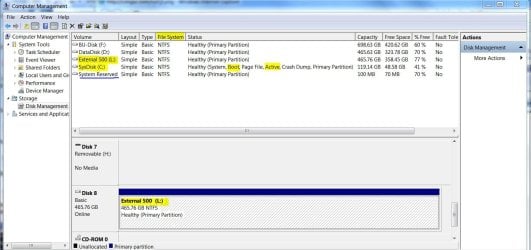
Make sure your C: drive is marked Active before you reboot. It's the one that has "Boot" under Status. You should be able to do that from Disk Manager.
Here's a snip of my drives for comparison. And yeah, the scan could cause the missing NTFS. It could be trying to determine the type. | My System Specs | | Computer type PC/Desktop System Manufacturer/Model Number Built 2/11/2011 OS Windows 7 Pro-x64 CPU i7-2600 3.4GHz - 3.8GHz Turbo Motherboard Intel DH67BL-B3 Memory 8Gb - 2x4GB, Muskin 991770 PC3-1333 Graphics Card Integrated Intel HD 2000 Sound Card Integrated Intel 10.1 HD, RealTek ALC892 Monitor(s) Displays Asus LCD VH222H, Haier HL24XSL2a Screen Resolution 1920x1080, 1920x1080 Keyboard Logitech EX100 Wireless Mouse Logitech EX100 Wireless PSU Seasonic 650W 80+ Gold Modular Case Rosewill Defender Cooling Stock CPU, Four 120mm case fans, PCH fan added Hard Drives Crucial C300-128Gb,
Western Digital WD5002AALX - 500Gb,
Western Digital WD7501AALS - 750Gb Internet Speed 2.5/1.5 Mbs Antivirus Microsoft Security Essentials Browser Microsoft Internet Explorer 10 Other Info Antec Veris Premier-Multimedia IR Station,
Cyber Accoustics-3602 Speakers,
AFT XM-5U Card Reader,
Hauppauge TV-HVR-2250,
Sony LX300 USB Turntable Cannot access 1TB External Hard drive (USB) Crashing windows explorer problems? All times are GMT -5. The time now is 02:13 AM. | |