Windows 7 Forums


Windows 7: Old Keyboard converter?

13 Jan 2013   #1

Windows 7 Home Premium 64 bit
 
 
Old Keyboard converter?

Hello all!


I have an old Keyboard from a mid-90's PC that ran Windows 95. The connector is a circular shape with five pins. I recently ordered a converter, but I got the sides switched.

I have been searching the Internetz for a reverse converter, so that I could at least try using my old keyboard with my laptop. All I have been able to find are some ways to artificially tamper with the hardware (splicing the cables and whatnot).

Does anyone here have a link to a converter so that I can plug my old keyboard into a USB port on a new computer?

Thanks!
My System SpecsSystem Spec

13 Jan 2013   #2

Windows 7 x64 Ultimate
A Finnish immigrant in Leipzig, Germany


Hi Dixonater, welcome to the Seven Forums.

The connector you desrcribed is called PS/2, widely used before USB to connect mouse and keyboard to PC.

A simple Google search PS/2 to USB adapter gives for instance this: Amazon.com: Adesso PS/2 to USB Adapter, connects 2 PS/2 connectors to 1 USB port/hub (ADP-PU21 ): Electronics

Kari
My System SpecsSystem Spec
13 Jan 2013   #3

Windows 7 Ultimate x64 SP1
Manchester UK


When I had a '95 box it used large audio type DIN, and I had an adapter. Google say still around . . .ah memories, but no help to the OP

Name:  old_din.jpg
Views: 48
Size:  5.6 KB
My System SpecsSystem Spec
.


13 Jan 2013   #4

Windows 7 Home Premium 64 bit


Quote   Quote: Originally Posted by Kari View Post
Hi Dixonater, welcome to the Seven Forums.

The connector you desrcribed is called PS/2, widely used before USB to connect mouse and keyboard to PC.

A simple Google search PS/2 to USB adapter gives for instance this: Amazon.com: Adesso PS/2 to USB Adapter, connects 2 PS/2 connectors to 1 USB port/hub (ADP-PU21 ): Electronics

Kari
To confirm, I can plug my keyboard into this cable no problem? Keep in mind that my old keyboard as the five spokes, as opposed to five holes for the spokes. The pictures on Amazon don't show this.
My System SpecsSystem Spec
13 Jan 2013   #5

Win 7 Ultimate (64-bit), Win 7 Pro (32-bit)
N. Calif


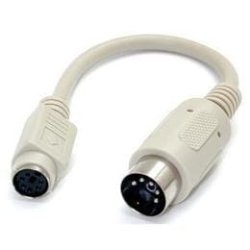
I have keyboard I've been using continuously since 1986 (IBM Model M) that has the large DIN connector. You can adapt it to use the PS2 connector with one of these: Amazon.com: 5pin DIN Female to PS/2 Male Keyboard Cable Adapter - 6 1/2 inches long - 5 pin din female plug to ps2 port Male - basically - allows you to plug an older 5pin keyboard into a newer computer with a ps2 port: Electronics

My newest computer doesn't have a PS2 connector so I have one of these as well to adapt the PS2 to USB: Amazon.com: Adesso PS/2 to USB Adapter, connects 2 PS/2 connectors to 1 USB port/hub (ADP-PU21 ): Electronics
My System SpecsSystem Spec
13 Jan 2013   #6

Windows 7 Home Premium 64 bit


Quote   Quote: Originally Posted by strollin View Post
I have keyboard I've been using continuously since 1986 (IBM Model M) that has the large DIN connector. You can adapt it to use the PS2 connector with one of these: Amazon.com: 5pin DIN Female to PS/2 Male Keyboard Cable Adapter - 6 1/2 inches long - 5 pin din female plug to ps2 port Male - basically - allows you to plug an older 5pin keyboard into a newer computer with a ps2 port: Electronics

My newest computer doesn't have a PS2 connector so I have one of these as well to adapt the PS2 to USB: Amazon.com: Adesso PS/2 to USB Adapter, connects 2 PS/2 connectors to 1 USB port/hub (ADP-PU21 ): Electronics
The first one wouldn't work because I don't have either port on my laptop (the one with five or six pins).

That second one, though, could work...but it doesn't give me a clear picture. Does that cable in your second link connect with a keyboard with the five pins into a laptop with USB ports?
My System SpecsSystem Spec
13 Jan 2013   #7

Win7 Enterprise, Win7 x86 (Ult 7600), Win7 x64 Ult 7600, TechNet RTM on AMD x64 (2.8Ghz)
SomeWhere in the HOT Arizona Desert !


I find keyboards (PS2 & USB) at thrift stores ( Like GoodWill) for $2 to $5 (some used some brand new)
My System SpecsSystem Spec
13 Jan 2013   #8

Windows 7 x64 Ultimate
A Finnish immigrant in Leipzig, Germany


As my esteemed fellow geeks have told you, it might also be a DIN connector.

Does it look like this:


or like this:

My System SpecsSystem Spec
13 Jan 2013   #9

Windows 7 Home Premium 64 bit


Quote   Quote: Originally Posted by Kari View Post
As my esteemed fellow geeks have told you, it might also be a DIN connector.

Does it look like this:


or like this:

It is the first one. :P
My System SpecsSystem Spec
13 Jan 2013   #10

Windows 7 x64 Ultimate
A Finnish immigrant in Leipzig, Germany


OK, it's DIN. I do not know if DIN to USB adapters exists, can not find on Google.

Theoretically it could work with connecting keyboard to DIN to PS/2 adapter, and then this adapter to a PS/2 to USB adapter, so first this and then this. However I refuse to take any responsibility if it does not work.

Worth to think is that those old keyboards might need more power than that a USB port can provide. Anyway, Why don't you just buy a new keyboard? You get a good USB keyboard with the price of adapters you would need with your old one.

Kari
My System SpecsSystem Spec
Reply

 Old Keyboard converter? problems?


Thread Tools


Similar help and support threads for: Old Keyboard converter?
Thread Forum
Solved Keyboard making sounds, won't repeat keystrokes - cat sat on keyboard! Hardware & Devices
Keyboard Layout Creator 1.4 -- problem with building keyboard Software
External Microsoft keyboard locks both laptop keyboard and itself. Hardware & Devices
Keyboard - Shift & Alt keys stopped working for keyboard shortcuts Hardware & Devices


All times are GMT -5. The time now is 10:07 AM.


Seven Forums Android App Seven Forums IOS App Follow us on Facebook

Windows 7 Forums is an independent web site and has not been authorized,
sponsored, or otherwise approved by Microsoft Corporation.
"Windows 7" and related materials are trademarks of Microsoft Corp.
© Designer Media Ltd
  

1 2 3 4 5 6 7 8 9 10 11 12 13 14 15 16 17 18 19 20 21 22 23 24 25 26 27 28 29 30 31 32