| Windows 7: Identifying the screws to mount motherboard onto case |
15 Jan 2013
|
#1 | | |
Identifying the screws to mount motherboard onto case Hi,
I have a HAF plus case and it came with quite alot of screws, could someone please identify what each of these are used for? I am trying to screw my case onto my motherboard and my guess is the following but please let me know if im wrong: 
From left:
1= Fan
2= Motherboard
3= Motherboard
4= Fan
When i built my old PC it used screw 2 (with large head) however in the new case it seems that screw 2 wont fit completely (it does go in but doesnt get to the bottom entirely) and that i should be using screw 3. Could someone just please confirm that? Im confused because screw 3 seems abit small to hold a motherboard.
The motherboard is an ASUS P8Z68 DELUXE/GEN3.
Thanks! | My System Specs |
| OS Windows 7 64-bit CPU Core 2 Duo OC 4GHZ Motherboard Asus P5Q SE Plus Memory 4MB DDR2 Graphics Card GTX 460 Sound Card Xonar D1 Monitor(s) Displays LG 42 inch Screen Resolution 1980x1020 |
15 Jan 2013
|
#2 | | 64-bit Windows 7 Ultimate SP1 & Windows 8 Enterprise Texas |
Hello Rezelute,
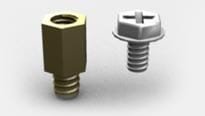
3 looks more like a drive bay screw. It'll work though if it there's enough of the screw head holding down the motherboard, and it's not stripping the mount screw (left below).
2 would be the motherboard screw (right below) . Double check that the mount screw (left below) is ok.
Hope this helps,
Shawn | My System Specs | | Computer type PC/Desktop System Manufacturer/Model Number Self built custom OS 64-bit Windows 7 Ultimate SP1 & Windows 8 Enterprise CPU Intel i7-3930K 3.2 Ghz (O/C 4 Ghz) Motherboard ASRock X79 Extreme11 Memory 32 GB (8GBx4) G.SKILL DDR3 Quad PC3-19200 2400MHz Graphics Card Sapphire HD5870 Eyefinity 6 2GB Sound Card SB Recon 3Di Integrated Chip Monitor(s) Displays 3x 27" Asus VE278Q Screen Resolution 1920x1080 Keyboard Logitech Cordless Desktop MX 5500 Revolution Mouse Logitech Cordless Desktop MX 5500 Revolution PSU OCZ Series Gold OCZZ1000M 1000W Case Thermaltake Level 10 GT Snow Edition Cooling Corsair Hydro H100 Hard Drives 256GB OCZ Vector
160GB OCZ RevoDrive X2
2 x 1TB Samsung HDD HD154UI SATA Internet Speed 50 Mb/s Download and 2 Mb/s Upload Other Info Microsoft LifeCam Cinema
Lite-On iHBS212 12x BD Writer
Samsung CLX-3175FW Printer
Netgear WNDR3800 Router
Motorola SBG6580 Cable Modem
2x APC Back-UPS XS 1500 |
15 Jan 2013
|
#3 | | |
Thank you for reply Brink, what your saying makes sense however I have added two new images of the fittings:
This is the one that seems to fit fine:
This is the one you are talking about which seems to struggle to fit in:
I have tried screwing it the one you suggested too and there always seems to be abit of the screw that sticks out.
My bay drives have an automatic clip too so i dont think they require screws. | My System Specs | | OS Windows 7 64-bit CPU Core 2 Duo OC 4GHZ Motherboard Asus P5Q SE Plus Memory 4MB DDR2 Graphics Card GTX 460 Sound Card Xonar D1 Monitor(s) Displays LG 42 inch Screen Resolution 1980x1020 |
15 Jan 2013
|
#4 | | Windows 7 64bit home premium UK |
The top pic is for your mobo
The lower picture is the black screw for mounting your gfx card etc to the case. | My System Specs | | System Manufacturer/Model Number Self built OS Windows 7 64bit home premium CPU I5 3570K Motherboard Gigabyte Z77-DS3H Memory 4 x 4GB Crucial Ballistix Sport DDR3 1600 Mhz Graphics Card Gigabyte Geforce 660 TI Sound Card creative x-fi Monitor(s) Displays Primary CiBox 22" Widescreen LCD ,Secondary Dell 22" Widescr Screen Resolution Both 1680 x 1050 Keyboard Trust ds-3200 Wireless keyboard and mouse Mouse Trust ds-3200 Wireless keyboard and mouse PSU Corsair HX 620W ATX2.2 Modular SLI Complient PSU Case Antec 900 Ultimate Gaming Case Cooling 3xfront 1xside 1xrear blue fan, 1 200mm blue top fan 1 Hard Drives 2 x 500G HD (SATA) 1 x 2 TB USB Internet Speed 288 / 4000 Other Info Creative Inspire 7.1 T7900 Speakers
Trust Graphics Tablet |
15 Jan 2013
|
#5 | | Win 7 Ultimate 64 bit At home. |
I would have to see the screws up close and personal to be sure but my guess is if screw #2 bottoms out prematurely, it may have the wrong thread. It appears in the photo to have a tapered thread which would make it a sheet metal screw. The correct screw for mounting MOBOs to the traditional brass standoffs is a 6-32 screw and doesn't have to be very long although screws #2 and #3 both look a bit short (and the diameter of #3 looks a bit small based on fan screws usually being 6-32). Screw #1 (why do I sound like I'm hosting Let's Make a Deal?) is definitely too long. Screw #4 is probably also too long.
I just ran a 6/32 screw into a spare standoff I had knocking about and it bottomed out at a red hair over 3/16". I'm thinkin' the screw you use should be between 1/4" and 3/16" longer than the thickness of your MOBO (do not include the screw head in your measurement) to ensure enough thread goes inside the standoff to secure the board without bottoming out. If the screws you have are both too long and too short, head on down to your friendly neighborhood hardware store/home center and get the right length (I suggest you check the depth your standoffs have first; most cases use 6-32 thumbscrews to secure the side panels, btw). If you can't find black oxide, get plated steel ones and color the heads with a fine Sharpie felt pin (it actually works; I've done it before).
Edit. Ok, some posts have happened since I started posting. If screw #3's threads don't wobble around in the standoff, then it's probably the right diameter (just because it goes in doesn't always mean it fits correctly). What I said about length stands unless your illustration shows it bottomed out in the standoff, in which case that is probably the correct length.
Last edited by Lady Fitzgerald; 15 Jan 2013 at 03:56 PM..
Reason: Getting slow in my old age.
| My System Specs | | Computer type PC/Desktop System Manufacturer/Model Number Custom Build OS Win 7 Ultimate 64 bit CPU Intel i7-3930K Motherboard ASUS P9X79 WS Memory Kingston HyperX Genesis 32GB Kit (8x4GB Modules) 1600MHz DDR Graphics Card MSI R7850 Twin Frozr 2GD5/OC Radeon HD 7850 2GB 256-bit GDDR Sound Card On board Realtek HD Monitor(s) Displays HP w2207h Screen Resolution 1680 x 1050 Keyboard Logitech G110 Mouse Logitech M525 (two in use) PSU Corsair HX750w Case Antec Two Hundred v2 Cooling Cooler Master GeminII S524 120mm (fan replaced with a 140mm) Hard Drives Samsun 128GB 840 Pro
Western Digital WD Black WD2002FAEX 2TB
Western Digital WD Black WD2002FAEX 2TB Internet Speed fair to middlin' Antivirus AVAST!, MBAM, SAS, Spybot S&D (all but MBAM free) Browser IE9 Other Info LSI 9211-8i SATA III controller card (eight more SATA III ports), 2.5" & 3.5" Hot Swap Bays, HooToo HT-CR001 PCI-E to USB 3.0 Internal Combo - 3 Ports USB 3.0 Hub + 6 Slot Card Reader, and LG Model CH12LS28 BD-ROM Combo Optical Drive. Also, ScanSnap S1500 ADF duplexing scanner, Canon 9000F flat bed scanner, Logitech 5.1 speaker system, Samsung CLP 415nw laser color printer, |
15 Jan 2013
|
#6 | | Windows 7 Ultimate x64 Service Pack 1 Doncaster, UK |
I had (and still have) a lot of screws and fittings that came with my current and previous cases. Many of the screws do look alike, but the threads on them are slightly different. Not enough to prevent the screws from being started, but quite often enough to prevent them from being fully screwed in. The easiest thing to do would be to take the required number of motherboard standoffs and pair them individually with the correct screws. The ones Shawn illustrated above are the ones you need, but bear in mind what I've said about screws being similar but different. | My System Specs | | System Manufacturer/Model Number Dwarf Dwf/11/2012 OS Windows 7 Ultimate x64 Service Pack 1 CPU Intel Core-i5-3570K 4-core @ 3.4GHz (Ivy Bridge) (OC 4.2GHz) Motherboard ASRock Z77 Extreme4-M Memory 4 x 4GB DDR3-1600 Corsair Vengeance CMZ8GX3M2A1600C9B (16GB) Graphics Card 2 x AMD Radeon HD7770 1GB CrossFired (OC 1100MHz/1250MHz) Sound Card Realtek High Definition on board solution (ALC 898) Monitor(s) Displays ViewSonic VA1912w Widescreen (VGA) Screen Resolution 1440x900 Keyboard Microsoft Comfort Curve Keyboard 3000 (USB) Mouse Microsoft Comfort Mouse 3000 for Business (USB) PSU XFX Pro Series 850W Semi-Modular Case Gigabyte IF233 Cooling 1 x 120mm Front Inlet 1 x 120mm Rear Exhaust Hard Drives OCZ Agility 3 SSD 120GB SATA III x2 (RAID 0)
Samsung HD501LJ 500GB SATA II x2
Hitachi HDS721010CLA332 1TB SATA II
Iomega 1.5TB Ext USB 2.0
WD 2.0TB Ext USB 3.0 Internet Speed NetGear DG834Gv3 ADSL Modem/Router (Ethernet) ~4.0 Mb/s (O2) Antivirus Avast! 7.0.1474 Browser IE 9 Other Info Optical Drive: HL-DT-ST BD-RE BH10LS30 SATA Bluray
Lexmark S305 Printer/Scanner/Copier (USB)
CTF-430 Tablet & Pen
WEI Score: 7.7/7.9/7.4/7.4/7.9
Asus Eee PC 1011PX Netbook (Windows 7 x86 Starter) |
15 Jan 2013
|
#7 | | 64-bit Windows 7 Ultimate SP1 & Windows 8 Enterprise Texas |

Quote: Originally Posted by roy69 The top pic is for your mobo
The lower picture is the black screw for mounting your gfx card etc to the case. Justin,
I agree with Roy. Use the screws in your top screenshot. You'll end up stripping the mount screws if you try to force using the screws in the lower screenshot. | My System Specs | | Computer type PC/Desktop System Manufacturer/Model Number Self built custom OS 64-bit Windows 7 Ultimate SP1 & Windows 8 Enterprise CPU Intel i7-3930K 3.2 Ghz (O/C 4 Ghz) Motherboard ASRock X79 Extreme11 Memory 32 GB (8GBx4) G.SKILL DDR3 Quad PC3-19200 2400MHz Graphics Card Sapphire HD5870 Eyefinity 6 2GB Sound Card SB Recon 3Di Integrated Chip Monitor(s) Displays 3x 27" Asus VE278Q Screen Resolution 1920x1080 Keyboard Logitech Cordless Desktop MX 5500 Revolution Mouse Logitech Cordless Desktop MX 5500 Revolution PSU OCZ Series Gold OCZZ1000M 1000W Case Thermaltake Level 10 GT Snow Edition Cooling Corsair Hydro H100 Hard Drives 256GB OCZ Vector
160GB OCZ RevoDrive X2
2 x 1TB Samsung HDD HD154UI SATA Internet Speed 50 Mb/s Download and 2 Mb/s Upload Other Info Microsoft LifeCam Cinema
Lite-On iHBS212 12x BD Writer
Samsung CLX-3175FW Printer
Netgear WNDR3800 Router
Motorola SBG6580 Cable Modem
2x APC Back-UPS XS 1500 |
15 Jan 2013
|
#8 | | Windows 7 Ultimate x64 Service Pack 1 Doncaster, UK |
How much easier PC building would be if every screw required (motherboard, drive, add-on card, etc.) were exactly the same. It would save a lot of confusion. | My System Specs | | System Manufacturer/Model Number Dwarf Dwf/11/2012 OS Windows 7 Ultimate x64 Service Pack 1 CPU Intel Core-i5-3570K 4-core @ 3.4GHz (Ivy Bridge) (OC 4.2GHz) Motherboard ASRock Z77 Extreme4-M Memory 4 x 4GB DDR3-1600 Corsair Vengeance CMZ8GX3M2A1600C9B (16GB) Graphics Card 2 x AMD Radeon HD7770 1GB CrossFired (OC 1100MHz/1250MHz) Sound Card Realtek High Definition on board solution (ALC 898) Monitor(s) Displays ViewSonic VA1912w Widescreen (VGA) Screen Resolution 1440x900 Keyboard Microsoft Comfort Curve Keyboard 3000 (USB) Mouse Microsoft Comfort Mouse 3000 for Business (USB) PSU XFX Pro Series 850W Semi-Modular Case Gigabyte IF233 Cooling 1 x 120mm Front Inlet 1 x 120mm Rear Exhaust Hard Drives OCZ Agility 3 SSD 120GB SATA III x2 (RAID 0)
Samsung HD501LJ 500GB SATA II x2
Hitachi HDS721010CLA332 1TB SATA II
Iomega 1.5TB Ext USB 2.0
WD 2.0TB Ext USB 3.0 Internet Speed NetGear DG834Gv3 ADSL Modem/Router (Ethernet) ~4.0 Mb/s (O2) Antivirus Avast! 7.0.1474 Browser IE 9 Other Info Optical Drive: HL-DT-ST BD-RE BH10LS30 SATA Bluray
Lexmark S305 Printer/Scanner/Copier (USB)
CTF-430 Tablet & Pen
WEI Score: 7.7/7.9/7.4/7.4/7.9
Asus Eee PC 1011PX Netbook (Windows 7 x86 Starter) |
15 Jan 2013
|
#9 | | |
Thank you all  , I will use the top screw in my second screenshot and just give the motherboard a shake to see if its secured enough when i fit them all in. | My System Specs | | OS Windows 7 64-bit CPU Core 2 Duo OC 4GHZ Motherboard Asus P5Q SE Plus Memory 4MB DDR2 Graphics Card GTX 460 Sound Card Xonar D1 Monitor(s) Displays LG 42 inch Screen Resolution 1980x1020 |
15 Jan 2013
|
#10 | | |
Dwarf i agree, I havent had any trouble in the past mounting motherboards but this is just confusing when everyone has their own view of how screw types should be different lol | My System Specs | | OS Windows 7 64-bit CPU Core 2 Duo OC 4GHZ Motherboard Asus P5Q SE Plus Memory 4MB DDR2 Graphics Card GTX 460 Sound Card Xonar D1 Monitor(s) Displays LG 42 inch Screen Resolution 1980x1020 Identifying the screws to mount motherboard onto case problems? All times are GMT -5. The time now is 02:36 PM. | |