That's likely normal, its initializing the port and looking for a connected device. The only way I know to "maybe" stop it would be to disable the port in the BIOS. That's likely not the answer you are looking for.
My Computer
Computer type
PC/Desktop
Computer Manufacturer/Model Number
Home Built
OS
Windows 10 Education 64 bit
CPU
AMD Phenom II X4 980 Black Edition Deneb 3.7GHz
Motherboard
Asus M4N68T-M V2 µATX Motherboard
Memory
8GB 4GBx2 Kingston PC10600 DDR3 1333 Memory
Graphics Card(s)
Zotac NVIDIA Geforce GT640 2 Gig DDR3 PCIe
Sound Card
VIA VT1708s High Definition Audio 8-channel Onboard
Maybe, if your software can control it like a regular parallel port. USB will loose power to if the PC shuts down and the +5V will be there as soon as you turn it on. What exactly is it your trying to do?
My Computer
Computer type
PC/Desktop
Computer Manufacturer/Model Number
Home Built
OS
Windows 10 Education 64 bit
CPU
AMD Phenom II X4 980 Black Edition Deneb 3.7GHz
Motherboard
Asus M4N68T-M V2 µATX Motherboard
Memory
8GB 4GBx2 Kingston PC10600 DDR3 1333 Memory
Graphics Card(s)
Zotac NVIDIA Geforce GT640 2 Gig DDR3 PCIe
Sound Card
VIA VT1708s High Definition Audio 8-channel Onboard
I trying control electrical devices such as lamps,amplifer on and off.
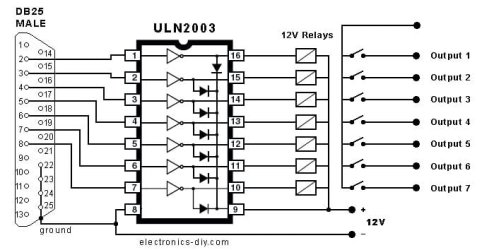
I use circuit.
And software saved like in screen.
But after reboot is all outputs switched on and stay on..
I hope all outputs wake up as I saved or all ouputs is turned off not all ON.
One output control portable USB HDD over 5v power vire and I do not want click it on and off ewery time pc reboot.
Win7 turn all outputs ON after start because it happen without any lpt control software installed.
I wonder how ignore behavior like that.
Maybe is some patch or software or lpt settings for lpt port ignore turn all data ON after WIN7 start.
Maybe rebuild circuit.
I build the circuit by myself and it works flawlessly.
Only problem is I described above.
Z-Manufacture answer is:
"Z-ParSwitch is a pure command line program with ui, it does not save any settings.
With startup Windows resets all ports. There are circuit boards wich are able save last settings and ignore the port reset".
I tray find out what kind circuit is the best (not expensive) or is possibility cheat on Windows 7.
You'll have to latch the last state imputed. You'll have to look at the outputs on the parallel port and see if there is a clock pulse or write pulse that goes out when a bit is changed, (new word written to the port). Then use that to latch the data into your circuit. You'll have to redo your circuit so you can latch your data in. Even then though, if that clock pulse gets sent on boot up you'll be in the same predicament you're in now. You'll have to do a lot of testing and bread boarding to get it working the way you want. I had my old laser printer on my parallel port and it would come out of sleep mode every time my PC was started up or rebooted. Windows looks for hardware while booting up so if that port is enabled its going to be initialized.
My Computer
Computer type
PC/Desktop
Computer Manufacturer/Model Number
Home Built
OS
Windows 10 Education 64 bit
CPU
AMD Phenom II X4 980 Black Edition Deneb 3.7GHz
Motherboard
Asus M4N68T-M V2 µATX Motherboard
Memory
8GB 4GBx2 Kingston PC10600 DDR3 1333 Memory
Graphics Card(s)
Zotac NVIDIA Geforce GT640 2 Gig DDR3 PCIe
Sound Card
VIA VT1708s High Definition Audio 8-channel Onboard
Yes,you`re right.
This circuit is last check box in my ``to do` list.
I build inside pc case five channel HI-FI amplifier for movies and stereo HI-FI amplifier for music and more.
I never give up never surrender...