| Windows 7: Problem with eSATA powered USB |
19 Jan 2013
|
#1 | | multiple computers and different OS' in space |
Problem with eSATA powered USB Hello. i have AsRock M3A770DE motherboard
it has 6 USB ports at back, 2 of them being eSATA powered.
i bought 3tb external hdd for fraps recordings, it is USB3.0, but this motherboard has no USB3.0 so i thought i will plug it into eSATA powered USB, but it's not showing up!
> YES HDD works fine using any other USB2.0 port
> YES eSATA USB ports work fine when i plug mouse, keyboard ..etc into it
> I have checked BIOS that its not in RAID mode and it isn't
> i checked asrock site for possible drivers, found nothing. well i found xFast USB which speeds up USB2.0 ports a little, but still not enought, it gets my fraps recording down to like 20-25fps and its not playable, while recording to internal hdd i get easy 30fps.
i can't think of anything else. can anyone help please?
please do not suggest me to take apart that 3tb and use as internal or to record on internal, i bought external for a reason, it has to remain external and i have NO room on any internal HDDs to record hundreds of GBs of videos. | My System Specs |
| OS multiple computers and different OS' CPU 8 core 4.6ghz Memory 16gb Graphics Card GTX 690 Monitor(s) Displays 15'' CRT, 15'' LCD, 24'' LCD, 17'' LCD and 42'' LCD Screen Resolution 1920x1080 Keyboard cyborg STRIKE 7 Mouse cyborg RAT 9 PSU 1000w corsair Case antec df85 Cooling corsair liquid cooling for cpu and gpu Hard Drives 3tb WD 7200rpm
2tb WD 6400rpm
1tb WD external Internet Speed 300mbit |
19 Jan 2013
|
#2 | | Windows 7 Home Premium 64 bit. SP-1 Northern Ohio |
If I understand your question, you want your USB 2.0 to be faster like a USB 3.0.
Thats not going to happen. If your motherboard doesn't have any 3.0 USB ports you don't get USB 3.0 speed. | My System Specs | | Computer type PC/Desktop System Manufacturer/Model Number Home made Desktop OS Windows 7 Home Premium 64 bit. SP-1 CPU Intel i7-960-3.2 @ 4.25 Motherboard ASUS P6X58D-E Memory KINGSTON KHX2000C9, Hyper X,12 GIGS Graphics Card MSI/Nvidia/460GTX-Cyclone 1GD5/OC Monitor(s) Displays DYNEX 40 IN. Screen Resolution 1920-1080 or 1280-720 HDMI Keyboard M/S 3000 v 2.0 wireless Mouse M/S 5000 wireless PSU Corsair AX-850 Plus Gold Case Corsair 600T (Black) + side panel with 2 140 mm Noctua fans Cooling Corsair H50/2 Noctua NF-P12 (120 mm) Push/Pull- Hard Drives INTEL SSD 120GB-SER 510
Seagate 1TB SATA 600 7200 rpm Hard Drive Internet Speed 3.0 mb Antivirus Microsoft Security Eesentials Browser I.E. 10 default/Firefox Other Info LG BluRay-Read/Write
Sound system
KLipsch-THX
Asus Router RTN-12
2 Noctua 140 added on top of 600t case
Malwarebytes Anti Malware Professional
Windows 7 Firewall |
19 Jan 2013
|
#3 | | Win7 Enterprise, Win7 x86 (Ult 7600), Win7 x64 Ult 7600, TechNet RTM on AMD x64 (2.8Ghz) SomeWhere in the HOT Arizona Desert ! |
I think you can buy PCI add in cards that have USB 3.0 ports on them. | My System Specs | | Computer type PC/Desktop System Manufacturer/Model Number Built them myself, Science Experiments ! OS Win7 Enterprise, Win7 x86 (Ult 7600), Win7 x64 Ult 7600, TechNet RTM on AMD x64 (2.8Ghz) CPU AMD fx8350 4ghz, AMD-32 2400mhz, AMD-64 3200mhz, AMDx64 2.8G Motherboard SIS 755, ECS-K8M890M-M (Ult 7600), GigaByte & others Memory 2gb, 4gb on the Ult 7600, 4gb on Technet RTM, 32gb on FX8350 Graphics Card Draw my own Graphics, several nVidia cards Sound Card on motherboard Monitor(s) Displays 19" flat scr, 28" I-Inc widescr,22" Emprex Widescr, 23" Acer Screen Resolution 1280 x 1024, 1440 x 900, 1920 x 1080 Keyboard Compaq & Dell recycled from GoodWill Mouse Made in China Optical Wired Mouse PSU 430w, 550w, 600w, 700, 800, etc Case All Generic Full Towers Cooling Open Air & a few fans, some w/ colored LEDs Hard Drives 6 pata Ide HD's & 2 Sata HD's
added 80gb external on Ult 7600 computer,
numerous extra 1tb, 2TB, 3Tb SATA HD's
A collection of ext HD Docks w/ HDs Internet Speed Fast Cable InterNet Antivirus AVG Free on 24 different Desktops, NO Problems! Browser IE 8 is preferred, but use FireFox sometimes Other Info Linksys Routers, switches, & Hubs
Too Many USB Flash Drives to count, Biggest is 64GB !
Eight computers in my home network.
Sixteen computers at my business network.
Linked via TeamViewer !
Lots of old used spare computer parts everywhere! |
19 Jan 2013
|
#4 | | multiple computers and different OS' in space |
no ...
3TB HardDrive is USB3.0 but my motherboard does not have USB3.0, i have eSATA powered USB ports, which are even faster than USB3.0.
what i want to do, is plug my USB3.0 device into eSATA powered USB port, but it doesn't work.
i tried inserting USB stick into one of those eSATA powered USB ports and it works (4gb stick), but hdd doesn't work...
im sure it is issue with windows, since my 3TB hdd works just fine and so does the eSATA USB port.
EDIT:
as about PCI card, i would like one, but can't find, they are all PCI-E, but both of my PCI-E slots are taken by graphic cards.
EDIT:
i have googled a lot, i see LOT of people having issues with eSATA HDDs under Windows 7, however mine is not just eSATA , it is eSATA/USB port.
in motherboard's manual it is described as "Powered eSATA/USB"
UPDATE:
I have just checked BIOS again, i have "SATA connection type" set to IDE
options are:
IDE
RAID
AHCI
so i tried AHCI, but it won't boot at all, i get instant BSOD saying that there might be error with harddrive, no error code at all. just generally saying that remove any newly installed harddrives.
so obviously AHCI doesn't work. im quite sure RAID won't help me, because as far as i know it is for merging HDDs or something, never used it tho.
its so frustrating ive been messing with this for hours and can't find any solution to this at all.
Last edited by B420; 19 Jan 2013 at 09:28 PM..
Reason: update
| My System Specs | | OS multiple computers and different OS' CPU 8 core 4.6ghz Memory 16gb Graphics Card GTX 690 Monitor(s) Displays 15'' CRT, 15'' LCD, 24'' LCD, 17'' LCD and 42'' LCD Screen Resolution 1920x1080 Keyboard cyborg STRIKE 7 Mouse cyborg RAT 9 PSU 1000w corsair Case antec df85 Cooling corsair liquid cooling for cpu and gpu Hard Drives 3tb WD 7200rpm
2tb WD 6400rpm
1tb WD external Internet Speed 300mbit |
19 Jan 2013
|
#5 | | multiple computers and different OS' in space |
SOLVED: (thus the new post)
this was so frustrating but yay on me, i did it!
i blame everything on Windows 7 ... and its all true.
so what i did?
AHCI mode was correct after all, but Windows 7 didnt like it
i had to regedit and disable AHCI thing
HKEY_LOCAL_MACHINE/SYSTEM/CurrentControlset/Services/msahci
set "start" to 0
reboot into BIOS
enable AHCI
windows now loads
installs the AHCI drivers
reboot
drive didn't show up .. i was about to scream out loud, but i did see it detecting it by name, so i thought i give it last try and swapped my mouse and drive (both using eSATA USB) and voilaaa! it works. | My System Specs | | OS multiple computers and different OS' CPU 8 core 4.6ghz Memory 16gb Graphics Card GTX 690 Monitor(s) Displays 15'' CRT, 15'' LCD, 24'' LCD, 17'' LCD and 42'' LCD Screen Resolution 1920x1080 Keyboard cyborg STRIKE 7 Mouse cyborg RAT 9 PSU 1000w corsair Case antec df85 Cooling corsair liquid cooling for cpu and gpu Hard Drives 3tb WD 7200rpm
2tb WD 6400rpm
1tb WD external Internet Speed 300mbit |
19 Jan 2013
|
#6 | | Windows 7 Home Premium 64 bit. SP-1 Northern Ohio |
I'm glad you got is figured out. It wasn't Windows if I understand you correctly. Your bios had to be set to AHCI and wasn't. You then set your bios to AHCI. Is that correct. The reason I ask is because people all over the world read our post and the exact fix could help many. | My System Specs | | Computer type PC/Desktop System Manufacturer/Model Number Home made Desktop OS Windows 7 Home Premium 64 bit. SP-1 CPU Intel i7-960-3.2 @ 4.25 Motherboard ASUS P6X58D-E Memory KINGSTON KHX2000C9, Hyper X,12 GIGS Graphics Card MSI/Nvidia/460GTX-Cyclone 1GD5/OC Monitor(s) Displays DYNEX 40 IN. Screen Resolution 1920-1080 or 1280-720 HDMI Keyboard M/S 3000 v 2.0 wireless Mouse M/S 5000 wireless PSU Corsair AX-850 Plus Gold Case Corsair 600T (Black) + side panel with 2 140 mm Noctua fans Cooling Corsair H50/2 Noctua NF-P12 (120 mm) Push/Pull- Hard Drives INTEL SSD 120GB-SER 510
Seagate 1TB SATA 600 7200 rpm Hard Drive Internet Speed 3.0 mb Antivirus Microsoft Security Eesentials Browser I.E. 10 default/Firefox Other Info LG BluRay-Read/Write
Sound system
KLipsch-THX
Asus Router RTN-12
2 Noctua 140 added on top of 600t case
Malwarebytes Anti Malware Professional
Windows 7 Firewall |
19 Jan 2013
|
#7 | | multiple computers and different OS' in space |
setting BIOS from IDE to AHCI was only one part of problem, as i said once i did that, i instantly got BSOD! without any error code, just general bla bla that remove any newly installed hard drives.
this is where i had to regedit and disable that AHCI thing so it won't start with windows.
I didn't find anything in google at first, because my problem was not just eSATA, mine is actual USB port that is eSATA powered, but as far as Windows 7 goes, Windows 7 still sees it as eSATA/SATA.
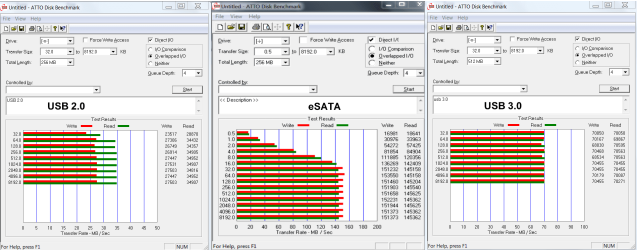
I got another problem/question, i don't see any incredible speed boost at all, any ideas?
it used to be like 35mb/s, now it is barely like 40-44mb/s
im sure HDD supports more than that, i mean cmon .. that's SLOW.
i think now problem is that windows doesn't know it is USB3 device and treats it as USB2 ... any way to change this? | My System Specs | | OS multiple computers and different OS' CPU 8 core 4.6ghz Memory 16gb Graphics Card GTX 690 Monitor(s) Displays 15'' CRT, 15'' LCD, 24'' LCD, 17'' LCD and 42'' LCD Screen Resolution 1920x1080 Keyboard cyborg STRIKE 7 Mouse cyborg RAT 9 PSU 1000w corsair Case antec df85 Cooling corsair liquid cooling for cpu and gpu Hard Drives 3tb WD 7200rpm
2tb WD 6400rpm
1tb WD external Internet Speed 300mbit |
19 Jan 2013
|
#8 | | Windows 7 Ultimate SP1 X64/ linux in VM NW Florida |
Every thing on your computer uses drivers to operate. You installed in IDE mode. There were no AHCI drivers installed as you were not using it. When you did the reg edit, you told windows to load AHCI drivers, so now it will run in AHCI mode. It was not Windows fault. Windows didn't install raid drivers either. If you want to use a different mode, you have to load the drivers for it.
Powered esata is a esata port and a USB 2.0 port combined. When you hook up your drive it will run off of the esata or the USB 2.0 bus. If you hook up a USB 3.0 cable to it, it is the same as if you plug a USB cable into a USB 2.0 port. All you're going to get is USB 2.0 speed. If you want to really increase your speed, get a powered esata drive dock or enclosure. The reason the port is powered is because it gets it's power from the USB port. In truth, it was never really intended to be a USB port, but that was the way to make it powered.The USB port will provide enough power to run a 2.5" hard drive, but rarely a 3.5" drive. esata is faster than USB 3.0 in practice. It does not have the overhead of USB.
The answer was here AHCI : Enable in Windows 7 / Vista | My System Specs | | Computer type PC/Desktop System Manufacturer/Model Number Home Built- Always under construction OS Windows 7 Ultimate SP1 X64/ linux in VM CPU Intel i7-3770K Motherboard Asus Maximus V Extreme Z77 Memory 8GB G.Skill Ripjaws Z DDR3-2400 (2X4GB) Graphics Card EVGA GTX 670 SC 4GB Sound Card On Board Monitor(s) Displays Asus 24" LCD Screen Resolution 1920X1080 Keyboard Logitech G510 Mouse Logitech G500 PSU CORSAIR AX850 Case Cooler Master HAF X Cooling Custom Water Cooling Hard Drives Samsung 840 Pro 256 GB, Samsung 840 Pro 256 GB, Samsung 830 256GB, Samsung HD103SJ 1TB . External HD- Black X dock esata 1TB Samsung Spinpoint, Rosewill USB 3.0 dock 1TB Samsung Spinpoint Internet Speed carrier pigeon speed Antivirus MSE/MBAM Browser ie8 Other Info 2nd Rig,Windows 7 Ultimate SP1 X64, i7-2600K, Asrock P67 Extreme 4, 8GB DDR3-2133, HAF XM case, Noctua NH-D14, Gigabyte HD6950 OC 1GB, 2 X Crucial M4 128GB, Asus 24" LED.
Laptop- Samsung RF711-SO1 17" i5-2310M, 8GB DDR3-1333, Crucial M4 and OCZ vertex2, Nvidia GT540M.Win 7 HP X64 SP1. |
19 Jan 2013
|
#9 | | multiple computers and different OS' in space |
right .. so all this was for nothing?
well i did notice small increase in speed, maybe like 10-20%, but still awfully slow.
anyway, how about getting eSATA to USB3.0 cable/adapter? would that fix my slow speed problem?
like this one: StarTech StarTech 3 ft SuperSpeed USB 3.0 to eSATA: Amazon.co.uk: Electronics
i don't understand, why can't USB3.0 just work in eSATA ...
I would rip it out of the case and use as internal for time being, but case is stupid and there are no screws or anything to open it, im quite sure i will damage the case when opening.
+ other problem is that i only got 1 SATA left and im planning on using it for SSD | My System Specs | | OS multiple computers and different OS' CPU 8 core 4.6ghz Memory 16gb Graphics Card GTX 690 Monitor(s) Displays 15'' CRT, 15'' LCD, 24'' LCD, 17'' LCD and 42'' LCD Screen Resolution 1920x1080 Keyboard cyborg STRIKE 7 Mouse cyborg RAT 9 PSU 1000w corsair Case antec df85 Cooling corsair liquid cooling for cpu and gpu Hard Drives 3tb WD 7200rpm
2tb WD 6400rpm
1tb WD external Internet Speed 300mbit |
19 Jan 2013
|
#10 | | Windows 7 Ultimate SP1 X64/ linux in VM NW Florida |
There are a lot of limiting factors to the speed of data. But in general, if you hook up with a USB cable, you are going to get USB speeds. You need to get an easta cable to run on an esata port. You can use it for an internal drive or an external drive. Get an esata enclosure and put your hard drive in it and you will get esata speeds. You can also get esata to sata cables, hook it to the rear esata port in the rear and the sata connection on your internal hard drive. You will always be limited to the type cable you use and the enclosure as well as the speed of the hard drive. There are other factors, but those are the main ones. You need a USB 3.0 port and a USB 3.0 cable to get USB 3.0 Speeds. You need an eSATA port and an eSATA enclosure and cable for esata speeds. This is what I use for esata. Newegg.com - Thermaltake BlacX ST0005U External Hard Drive SATA Enclosure Docking Station 2.5” & 3.5” USB 2.0 & eSATA
You will notice, it comes with a USB 2.0 plug and an eSATA plug, meaning you can use either one but not at the same time. You can also switch hard drives in less than 1 minute. Turn it off, pull the old one out stick the new one in, turn it back on.
If you want to use that port for an internal drive, you can use this for your sata data cable hooked to your rear port. Newegg.com - BYTECC Model SATA-136EO 36" Serial ATA to e-SATA Cable | My System Specs | | Computer type PC/Desktop System Manufacturer/Model Number Home Built- Always under construction OS Windows 7 Ultimate SP1 X64/ linux in VM CPU Intel i7-3770K Motherboard Asus Maximus V Extreme Z77 Memory 8GB G.Skill Ripjaws Z DDR3-2400 (2X4GB) Graphics Card EVGA GTX 670 SC 4GB Sound Card On Board Monitor(s) Displays Asus 24" LCD Screen Resolution 1920X1080 Keyboard Logitech G510 Mouse Logitech G500 PSU CORSAIR AX850 Case Cooler Master HAF X Cooling Custom Water Cooling Hard Drives Samsung 840 Pro 256 GB, Samsung 840 Pro 256 GB, Samsung 830 256GB, Samsung HD103SJ 1TB . External HD- Black X dock esata 1TB Samsung Spinpoint, Rosewill USB 3.0 dock 1TB Samsung Spinpoint Internet Speed carrier pigeon speed Antivirus MSE/MBAM Browser ie8 Other Info 2nd Rig,Windows 7 Ultimate SP1 X64, i7-2600K, Asrock P67 Extreme 4, 8GB DDR3-2133, HAF XM case, Noctua NH-D14, Gigabyte HD6950 OC 1GB, 2 X Crucial M4 128GB, Asus 24" LED.
Laptop- Samsung RF711-SO1 17" i5-2310M, 8GB DDR3-1333, Crucial M4 and OCZ vertex2, Nvidia GT540M.Win 7 HP X64 SP1. Problem with eSATA powered USB problems? All times are GMT -5. The time now is 02:41 AM. | |