| Windows 7: Hard Disk Check Fails In Normal Mode |
20 Jan 2013
|
#1 | | |
Hard Disk Check Fails In Normal Mode I just bought a Western Digital Black hard drive: WD Caviar Black 1TB Internal Serial ATA Hard Drive for Desktops WDBAAZ0010HNC-NRSN - Best Buy
I have it attached to this motherboard: GIGABYTE - Motherboard - Socket 775 - GA-P35-S3G (rev. 1.0)
The symptoms of my computer are that Windows may run very slow, disk usage is high, and Windows explorer will stop responding often. When I boot into safe mode and run Western Digital's Data Lifeguard Diagnostic the extended test succeeds. When I'm not in safe mode it fails and says "too many bad sectors." The quick test does not finish in Normal mode and says something like "error code 02 - interrupted by a hard or soft reset."
Windows update will also say "Windows cannot search for updates with error code C80001FE."
What could be the reason for this and how can I trouble shoot it?
I have installed all the drivers necessary on my computer. I have AHCI set in the BIOS also. It is a fresh install of Windows 7 Ultimate. | My System Specs |
| OS Windows 7 Ultimate x64 |
20 Jan 2013
|
#2 | | Windows 7 Ultimate SP1 X64/ linux in VM NW Florida |
I would RMA the drive back to Best Buy and get a replacement. The drive is obviously bad. It happens a lot more often than many people think. Erase the drive and take it back and tell them it is defective and failed Western Digital's diagnostic test. | My System Specs | | Computer type PC/Desktop System Manufacturer/Model Number Home Built- Always under construction OS Windows 7 Ultimate SP1 X64/ linux in VM CPU Intel i7-3770K Motherboard Asus Maximus V Extreme Z77 Memory 8GB G.Skill Ripjaws Z DDR3-2400 (2X4GB) Graphics Card EVGA GTX 670 SC 4GB Sound Card On Board Monitor(s) Displays Asus 24" LCD Screen Resolution 1920X1080 Keyboard Logitech G510 Mouse Logitech G500 PSU CORSAIR AX850 Case Cooler Master HAF X Cooling Custom Water Cooling Hard Drives Samsung 840 Pro 256 GB, Samsung 840 Pro 256 GB, Samsung 830 256GB, Samsung HD103SJ 1TB . External HD- Black X dock esata 1TB Samsung Spinpoint, Rosewill USB 3.0 dock 1TB Samsung Spinpoint Internet Speed carrier pigeon speed Antivirus MSE/MBAM Browser ie8 Other Info 2nd Rig,Windows 7 Ultimate SP1 X64, i7-2600K, Asrock P67 Extreme 4, 8GB DDR3-2133, HAF XM case, Noctua NH-D14, Gigabyte HD6950 OC 1GB, 2 X Crucial M4 128GB, Asus 24" LED.
Laptop- Samsung RF711-SO1 17" i5-2310M, 8GB DDR3-1333, Crucial M4 and OCZ vertex2, Nvidia GT540M.Win 7 HP X64 SP1. |
20 Jan 2013
|
#3 | | |
I have done that already and had the same problem with both disks. I am assuming that 2 brand new hard drives would not both be bad right out of the box. Otherwise, I am extremely unlucky.
I see this on my motherboard's detail page: 4 x SATA 3Gb/s connectors (SATAII0, SATAII1, SATAII4, SATAII5) supporting up to 4 SATA 3Gb/s devices
Could it be because my hard drive is 6Gb/s?? | My System Specs | | OS Windows 7 Ultimate x64 |
20 Jan 2013
|
#4 | | Windows 7 Ultimate SP1 X64/ linux in VM NW Florida |
No. Sata is backward compatable, meaning it will run on sata II or sata III. It does happen. I once recently bought 4 motherboards before I got one that worked. It's not just your luck. Just hook it up to sata II0, and disconnect 1 of the cables from any other hard drive you have in the machine before you install on the next one. Sorry you're having the problem. Actually, it's Western Digital having the problem. You are just the one catching it. The cavier Black drives are usually good drives, noisy but good. | My System Specs | | Computer type PC/Desktop System Manufacturer/Model Number Home Built- Always under construction OS Windows 7 Ultimate SP1 X64/ linux in VM CPU Intel i7-3770K Motherboard Asus Maximus V Extreme Z77 Memory 8GB G.Skill Ripjaws Z DDR3-2400 (2X4GB) Graphics Card EVGA GTX 670 SC 4GB Sound Card On Board Monitor(s) Displays Asus 24" LCD Screen Resolution 1920X1080 Keyboard Logitech G510 Mouse Logitech G500 PSU CORSAIR AX850 Case Cooler Master HAF X Cooling Custom Water Cooling Hard Drives Samsung 840 Pro 256 GB, Samsung 840 Pro 256 GB, Samsung 830 256GB, Samsung HD103SJ 1TB . External HD- Black X dock esata 1TB Samsung Spinpoint, Rosewill USB 3.0 dock 1TB Samsung Spinpoint Internet Speed carrier pigeon speed Antivirus MSE/MBAM Browser ie8 Other Info 2nd Rig,Windows 7 Ultimate SP1 X64, i7-2600K, Asrock P67 Extreme 4, 8GB DDR3-2133, HAF XM case, Noctua NH-D14, Gigabyte HD6950 OC 1GB, 2 X Crucial M4 128GB, Asus 24" LED.
Laptop- Samsung RF711-SO1 17" i5-2310M, 8GB DDR3-1333, Crucial M4 and OCZ vertex2, Nvidia GT540M.Win 7 HP X64 SP1. |
20 Jan 2013
|
#5 | | |
Ok, one more question. Do you have any idea why even the extended test ran perfectly fine in safe mode? That is why I am hesitant to return it again.. it makes me think it could be a Windows issue. 
Quote: Originally Posted by essenbe No. Sata is backward compatable, meaning it will run on sata II or sata III. It does happen. I once recently bought 4 motherboards before I got one that worked. It's not just your luck. Just hook it up to sata II0, and disconnect 1 of the cables from any other hard drive you have in the machine before you install on the next one. Sorry you're having the problem. | My System Specs | | OS Windows 7 Ultimate x64 |
20 Jan 2013
|
#6 | | Windows 7 Ultimate SP1 X64/ linux in VM NW Florida |
No, I have no idea. Safe mode usually only loads Windows drivers and only enough to make the system run. There is nothing you can do to make the drive have bad sectors in or out of safe mode. The only thing I can think of at the moment is that safe mode does not load some of the drivers for the diagnostic program to run correctly.
EDIT: If it concerns you, tell them to put it in their machine and run the diagnostic test. Bad sectors is a physical defect in the drive itself. | My System Specs | | Computer type PC/Desktop System Manufacturer/Model Number Home Built- Always under construction OS Windows 7 Ultimate SP1 X64/ linux in VM CPU Intel i7-3770K Motherboard Asus Maximus V Extreme Z77 Memory 8GB G.Skill Ripjaws Z DDR3-2400 (2X4GB) Graphics Card EVGA GTX 670 SC 4GB Sound Card On Board Monitor(s) Displays Asus 24" LCD Screen Resolution 1920X1080 Keyboard Logitech G510 Mouse Logitech G500 PSU CORSAIR AX850 Case Cooler Master HAF X Cooling Custom Water Cooling Hard Drives Samsung 840 Pro 256 GB, Samsung 840 Pro 256 GB, Samsung 830 256GB, Samsung HD103SJ 1TB . External HD- Black X dock esata 1TB Samsung Spinpoint, Rosewill USB 3.0 dock 1TB Samsung Spinpoint Internet Speed carrier pigeon speed Antivirus MSE/MBAM Browser ie8 Other Info 2nd Rig,Windows 7 Ultimate SP1 X64, i7-2600K, Asrock P67 Extreme 4, 8GB DDR3-2133, HAF XM case, Noctua NH-D14, Gigabyte HD6950 OC 1GB, 2 X Crucial M4 128GB, Asus 24" LED.
Laptop- Samsung RF711-SO1 17" i5-2310M, 8GB DDR3-1333, Crucial M4 and OCZ vertex2, Nvidia GT540M.Win 7 HP X64 SP1. |
20 Jan 2013
|
#7 | | |
Thanks for your help. I found a jumper laying around so I am going to try to jump it to 3Gb/s and do a clean install as the motherboard is pretty old so maybe there are some compatibility issues. If this doesn't work I will return it and get a new one. | My System Specs | | OS Windows 7 Ultimate x64 |
20 Jan 2013
|
#8 | | Windows 7 Ultimate SP1 X64/ linux in VM NW Florida |
DanglaGT, I'm not sure what you mean by 'jump it'. It should hook up with a sata cable from port 0 on the motherboard to the hard drive with a sata power cable to give it power. But, if it has bad sectors, that is a physical defect in the drive. | My System Specs | | Computer type PC/Desktop System Manufacturer/Model Number Home Built- Always under construction OS Windows 7 Ultimate SP1 X64/ linux in VM CPU Intel i7-3770K Motherboard Asus Maximus V Extreme Z77 Memory 8GB G.Skill Ripjaws Z DDR3-2400 (2X4GB) Graphics Card EVGA GTX 670 SC 4GB Sound Card On Board Monitor(s) Displays Asus 24" LCD Screen Resolution 1920X1080 Keyboard Logitech G510 Mouse Logitech G500 PSU CORSAIR AX850 Case Cooler Master HAF X Cooling Custom Water Cooling Hard Drives Samsung 840 Pro 256 GB, Samsung 840 Pro 256 GB, Samsung 830 256GB, Samsung HD103SJ 1TB . External HD- Black X dock esata 1TB Samsung Spinpoint, Rosewill USB 3.0 dock 1TB Samsung Spinpoint Internet Speed carrier pigeon speed Antivirus MSE/MBAM Browser ie8 Other Info 2nd Rig,Windows 7 Ultimate SP1 X64, i7-2600K, Asrock P67 Extreme 4, 8GB DDR3-2133, HAF XM case, Noctua NH-D14, Gigabyte HD6950 OC 1GB, 2 X Crucial M4 128GB, Asus 24" LED.
Laptop- Samsung RF711-SO1 17" i5-2310M, 8GB DDR3-1333, Crucial M4 and OCZ vertex2, Nvidia GT540M.Win 7 HP X64 SP1. |
20 Jan 2013
|
#9 | | |
By jumping it i mean to put a jumper on 2 of the pins on the back of the hard drive to force it to run at 3Gb/s, which would be pins 5 & 6 on the WD Black hard drive. 
Quote: Originally Posted by essenbe DanglaGT, I'm not sure what you mean by 'jump it'. It should hook up with a sata cable from port 0 on the motherboard to the hard drive with a sata power cable to give it power. But, if it has bad sectors, that is a physical defect in the drive. | My System Specs | | OS Windows 7 Ultimate x64 |
21 Jan 2013
|
#10 | | Windows 7 Ultimate SP1 X64/ linux in VM NW Florida |
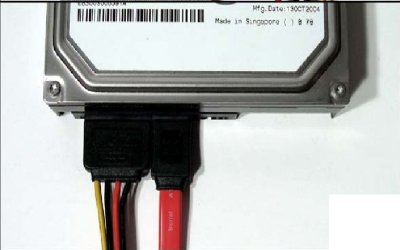
This is the way it should be connected. Whether it is connected to sata II or SATA III does not matter. As a practical matter, the drive can't run at sata III. It is not capable of those speeds. No mechanical hard drive can even run as fast as SATA II is capable. Some SSDs can but not mechanical hard drives. But, yhis is what the connections should look like. 1 power cable and 1 sata cable, hooked up as shown. | My System Specs | | Computer type PC/Desktop System Manufacturer/Model Number Home Built- Always under construction OS Windows 7 Ultimate SP1 X64/ linux in VM CPU Intel i7-3770K Motherboard Asus Maximus V Extreme Z77 Memory 8GB G.Skill Ripjaws Z DDR3-2400 (2X4GB) Graphics Card EVGA GTX 670 SC 4GB Sound Card On Board Monitor(s) Displays Asus 24" LCD Screen Resolution 1920X1080 Keyboard Logitech G510 Mouse Logitech G500 PSU CORSAIR AX850 Case Cooler Master HAF X Cooling Custom Water Cooling Hard Drives Samsung 840 Pro 256 GB, Samsung 840 Pro 256 GB, Samsung 830 256GB, Samsung HD103SJ 1TB . External HD- Black X dock esata 1TB Samsung Spinpoint, Rosewill USB 3.0 dock 1TB Samsung Spinpoint Internet Speed carrier pigeon speed Antivirus MSE/MBAM Browser ie8 Other Info 2nd Rig,Windows 7 Ultimate SP1 X64, i7-2600K, Asrock P67 Extreme 4, 8GB DDR3-2133, HAF XM case, Noctua NH-D14, Gigabyte HD6950 OC 1GB, 2 X Crucial M4 128GB, Asus 24" LED.
Laptop- Samsung RF711-SO1 17" i5-2310M, 8GB DDR3-1333, Crucial M4 and OCZ vertex2, Nvidia GT540M.Win 7 HP X64 SP1. Hard Disk Check Fails In Normal Mode problems? All times are GMT -5. The time now is 01:02 PM. | |