Disk Boot Failure (BIOHD-2)

Equin0x

New member
Hi, well my problem is that my PC wont startup. It happened basically overnight, the PC worked 100% fine nothing was wrong with it except it would be slow (even though it has decent specs). So one day my stepfather moved the computer from my room to the living room and when I went to turn it on this message popped up.

imag0038dw.jpg


I assumed the hard drive was moved or something so I opened up the computer and everything was in place so I just replugged the hard drive and still received the same message. I tried a diagnostics? test and this is the error code I got.

imag0037if.jpg


Im completely lost as to what I can do in order to get my PC up and running again. I tried reinstalling Windows but it gives me a message saying the local drive cant be used. Though I can put a Linux disc into the cd drive and run Linux from there,I can also view the 'C' drives files like that.

This is a video I took of the hard drive connection, the inside is pretty dusty but im sure that doesnt affect the hard drive from working.
 

My Computer

OS
Windows 7 Home Premium x64

My Computer

Computer Manufacturer/Model Number
Customized build from CyberPower
OS
Windows 7 Home Premium 64bit SP 1
CPU
Intel i5 2500k
Motherboard
Asus P8P67 Deluxe
Memory
8 gigabytes Corsair PC3-12800 DDR3
Graphics Card(s)
EVGA GeForce GTX 460 superclocked
Sound Card
Integrated
Monitor(s) Displays
ViewSonic 23" LCD
Screen Resolution
1980 x 1080
Hard Drives
120 Gb Samsung 840 Pro SSD
120 Gb Kingston Hyper X SSD
1 Tb WD Caviar Black HDD
PSU
Coolermaster 1000 watt modular
Case
Coolermaster HAF X full tower
Cooling
Coolermaster Hyper 212 plus
Keyboard
Logitech USB
Mouse
Microsoft 3 button
Internet Speed
download 1.5 Mb/sec upload 300Kb/sec
Hi Equin0x,

I am afraid you have hit a bad patch.

A BIOHD-2 error would generally indicate that your hard disk has failed or is failing.

It could also be due to a bad SATA Controller in the motherboard.

However linking the event that preceded it - shifting of the computer - it is more likely to be the HDD.

In any case, the HDD needs to be tested first.

More details of your system whether it is a branded one or custom-built, the HDD manufacturer and model number, the motherboard make and model would be welcome for any further deliberations on the issue or else we will only be shooting in the dark. :)
 

My Computer

OS
Windows 7 Home Premium 32 bit
It's a HP Pavilion a6700y
It has a Seagate HDD 500gb, says Certified Repaired HDD. (and remembering now we actually got this a few years ago since the same? message popped up and we called an so on, but we are out of warranty now).
Doesn't look like it has a model #. Now about the motherboard, I'm not sure how to tell what model it is. The only thing I would assume is the make would be HT2000?
 

My Computer

OS
Windows 7 Home Premium x64
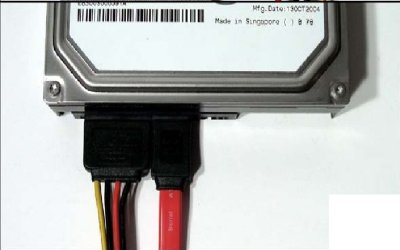
My suggestion would be to use an external hard drive and copy out your personal information with the Linux CD. The reason the Linux will work is because it runs from ram and does not use the hard drive. If it can see and copy the personal data from your drive, I would do that as soon as possible. If BIOS and the operating system cannot see the hard drive, it is going to be quite difficult to test it. But, I agree it sounds like the drive has died. In your video you showed 2 cables. The wider cable with the 4 wires provide power to the drive. The narrow orange cable is the data cable. Both have to be completely seated for the drive to be seen and work. I would suggest you make sure both ends are connected completely. The data cable will connect to the motherboard and the power cable will connect directly from the power supply or connect to a 4 pin connector coming from the power supply. You can also start the computer and feel the drive to see if it feels like it is spinning.
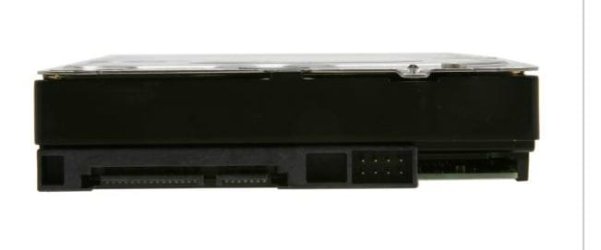
this is what the top of the drive looks like
Sata Hard drive.JPG

looking from the bottom these are the pins and which one is which

sata data - power cable location.JPG

This is what it should look like properly connected.

SATA-cable.jpg
 

My Computers

System One System Two

  • Computer type
    PC/Desktop
    Computer Manufacturer/Model Number
    ALWAYS UNDER CONSTRUCTION
    OS
    Windows 11 Pro
    CPU
    Ryzen 9 5900X
    Motherboard
    Asus X570 Crosshair Viii Hero
    Memory
    32GB G Skill DDR4-3600
    Graphics Card(s)
    EVGA RTX 3080 FTW 3 Ultra
    Sound Card
    On Board/Sennheiser PC37X Headset
    Monitor(s) Displays
    3 X Asus 27"
    Screen Resolution
    2560x1440
    Hard Drives
    2 X 1 TB NVME drives
    PSU
    EVGA 850
    Case
    Phanteks Eclipse P400A
    Cooling
    EVGA 280 AIO
    Keyboard
    Logitech G510s/ Logitech G13
    Mouse
    Logitech G502
    Internet Speed
    24/1
    Antivirus
    ESET/MBAM Pro/SAS Pro
    Browser
    Chrome/ Firefox/ Edge
  • Computer type
    Laptop
    System Manufacturer/Model Number
    Dell 16 Plus
    OS
    Windows 11 Pro
    CPU
    Intel Ultra 9 288V
    Memory
    32 GB LPDDR5X 8533
    Monitor(s) Displays
    16" Mini-LED HDR600 Touch 90 Hz
    Screen Resolution
    2560X1600
    Hard Drives
    1 TB NVME
HP desktop and a Seagate drive - I anticipated it :). Add to it a previous history of the same error and a refurbished HDD by HP service and that clinches the issue.

Now go get a new HDD from a nearby brick and mortar vendor like Office Depot/Best Buy or whatever with a good return policy and reinstall the OS from the HP recovery disks - if you have made one. Otherwise a clean install with the COA key on the sticker - provided your cat hasn't already licked it :) - should be in order.

In the most unlikely event of the new HDD not being recognised, return the new HDD to the vendor. ( BTW, that is the easiest way to confirm that your old HDD is dead. Is it not? :D ) Keep all the packing safely and do not throw it away into the garbage truck.

Recovery from your old HDD? If it does not show up in the BIOS, no hopes absolutely unless you turn it on to a professional recovery service with unpredictable results and pay through your nose.

You can, for your own satisfaction, try out various methods/software but that can come on later.

Your first priority now should be to revive your computer - unless you want to junk it.
 

My Computer

OS
Windows 7 Home Premium 32 bit
So my only option is to buy a new HDD? That will take a while. Also I was on BIOS and it indeed detected my HSD, I ran a smart test and it gave me a value of 7 (completed with the read element of the test failed).
imag0047an.jpg


Also while messing around on Linux, I was able to copy a text file from the HDD and view it. I edited a text document and was able to read, write, and save.
 
Last edited:

My Computer

OS
Windows 7 Home Premium x64
Since the HDD is recognised at boot, I would recommend that you go ahead and try to recover as much as possible using Live Linux CD.

Prepare a Live Puppy pendrive or Peppermint pendrive.

Download Lucid Puppy (Ubuntu-Compatible Build) v5.2.8 ISO from http://puppylinux.org/main/Download%20Latest%20Release.htm . It is light and only 132.6 MB. Make a Bootable pendrive with Rufus v1.3.1 (438 KB) [URL="http://rufus.akeo.ie/ It"]http://rufus.akeo.ie/ It[/URL] takes less than 2 minutes to create your bootable live Linux pendrive.

For more guidance on the recovery process directly get into the heading Recovering files from the non-bootable Internal Drive - applicable to recovery from any hard drive - in [URL="http://www.sevenforums.com/software/198909-lucid-puppy-way-recover-files-non-bootable-computer.html"]http://www.sevenforums.com/software/198909-lucid-puppy-way-recover-files-non-bootable-computer.html[/URL]

You may also use this tutorial by Golden http://www.sevenforums.com/tutorials/256518-peppermint3-create-live-cd-dvd-usb-use-emergency-backup.html to create your bootable pendrive with Peppermint Linux. Peppermint 3 - 535MB Lili to create your pendrive- 4.5 MB ( Again you may use Rufus instead of Lili )
- whichever is easy on you.

Once the recovery process is over, run the Seagate Diagnostic tool and you will know whether your drive is serviceable or is beyond repair.
SeaTools for DOS | Seagate

Keep us posted.


My Computer

OS
Windows 7 Home Premium 32 bit
@essenbe everything was connected just as you said, I even tried with a spare data? cable and nothing different happened.
I just tried the Sea tools cd and it gave me an error saying the drive was unreadable. Nothing on the HDD is important since I had it formatted a while ago. I just want to try and fix the HDD myself or just buy a new one. But of course I want to try the free route first.

Copying files to RAM Drive C:...
Error reading from drive A: DOS area: sector not found
Abort, ignore, retry, fail
 

My Computer

OS
Windows 7 Home Premium x64
Back
Top